
Combine Videos on Mac: Three Routes, and the One That Wastes an Evening
To combine videos on Mac, open the first clip in QuickTime Player and choose Edit, then Add Clip to End. That covers a straight join. Mismatched footage, music or captions want iMovie instead.

Can you combine videos on Mac without installing anything?
Yes, and the app is already there.
QuickTime Player appends one movie to another from the Edit menu. Nothing downloads, nothing uploads, and no account is asked for.
Apple's guide to adding a movie or clip gives the three placements, and they are the whole feature.
- Open the first clip, then choose View > Show Clips.
- With nothing selected, choose Edit > Add Clip to End.
- Pick the next file, click Choose media, then click Done.
- Repeat for each clip, dragging any thumbnail sideways to change the order.
- Choose File > Export As and pick 4K, 1080p, 720p or 480p.
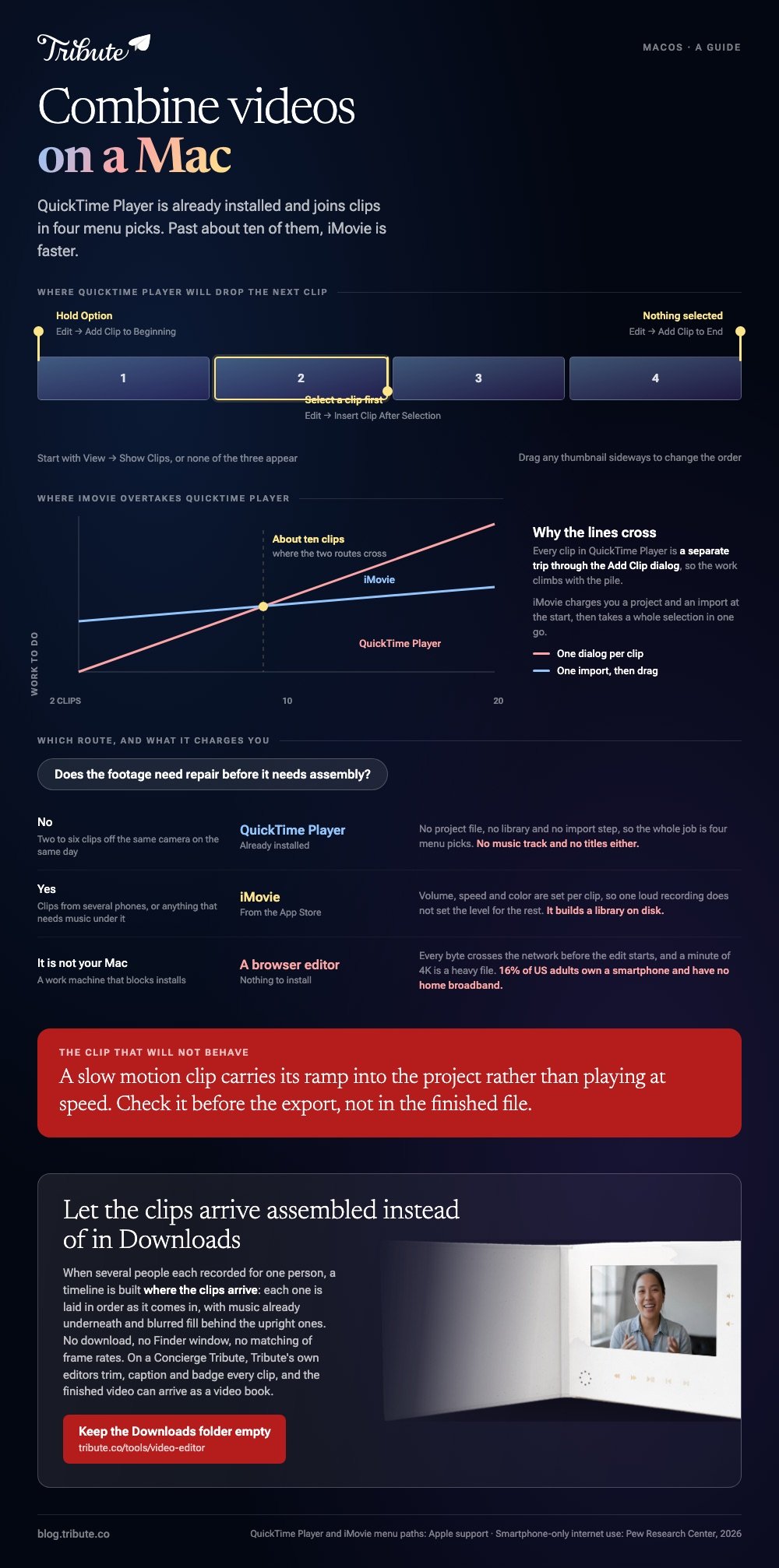
To add a clip at the front instead, hold Option and the same menu reads Add Clip to Beginning. To drop one in the middle, select a clip first and choose Insert Clip After Selection.
Best for: Two to six clips that came off the same camera on the same day.
Why it works: There is no project file, no library and no import step, so the whole job is four menu picks.
Which Mac app should you use to combine video files?
It depends on whether the clips match each other.
Three routes cover almost everyone, and the difference between them is how much repair the footage needs before it plays as one piece.
| Route | Install | Good at | Watch out for |
|---|---|---|---|
| QuickTime Player | Already there | A plain join | No music, no titles |
| iMovie | Apple, from the App Store | Mismatched clips, music, titles | Builds a library on disk |
| A browser editor | None | A Mac you do not own | Every clip uploads first |
iMovie, when the clips disagree
Clips butt up against each other on the iMovie timeline with nothing between them.
- Open iMovie, click Create New, then click Movie.
- Drag your files into the browser at the top, or choose File > Import Media.
- Select a clip in the browser and choose Edit > Add to Movie, or click the Add (+) button on the clip. It lands at the end of the timeline.
- To drop a clip into the middle, park the playhead and choose Edit > Insert.
- Drag any clip sideways to reorder, and pull its edge in to cut the silence at the head.
- Choose File > Share > File, set Resolution and Quality, click Next, then Save.
Apple documents that last step in its page on exporting a movie as a file, which is also where the Allow export segmentation checkbox lives on an Apple silicon Mac.
Best for: Clips from several phones, or anything that needs music under it.
Why it works: Volume, speed and color are per clip, so one loud recording does not set the level for the rest.
A browser editor, when it is not your Mac
Work machines block installs, and a browser tool sidesteps that.
The trade is upload time. Unlike a local join, every byte crosses the network before the edit starts, and a minute of 4K is a heavy file.
That matters more than it sounds: 16% of US adults own a smartphone but have no home broadband, per the Pew Research Center mobile fact sheet.
The browser route in full is in combining video clips online.
How do you combine MP4 files on a Mac without losing quality?
Match the files first, then join them.
Combine two MP4 files on a Mac that share a codec, a resolution and a frame rate and the picture survives the round trip. Mix 4K at 60 fps with 1080p at 30 and everything is rebuilt, with the weakest file setting the ceiling.
Order matters here too. Combine multiple MP4 files into one video on a Mac and the sequence you add them in is the sequence they play, so check it before you export rather than after.
- Export at the top resolution offered. A second pass through an export is where quality goes.
- Keep the audio consistent. One clip recorded in stereo among a run of mono clips reads as a fault.
- Watch the slow motion. A slo-mo clip carries its ramp into the project rather than playing at speed.

What goes wrong when you combine videos on Mac?
The joining is never the hard part.
A set of clips collected from relatives has no shared settings at all, and four mismatches account for most bad results.
- Orientation. The frame follows the first clip you add, so one upright recording in a wide project sits between black bars.
- Volume. A kitchen, a car and a quiet bedroom produce three different levels from the same sentence.
- Heads and tails. Everyone presses record, looks at the lens, then starts. Twenty clips carry twenty of those pauses.
- Running time. Past about eight minutes of talking heads, people start checking their phones.
Compared to footage you shot yourself in one afternoon, a collected set needs repair before it needs assembly, which is why the Mac app that handles clip by clip settings wins over the one that only concatenates.
On a phone, the same job is covered in combining videos on iPhone, and the wider app choice in video editing programs for Mac.
What if every clip arrived from somebody else?
The Tribute video editor is a browser-based group video editor: contributors record clips on their phones and Tribute assembles them on a timeline with the music balanced under the voices.
It is ours, and it is the last thing on this page.
- Clips arrive already in order, with a tick against the ones on the timeline
- Reorder media numbers every clip and offers move to front, move to back and move to position
- Music ducks to 25% under video and 75% under photos, overridable on a single clip
- Blurred edges fill the frame behind upright phone footage rather than black bars
- A waveform under every clip, so the silence before the first word is visible

Best for: An evening you would rather not spend collecting, naming and ordering clips by hand.
Why it works: The mismatch is handled as each clip lands rather than one at a time after the merge.
What if the clips were never on your Mac to begin with?
Every route above starts with files sitting in your Downloads folder.
Getting them there is the part nobody counts. They came by text, email and a shared album, at four sizes, and three arrived the night before.
For one kind of reader that collection step does not happen.
The case: several people each recorded for one person
You are in it when none of the footage is yours.
A grandmother turning eighty. A colleague leaving after fifteen years. A memorial where the people who should speak are in four states.

Nobody is combining anything yet. Everyone is recording a message, and the job is assembly, not collection.
Why nothing lands in Downloads
A timeline is built where the clips arrive.
Each recording is laid in order as it comes in, with music already underneath and blurred fill behind the upright ones. No download, no Finder window, no matching of frame rates.
That is how the Tribute video editor handles it: not a fourth way to combine video clips on a Mac, but a video with the combining already done.

What you do not have to do
- No Downloads folder. Each person uploads from the phone that recorded the clip.
- No ordering. They land numbered and in sequence before you open anything.
- No edit. On a Concierge Tribute, Tribute's own editors trim, caption and badge every clip, then send the video back.
- No export settings. The preview is frame-accurate to what comes back.
It does not have to stay a file either. The finished video can arrive as a video book, a hardcover case with a screen inside that plays when the cover opens.

When this is the wrong answer: you shot every clip yourself, or you want one file joined and nothing else. Then QuickTime Player is still two minutes of work. The editor runs in a browser and lives inside a paid Tribute.
The broader craft is covered in making a video montage.
Frequently Asked Questions
Can Photos on a Mac combine two videos?
No. Apple's Photos app trims, crops, straightens and adjusts a single video, and joining is not one of its tools. Apple puts that job in iMovie.
What is the fastest way to combine 2 videos on Mac?
QuickTime Player, in four moves: open the first clip, choose View then Show Clips, choose Edit then Add Clip to End, pick the second file. Export with File then Export As.
Does combining MP4 files on a Mac reduce the quality?
Not when the files share a codec, resolution and frame rate, because the streams are copied rather than rebuilt. A mismatched set is re-encoded and the weakest file decides the result.
How do I combine videos in Mac with music underneath?
Use iMovie. Drop the clips on the timeline, then drag an audio file under them and set the volume per clip rather than once for the project. QuickTime Player has no audio track of its own.
Is there a limit on how many clips QuickTime Player will take?
Apple publishes no count. In practice the limit is patience, since each clip is a separate trip through the Add Clip to End dialog. Past about ten, iMovie is faster.
Can I combine video clips on Mac that were shot on different phones?
Yes, though expect a re-encode. Build the project starting from a clip in the orientation you want the whole video, then rotate or fill the odd ones so nothing sits between black bars.
Where does iMovie save the exported file?
Wherever you point the Save As dialog after clicking Next. The project itself stays in the iMovie library, which is a separate thing from the video you just exported.
👉 Let the clips arrive assembled instead of in Downloads if several people each recorded for one person, and the folder never fills up.
