
YouTube Video Downloader Without Audio: Why the File Comes Back Silent
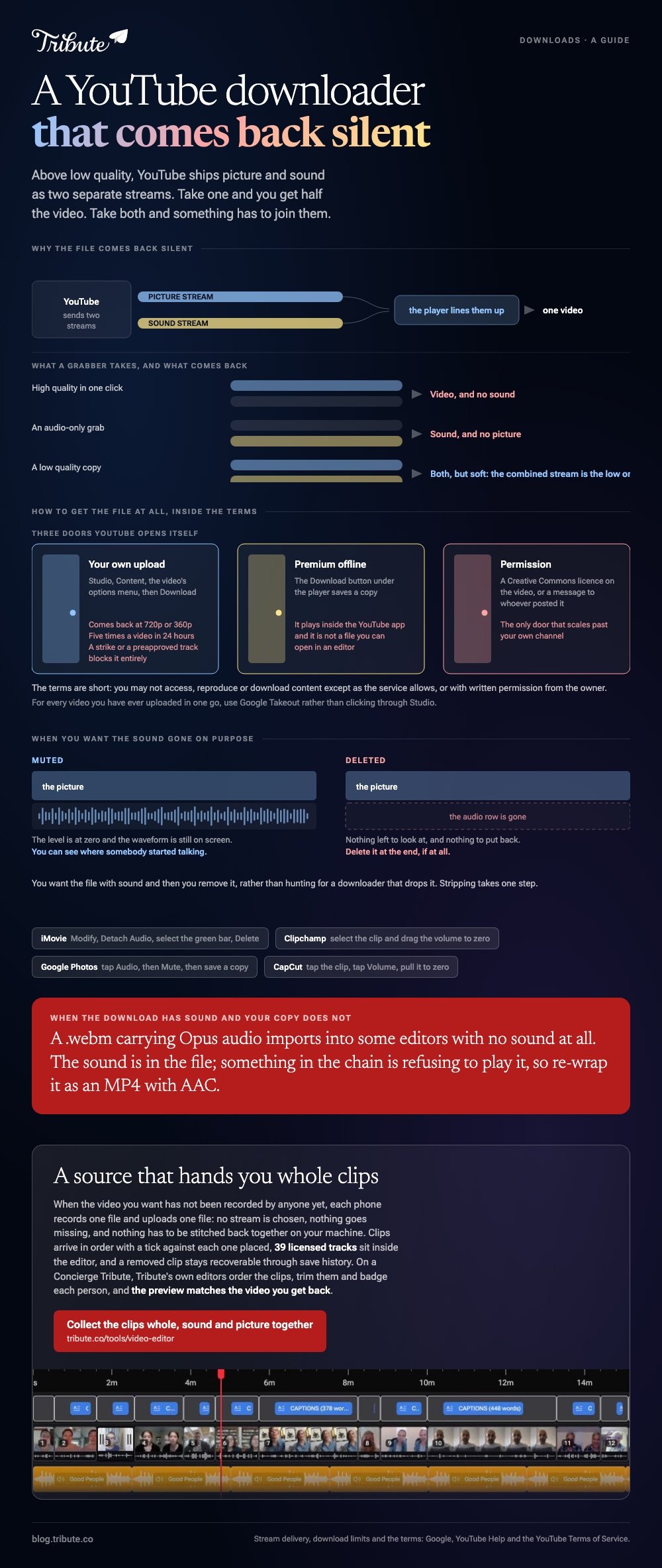
A YouTube video downloader without audio hands you a silent file because YouTube delivers picture and sound as two separate streams above low quality. Take one and you get half the video. Take both and something has to join them.

Why does a YouTube video downloader without audio give you a silent file?
Because the two halves are shipped apart.
A modern player asks for a picture stream and a sound stream and lines them up as it goes. That is what lets quality drop mid-video without the audio stuttering.
Grab one of those streams on its own and you have what the server sent: a video track and nothing else.
Command line tools such as youtube-dl download the video and audio streams and merge them with ffmpeg. A browser-based grabber skips that step, which is where the silence comes from.
Two searches land on this page: download YouTube video no audio, and video downloader no audio. The first wants the sound gone, the second lost it by accident.
A vlog audio download fails the same way around. The sound arrives with no picture, because that is the other half of the same pair.
| What you asked for | What arrives | Why |
|---|---|---|
| High quality in one click | Video, no sound | Only the picture stream was taken |
| An audio-only grab | Sound, no picture | Only the audio stream was taken |
| A low quality copy | Both, soft | The combined stream is the small one |
How do you get the file at all, inside YouTube's terms?
Through a door YouTube opened, not around one.
YouTube's terms are short on this. You may not access, reproduce, download, distribute content except as the service allows or with written permission from the owner.
Three doors are open.
- Your own upload. In YouTube Studio, open Content, click the video's options menu and choose Download.
- Premium offline. The Download button under the player saves a copy that plays inside the YouTube app. It is not a file you can open in an editor.
- Permission. A Creative Commons license on the video, or a message to whoever posted it.
Google sets limits on the first one. The download comes back as an MP4 at 720p or 360p, whatever you uploaded.
You can take an individual video five times in twenty four hours. A video carrying a strike, or one using a preapproved audio track, will not download at all.
For every video you have ever uploaded in one go, use Google Takeout rather than clicking through Studio.
When do you want a video download without audio on purpose?
More often than the phrase suggests.
- Background footage that runs under a voiceover you recorded.
- A loop behind a title card, where the original room tone would fight the music.
- A clip whose soundtrack would draw a claim on the video you are about to publish.
In each case you want the file with sound and then you remove it, rather than hunting for a downloader that drops it. Stripping takes one step.
| Where the file is | What to do |
|---|---|
| iMovie | Modify > Detach Audio, select the green bar, press Delete |
| Clipchamp | Select the clip and drag the volume to zero |
| Google Photos | Tap Audio, then Mute, then save a copy |
| CapCut | Tap the clip, tap Volume, pull it to zero |
Muting beats deleting while you are still cutting. The waveform stays on screen, so you can see where somebody started talking.
Compared to hunting for a downloader that drops the sound, this costs one click and keeps the option of putting the audio back.

What if the download has sound and your copy does not?
Then the file is fine and something after it is not.
- Check the player, then the system. A muted tab and a muted output look identical from the chair.
- Open it somewhere else. VLC plays codecs that a built-in player refuses, and silence in both points at the file.
- Look at the container. A .webm carrying Opus audio imports into some editors with no sound at all.
- Convert once. Re-wrap it as an MP4 with AAC audio and most editors stop arguing.
Unlike a video-only download, this one is recoverable without going back to the source. The sound is in the file; something in the chain is refusing to play it.
A longer walk through the causes is in why YouTube videos have no audio. Putting a new track under a silent clip is in adding audio to a video clip.
What if the footage came straight from the people in it?
The Tribute video editor is a browser-based group video editor: contributors record clips on their phones and Tribute assembles them on a timeline with the music balanced under the voices.
It is ours, and it sits at the end of this page.
- Clips arrive in order on the timeline, with a tick against each one already placed
- 39 licensed tracks across 11 genres, plus a YouTube link or your own MP3, WAV, M4A or FLAC
- Music at 25% under speech and 75% under photos, set per clip where a room was loud
- Autosave and a restorable save history, so a removed clip is recoverable rather than gone

Best for: A video that has to be built out of footage other people are holding on their phones.
Why it works: Each clip arrives whole, with its own sound attached, so nothing has to be rejoined to anything.
What if the clips arrived instead of being downloaded?
A download is what you do when the footage you need already belongs to somebody else.
That is a fair description of a stock clip. It is a poor description of a birthday video. There is one case where the source is a group of people rather than a link.
The case: the footage does not exist yet
You are in it when the video you want has not been recorded by anyone.
A grandmother turning eighty. A colleague leaving after fifteen years. Nothing on the internet covers it, because the people who should speak have not spoken yet.
Why nothing needs merging
Because the picture and the sound were never pulled apart.
Each phone records one file and uploads one file. No stream is chosen, no track goes missing, and nothing has to be stitched back together on your machine.
That is how the Tribute video editor gets its material: not a smarter downloader, but a source that hands you whole clips.
What you do not have to do
- No download. Nothing is pulled off a stream, so nothing arrives silent.
- No merge of audio and video. Both come in together, on one upload.
- No edit. On a Concierge Tribute, Tribute's own editors order the clips, trim them and badge each person.
- No export settings. The preview matches the video you get back.
When this is the wrong answer: you need a clip that exists on YouTube and nowhere else. Then it is Studio, Premium or a message to the uploader. The editor is not a downloader: it lives inside a paid Tribute.

Frequently Asked Questions
Is it against the rules to download a YouTube video?
Unless the service offers you a download or the owner says yes, the terms say no. Your own uploads and Premium offline are the two routes YouTube opens itself.
Why is my downloaded file 360p when the video was 1080p?
The combined picture-and-sound stream is the low one. Everything sharper is served as two separate streams that have to be merged after the fact.
How do I download my own video from YouTube?
Sign in to YouTube Studio, open Content, then use the video's options menu and choose Download. It arrives as an MP4 at 720p or 360p.
Can I pull the audio out of a video I downloaded?
Yes, with any editor that detaches audio. Rights do not change because the sound is in a different file, so this is for your own footage.
What does the five downloads a day limit mean?
Google caps an individual video at five downloads in twenty four hours from Studio. Save the file somewhere rather than fetching it again each time.
What should I do if the footage I want does not exist?
Ask the people who could record it. A tool built for that collects the clips and assembles them, as in a video tribute or a video montage.
👉 Collect the clips whole, sound and picture together if the footage does not exist yet because nobody has recorded it, and no stream ever goes missing.
