
Music Video Church Teams Can Make: Three Kinds, and the License Each One Needs
A music video for church is one of three jobs: a lyric video for the congregation to sing to, a recording of your own worship team, or a song laid under photos of the year. The license differs for each.

What counts as a music video church services can use?
Three things, and they are built in three different ways.
Mixing them up is what sends a volunteer down the wrong path for an afternoon. A lyric video is typography over a background. A worship recording is a camera job. A year-in-review is a slideshow with a track under it.
| Kind | What it is | Built in |
|---|---|---|
| Lyric video | Words on screen, song underneath | A browser editor |
| Worship recording | Your own team playing | Phones plus the sound desk |
| Year in review | Photos and clips under a song | A slideshow tool |
Searches for worship music videos for church land on the first and the third most often, because the second needs people in a room on a Tuesday night.
Which license does a music video church teams make need?
The one you hold for Sunday does not cover the one you upload.
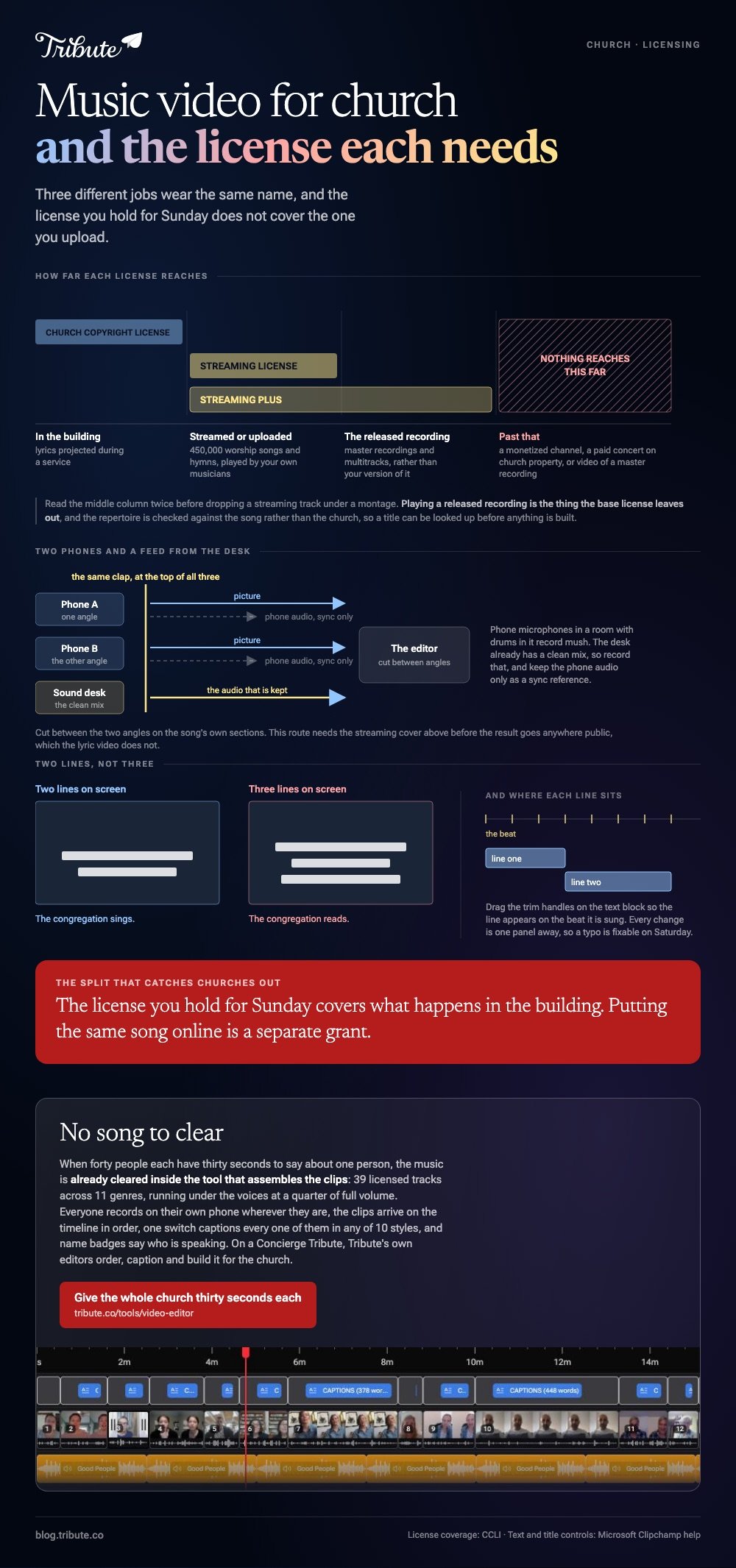
CCLI's Church Copyright License covers what happens in the building. Putting the same song online is a separate grant, and CCLI's streaming licenses set out the split.
- Streaming License: covers 450,000 worship songs and hymns performed live by your own musicians in a stream or an uploaded service.
- Streaming Plus: adds master recordings and multitracks, meaning the commercial recording rather than your version of it.
- Neither: covers a monetized channel, a paid concert on church property, or video of a master recording.
Read that middle line twice before you drop a Spotify track under a montage. Playing a released recording is the thing the base license leaves out.
Best for: Any church that already streams the service and wants the music to stay up.
Why it works: The repertoire is checked against the song, not the church, so you can look a title up before you build anything.
How do you make a lyric video in a browser?
In Clipchamp, in five moves, with nothing installed.
- Drag your background video or image onto the timeline.
- Click the text tab on the toolbar, pick a title style and use the add to timeline button.
- Type the line in the text tab of the property panel, and set font, size, alignment, color and background color there.
- Drag the trim handles on the text block so the line appears on the beat it is sung.
- Add the song, pull the volume down under any spoken parts, then export.
Microsoft documents the panel in its guide to adding text and titles to a video, including which styles carry a background box.
Keep it to two lines on screen at a time. Three turns the congregation into readers rather than singers.
Best for: A song your team is not playing this week, or a midweek post.
Why it works: Every change is one panel away, so a volunteer can fix a typo on Saturday night.
How do you record the worship team without a crew?
Two phones and a feed from the sound desk.
Phone microphones in a room with drums in it record mush. The desk already has a clean mix, so record that to a laptop or a recorder and keep the phone audio only as a sync reference.

Line both phones up on the same clap at the top, swap the audio for the desk mix in your editor, then cut between the two angles on the song's own sections.
Unlike a lyric video, this route needs the CCLI streaming cover above before the result goes anywhere public.
What about a song under photos of the year?
That is a slideshow, and it is the quickest of the three.
Count the photos, divide the song length by that number and give every image the same duration. A three minute song carries about forty five photos at four seconds each.
Pick the track before you build the order, because a song swap at the end means recutting every image. The sources that cost nothing are set out in royalty free music for videos, and the mechanics in making a slideshow with music.
For the general case of laying a track under footage you already have, see putting music into a video.
What if the video is forty people from the congregation?
Then none of the three shapes above fits, because there is no song to clear and no crew to book.
The Tribute video editor is a browser-based group video editor: contributors record clips on their phones and Tribute assembles them on a timeline with the music balanced under the voices.
- 39 licensed tracks across 11 genres, cleared for use inside the editor, with your own MP3 or a YouTube link as an alternative
- Captions on every clip from one switch, in 10 styles, with each line editable
- Name badges from an uploader name and relation, so the congregation knows who is speaking
- 83 occasion backgrounds grouped by occasion, including retirement and celebration

Best for: A pastor leaving, a church anniversary, or a farewell for someone who ran the nursery for thirty years.
Why it works: Compared to a song-led video, a message-led one needs no license at all, because the people in it are the content.
Who edits it when the whole church is in the video?
Every route above ends with one volunteer at a laptop on a Saturday, and that volunteer tends to be the one who already runs the slides.
Clearing the song, matching the lines to the beat, cutting the angles. The work is real, and for a farewell it is the wrong work.
There is a version of this where nobody does it.
The case: forty people each have thirty seconds to say
You are in it when the subject is a person rather than a song.
A pastor moving to another state. A worship leader stepping down. The point is not the music: it is that the youth group, the Tuesday prayer group and three people who moved away all get a turn.
If what you need is the words to Great Is Thy Faithfulness on a screen by Sunday, the lyric video steps above are your page.

Why the licensing question never comes up
Because the music is already cleared inside the tool that assembles the clips.
Forty people record on their own phones, wherever they are, and 91% of US adults own a smartphone according to the Pew Research Center mobile fact sheet, so the recording side asks nothing of the church.
The clips arrive in order on the timeline in the Tribute video editor, with one of 39 cleared tracks running underneath at a quarter of full volume while anyone speaks.
What the volunteer does not have to do
Three jobs come off the Saturday, starting with the license check.
- No clearing. 39 tracks are cleared inside the editor, sitting under the voices at a quarter volume.
- No forty trims on a Concierge Tribute: Eve, the assistant inside the editor, takes the throat-clearing off every clip.
- No Saturday at all on Concierge, where Tribute's editors order, caption and build it for the church.

When this is the wrong answer: the video is about a song rather than a person. Then you are back on the CCLI question above, and the lyric video route is the one to take.
The wider job of turning many clips into one piece is covered in making a video montage.
Frequently Asked Questions
Can we play a commercial worship recording in our live stream?
Not under the base CCLI Streaming License, which covers songs your own musicians perform. Streaming Plus adds master recordings, and video of those still needs the owner's permission.
Do we need a license for a lyric video we only show in the building?
Projection of lyrics in a service is what the Church Copyright License covers. The moment that same video is uploaded or streamed, the streaming cover applies.
What is the quickest way to make church music videos each week?
Build one lyric video template in a browser editor and swap the words and the background each time. The timing drag is the only real work after the first one.
How long should a year in review video be?
One song, three to four minutes. Past five, people start looking at the exits rather than the screen.
Can volunteers edit on a phone instead of a laptop?
For a slideshow, yes. For a lyric video, no: placing text on a beat needs a timeline you can see, and a phone screen hides most of it.
What resolution should we export at?
1080p for a projector and for YouTube. 4K costs upload time the congregation will never see on a screen at the front of a room.
👉 Give the whole church thirty seconds each if the farewell is for someone everybody knows, and no song has to be cleared for it.
