
Add Audio to Video: QuickTime, iMovie, and What Each One Will Do
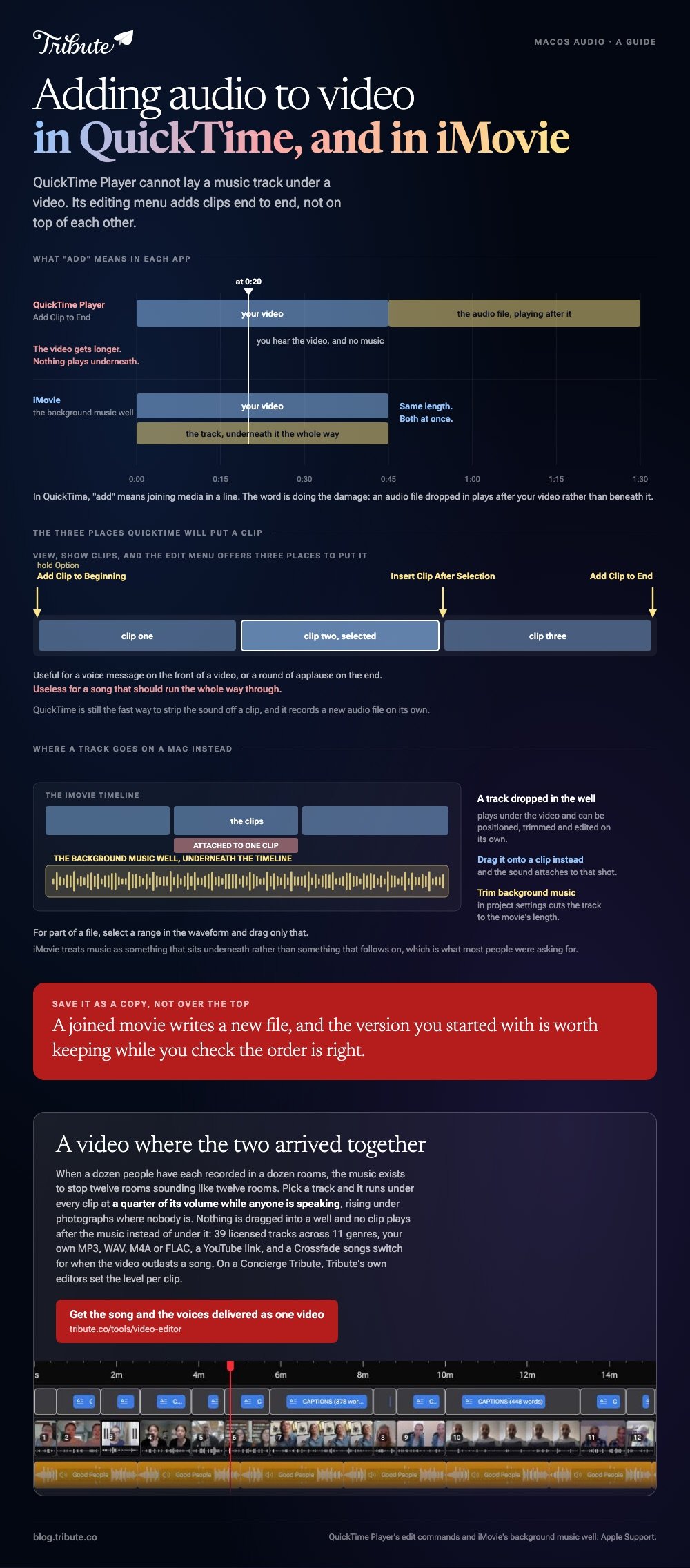
QuickTime Player on a Mac cannot lay a music track under a video. Its editing menu adds clips end to end, not on top of each other. For music under picture, the tool already on your Mac is iMovie.

Where does add audio to video QuickTime advice go wrong?
It confuses adding a clip with adding a track.
Apple's own guide to editing movies in QuickTime Player lists what the app does: trim, split, add a clip, rearrange clips, rotate, and remove audio or video. Layering a second track under the first is not among them.
The word "add" is doing the damage. In QuickTime it means joining media in sequence, so an audio file dropped in plays after your video rather than beneath it.
| What you want | QuickTime Player | Where it is done |
|---|---|---|
| Music under the whole video | No | iMovie, or a browser tool |
| Join two clips together | Yes | The Edit menu |
| Strip the sound off a clip | Yes | Remove audio |
| Record a voice message | Yes | New Audio Recording |
What can QuickTime Player do with audio?
More than people think, as long as the audio stays in a line.
Apple documents the sequence commands on its add a movie or clip page. With View, then Show Clips, the Edit menu offers Add Clip to End, Add Clip to Beginning while holding Option, and Insert Clip After Selection.
- Open the video, then choose View and Show Clips.
- With nothing selected, choose Edit > Add Clip to End.
- Pick the file and click Choose media.
- Drag the new clip left or right to change its place in the line.
- Click Done.
Useful for a voice message you want on the front of a video, or a round of applause on the end. Useless for a song that should run the whole way through.
Save the result as a copy rather than over the original. A joined movie writes a new file, and the version you started with is worth keeping while you check the order.
Two things worth knowing
Removing audio is a single command, which makes QuickTime the fast way to mute a clip before taking it somewhere else.
Recording is built in too: a new audio recording captures a message straight into a file, ready to bring into an editor.
What is the fastest add audio to video QuickTime alternative?
iMovie, which is on the Mac already and handles music as its own layer.
Apple's guide to adding music and sound clips describes a background music well underneath the timeline. A track dropped there plays under the video and can be positioned, trimmed and edited on its own.
- Open the movie in the timeline and click Audio & Video above the browser.
- Choose Music or Sound Effects in the sidebar.
- Drag the track into the background music well below the timeline.
- To attach a sound to one shot, drag the audio clip onto that clip instead.
- For part of a file, select a range in the waveform and drag only that.
- Check Trim background music in project settings to cut the track to the movie's length.
Unlike QuickTime, iMovie treats music as something that sits underneath rather than something that follows on. Compared with a sequence of clips, a background track is the thing most people were asking for in the first place.
Other routes: adding audio in Clideo if you would rather stay in a browser, the general how to add audio to a video clip, the iPhone version of the job, and building a montage where the music carries the edit.

What if the audio belongs to a dozen different people?
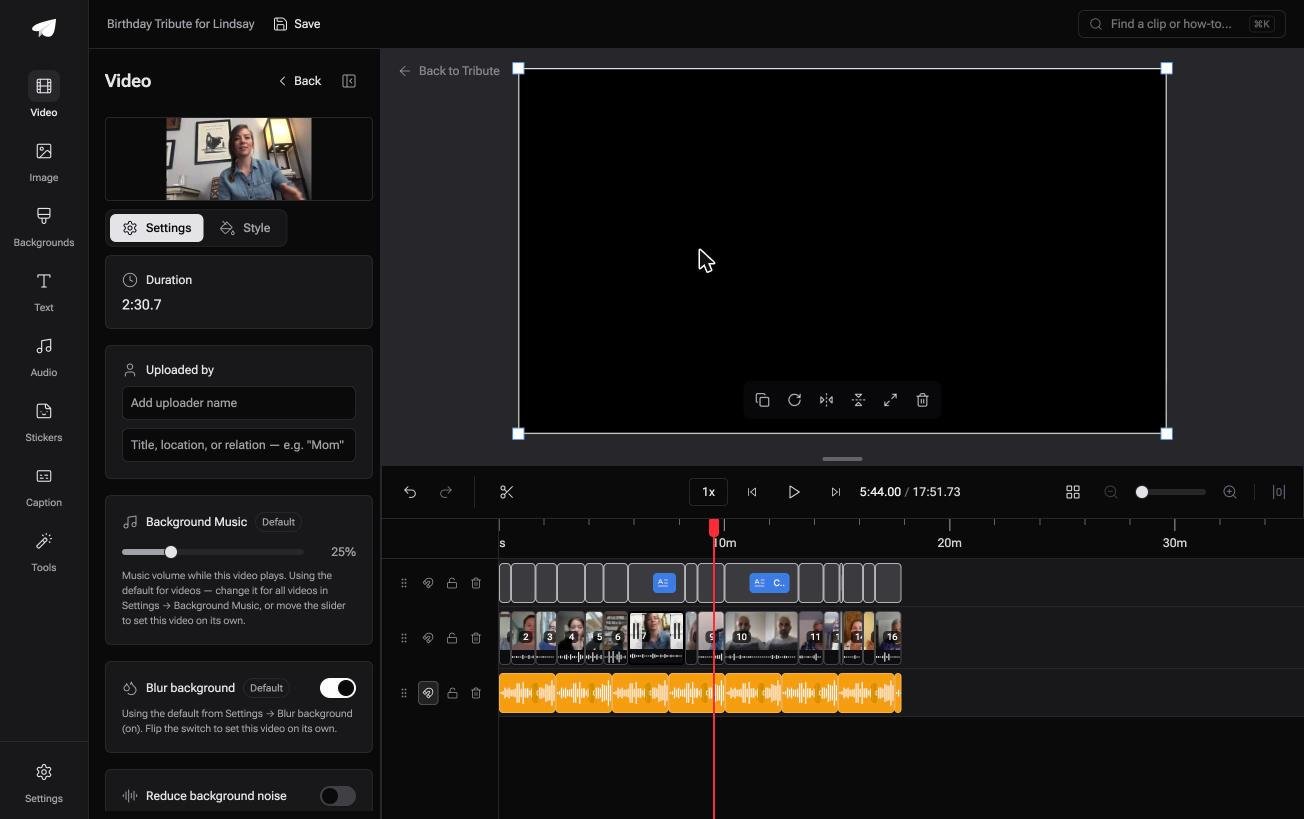
The Tribute video editor is a browser-based group video editor: contributors record clips on their phones and Tribute assembles them on a timeline with the music balanced under the voices.
It is ours, and it is the last thing on this page.
- 39 licensed tracks across 11 genres, plus a YouTube link or an MP3, WAV, M4A or FLAC upload
- Music at 25% under video and 75% under photos as the default, overridable per clip
- Crossfade songs blends one track into the next when a video outlasts a song
- A waveform under every clip, so silence is visible and the music level can be set against it

Best for: A video where twelve people are talking and the music has to get out of the way of all of them.
Why it works: The track is laid under the voices before you arrive, at a level set per clip rather than once for the whole video.
What if the soundtrack arrived with the pictures?
Every step above is a way of joining two things that were made apart: a video over here, a piece of audio over there.
Most people doing this are not scoring anything. They are putting a song under footage of a person, and the song and the footage met for the first time on their desktop.
The case: the clips are messages from a group
This is the case where several people each record something for one person.
A retirement, a ninetieth birthday, a memorial where the speakers are in four time zones. Everyone talks, nobody scores, and the music exists to keep twelve separate rooms from sounding like twelve separate rooms.

Why the two never have to be joined
Because the music is part of the timeline, not a file you bring to it.
Pick a track and it runs under every clip at a quarter of its volume while anyone is speaking, rising under photographs where no one is. Nothing is dragged into a well, and no clip plays after the music instead of under it.
That is how the Tribute video editor treats sound: not a smarter way to attach audio, but a video where the two arrived together.
What you do not touch
- Not the joining. The music is part of the timeline rather than a file you bring to it.
- Not the choosing. There are 39 licensed tracks, your own file, or a YouTube link.
- Not the level in a kitchen or a car. On a Concierge Tribute, Tribute's editors set it per clip and hand the video back.
- Not the caption that got a name wrong. Eve, the assistant on Concierge and Concierge + Video Book, fixes the line and its timing.
When this is the wrong answer: you have one video and one specific song, and the timing between them is the whole point. Then iMovie, or something larger, is where that edit belongs.
The editor is not a sound editor either. It sets levels and blends tracks, and it lives inside a paid Tribute rather than standing on its own.
Frequently Asked Questions
Can QuickTime Player add music to a video?
No. Its Edit menu joins clips in sequence, so an audio file plays before or after the video rather than underneath it. iMovie handles background music on the same Mac.
How do I combine an audio file and a video on a Mac?
Open the video in iMovie and drag the audio into the background music well below the timeline. From there it can be moved, trimmed and set to the length of the movie.
Can I remove the sound from a clip in QuickTime?
Yes. Removing audio is one of the edits Apple lists for QuickTime Player, alongside trim, split, rotate and adding a clip.
What happened to QuickTime Pro?
The paid version of the old QuickTime 7 is long gone, and the current Player is the stripped back one. Anything beyond trimming and joining now belongs in iMovie or another editor.
Does adding a clip in QuickTime re-encode the video?
Saving a joined movie writes a new file, so expect a wait on long clips. Trimming a single clip and saving as a copy is the quicker operation.
How do I record a voiceover on a Mac?
QuickTime Player records a new audio file on its own, and iMovie records a voiceover straight onto the timeline. Use the second if the words have to land on a specific shot.
Can I add audio in a browser instead?
Yes, and it suits one short clip where installing nothing matters more than control. Upload the video, upload the track, set the balance and download the result.
👉 Get the song and the voices delivered as one video if a dozen people recorded in a dozen rooms, and nothing has to be attached to anything.
