
Insert Audio to Video Online: The Three Minute Version
Adding a track to a video in a browser takes about three minutes: upload the clip, drop the audio underneath, set the level, export. The part that takes longer is deciding what happens to the sound the clip already has.

What does it take to insert audio to video online?
One browser tab and a decision about the original sound.
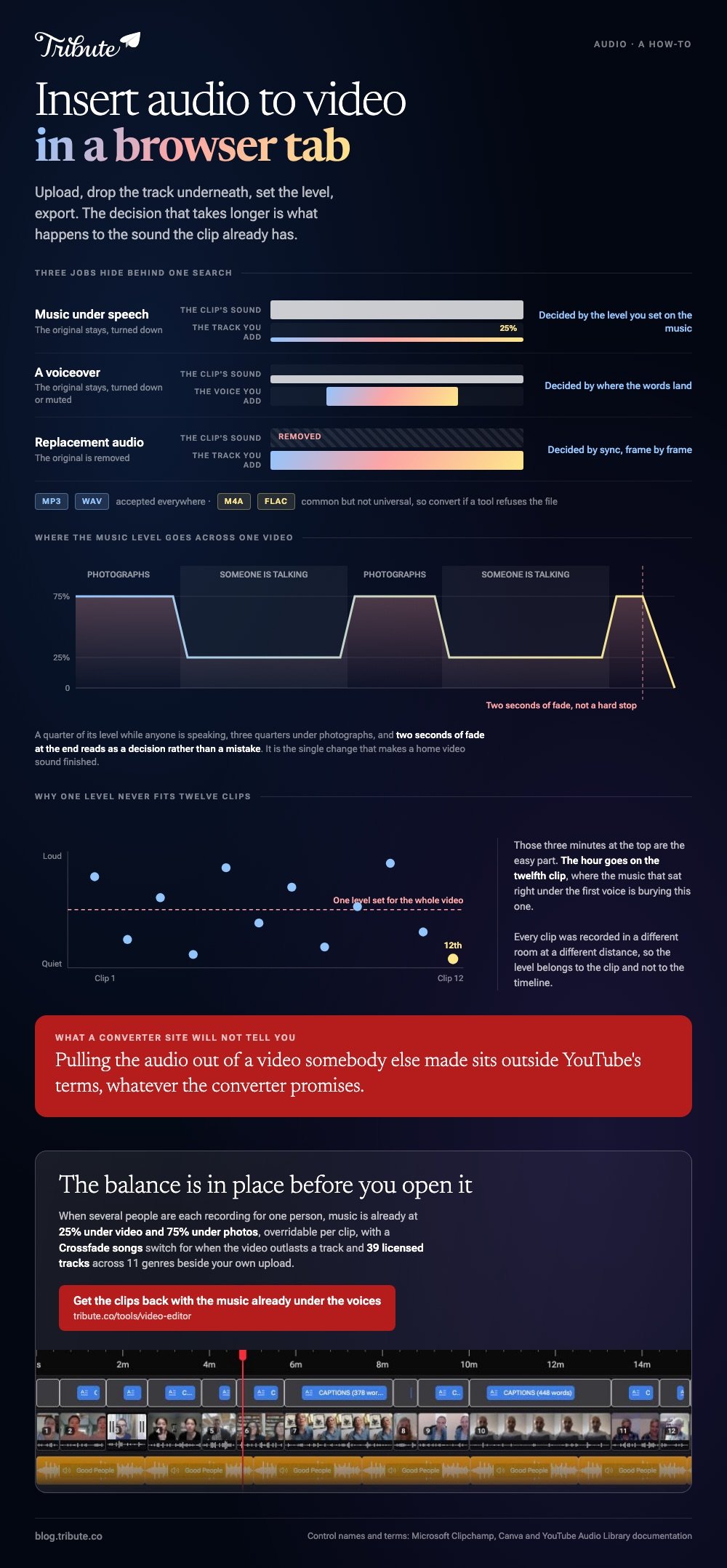
Three jobs hide behind the same search, and they end in different places. Pick the wrong one and you spend an hour fixing a video that was fine.
| What you are adding | What happens to the original sound | What decides the result |
|---|---|---|
| Music under speech | Stays, turned down | The level you set on the music |
| A voiceover | Stays, turned down or muted | Where the words land |
| Replacement audio | Removed | Sync, frame by frame |
How do you insert audio to video online in Clipchamp?
Media panel, timeline, level, export.
Clipchamp runs in a browser tab and takes both the video and the audio as ordinary uploads. Microsoft's page on adding audio or music to videos names every control in the path.
- Click My media in the left sidebar and drag your audio file in, or use import media.
- Drag the video onto the timeline first, so the audio has something to sit under.
- Hover the audio in My media and click the add to timeline button, or drag it below the video.
- Drag the ends of the audio bar to trim it, and drag the middle to slide it into place.
- Click the audio and open the audio tab in the property panel to set the volume.
- Export at 1080p.
For stock music rather than your own file, open Content library, then the audio drop-down, and choose music or sound effects. Those tracks are cleared inside videos you export and may not be pulled out and used somewhere else.

How do you fade the end instead of cutting it dead?
With a fade control, not by dragging the level down over time.
Canva puts both fades in one place. Select the audio, then use the Fade option in the toolbar above the editor, which gives separate fade in and fade out sliders you set with a slider or a number.
To run a video audio fade out online on the sound already inside a clip, Canva exposes the same fades through the audio tools in the toolbar when the video itself is selected.
Unlike a hard stop, two seconds of fade reads as a decision rather than a mistake. It is the single change that makes a home video sound finished.
Using the middle of a song
Open the more menu at the end of the audio and choose Adjust.
Drag the waveform until the section you want sits inside the colored area, and the design plays that part alone. Most songs do not open with their best thirty seconds.
Where should the audio come from?
A library that already cleared it, in almost every case.
The YouTube Audio Library lives in YouTube Studio and hands you an MP3: hover the date, click DOWNLOAD, and filter for "Attribution not required".
Tracks marked Creative Commons ask you to credit the artist in the description, and the icon in the license column copies the wording for you.
That is also the honest answer to a YouTube audio editor online, and to every YouTube video to audio online editor beside it. Studio edits your own uploads.
Pulling the audio out of a video somebody else made sits outside YouTube's terms, whatever a converter promises.
Compared with a converter site, the Audio Library costs the same and leaves you with a file you may publish. A YouTube video audio cutter online solves a problem you should not have.
What about captions from the same track?
The speech in your clip is enough to generate them.
A subtitle generator from audio online reads the voice track and writes timed lines you then correct, which is faster than typing. YouTube itself auto-captions uploads in more than sixty languages, so a draft exists even when you did not ask for one.
More on the neighboring jobs in adding audio to a single clip, a phone video that came back silent, putting a video tribute together, and building a montage from several clips.
What if the clips came from a dozen different people?
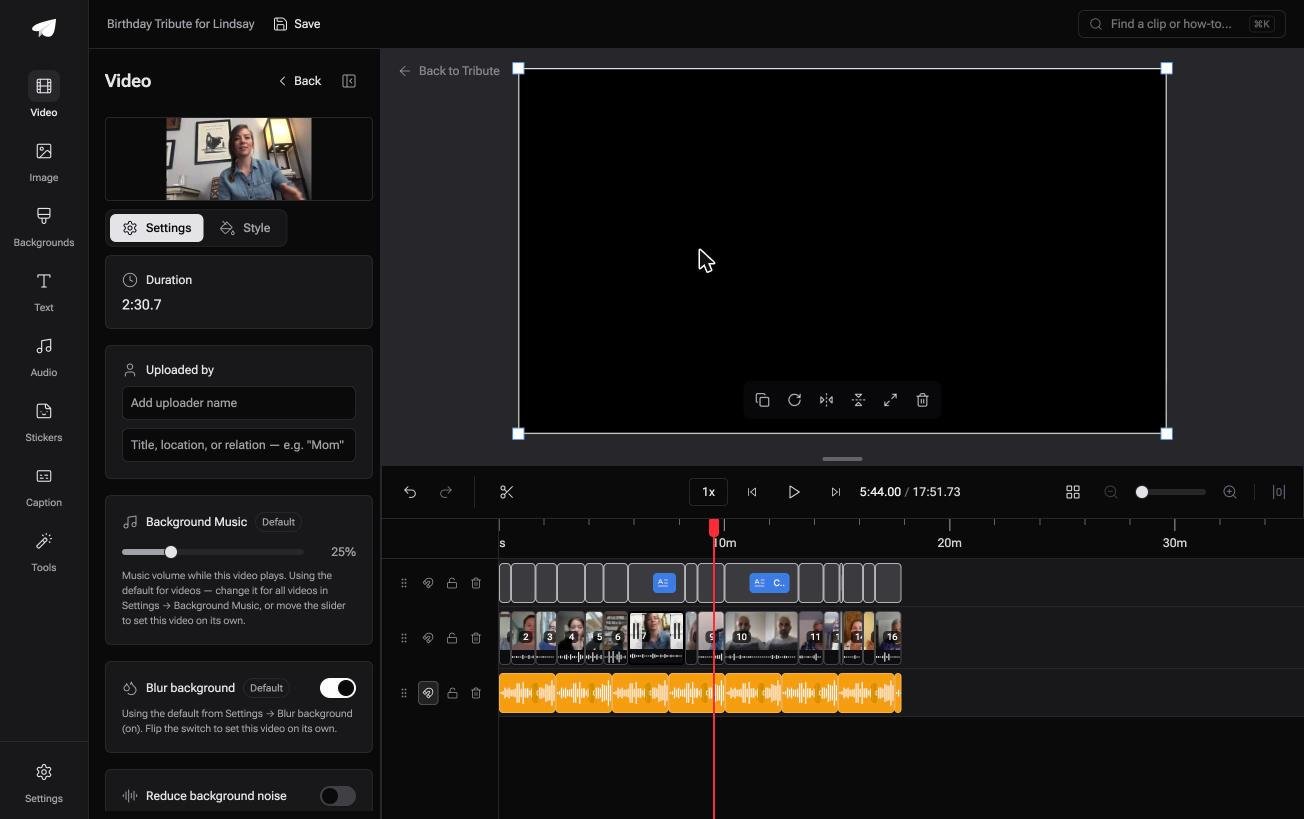
The Tribute video editor is a browser-based group video editor: contributors record clips on their phones and Tribute assembles them on a timeline with the music balanced under the voices.
It is ours, and it is the last thing on this page.
- Music at 25% under video and 75% under photos by default, overridable per clip
- A Crossfade songs switch that blends one track into the next when the video outlasts a song
- 39 licensed tracks across 11 genres, plus a YouTube link import and MP3, WAV, M4A or FLAC upload
- One caption switch that captions every clip, with 10 caption styles and every line editable by timecode
Best for: A browser, a video, and a track that has to go underneath a voice.
Why it works: Every clip was recorded in a different room at a different distance, and the level is set per clip rather than once for the whole timeline.
Who sets the levels if you never open the mixer?
Those three minutes at the top of this page are the easy part.
The hour goes on the twelfth clip, where the music that sat right under the first voice is burying this one. There is one kind of video where that pass is already done.
The case: the voices are sent to you, not recorded by you
It starts when several people each record something for one person.
A grandmother turning eighty. A colleague leaving after fifteen years. A memorial where the people who should speak are in four time zones. Every clip comes from a different kitchen, and no single level fits all of them.

Why you never insert audio to video online at all
Because the track is under the voices before you open the editor.
The clips land in order with music already ducked to a quarter while anyone speaks, and you adjust what sounds wrong rather than building the mix. That is how the Tribute video editor starts, with a balance in place instead of an empty audio lane.
What you do not have to mix
- Not the opening balance. Music is at a quarter under speech and three quarters under photographs before you arrive.
- Not the bad recording on a Concierge Tribute: Eve, the assistant inside the editor, cleans up background noise across every clip.
- Not the caption pass. One switch captions all of them, and on that tier Eve fixes the lines that came out wrong.
- Not the edit itself, if you choose Concierge and Tribute's editors build it for you.
Where it ends up
On a laptop, on a phone passed around a table, or inside a video book with a screen in the cover.
When this is the wrong answer: you have one clip and one song and nobody else is involved. Then go back up this page and open Clipchamp. The Tribute editor is not a standalone audio tool either: it lives inside a paid Tribute.
Frequently Asked Questions
Can I add audio without losing the sound already in the clip?
Yes. The new track goes on its own lane below the video, and both play together. Turn the music down to about a quarter wherever somebody is speaking.
Which audio file types can I upload?
MP3 and WAV are accepted everywhere. M4A and FLAC are common but not universal, so convert to MP3 if a tool refuses the file.
How do I mute the original sound instead?
Select the video clip and set its own volume to zero, rather than deleting the clip's audio. That way you can bring it back if the replacement does not line up.
Why is my added track longer than the video?
Songs run three or four minutes and most home videos do not. Trim the audio at the timeline, then fade the last two seconds so the end sounds intentional.
Can I cut a song down to one section in a browser?
Yes. Canva has an Adjust control that lets you drag the waveform to pick the part that plays, and Clipchamp lets you split the audio and delete what you do not want.
Do I need an account to do this?
You need one to export. Neither Clipchamp nor Canva asks for a card to save a 1080p video on the free plan.
Will adding audio re-encode the video?
Yes, because the browser writes a new file with both streams in it. The quality loss is small at 1080p and invisible against the gain from a track that sits at the right level.
👉 Get the clips back with the music already under the voices if several people are each recording for one person, and the only levels you touch are the ones that sound wrong.
