
Join Videos: Mac Already Has a Joiner, and It Is Not iMovie
QuickTime Player joins clips from the Edit menu, with nothing to install and no account. iMovie is the answer only when the clips disagree with each other on volume, orientation or frame rate.

Do you need a video joiner for Mac at all?
Almost never, and the reason is in what those tools sell.
A dedicated joiner promises three things: batch handling, no re-encode, and no editing interface to learn. Only the first is something macOS lacks.
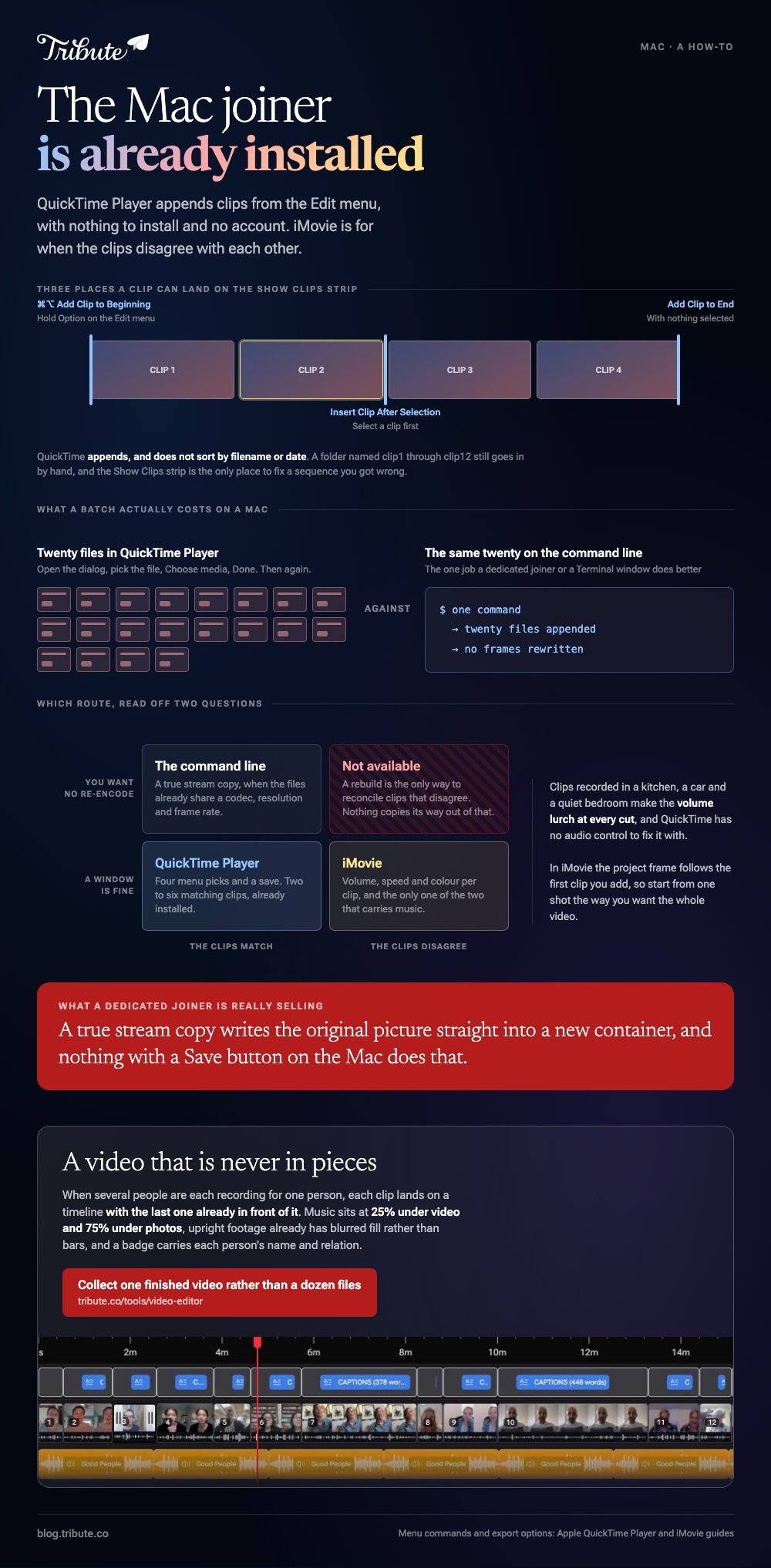
The second is worth checking before you pay for it. A true stream copy writes the original picture straight into a new container, and nothing with a Save button on the Mac does that.
| Route | Re-encodes | Best at | Cost |
|---|---|---|---|
| QuickTime Player | Yes, on export | Two to six matching clips | Already installed |
| iMovie | Yes | Clips that do not match | From the App Store |
| Browser joiner | Yes | One job on a borrowed Mac | Upload time, size caps |
| Command line | No, when files match | A true lossless join | A Terminal window |
How do you join videos, Mac built in, with QuickTime Player?
Open the first clip and work down the Edit menu. Nothing else on a Mac joins videos in fewer moves.
- Open the first file, then choose View > Show Clips.
- With nothing selected, choose Edit > Add Clip to End.
- Pick the next file, click Choose media, then Done.
- Repeat for each clip. Drag a thumbnail sideways in the clip strip to change the order.
- Choose File > Export As and pick a size.
Apple's page on adding a movie or clip gives two more placements. Hold Option for Add Clip to Beginning, or select a clip first and choose Insert Clip After Selection to drop one into the middle.
Best for: A handful of clips off one camera that need to play as a single file.
Why it works: No project, no library, no import. The whole job is four menu picks and a save.
The order is the order you add them
QuickTime appends. It does not sort by filename, date or anything else.
So a folder named clip1 through clip12 still goes in by hand, and the Show Clips strip is the only place to fix a sequence you got wrong.
Is there a lossless way to join videos, Mac or otherwise?
Only outside the apps with windows.
Apple lists the QuickTime export options as 4K, 1080p, 720p, 480p and audio only, with a Format choice of Smaller File Size for HEVC or Greater Compatibility for H.264. Every one of those writes new frames.
To join MP4 files on a Mac without touching the picture you need a stream copy, which is what command line tools like ffmpeg do when the files already share a codec, resolution and frame rate.
For most people the honest advice is to stop worrying about it. Export once at the top size offered and the loss is invisible on a phone, a laptop and a television.

When is iMovie the better joiner?
When the clips came from more than one camera.
Join MP4 files on a Mac that were recorded in a kitchen, a car and a quiet bedroom and the volume lurches at every cut. QuickTime has no audio control to fix that with, and iMovie sets volume, speed and color per clip.
Build the project by selecting a clip in the browser and choosing Edit > Add to Movie, which Apple's page on adding clips notes drops it at the end of the timeline. Park the playhead and choose Edit > Insert for the middle.
Compared to QuickTime, iMovie costs a project file and about ten minutes of learning, and it is the only one of the two that will also carry music.
Best for: Clips from several phones, or anything with a soundtrack under it.
Why it works: The repair happens clip by clip, so one loud recording does not set the level for the rest.
What a browser joiner costs you
Upload time, and sometimes a watermark you find out about at the end.
Unlike a local join, every byte crosses the network before the edit starts, and size caps tend to be stated per file rather than per project. Read the export screen before you commit anything long.
More routes are in joining multiple videos into one, the phone version in joining videos on iPhone, and the wider app choice in video editing programs for Mac.
Is there a tool built for clips from a dozen people?
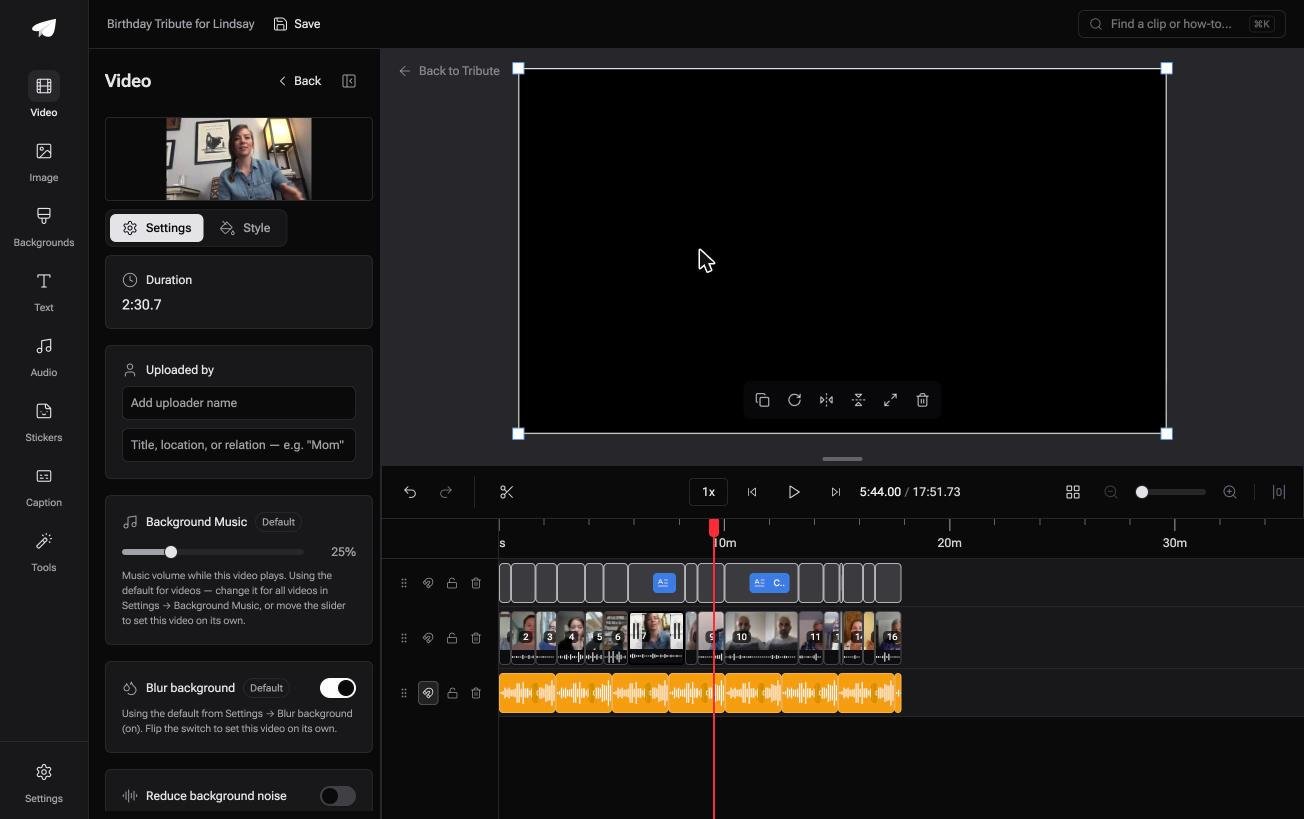
The Tribute video editor is a browser-based group video editor: contributors record clips on their phones and Tribute assembles them on a timeline with the music balanced under the voices.
It is ours, and it is the last thing on this page.
- Clips arrive already in order, with a tick against the ones on the timeline
- Music ducks to 25% under video and 75% under photos, overridable on a single clip
- Blurred edges fill the frame behind upright phone footage rather than black bars
- Name badges from an uploaded by name and relation, in four corner positions, dark or light
- Tribute renders the video on its servers, and the preview matches what comes back
Best for: Clips that are not on this Mac yet, because the people who recorded them live elsewhere.
Why it works: The volume lurch and the black bars are both settled as each clip lands, not after the join.
When does nobody need a joiner?
Joining, in every route above, is something you perform.
Collect the files, decide the order, append, export. The work is real even when each part is small, and twenty clips make it an evening.
For one kind of video, no step exists to perform.
The case: several people each recorded for one person
You are in it when none of the footage is yours.
A grandmother turning eighty. A colleague leaving after fifteen years. A memorial where the people who should speak are in four states.

Nobody is joining anything yet. Everyone is recording a message, and the only open question is what order they go in.
Why there is nothing to append
Each clip lands on a timeline with the last one already in front of it.
No Edit menu, no Show Clips strip, no folder to sort by hand. Music is already underneath, and upright footage already has blurred fill rather than bars.
That is how the Tribute video editor handles it: not a better video joiner for Mac, but a video that is never in pieces.
What you do not have to do
- No files to collect. One link, and each person records on their own phone.
- No joining. The clips are numbered and in order before you open the timeline.
- No captions to type. One switch covers every clip, and a badge carries each person's relation.
- No file to hand over. On Concierge Deluxe it arrives as a video book, a hardcover case with a screen inside.

When this is the wrong answer: you shot the clips yourself, or you want two matching files appended and nothing else. Then QuickTime Player is two minutes of work. The editor runs in a browser and lives inside a paid Tribute.
The wider craft is in making a video montage.
Frequently Asked Questions
Can I join videos together on a Mac without iMovie?
Yes. QuickTime Player is on every Mac and appends one movie to another from the Edit menu. iMovie is worth opening only when the clips need repair before they sit together.
Does QuickTime Player join MP4 files or only MOV?
It opens and joins MP4 alongside MOV, and the export writes a QuickTime movie using H.264 or HEVC. The container changes even though the footage is the same.
How do I join two videos on a Mac that are different sizes?
Use iMovie. The project frame follows the first clip you add, so start from one shot the way you want the whole video and let the odd ones sit inside it.
Is there a batch joiner on macOS?
Nothing with a window. Appending twenty files in QuickTime Player means twenty passes through the dialog, which is the one job a dedicated joiner or a command line tool does better.
Will joining videos on a Mac lose quality?
One export is one re-encode, and at the top size offered that is hard to see. Exporting the result a second time is where the picture starts to go.
Can I join videos on a Mac and add music?
Not in QuickTime Player, which has no audio track of its own. Drop the clips into iMovie, drag an audio file underneath, and set the level per clip.
What happens to the original files?
Nothing. Both routes write a new file and leave the sources alone, so keep them until you have watched the result the whole way through.
👉 Collect one finished video rather than a dozen files if several people are each recording for one person, and no joiner has to open on the Mac.
