
Free Video Montage Software: Free Tools Compared
The strongest free video montage software is Clipchamp on Windows, iMovie on Apple hardware, CapCut on any device, and DaVinci Resolve if the project is long. Shotcut is the pick for an old laptop. They differ less in what they do than in where they run and what their paid tier holds back.

| Software | Best for | Price |
|---|---|---|
| Microsoft Clipchamp | Windows 11 and browser-only machines | Free tier, 4K with Microsoft 365 |
| iMovie | Mac, iPhone and iPad | No charge from Apple |
| CapCut | Captions, music and vertical clips | Free tier, Pro from $19.99 a month |
| DaVinci Resolve | Hundreds of photos, long timelines | Free version, Studio $236 |
| Shotcut | Older machines, no account wanted | No charge, open source |
| The Tribute video editor | Clips recorded by many different people | Paid, DIY from $35 |
Prices as of October 2026.
What does montage software have to do that a plain editor does not?
A montage is clips and stills cut to music, which puts three demands on the software.
It has to hold a long row of short items without slowing down, give each photo a duration you can set once and apply to all of them, and keep a music track running underneath while the speech drops below it.
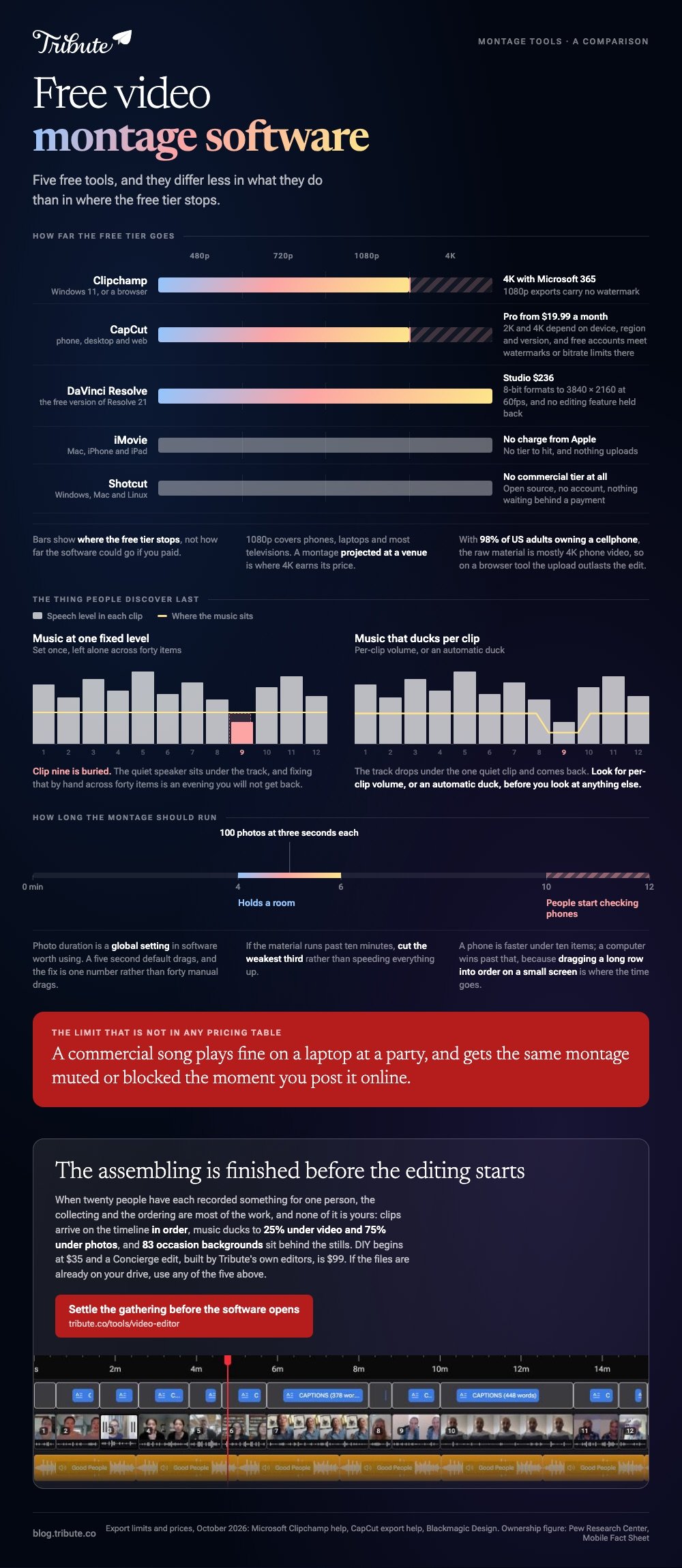
Ducking is the one people discover last. Music at a fixed level will bury a quiet speaker in clip nine, and fixing that by hand across forty items is an evening you will not get back.
Look for per-clip volume, or an automatic duck, before you look at anything else.
Photo duration is the second trap. Software that treats a still as a five second block by default will produce a montage that drags, and the fix is a global setting rather than forty manual drags.
That setting is the first thing to look for in the free tools below.
Which free video montage software is worth your time?
Arguments about the best video montage software tend to ignore the only variable that decides it for you, which is the machine you own. Five entries follow, ordered by how many people they suit rather than by how capable they are.
Microsoft Clipchamp
Clipchamp is installed on Windows 11 and also runs at app.clipchamp.com in Edge or Chrome, which covers the two machines most people have.
Click create a new video, open My media, click import media, then select every file at once and drag the group onto the timeline rather than adding them one by one.
Trim by dragging the green bars at a clip's edges. Split with the seeker and the split button, add titles from the text tab, and pull music from the content library under audio.
Microsoft's guide to editing a video in Clipchamp covers the sequence, and the export menu offers 480p, 720p, 1080p and 4K, with 4K reserved for subscribers.
Best for: A Windows PC, a Chromebook, or any machine where installing software is not an option.
Why it works: 1080p exports carry no watermark, and multi-select drag means a forty item montage lands on the timeline in one motion.
iMovie
Apple's editor handles a montage well and hides most of the controls for it. On a Mac, drag clips and photos into the timeline in order, then set the default photo duration once in the project settings rather than trimming each still.
Its Magic Movie mode on iPhone and iPad is the underused shortcut: choose your clips and photos and iMovie assembles the montage with a soundtrack and transitions, which you then adjust.
For a photo-led montage with a song under it, that produces something watchable in minutes.
Best for: Apple households that want a result today rather than a skill.
Why it works: The Photos library is one tap away, and no footage leaves the machine. Compared with a browser tool, nothing uploads.

CapCut
CapCut runs on phone, desktop and web with a layout close enough across all three that the habits transfer.
Tap New project, add your clips and photos, drag them into order, and tap Export at the top right, where the resolution label sits beside the button.
Its advantage for a montage is audio and captions. Per-clip volume is two taps away, and the automatic caption pass means a montage with speech in it arrives readable.
CapCut's export help page lists 720P and 1080P on mobile, with 2K and 4K depending on device, region and app version, and notes that accounts on the free tier can meet watermarks or bitrate limits at 4K.
Best for: A montage with speaking in it, or one headed for a phone screen.
Why it works: The two things montages fail on, uneven volume and unreadable speech, are the two things it handles with the least effort.
DaVinci Resolve
Resolve 21 is the free version of software used to grade feature videos, and Blackmagic puts no editing features behind the paywall.
Its product page lists the paid Studio edition at $236 and the free version as handling 8-bit formats up to 3840 by 2160 at 60fps.
For a montage, the draw is scale. Three hundred photos and a two hour timeline will not slow it down the way a browser editor would, and the Fairlight page gives you proper control over how music sits under voices.
The cost is the first evening, which you will spend learning where things are.
Best for: A long retirement or anniversary montage with hundreds of stills.
Why it works: Nothing is held back for paying users in ordinary editing, so the only ceiling is how much time you want to invest.
Shotcut
Shotcut is open source, runs on Windows, Mac and Linux, and asks for no account. Version 26.9 is current on the project's own site, and the download page is the only place you should get it from.
Pick it when the machine is the constraint. Browser editors push the render to a server and depend on your upload speed. Shotcut keeps the work on the laptop in front of you, which often suits an older computer better than a web tool does.
It is also the only entry here with no commercial tier at all, so there is no feature waiting behind a payment and no account to cancel later.
What you give up is polish: the icons are plain, the defaults are conservative, and the first hour is spent reading rather than editing.
Best for: An ageing laptop, a Linux machine, or a preference for open source.
Why it works: No sign-up, no upload, no tier to compare. The trade is a less welcoming first hour.

The Tribute video editor
Here is the paid one, and the case where it does not fit is worth stating first: if the clips are already on your own drive, use any of the five above.
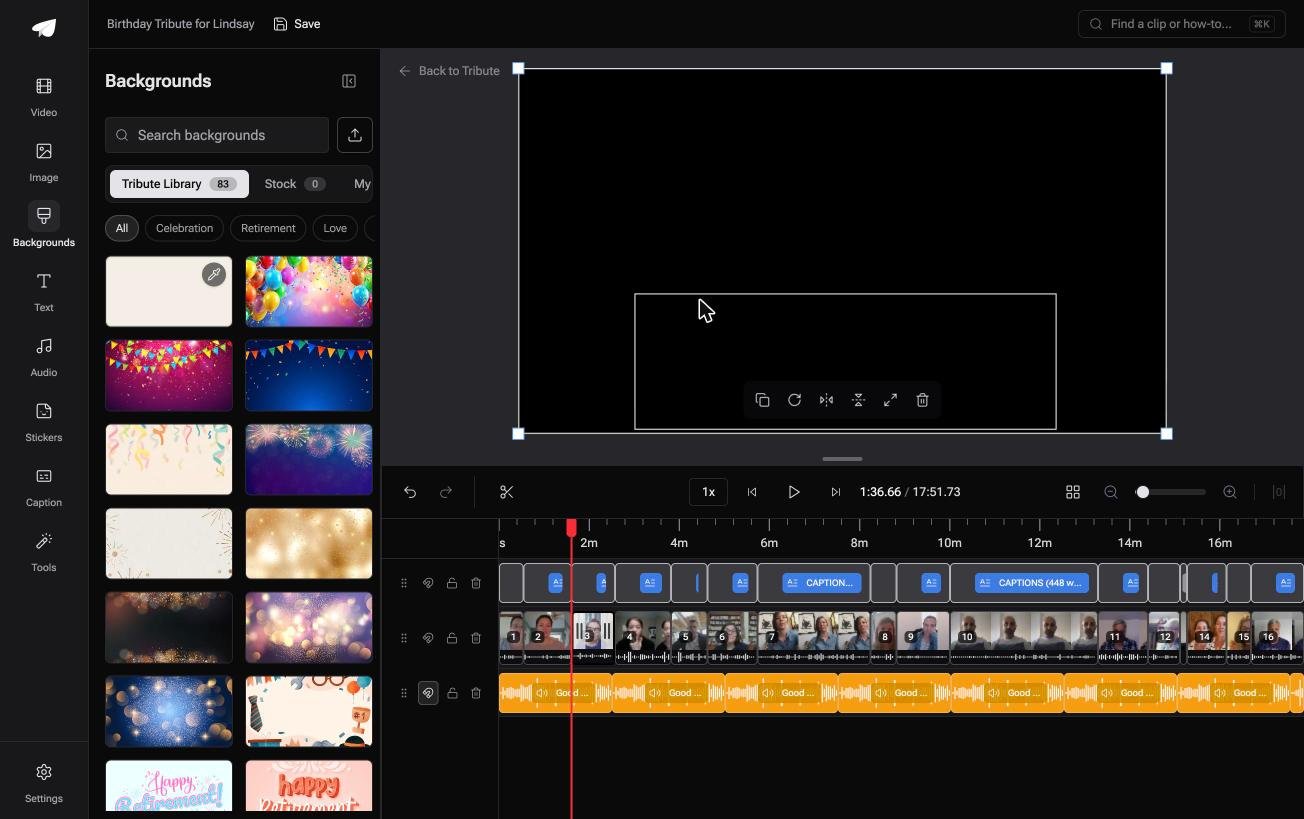
The Tribute video editor is a browser-based group video editor: contributors record clips on their phones and Tribute assembles them on a timeline with the music balanced under the voices. It lives inside a paid Tribute and will not open an unrelated video.
The job it is built for is the one the others leave to you. Twenty people each recorded something for one person, and collecting those files at full quality, in a sensible order, is most of the work.
Clips arrive on the timeline in order, music ducks to 25% under video and 75% under photos by default, and 83 occasion backgrounds sit behind the stills.
Best for: Software you are shopping for only because twenty other people owe you clips.
Why it works: The assembling is finished before the editing starts. DIY pricing begins at $35 and a Concierge edit, built by Tribute's editors, is $99.
Where does the free tier of montage software run out?
Video montage software with a free tier always draws a line somewhere, and three limits turn up across the whole category. All three are visible before you start if you go looking for them.
Export resolution. 1080p is the usual ceiling without paying, which covers phones, laptops and most televisions. A montage projected at a wedding venue is the case where 4K earns its price.
Music libraries. This is where no-cost software most often turns into paid software.
Confirm the track you want is included before you cut forty clips to it, and remember that a commercial song will get a montage muted if you upload it to a social platform.
Render time and upload. Browser tools trade a fast render for a slow upload.
With 98% of US adults owning a cellphone of some kind, according to the Pew Research Center mobile fact sheet, the raw material for a family montage is in the main 4K phone video, and sending twenty of those files to a server takes longer than the edit.
Our browser-only comparison goes further into those caps: free online video editors compared. For the phone equivalent of this page, see montage apps for phones.
How do you pick between this montage software today?
Work from the machine and the material. Windows sends you to Clipchamp, Apple hardware to iMovie, a phone to CapCut, hundreds of photos to Resolve, and an old laptop to Shotcut. That covers most projects without further thought.
Change the answer when the material is not yours. Clips arriving from a dozen people over text, email and cloud links is a collection problem wearing an editing problem's clothes, and a better timeline does not solve it.
We cover that in how a group video maker handles thirty phones.
Run a ten minute test before you commit to any of them. Join two clips, drop a song underneath, and export, following either the browser route or the longer walkthrough in our guide to making a video montage.

Frequently Asked Questions
What montage software do most people end up using?
Whatever came with the machine, which means Clipchamp on Windows and iMovie on Apple hardware. CapCut is the most common deliberate download, and Resolve is the most common second tool.
Compared with buying something, starting with what is installed costs you one evening and no money.
Can I make a montage without a watermark?
Yes. Clipchamp, iMovie, Resolve and Shotcut leave the image clean at every resolution they offer, and CapCut is clean at 1080p. Phone apps outside this list are where stamped exports still live.
How long should a montage be?
Four to six minutes holds a room, and past ten people start checking phones. If the material runs longer, cut the weakest third rather than speeding everything up.
What music am I allowed to use?
Licensed library tracks inside the software, or music you hold the rights to. A commercial song will play fine on a laptop at a party and will get the video muted or blocked if you post it online.
How many photos can I put in a montage?
At three seconds each, a hundred photos is five minutes. Desktop software handles several hundred without complaint, while browser tools tend to hit an upload cap before a count limit.
Is there montage software that assembles the clips for me?
In part. iMovie's Magic Movie and CapCut's templates will build a first cut from a selection, and both still expect you to have gathered the files yourself.
Should I edit on a phone or a computer?
A phone is faster for under ten items and a computer wins past that, because dragging a long row of clips into order on a small screen is where the time goes.
👉 Settle the gathering and the running order before the software opens if the montage depends on files that have not arrived yet, which is the part no free tier covers.
