
Add Song to Video Online Free: Three Free Tools and Where Each Stops
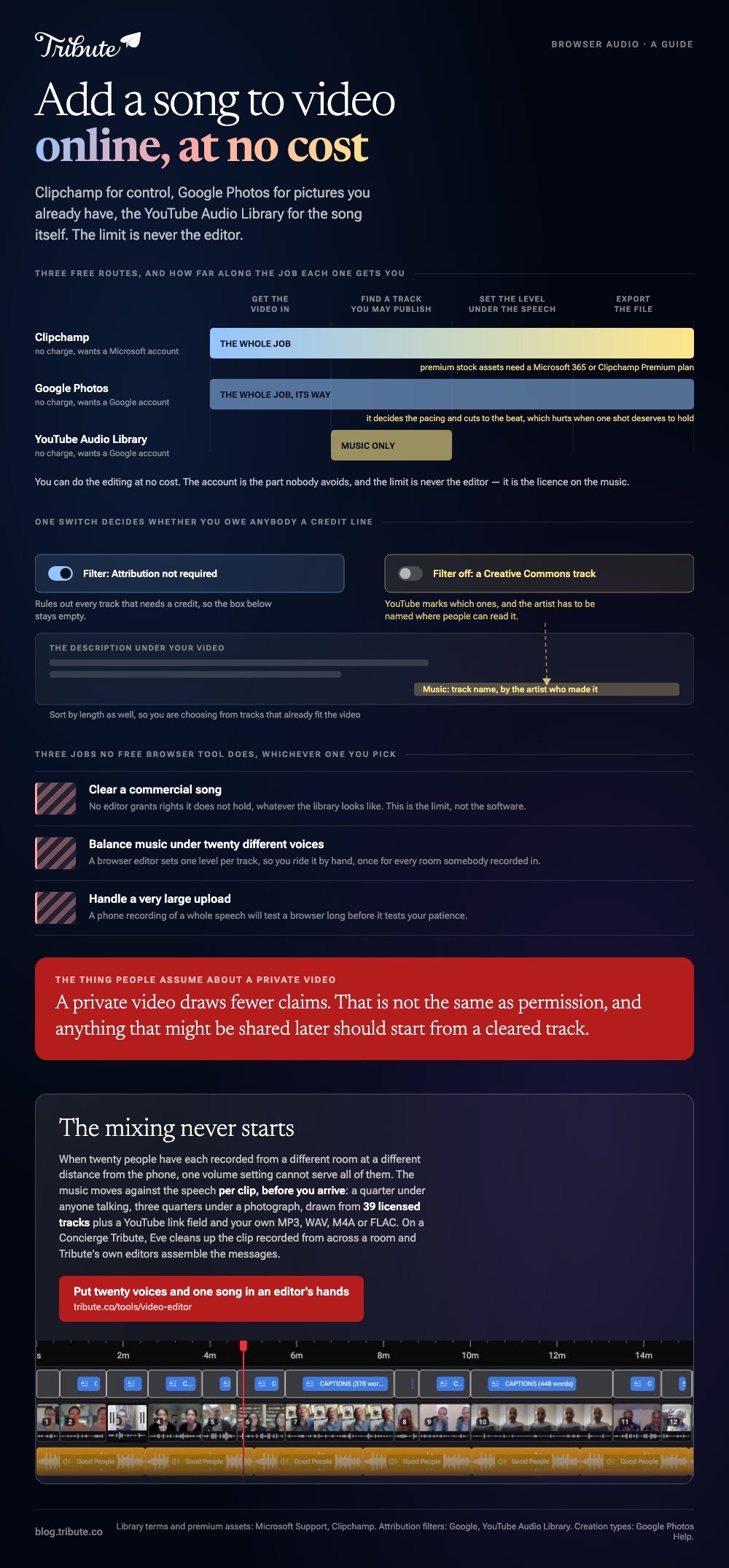
Three browser routes put a track under a video at no cost: Clipchamp for control, Google Photos for pictures you already have, and the YouTube Audio Library for the song itself. The limit is never the editor. It is the license on the music.

Can you add song to video online free, with free tools and no account?
You can do the editing at no cost; the account is the part nobody avoids.
People type this a few ways: a video maker app with song and photos free, a free app for video making online, a free tool in a browser. The job behind all of them is the same.
| Route | Cost | What it asks of you |
|---|---|---|
| Clipchamp | Nothing for the editor | A Microsoft account, and some stock is paid |
| Google Photos | Nothing | A Google account, and the template sets the pacing |
| YouTube Audio Library | Nothing | A Google account. Music only, no editor |
How do you put a track under a video in Clipchamp?
Drop the video on the timeline, then drop the audio on the row beneath it.
Microsoft's page on adding audio or music to videos gives two sources for the sound, and the difference between them is who holds the rights.
- Click My media in the left sidebar, then Import media, and bring in the video.
- Drag it onto the timeline. The arrow beside Import media also pulls from OneDrive, Google Drive, Dropbox or Box.
- Click Content library, then Music, pick a mood or genre and click the + on a track to place it.
- Or import your own audio file the same way, then hover over it and use the add to timeline button.
- Trim the track to the length of the video and export.
One caveat worth knowing before you fall for a track: Microsoft's support pages say premium stock assets need a subscription such as Microsoft 365 or Clipchamp Premium. The rest of the library costs nothing.
Set the level before you export
Music mastered on its own will bury a voice recorded on a phone.
Drop it to about a quarter of full volume wherever anyone is speaking, and let it come back up over anything silent. Fade the last few seconds rather than letting the song stop dead.
Where do you find a song you are allowed to publish?
In a library that states its terms in writing, which rules out most of what you already own.
People looking for free songs to use in YouTube videos end up in the same place, and it is the one Google runs. The YouTube Audio Library sits inside YouTube Studio and holds royalty free production music and sound effects.
- Filter by attribution. An Attribution not required filter rules out the tracks that need a credit
- Creative Commons tracks need the artist named in your description, and YouTube marks which ones
- Sort by length so you are choosing from tracks that already fit your video
- Owning a song buys you a copy to listen to, not permission to publish it inside a video
Compared with pulling audio off a music video, this costs you ten minutes of browsing and nothing afterward. It also removes the one outcome nobody plans for: a video that plays with the sound muted because a rights holder blocked it.
Does Google Photos do this without an editor at all?
If the material is already in your library, yes, and in about two minutes.
Google's help page on making creations in Google Photos describes a Highlight video that arrives with music and beat matching in place.
- On a computer, open photos.google.com, click Create, then Highlight video.
- Type a subject such as a name or a place, or choose to build your own from scratch.
- Click Edit, then Music to change the track, and Save.
- On a phone, open the Create tab, tap Highlight video, then Add Music and choose a mood: Bright, Chill, Romantic, Inspirational, Funky, Dramatic or Sad.
Unlike Clipchamp, it decides the pacing and cuts to the beat. That is the appeal on a Tuesday night and the problem when one shot deserves to hold.
From the Edit screen you can change which part of the song plays, trim it, move the volume or drop the soundtrack.
Which jobs can an add song to video online free tool not do?
Three, and knowing them saves an evening.
- Clear a commercial song. No editor grants rights it does not hold, whatever its library looks like
- Balance music under twenty different voices. Browser editors set one level per track, so you ride it by hand
- Handle very large uploads. A phone video of a whole speech will test a browser long before it tests your patience
More on the mechanics in adding audio to a video clip, on words in making a lyrics video, and on phones in adding music on an iPhone.
What if the voices outnumber the songs?
Then the music is not one decision. It is one decision and twenty volume changes underneath it.
The Tribute video editor is a browser-based group video editor: contributors record clips on their phones and Tribute assembles them on a timeline with the music balanced under the voices.
It is ours, and it is the last thing on this page.
- 39 licensed tracks across 11 genres, cleared for use inside the editor
- Your own audio too: a YouTube link, or an MP3, WAV, M4A or FLAC file
- 25% under speech and 75% under photos by default, overridable per clip
- A Crossfade songs switch blends one track into the next when the video outlasts a song

Best for: A video with twenty speakers, where one music level cannot serve all of them.
Why it works: Compared with one volume for a whole timeline, a level per clip survives twenty rooms and twenty microphones.
What if nobody has to set the volume at all?
One video, one song and you in the middle holding the balance: that is this page so far.
You found a track, you dropped it under the picture, you pulled it down so the talking survived, and then you pushed it back up where nobody spoke. There is a job where that mixing never starts.
The case: twenty voices, one occasion
That case arrives when several people each record a message for the same person.
A grandmother turning eighty. A teacher retiring after thirty years. A memorial where the people who should speak are in four time zones.
Every clip comes from a different room, at a different distance from the phone, which is the thing one volume setting cannot fix.
Why the level stops being yours to ride
Because the music moves against the speech on its own.
It sits at a quarter under anyone talking and three quarters under a photograph, per clip, before you touch anything. The Tribute video editor treats that as a default rather than a mix you have to build.
What you do not have to do
- Not the mixing. The music moves against the speech per clip before you arrive.
- Not the hunt for a track. There are 39 licensed songs, a YouTube link field and your own uploads.
- Not the edit. On a Concierge Tribute, Tribute's editors assemble the messages and hand the video back.
- Not the clip recorded from across a room. Eve, the assistant on Concierge and Concierge + Video Book, cleans up its audio along with every other clip.

When this is the wrong answer: you have one video, one song and twenty minutes. Then Clipchamp does it at no cost and nothing on this page should talk you out of that.
Tribute is not a music source on its own, and the editor lives inside a paid Tribute. The wider job is covered in making a video montage.
Frequently Asked Questions
Can I add music to a video online without downloading software?
Yes. Clipchamp and Google Photos both run in a browser and both carry music cleared for use inside them. Neither asks you to install anything.
Is the YouTube Audio Library free to use?
Yes, and it is open to anyone with a Google account through YouTube Studio. Some tracks ask for the artist to be credited in your description, and a filter rules those out.
Can I use a popular song if the video is private?
A private video draws fewer claims, which is not the same as permission. For anything that might be shared later, start from a cleared track instead.
Why does my music drown out the speech?
Because the track was mastered to be listened to on its own. Drop it to about a quarter of full volume under anyone talking, and bring it up only where nobody speaks.
What if the video is longer than the song?
Loop the track with a fade, or add a second song and cross the two over. A loop that fades reads as a choice, while a hard stop reads as a mistake.
Which format should I export?
MP4 with H.264 video. It plays on phones, televisions and every upload form, and both browser tools produce it by default.
Can I do all this on a phone?
Google Photos can, from the Create tab. Clipchamp's browser editor is happier with a keyboard, so use a laptop for anything you want to time by hand.
👉 Put twenty voices and one song in an editor's hands if every clip is coming from a different room, and the mixing stops being your evening.
