
Make Birthday Video Online Free: What the Free Plan Gives You
Three browser editors will build a birthday video end to end without a card: Clipchamp, CapCut on the web and Google Photos. The limits are not where people expect. Export quality is fine; patience with uploads is the cost.

Can you make birthday video online free?
Free online, yes, and at 1080p.
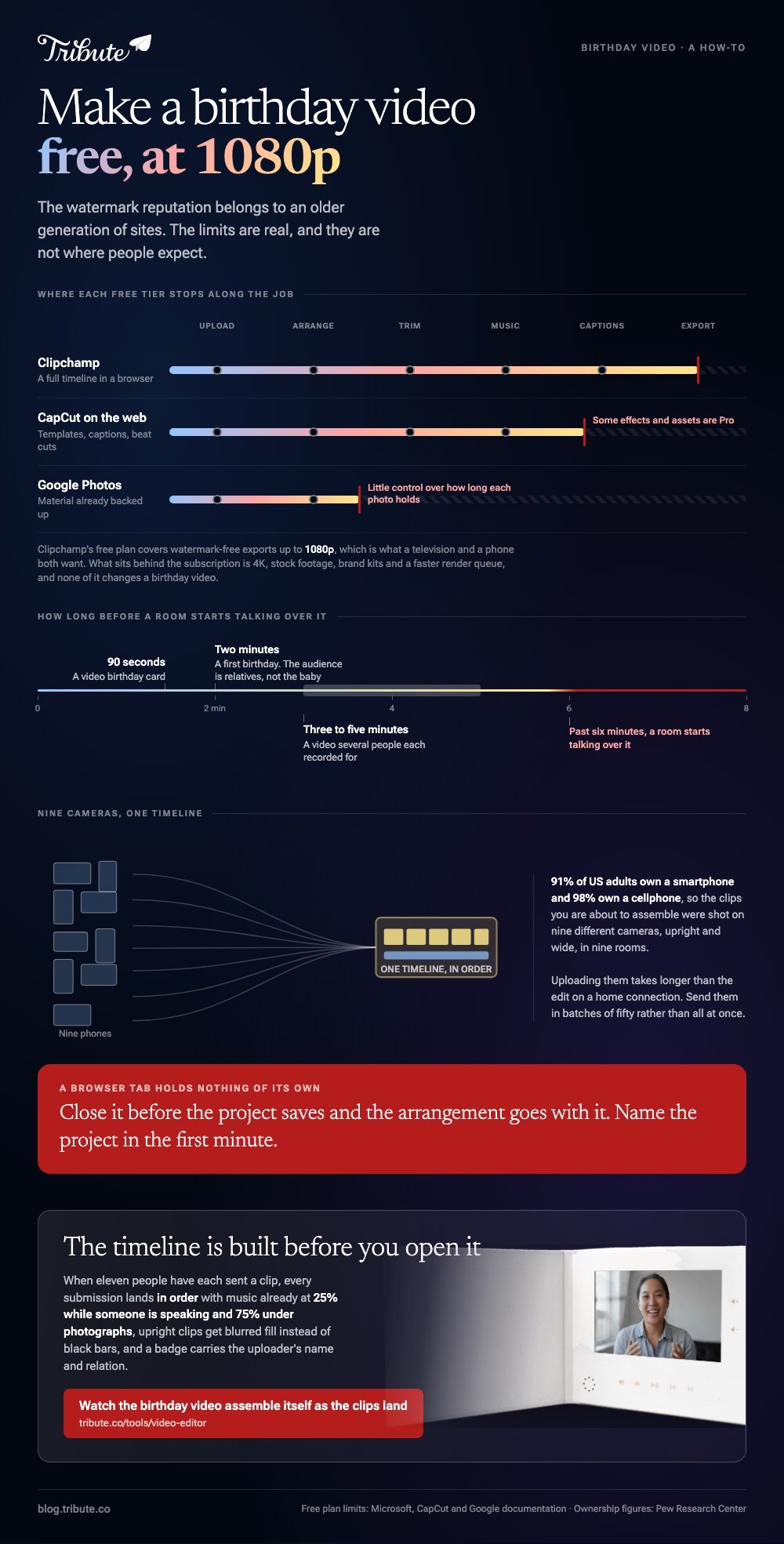
The watermark reputation belongs to an older generation of sites. Microsoft states that the Clipchamp free plan covers watermark-free exports up to 1080p, with 4K reserved for a subscription.
What you give up is further down the page: stock footage, brand kits, bulk tools and the faster render queue. For one birthday video a year, none of that changes the result.
Which sites let you make birthday video online free?
Three, and each free tier stops somewhere different.
| Editor | Strength | Where the free tier stops |
|---|---|---|
| Clipchamp | A full timeline in a browser | 1080p ceiling, 4K is paid |
| CapCut on the web | Templates, captions, beat cuts | Some effects and assets are Pro |
| Google Photos | Material already backed up | Little control over timing |
A free online birthday wishes video maker is one of these three with a template on top. The template saves you the layout and costs you the timing, which matters when someone tells a story with a pause in it.
Pew Research Center's mobile fact sheet puts smartphone ownership at 91% of US adults, with 98% owning a cellphone, so the clips you are about to assemble were shot on nine different cameras.
How do you build it, step by step?
Upload first, arrange second, music last.
Clipchamp
- Start a project and upload the clips and photographs. Send them in batches of fifty rather than all at once.
- Drag the material onto the timeline in the order you want, then trim each clip's head in to the first word.
- Select the stills and set one duration. Four seconds each is the pace that reads as deliberate.
- Add the music on the track underneath and drop its level under anyone speaking.
- Add names as text over the first second of each person's clip, then export at 1080p.
CapCut on the web
- Open the Template section, pick one, then click Use Template to open it in the web editor.
- Click Replace on each clip in the timeline to drop your own footage into the slot.
- Run the captions tool, then read every line. It will get at least one name wrong.
- Click Export at the top right.
CapCut's help page on using and exporting templates confirms templates work on mobile and web, with the desktop app limited to official ones.
Google Photos
- At photos.google.com click Create, then Highlight video, then Create your own video.
- Click or select photos, choose the material, click Create, then Save.
- Change the soundtrack from Edit, then Music.

Where does the free tier stop?
At the extras, not at the output.
| What people worry about | What is true on a free plan |
|---|---|
| A watermark | Not in Clipchamp, and not in Canva while every element is from the free library |
| Export quality | 1080p, which is what a television and a phone both want |
| Length | Long enough for a birthday video in all three |
| Stock music | A smaller shelf, and some tracks sit behind the paid tier |
Compared with a paid plan, the honest difference for this job is time: slower renders, fewer presets, and more manual work on the captions.
Unlike a desktop editor, a browser tab holds nothing of its own. Close it before the project saves and the arrangement goes with it, so give the project a name in the first minute.
Storage is the other quiet limit. Each of these tools keeps your uploads on its own servers, and a long birthday video from a dozen phones fills a hobby account faster than a year of documents.
What changes for a first birthday or an animated card?
The length, and almost nothing else.
For a first birthday, a free online video maker handles photographs and clips in one sequence, which suits a year that produced four hundred pictures and six videos. Keep it to two minutes, because the audience is relatives, not the baby.
You can also create an animated birthday video online for free from a template, where the type moves and your photographs sit in frames. A free online birthday card video maker is the same build with a ninety second timeline.
More on the pieces: making a video montage, fun birthday videos, a photo birthday video maker and the video birthday card.
What if ten people are each sending a clip?
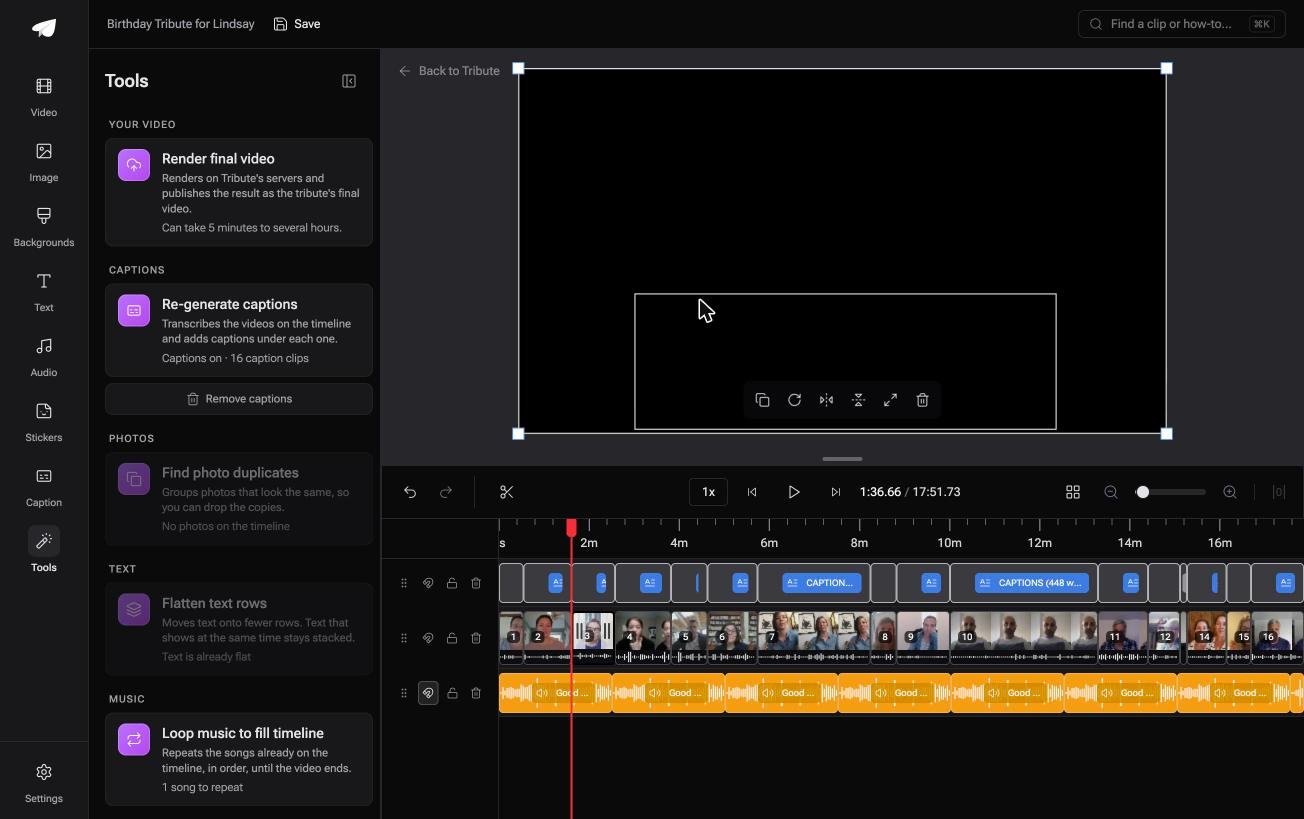
The Tribute video editor is a browser-based group video editor: contributors record clips on their phones and Tribute assembles them on a timeline with the music balanced under the voices.
It is ours, and it is the last thing on this page.
- Clips arrive in order on the timeline, with a tick against the ones already placed
- Tools panel bulk actions: render, re-generate captions, remove captions, find photo duplicates, loop music to fill the timeline
- 47 entrance and 47 exit animations, including the slow zoom that makes a still photograph move
- Autosave and version history, with removed clips recoverable rather than gone
Best for: The person who agreed to make the video and then found nine people had sent nine clips.
Why it works: The bulk actions run across the whole timeline at once, so a nine clip video takes the same handful of decisions as a three clip one.
Is there a version of this with no editing step?
Every step above is editing.
Uploading, dragging, trimming, levelling the music: that is the job, and it takes an evening once the material is in front of you. The question worth asking is whether your birthday video needs you to do it at all.
For one kind of video, it does not.
The case: the video is other people
You are in it when the content is a group of people each recording for one person.
Say your sister turns forty and you have told eleven people to send something. You are not making a video. You are the inbox, and the editing you are about to learn exists because the clips arrived loose.
Which means what you searched for, how to make birthday video online free of a long evening, is a question about the arrival of the clips rather than the tool.
Why the editing shrinks
The timeline is built before you open it.
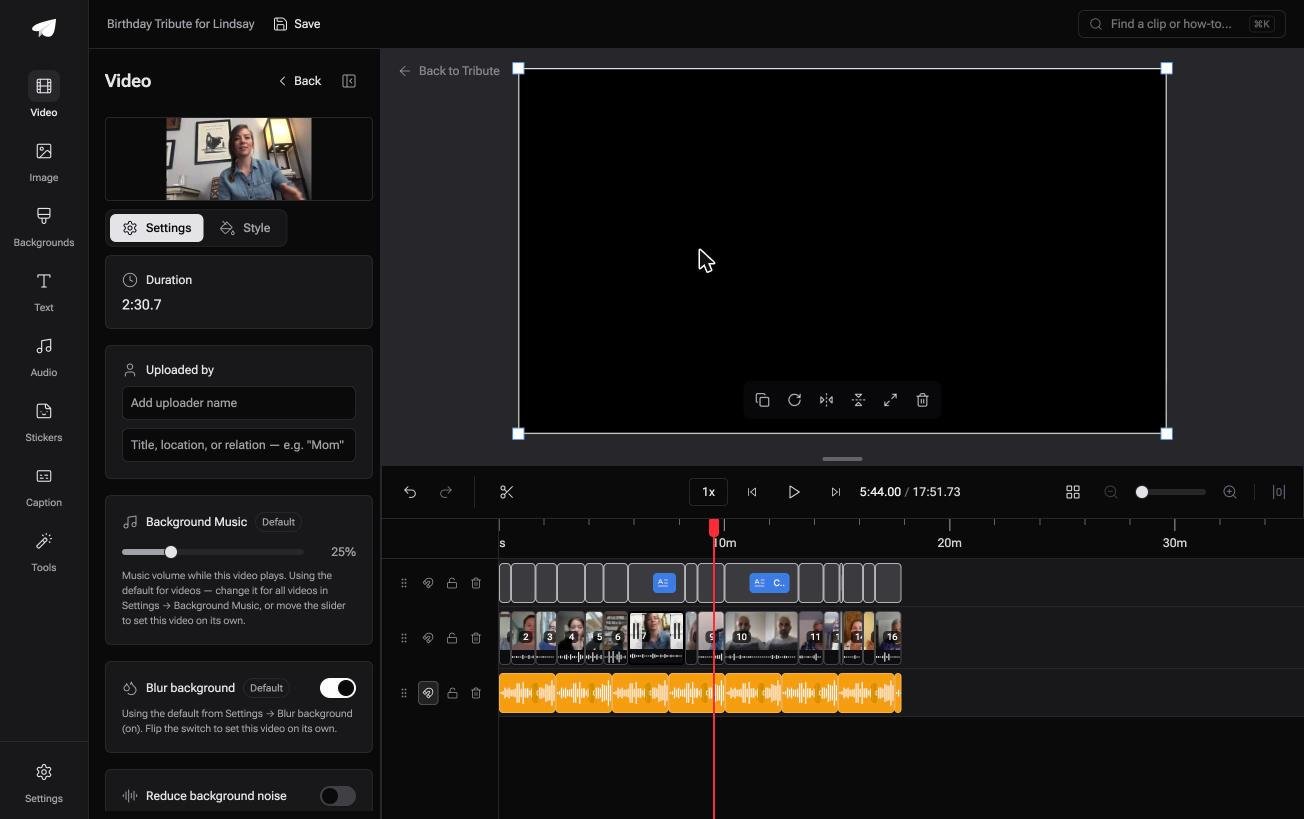
In the Tribute video editor each submission lands in order with music already underneath, at 25% while someone is speaking and 75% under photographs, and upright phone clips get blurred fill instead of black bars.
What you do not have to do
- Collect eleven files. Each person records from one link, on their own phone, in their own time.
- Work out an order. The clips are in one before you open the timeline.
- Label anybody. A badge carries the uploader name and relation, in whichever corner you pick.
- Edit it, on a Concierge Tribute. Tribute's editors assemble the whole video, and Concierge + Video Book sends it back as a hardcover keepsake.
When this is the wrong answer: the footage is all yours, or you want a template with beat-matched cuts and moving type. Then CapCut on the web is the shorter road and costs nothing.

Frequently Asked Questions
Do any of these need a download?
No. All three run in a browser tab, though Clipchamp also ships as a Windows app if you prefer one.
Will there be a watermark?
Not on a Clipchamp export at 1080p. Canva adds one when a design mixes a free account with paid elements, so check each element before you download.
How long does uploading take?
Longer than the edit, on a home connection. Start the upload, make the tea, then come back and arrange.
Can I edit on a phone instead?
Yes. CapCut and iMovie both do the whole job on a phone, and the web versions matter when the clips are on a laptop.
What is the best length?
Three to five minutes for a group, ninety seconds for a card. Past six minutes a room starts talking over it.
How do I stop upright clips having black bars?
Either crop them to the frame you are exporting, or put a blurred copy of the clip behind them. Most editors offer the second as a background fill.
👉 Watch the birthday video assemble itself as the clips land if eleven people have each sent you one, and the editing step above never has to happen.
