
Best Apps for Birthday Video Making: 6 Picks Compared
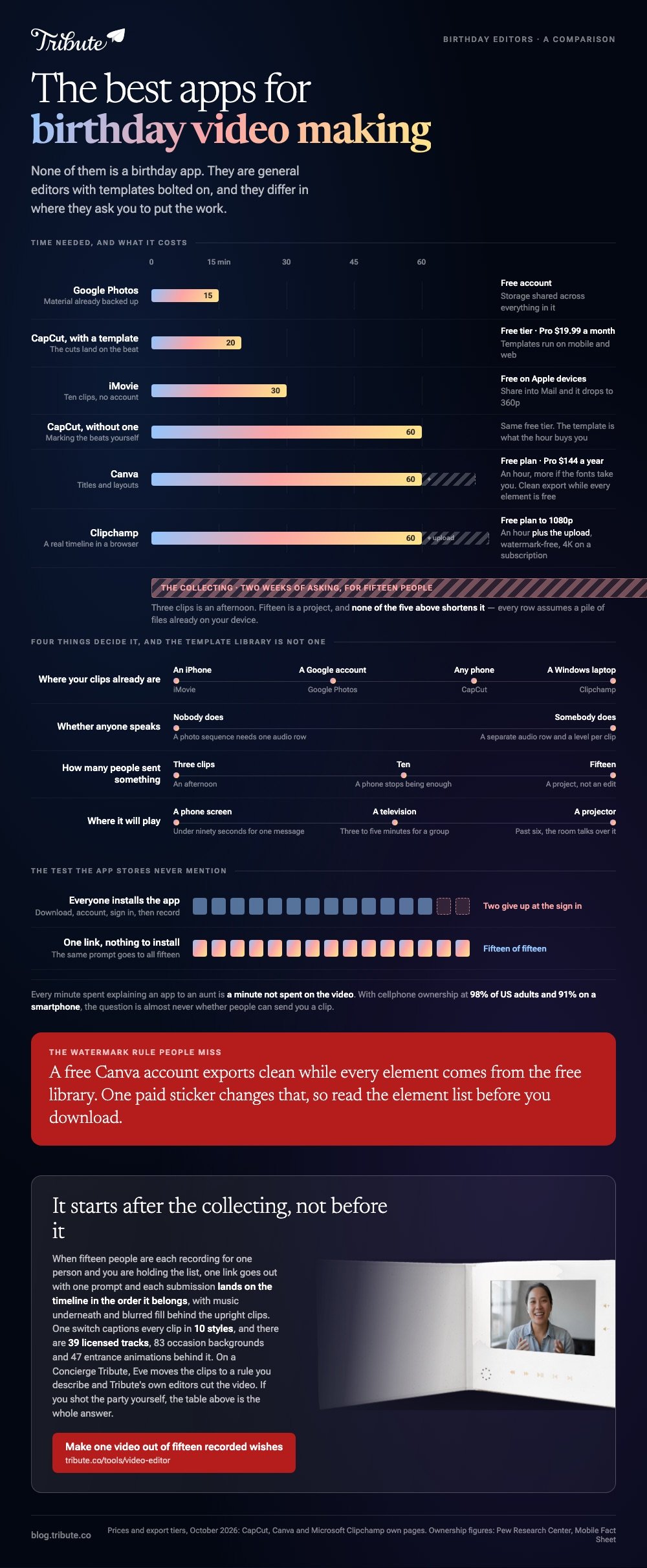
The best apps for birthday video making are the ones that match where your clips already are. CapCut for templates and captions, iMovie on Apple devices, Clipchamp in a browser, Google Photos when everything is backed up. All four finish the job without a card.

| App | Best for | Price, October 2026 |
|---|---|---|
| CapCut | Templates and automatic captions | Free tier; Pro listed at $19.99 a month |
| iMovie | A first cut on an iPhone | Free app on Apple devices |
| Clipchamp | A real timeline in a browser | Free plan to 1080p |
| Google Photos | Material already backed up | Free account, shared storage |
| Canva | Titles and layouts that look designed | Free plan; Pro $144 a year |
| Tribute video editor (ours) | Clips sent in by a group | Part of a paid Tribute |
Which are the best apps for birthday video making?
Five general editors, and one built for a group.
Each of the five does the same four jobs: hold your clips in order, trim them, put text and music over them, and export a file. They differ in where they ask you to put the work.
None of these is a birthday app. Calling anything the best birthday editing app is a category error: these are general editors with birthday templates bolted on, and the templates are the smallest part of what you get.
Pew Research Center's mobile fact sheet puts cellphone ownership at 98% of US adults, with 91% on a smartphone, which is why the question is almost never whether people can send you a clip.
1. CapCut
The template library is the reason to open it. Pick a birthday template, drop your own clips into the slots, and the cuts land on the beat without you marking anything.
Captions are the second reason. The automatic pass is fast and wrong about two names, which is a two minute fix rather than an afternoon of typing.
- Look for: the Template section, Use template, then Replace on each slot
- Price: free tier; CapCut's pricing page lists Pro at $19.99 a month as of October 2026
- Time needed: 20 minutes with a template, an hour without
CapCut's help page on using and exporting templates confirms templates run on mobile and web, with the desktop app carrying official ones only.
Best for: A fast, modern looking birthday video for someone under thirty.
Why it works: The beat matching and the caption pass are the two jobs that take longest by hand.
2. iMovie
Still the shortest road from a camera roll to a finished video on an iPhone. Magic Movie builds a first cut from the clips you tap, in the order you tap them, and leaves you to fix the titles.
It also asks for no account, which matters when the person making the video is the grandparent rather than the grandchild.
- Look for: Start New Project, then Magic Movie, then Create Magic Movie
- Price: a free app on iPhone, iPad and Mac
- Time needed: 30 minutes for ten clips
One trap worth knowing: exporting through Share, then Share Video, then Save Video keeps your resolution, while sharing into Mail or Messages sends a 360p copy.
Best for: Anyone whose clips never left an iPhone.
Why it works: No upload, no sign in, and the first cut exists before you have made a single decision.
3. Clipchamp
The browser option with a proper timeline. Separate rows for video, music and text, which is what you want when a birthday video has speeches in it.
Uploading is the cost. Everything has to reach Microsoft's servers before you can arrange it, and on a home connection that is the long part of the evening.
- Look for: the timeline rows, and Export at 1080p
- Price: free plan; Microsoft says the free plan covers watermark-free exports up to 1080p, with 4K on a subscription
- Time needed: an hour, plus the upload
Best for: A Windows laptop and a video with talking in it.
Why it works: You control where every cut lands, and the free export is the same 1080p the paid one gives you.

4. Google Photos
The one that needs the least from you. Highlight videos build themselves from material already in the account, and swapping the soundtrack is two clicks.
Control is the trade, and it is a real one. You cannot hold a photograph for an extra second because the story needs it, and that limit shows up in every sequence longer than two minutes. For twenty pictures and a soundtrack, nobody will notice.
- Look for: Create, then Highlight video, then Create your own video
- Price: a free account, with storage shared across everything in it
- Time needed: 15 minutes
Best for: A photo led birthday video when the photographs are already backed up.
Why it works: Nothing to upload, which removes the step that stops most people finishing.
5. Canva
Open this one when the type matters. A birthday title in Canva looks designed rather than typed, and the layouts carry a photo sequence further than a plain cut does.
The watermark rule is the thing to watch. Canva's own pages say a free account exports clean while every element comes from the free library, and one paid sticker changes that.
- Look for: the video timeline under the page, and the element list before you download
- Price: free plan; Canva Pro is listed at $144 a year for one person as of October 2026
- Time needed: an hour, more if the fonts take you
Best for: A birthday video with chapters, names and a title sequence.
Why it works: Compared with the other five, it treats a video as a design rather than as a strip of clips.
What separates the best birthday video maker from the rest?
Four things, and none of them is the template library.
Templates are what the app stores advertise and the first thing most people abandon. A template decides your pacing for you, which is a gift on a thirty second card and a problem on a four minute video where somebody pauses to find a word.
- Where your clips already are. The best birthday editor app is the one holding the material, because uploading is the slowest step in this job.
- Whether anyone speaks. Speech needs a separate audio row and per clip levels. Photo sequences do not.
- How many people sent something. Three clips is an afternoon. Fifteen is a project.
- Where it will play. A phone screen, a television in a living room and a projector in a function room want different lengths.
A video message for a best friend's birthday is a different job from a family montage: one person, one in joke, ninety seconds, and no app needed beyond the camera.
Shot for a bestie birthday, the video lives on a phone screen, so hold the camera upright and let the editor fill the sides rather than cropping heads off.
One more test, which the app stores never mention: can the people sending you clips take part without installing anything?
Every minute spent explaining an app to an aunt is a minute not spent on the video, and two of them will give up at the sign in screen anyway.
More on the formats: making a video montage, fun birthday videos, a photo birthday video maker and the video birthday card.
What if the clips come from fifteen people at once?
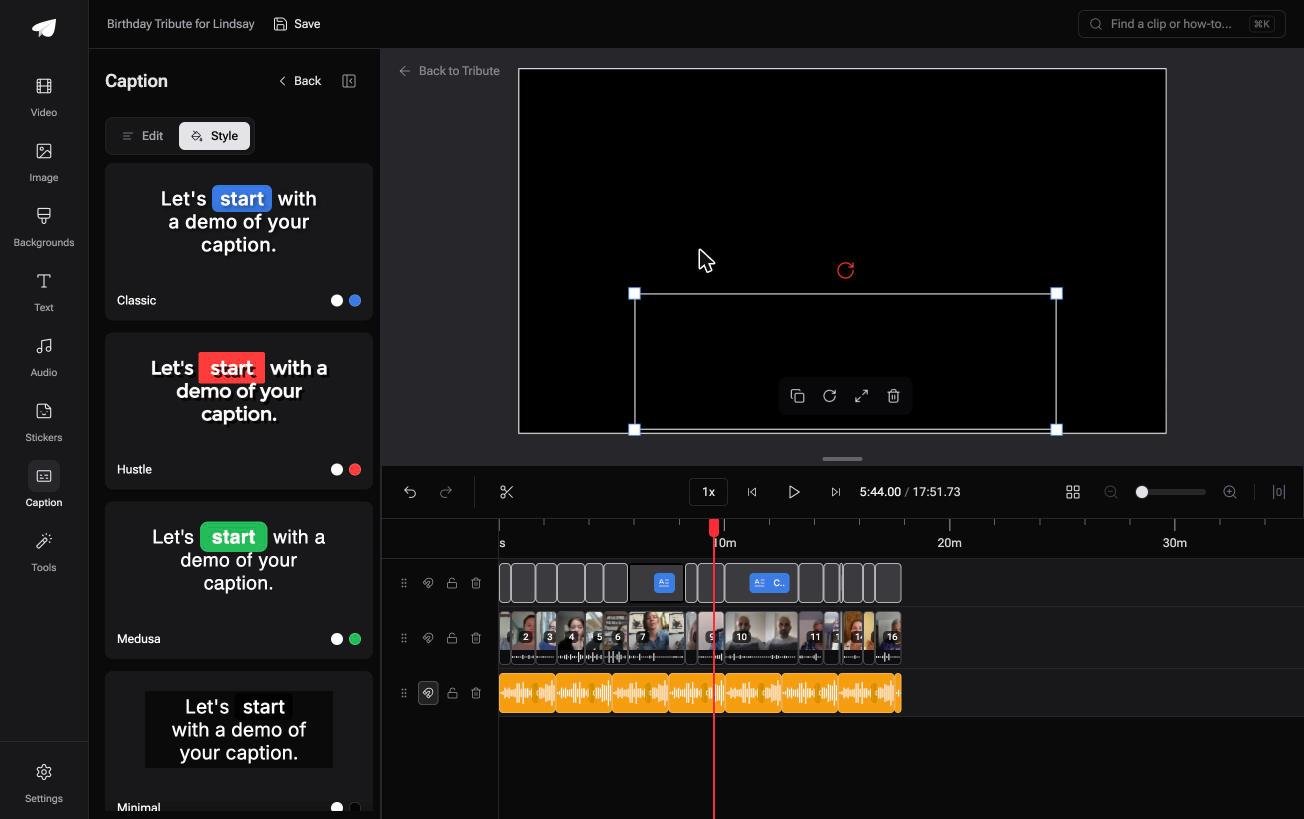
The Tribute video editor is a browser-based group video editor: contributors record clips on their phones and Tribute assembles them on a timeline with the music balanced under the voices.
It is ours, and it is the sixth pick on this page because it answers a narrower question than the other five.
- Look for: clips arriving in order with a tick against the ones already placed, the Reorder media window, and the Tools panel
- Price: part of a paid Tribute; the editor is not sold on its own
- Time needed: an evening for the edit, two weeks for the asking
The numbers behind it: 39 licensed tracks across 11 genres, 10 caption styles applied by one switch, 83 occasion backgrounds, 47 entrance and 47 exit animations, and music at 25% under a voice or 75% under a photograph.
Best for: A milestone birthday where the clips are promised by people who will never open an editor.
Why it works: Unlike the five above, it starts after the collecting instead of before it.
What happens when the app choice stops mattering?
Picking the app is the part of this post you cannot skip.
Except that the comparison above only matters while you are the one assembling. Every row in that table assumes a pile of files on your device and an evening to spend on them.
One kind of birthday video never produces that pile.
The case: the gift is fifteen people
You are in it when each person records for the same person and you are holding the list.
Say your father turns eighty in April. Four of his friends are not on any messaging app you use, and two relatives will send photographs instead of clips.
One cousin will record upright in a car. You are not editing a video yet; you are running a collection.
Which means the search that brought you here, best apps for birthday video making, is answered by whichever tool removes the collection, not by whichever has the better timeline.
Why the comparison collapses
The arrangement exists before anyone opens an editor.
In the Tribute video editor each submission lands on the timeline in the order it belongs, with music underneath and blurred fill behind the upright clips, so the features you were comparing become settings you adjust rather than work you do.
What you do not have to do
- No app to choose. One link goes out with one prompt, the same to everyone.
- No reordering by hand. On a Concierge Tribute, Eve moves the clips to a rule you describe, such as the grandchildren together.
- No captions to type. One switch covers every clip, and a badge carries who is speaking.
- No edit at all, if you want none. Tribute's editors cut the birthday video and hand it back for approval.

When this is the wrong answer: you shot the party yourself, or the video is one clip for one friend. Then the table at the top of this page is the whole answer, and CapCut or iMovie finishes it tonight.
Frequently Asked Questions
What is the best free app for making a birthday video?
iMovie on an Apple device, Clipchamp in a browser, Google Photos when the material is already backed up. All three export at full resolution without a payment.
Do any of these add a watermark?
Clipchamp does not at 1080p, and Canva does not while every element is from its free library. Check the element list before you download in Canva, because one paid item changes the answer.
Which app handles captions best?
CapCut for an automatic pass you then correct. Captions matter more than people expect, because half the audience will watch with the sound off the first time.
Can I edit a birthday video on a phone?
Yes, and for ten clips or fewer a phone is faster than a laptop. The phone stops being enough when there are two audio rows to balance.
How long should a birthday video be?
Three to five minutes for a group video, under ninety seconds for a single message. Past six minutes a room starts talking over it.
What about a video message for a best friend's birthday?
Shoot it in one take on the camera app, upright, and send a link rather than a file. Editing it is what makes it feel like a greeting card instead of a message.
Is it worth paying for an editor for one birthday?
No. Every paid tier on this page exists for people publishing every week, and the free plans export the same 1080p a birthday needs.
👉 Make one birthday video out of fifteen recorded wishes if fifteen people are each sending a clip, and the comparison above stops being your problem.
