
Merge Clips for Free: The Best Free Program to Merge Videos
On a Mac the answer is iMovie, on Windows 11 it is Clipchamp, and both are already installed. Shotcut and DaVinci Resolve give you a real timeline. Pick by machine, not by review: all four are free to use.

Which free program to merge videos is already on your computer?
One of two, depending on what you are sitting at.
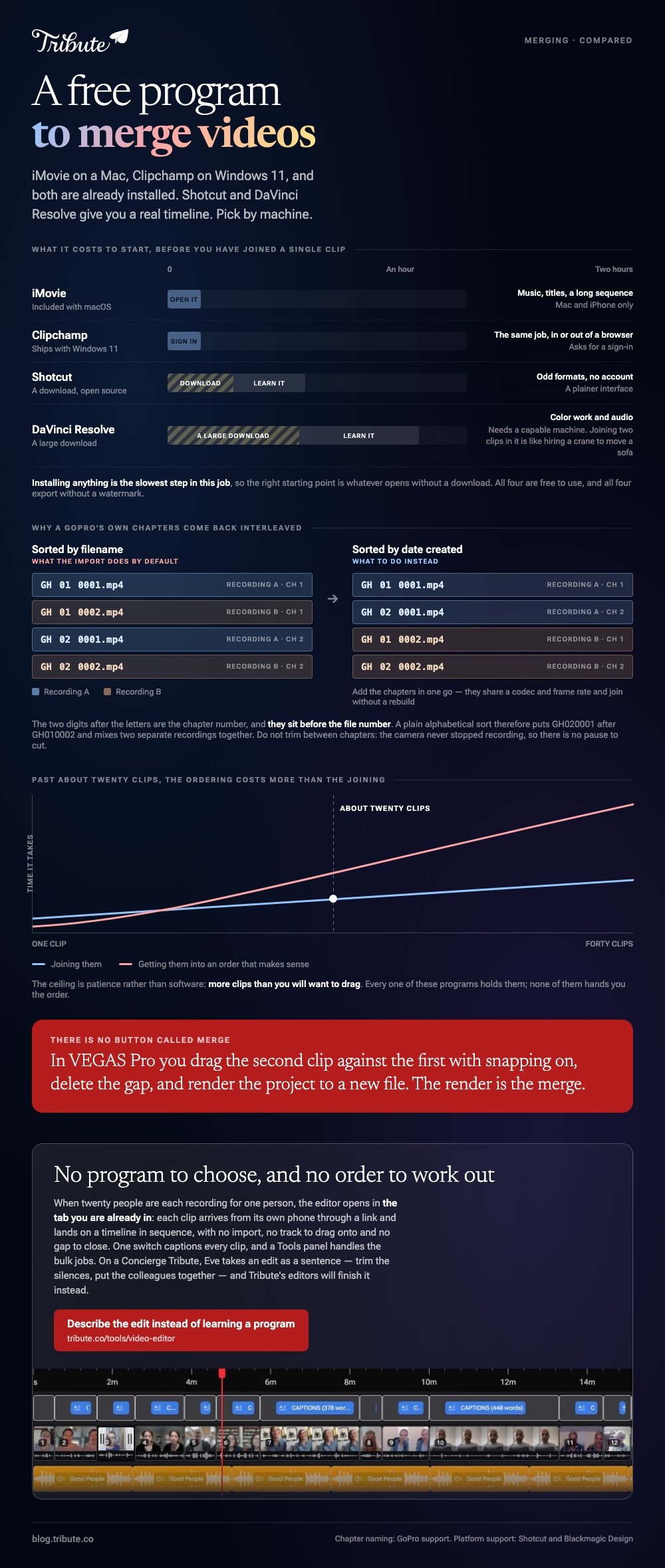
Installing anything is the slowest step in this job, so the right starting point is whatever opens without a download. Both of the built-in options join clips, add music and export at 1080p.
| Program | Where it comes from | Good for | Limit |
|---|---|---|---|
| iMovie | Included with macOS | Music, titles, a long sequence | Mac and iPhone only |
| Clipchamp | Ships with Windows 11 | The same job, in or out of a browser | Asks for a sign-in |
| Shotcut | A download, open source | Odd formats, no account | A plainer interface |
| DaVinci Resolve | A large download | Color work and audio | Needs a capable machine |
What should you install when the built-in option will not do?
Two downloads cover almost every reason to go looking.
Shotcut
Shotcut calls itself a free tool that is open source and cross-platform, and it runs on Windows, Mac and Linux. It opens formats the built-in editors refuse, which is the usual reason people go looking at all.
Best for: A clip that other editors will not import.
Why it works: It edits files where they are rather than converting them on the way in.
DaVinci Resolve
Blackmagic ships a version of Resolve that costs nothing, alongside a paid Studio edition.
It is a broadcast tool, so joining two clips in it is like hiring a crane to move a sofa. Reach for it when the footage also needs grading.
Best for: Clips shot on different cameras that have to end up matching.
Why it works: Unlike the lighter editors, it treats color and audio as first-class work rather than filters.
How do you merge clips step by step?
The shape is the same in every one of these programs.
- Start a new project and set it to 1080p unless the footage is higher.
- Import every clip at once rather than one at a time.
- Drag them onto a single video track in the order you want them.
- Close any gap between two clips, because a gap renders as a flash of black.
- Drag the head of each clip in to cut the silence before the first word.
- Export at the highest setting offered and keep the originals.

Step four is the one people skip. Compared to a visible mistake like a wrong caption, a half-second of black between two clips reads as a broken file rather than an edit.
How do you merge GoPro videos that split themselves?
The camera did it on purpose, and the chapters are meant to be rejoined.
A long recording is written as several files. GoPro's file naming article gives the pattern: GH011234.mp4 is the first part and GH021234.mp4 is the second chapter of that same recording, where the two digits after the letters are the chapter number.
Note where those digits sit. The chapter comes before the file number, so a plain alphabetical sort puts GH020001 after GH010002 and interleaves two separate recordings.
- Sort by date created, not by name, before you drag anything in.
- Add the chapters in one go, since they share a codec and frame rate and will join without a rebuild.
- Do not trim between chapters. The camera did not stop recording, so there is no pause to cut.
GoPro does not merge videos into one file on the card, so the join happens in whichever program you chose above.
Can VEGAS Pro merge clips if you already own it?
Yes, though there is no command called merge.
You drag the second clip against the first on one track with snapping turned on, delete any gap, then render the project to a new file. The render is the merge.
VEGAS Pro is paid software, so it belongs on this page only if it is already on the machine. For anyone choosing now, see video editing programs for a Mac, or the browser routes in merging video clips online and merging YouTube videos.
What if the clips came from twenty different phones?
The Tribute video editor is a browser-based group video editor: contributors record clips on their phones and Tribute assembles them on a timeline with the music balanced under the voices.
It is ours, and it is the last thing on this page.
- Clips arrive in order, with a tick against the ones already on the timeline
- One switch captions every clip, 17 minutes across 16 contributors in under a minute, in 10 styles
- A Tools panel handles the bulk jobs: render, re-generate captions, find photo duplicates, loop music to fill the timeline
- Nothing to install, because the editor is a browser tab rather than a download
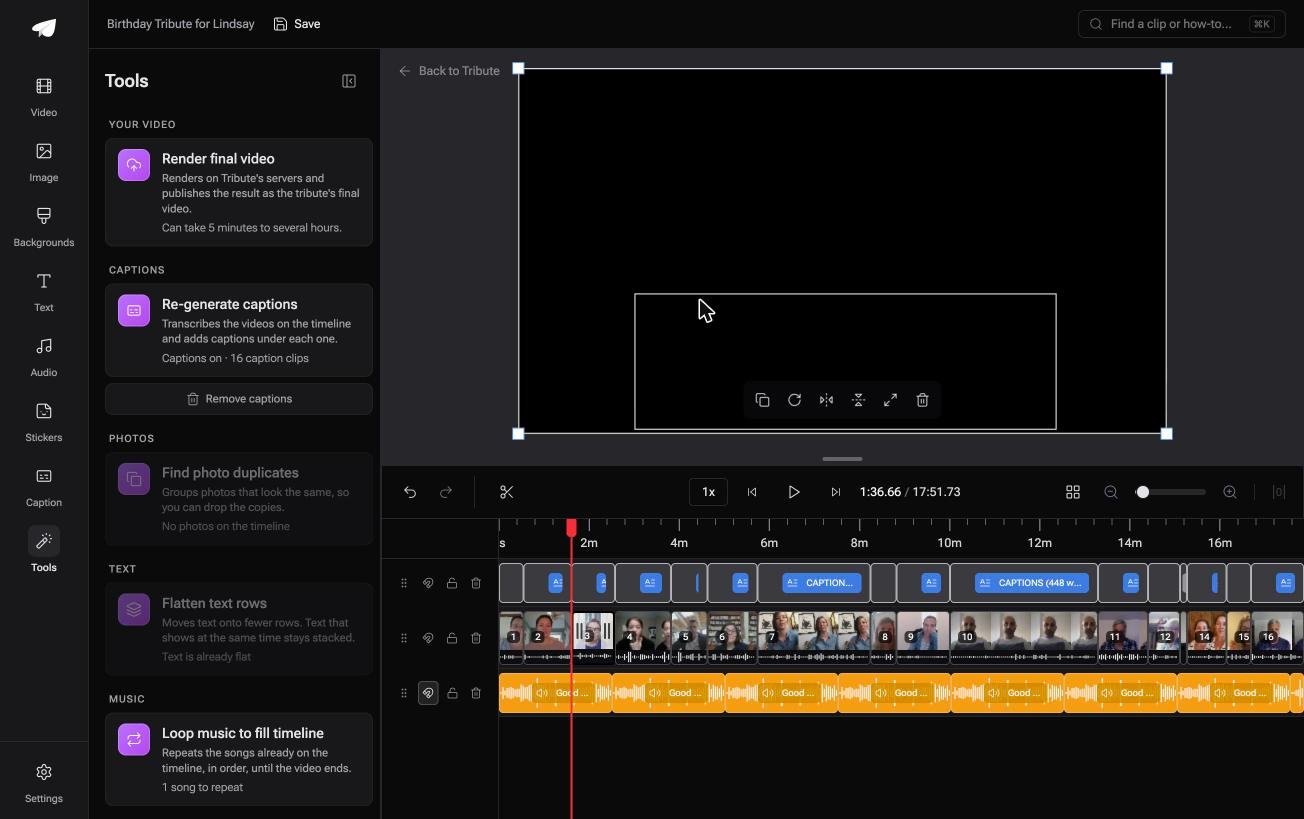
Best for: Nothing to install, nobody to chase, and sixteen senders whose clips land already in order.
Why it works: The collecting and the ordering are done before an editor opens, which is the part that takes two evenings.
What if nobody has to install anything?
This page began with a question about software, not about video.
You compared four programs, downloaded one, waited for it to open and then spent longer learning where its export button lives than you spent on the edit.
There is one case where that decision never comes up.
The case: several people each recorded for one person
You are in it when the clips were never yours to collect.
A fiftieth wedding anniversary. A manager leaving after twenty years. A graduation where half the family watched it on a screen.
With 98% of US adults owning a cellphone of some kind, per the Pew Research Center mobile fact sheet, the camera is not the hard part. Getting twenty of them pointed at the same video is.

Why there is no program to choose
The editor opens in the tab you are already in.
Each clip arrives from its own phone through a link and lands on a timeline in sequence. No import, no track to drag onto, no gap to close.
That is the shape of the Tribute video editor: not a lighter download, no download.

What you do not have to do
- Not the install. The editor opens in the tab you are already in.
- Not the learning. Eve, the assistant on Concierge and Concierge + Video Book, takes an edit as a sentence: trim the silences, put the colleagues together.
- Not the edit at all, if you would rather not. On a Concierge Tribute, Tribute's editors caption every clip and pick from the 39 licensed tracks.
When this is the wrong answer: you shot the footage yourself, or you want keyframes and color wheels. Then install Resolve. The editor is not a standalone joiner and lives inside a paid Tribute.
The wider job is covered in making a video montage.
Frequently Asked Questions
What is the best program to merge videos without a watermark?
iMovie, Clipchamp, Shotcut and Resolve all export clean. Watermarks turn up on browser tools with a paid tier, so check the export screen before you upload rather than after.
Can I merge videos without re-encoding them?
Only when the clips match in codec, resolution and frame rate, which is why GoPro chapters join without a rebuild and a phone clip beside a camcorder clip does not.
Is there a merge program for Windows 10?
Clipchamp runs in a browser on Windows 10, since the old Photos movie editor is gone from current builds. Shotcut installs there as well.
How many clips can one project hold?
More than you will want to drag. The ceiling is patience rather than software, and past about twenty clips the ordering takes longer than the joining.
Why is my merged video out of order?
The import sorted by filename. Sort by date created instead, which matters most with action cameras that number chapters before recordings.
Do I need to convert a .mov before merging it?
Not often. Most editors read .mov and .mp4 without complaint, and Shotcut is the one to try when something refuses to import.
Can I merge clips on a phone instead?
Yes. iMovie on an iPhone and CapCut on Android both join clips and export without a watermark, and neither asks for a card.

👉 Describe the edit instead of learning a program if twenty people are each recording for one person, and the software question never gets asked.
