
Android Merge Videos: Three Routes That Work and One to Skip
To merge videos on Android with nothing installed, open Google Photos, tap Create, then Highlight video, and pick your clips. For a plain end-to-end join with no template over the top, install CapCut. Both cost nothing.

Can Android merge videos without installing an app?
Google Photos is already on the phone and it will do it.
- Open Google Photos and tap Create at the bottom, then Highlight video.
- Tap Select content at the top, choose the clips, then tap Next.
- Touch and hold a clip and drag it to a different position in the order.
- Tap a clip you do not want, then tap Remove.
- Tap Save.
Those steps come from Google's guide to making creations in Google Photos.
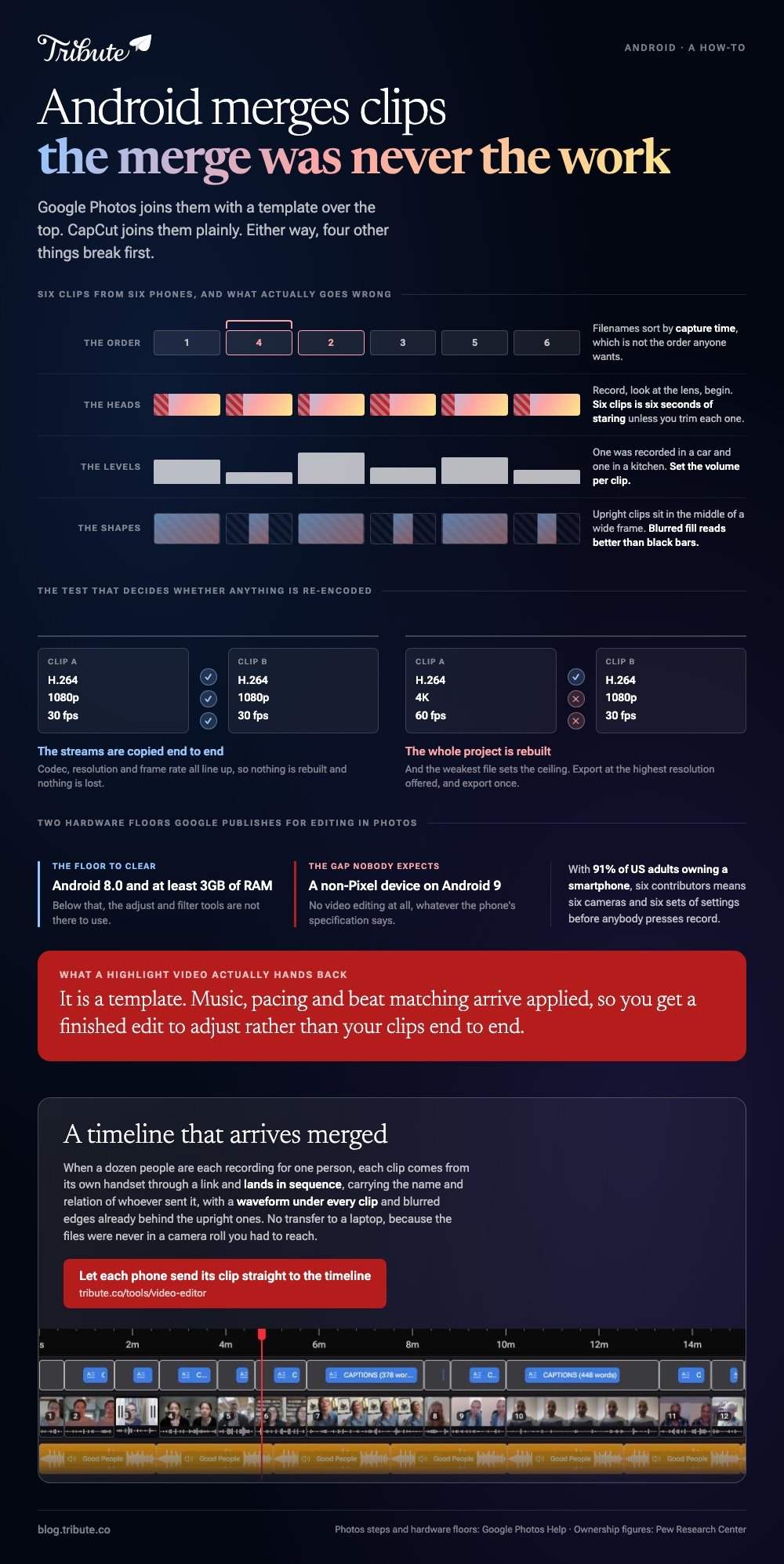
Read the catch before you start. A highlight video is a template: music, pacing and beat matching arrive applied, so what you get is a finished edit to adjust rather than your clips end to end.
Best for: Six or eight clips from one event that need to be one video tonight.
Why it works: No install, no account, and the result saves straight to the phone.
Which video merger app for Android should you install?
CapCut, unless you have a reason not to.
Tap New project, select every clip, then tap Add. They land on the timeline in the order you tapped them, which is worth knowing before you start tapping.
Press and hold a clip to drag it somewhere else. Tap a clip and then Volume to set a level for that one alone, and tap Export at the top right.
| What you have | Use | Why |
|---|---|---|
| Clips from one event | Google Photos | Already installed, no account |
| Clips at different volumes | CapCut | A volume control per clip |
| Twenty files from twenty people | A laptop, or something that orders them | The merge was never the work |
| A subtitle file to burn in | A desktop tool | Android has no built-in route |
Best for: Clips recorded by different people in different rooms.
Why it works: Per clip volume is the control a mismatched set needs most, and no video merger app Android users can install does it with fewer taps.

How do you merge srt with mp4 on Android?
You do not, in the strict sense, and that is worth knowing before you download four apps that promise it.
A subtitle file sits beside the video rather than inside it. Players that read sidecar files will show the captions when the .srt shares the video's filename and folder, and nothing has been written into the MP4.
To put the words into the picture itself, the video has to be re-encoded, which is slow on a phone and costs a generation of quality. Two better options:
- Keep them separate where the video is for you, and let the player pair them up.
- Caption in the editor instead where the video is for other people. An editor that generates captions burns them in during the export you were doing anyway.
Unlike merging two clips, merging an SRT is a format problem rather than a timeline one, and the phone is the wrong machine for it.
Will Android merge videos without losing quality?
Only when the clips already match.
Where codec, resolution and frame rate line up, an editor can copy the streams end to end. Mix a 4K clip at 60fps with a 1080p clip at 30fps and the whole project is rebuilt, with the weakest file setting the ceiling.
Export at the highest resolution offered and export once. Every extra pass through an encoder costs a little more than the one before.
Google lists real hardware floors for video editing in Google Photos: at least 3GB of RAM and Android 8.0 for the adjust and filter tools, and no video editing at all on non-Pixel devices running Android 9.
The browser alternatives are compared in merging videos online and merging video clips online.
What breaks when the clips come from six different phones?
Four things, and the merge is not one of them.
- The order. Filenames sort by capture time, which is not the order anyone wants.
- The heads. Everyone presses record, looks at the lens, then begins. Six clips means six seconds of staring unless you trim each one.
- The levels. One was recorded in a car and one in a kitchen. Set volume per clip.
- The shapes. Upright clips sit in the middle of a wide frame. Blurred fill in the gutters reads better than black bars.

With 91% of US adults owning a smartphone, per the Pew Research Center mobile fact sheet, six contributors means six cameras and six sets of settings before anybody presses record.
What if a dozen people each recorded their own clip?
The Tribute video editor is a browser-based group video editor: contributors record clips on their phones and Tribute assembles them on a timeline with the music balanced under the voices.
It is ours, and it is the last thing on this page.
- Clips arrive auto-assembled in order, with a tick against the ones already on the timeline
- A reorder window numbers every clip, with select all, move to front, move to back, move to position and bulk remove
- A waveform under every clip, so the silence before the first word is something you can see
- Blurred edges fill the frame behind upright phone footage, on by default
- Autosave and restorable version history, so a clip you removed is recoverable rather than gone

Best for: Clips arriving by text and email from relatives who will not install anything on a phone.
Why it works: The collecting and the ordering finish before the editor opens, and those are the two evenings.
Can the clips arrive already merged?
Each route above assumes you can lay hands on the clips.
You asked six people for clips, two sent links, one sent a video so long the message failed, and the last one arrived after you had already exported.
That chase is the real cost, and there is a case where it does not happen.
The case: several people each recorded for one person
You are in it when the clips were never on your phone.
A grandmother turning eighty. A colleague leaving after fifteen years. A memorial where the people who should speak are in four states.
Nobody is merging anything yet. Everyone is recording a message, and your job is assembly, not collection.
Why the merge never happens on the phone
The clips are already end to end when the page loads.
Each one arrives from its own phone through a link and lands on the timeline in sequence, carrying the name and relation of whoever sent it.
No transfer to a laptop, because the files were never in a camera roll you had to reach.
That is how the Tribute video editor handles it: not a faster merge on Android, but a timeline that arrives merged.
What you do not have to collect
- No files on your phone. Each clip arrives from its own handset and lands in sequence.
- No merge, no storage warning, and no clip that failed to send because it ran too long.
- No reordering by hand on a Concierge Tribute: ask Eve, the assistant inside the editor, to put the grandchildren together and it does it.
- None of it, if you take Concierge: Tribute's editors build the video and send it back.
Where it ends up
It can stay a link, or arrive as a video book: a hardcover case with a screen inside that plays when the cover opens.
When this is the wrong answer: you recorded all six clips yourself, or you want frame-level control. Then open CapCut. Compared to a phone editor, this one is not a general merger at all, and it lives inside a paid Tribute.

The wider job is covered in making a video montage.
Frequently Asked Questions
Does Android have a built-in video merger?
Not as a plain join. Google Photos builds a highlight video from several clips, which merges them and applies a template at the same time, and Samsung's gallery editor can append clips on some models.
How many clips can one phone project hold?
A dozen is comfortable and twenty starts to feel slow, because dragging clips into order on a small screen is the bottleneck rather than the processor. Past that, move to a laptop.
Can I merge videos on Android without a watermark?
Yes. Google Photos and CapCut both export without one on the standard layouts, and an app that stamps the output wants a subscription to remove it.
Why is there a black flash between two clips?
There is a gap on the timeline. Drag the second clip left until it snaps against the first, or delete the gap where the editor offers that.
Can I merge clips that were recorded sideways?
Yes, and rotate them before the merge rather than after. The project frame follows the first clip you add, so start from one in the orientation you want.
Will merging drain the battery?
The export will. A ten-minute video on a mid-range phone can take several minutes of full load, so plug in first and leave the screen on.
What is the best video merger app for Android with no sign-in?
Google Photos, because the account is the one already signed in on the phone. CapCut asks for an account before some features, though a basic merge and export does not need one.
👉 Let each phone send its clip straight to the timeline if a dozen people are each recording for one person, and chasing files through six phones stops being your week.
