
Merge Videos on Mac: QuickTime in Two Minutes, iMovie When You Need More
The quickest way to merge videos on Mac is QuickTime Player, which is already installed: open the first clip and choose Edit > Add Clip to End. Reach for iMovie when the clips also need trimming, music or titles.

What is the fastest way to merge videos on Mac?
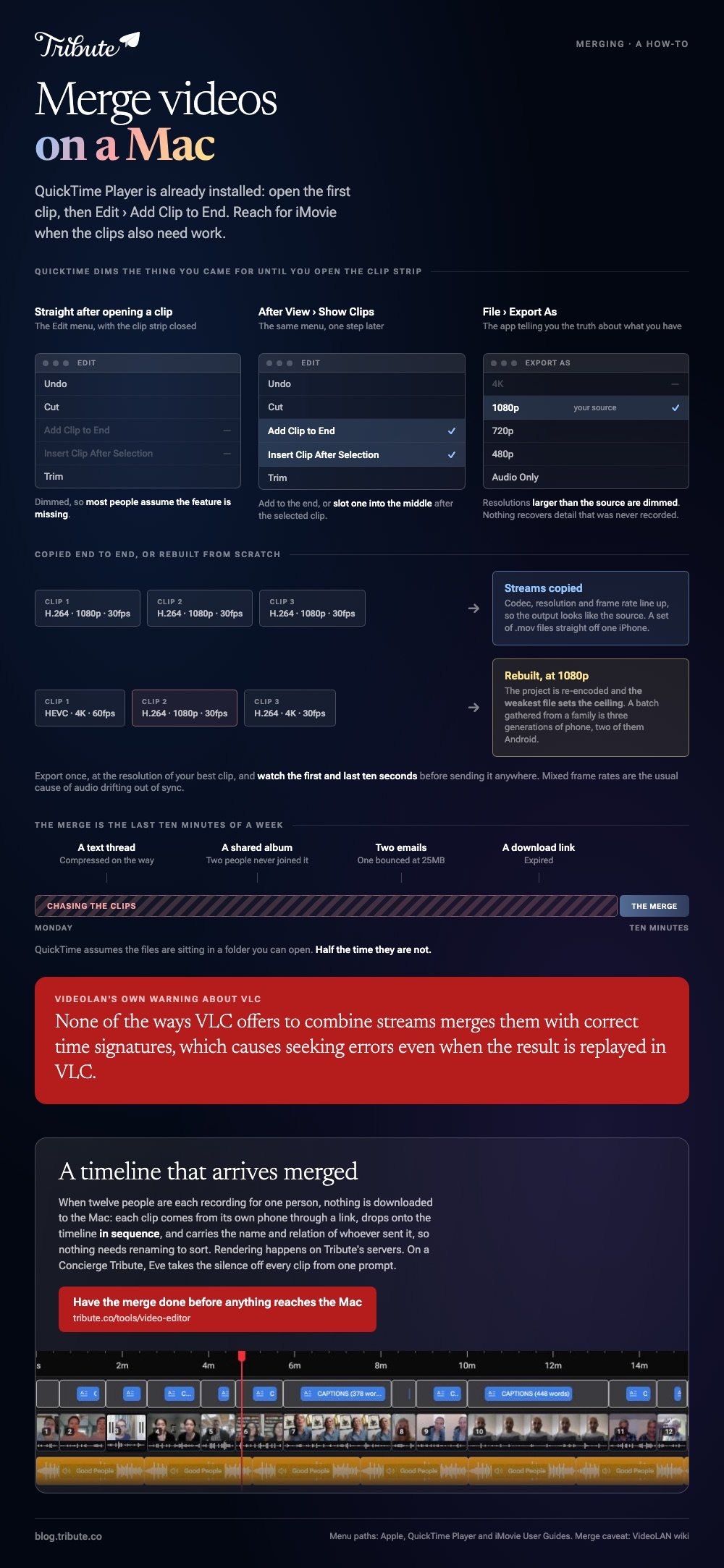
QuickTime Player, and most people never find this menu.
- Open the clip you want to come first, then choose View > Show Clips.
- With nothing selected, choose Edit > Add Clip to End.
- Find the next video, select it, then click Choose media.
- Repeat for each clip. To slot one into the middle, select a clip and choose Edit > Insert Clip After Selection.
- Click Done, then choose File > Export As and pick 1080p or 4K.
Apple documents the whole sequence in its guide to adding a movie or clip in QuickTime Player. Resolutions larger than the source are dimmed in that export menu, which is the app telling you the truth about what you have.
Best for: Two to six clips that are already in the order you want.
Why it works: Nothing uploads, nothing installs, and the clip strip is simple enough to use once a year and remember.
How do you merge mp4 files on Mac in iMovie?
Use iMovie the moment the clips need work rather than just joining.
Drag a clip from the browser onto the timeline, or select it and choose Edit > Add to Movie to append it to the end. Clicking the Add button that appears on a clip in the browser does the same thing.
To cut the dead air at the head of a clip, drag its left edge in. To merge mp4 files on Mac into something with music under it, drop a track from the audio browser beneath the row.
Export with File > Share > File, set Resolution and Quality, click Next, then Save. Apple's page on exporting a movie as a file lists every option in that dialog.
Best for: Ten or more clips that need trimming, reordering and a soundtrack.
Why it works: A full-width timeline turns reordering into a drag instead of a guess.

Should you merge videos on Mac in a browser instead?
Only when the files are not on the Mac.
Clipchamp and the other browser editors run in Chrome or Safari and hand back a 1080p file. That helps when the clips live in a shared drive or arrived by email.
The cost is an upload for every clip and a sign-in before the export.
Compared to QuickTime, a browser editor asks for your time at the start rather than at the end. On a Mac holding the files already, that trade makes no sense.
Browser routes are compared in merging video clips online, and the full app picture in video editing programs for Mac.
Does VLC merge videos on macOS?
Skip it, and the reason comes from VideoLAN rather than from us.
VLC plays almost anything, so it looks like the obvious macOS merge videos answer on a machine with nothing else installed. It does offer stream combining: a gather output module on the command line, and a file-append option as an alternative.
VideoLAN's own wiki then says that none of the ways VLC offers to combine streams appears to merge them with correct time signatures, which causes seeking errors even when the result is replayed in VLC.
A video that will not scrub is a video nobody can check. QuickTime is two menu items away on the same machine.
Can you merge mov files on Mac without re-encoding?
Where the files already match, yes.
When codec, resolution and frame rate line up, the streams can be copied end to end and the output looks like the source.
Mix a 4K clip at 60fps with a 1080p clip at 30fps and the project is rebuilt, with the weakest file setting the ceiling.
A set of .mov files straight off one iPhone lines up. Unlike that set, a batch gathered from a family is three generations of phone, two of them Android.
Export once, at the resolution of your best clip, and watch the first and last ten seconds before sending it anywhere.
What if the clips were recorded by twelve different people?
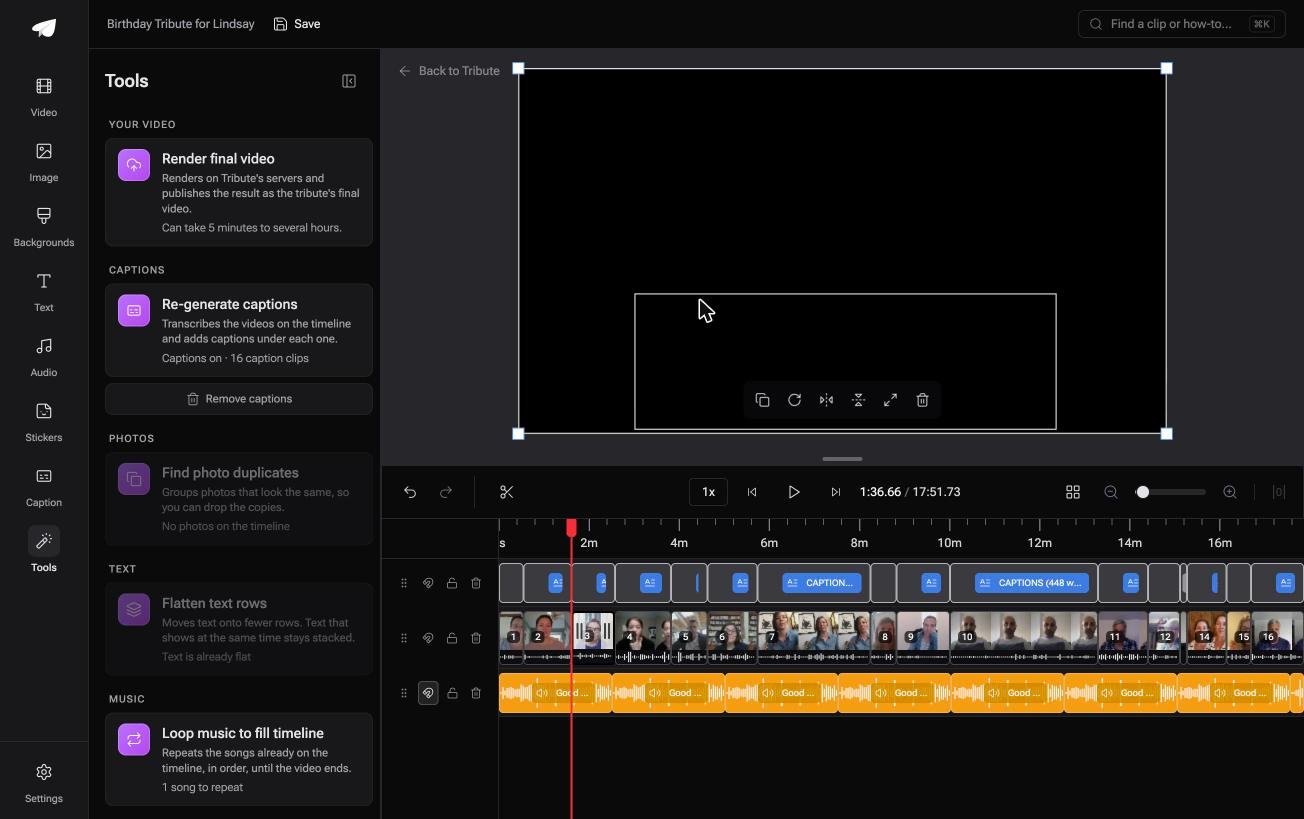
The Tribute video editor is a browser-based group video editor: contributors record clips on their phones and Tribute assembles them on a timeline with the music balanced under the voices.
It is ours, and it is the last thing on this page.
- Clips arrive auto-assembled in order, with a tick against the ones already on the timeline
- A waveform under every clip, so the silence before the first word is visible rather than guessed at
- 39 licensed tracks across 11 genres, sitting at 25% under a voice and 75% under a photograph
- Blurred edges fill the frame behind upright phone footage, on by default
- A tools panel that renders the final video, regenerates captions, finds duplicate photos and loops the music to fill the timeline
Best for: Ten or more recordings that have to be gathered before a Mac has anything to merge.
Why it works: Rendering happens on Tribute's servers, so the Mac is not tied up for an hour at the end.
Who does the merging when the clips are not yours?
QuickTime assumes the files are sitting in a folder you can open.
Half the time they are not. They are in a text thread, a shared album, two emails and a download link that expired, and the merge is the last ten minutes of a job that took a week.
One case removes the week.
The case: several people each recorded for one person
You are in it when the clips were never on your Mac.
A grandfather turning ninety. A colleague leaving after fifteen years. A memorial where the people who should speak are in four states.
Nobody is merging anything yet. Everyone is recording a message, and your job is assembly, not collection.
Why the merge is finished before you open anything
The clips land in order as they arrive.
Each one comes from its own phone through a link, drops onto the timeline in sequence, and carries the name and relation of whoever sent it. Nothing gets downloaded to the Mac, so nothing needs renaming to sort.
That is how the Tribute video editor handles it: not a faster way to merge videos on Mac, but a timeline that arrives merged.

What you do not have to do
- Not the collecting. Each clip arrives from its own phone through one link.
- Not the merging. They land in sequence, named by whoever sent them.
- Not the trims. On a Concierge Tribute, Eve, the AI assistant inside the editor, takes the silence off every clip from one prompt.
- Not the edit. Tribute's own editors finish it, and the Mac stays out of it.
Where it ends up
It can stay a link, or arrive as a video book: a hardcover case with a screen inside that plays when the cover opens.
When this is the wrong answer: you shot the footage yourself, or you want frame-level control over every cut. Then open iMovie, which is already on the Mac. Tribute's editor is not a standalone merger and it lives inside a paid Tribute.

The wider job is covered in making a video montage.
Frequently Asked Questions
Can QuickTime Player merge videos of different sizes?
It will join them, and the result takes the frame of the first clip, so anything in a different shape gets letterboxed. Put the clip in the shape you want first.
Where is the merge option in QuickTime?
Under the Edit menu, after you choose View then Show Clips. Without the clip strip open, the Add Clip to End item stays dimmed and most people assume the feature is missing.
Does merging videos on a Mac reduce quality?
Not when the clips match in codec, resolution and frame rate, because the streams are copied rather than rebuilt. Mismatched clips force a re-encode and the weakest file sets the ceiling.
Can I merge videos on Mac without iMovie?
Yes. QuickTime Player handles a straight join, and the Finder's own preview tools do not, so QuickTime is the shortest route on a machine with nothing added.
How do I merge a lot of clips at once?
Rename them 01, 02, 03 so they sort, then add them in that order. QuickTime adds one at a time, while iMovie takes a whole selection into the timeline in one go.
What format should the finished video be?
An H.264 MP4 at 1080p plays everywhere, including on televisions and in messaging apps. HEVC makes a smaller file and is pickier about where it will open.
Why is the audio out of sync after merging?
Mixed frame rates are the usual cause. Export the merged video at one frame rate rather than letting the editor switch between clips, and the drift disappears.
👉 Have the merge done before anything reaches the Mac if twelve people are each recording for one person, and the folder of files you chased never exists.
