
Compress WhatsApp Video: What Fits, and What to Send Instead
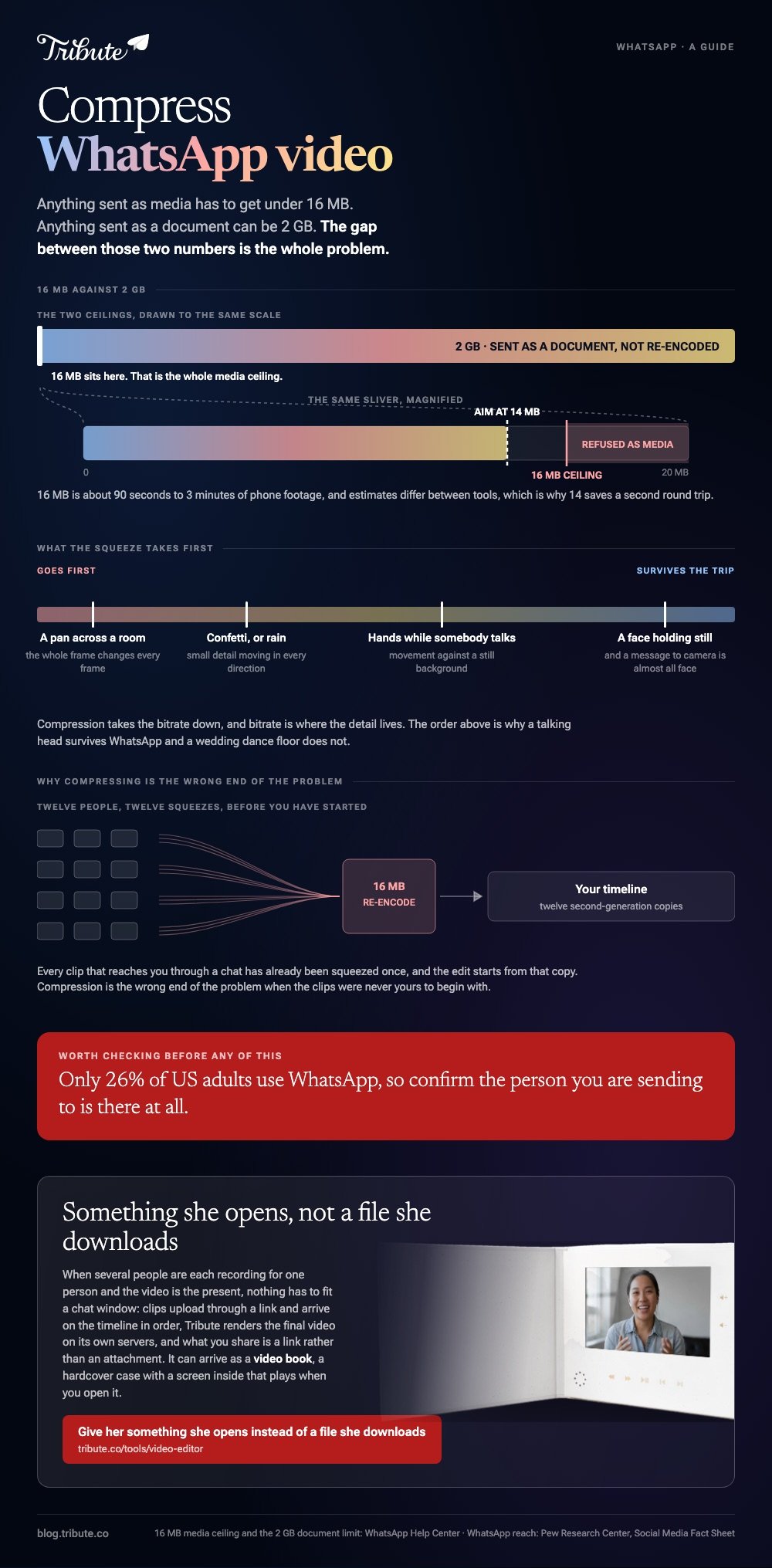
To compress WhatsApp video you have to get under 16 MB, which WhatsApp sets as the ceiling for any photo, video or voice message. That is about 90 seconds to 3 minutes of phone footage. Sending the file as a document skips the squeeze.

Compress WhatsApp video: what is the real limit?
16 MB, on every platform, for anything sent as media.
WhatsApp states that ceiling in its help center page on why long videos will not send, and puts it at about 90 seconds to 3 minutes of video on most phones. The exact length depends on what your camera was set to.
| How you send it | Ceiling | What the other person sees |
|---|---|---|
| As media, in a chat | 16 MB | A thumbnail that plays in place |
| As a document | 2 GB | A file to download first |
| Recorded inside WhatsApp | 16 MB | Capped before you press send |
| As a link to a cloud folder | Your storage | A tap out to a browser |
The gap between 16 MB and 2 GB is the whole article. Most people searching for a video file compressor for WhatsApp are trying to squeeze something into the first row when the second row would take it whole.
How do you compress a video for WhatsApp on a phone?
Let WhatsApp do it, then check what came out the other side.
- Attach the clip in a chat. If it is over 16 MB, WhatsApp offers to trim the length before sending.
- Drag the trim handles until the size estimate drops under the cap.
- Before you send, check the HD control in the attach menu. Standard sends a smaller, faster file. HD sends a clearer one.
- Send it, then open the sent message and watch five seconds of it.
WhatsApp re-encodes what you send either way, so the copy that lands is never the copy you shot.
Where trimming is not an option because the whole thing matters, record the next one at a lower resolution. A 1080p clip at 30fps is a third the size of the same minute shot in 4K.
Best for: One clip, going to one person, where a minute of it is the part that counts.
Why it works: You are cutting length rather than quality, and length is the thing nobody notices you removed.
How do you compress WhatsApp video on a computer?
With HandBrake, one slider, and no guessing.
- Open the clip in HandBrake and pick a preset such as Fast 1080p30.
- On the Video tab, find Constant Quality and its RF number.
- Raise RF to shrink the file. HandBrake's docs suggest RF 20 to 24 for 1080p and 19 to 23 for 720p.
- Start the encode, check the output size, and raise RF a point or two if it is still over.
HandBrake explains the scale on its page about adjusting quality: higher quality makes a larger file, and lower quality makes a smaller one.
Compared to a browser video compressor, WhatsApp size targets are easier to hit this way, because you can re-encode as many times as you like without an upload between each attempt.
The browser alternatives are set out in compressing a video file online, and the full HandBrake walkthrough in compressing a video with HandBrake.

Can you send a long video without compressing it at all?
Yes. Attach it as a document rather than as media.
In the attach menu, choose Document and pick the video file. WhatsApp allows up to 2 GB that way and does not re-encode it, so what arrives is the file you made.
The cost is the preview. A document shows up as a file row rather than a playable thumbnail, and the other person has to download it before they can watch.
Unlike a compressed send, this one survives the trip at full quality. For a thirty minute memorial video or a wedding toast reel, that is the version worth keeping.
What does WhatsApp video compression size do to the picture?
It takes the bitrate down, and bitrate is where the detail lives.
Fast movement goes first: hands, confetti, a camera pan across a room. Faces holding still survive the trip well, which is lucky, because a message to camera is almost all face.
Only 26% of US adults use WhatsApp, according to the Pew Research Center social media fact sheet, so before you compress for it, check that the person you are sending to is there at all.
What if the clips came from a dozen different people?
Then compression is the wrong end of the problem. Twelve people sending you 16 MB fragments is twelve compressed sources before you have started.
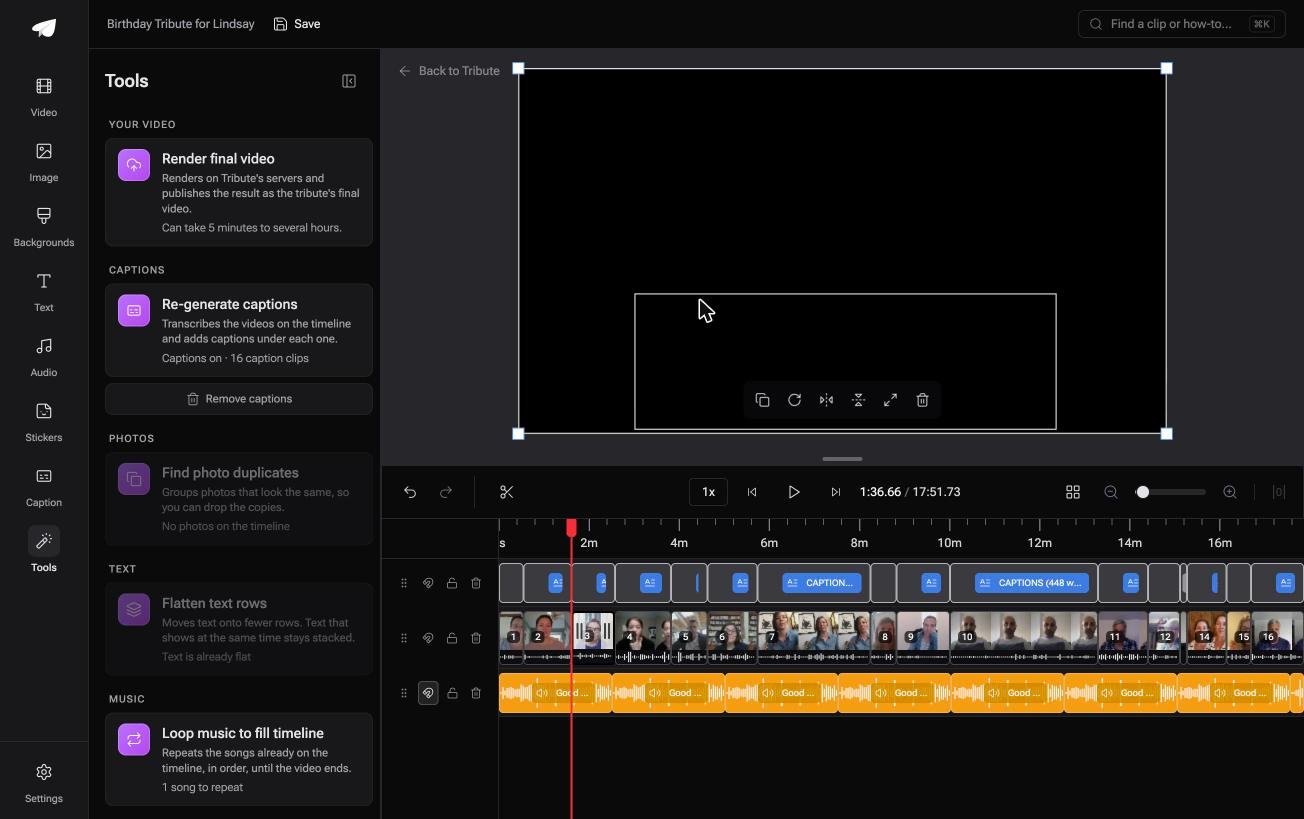
The Tribute video editor is a browser-based group video editor: contributors record clips on their phones and Tribute assembles them on a timeline with the music balanced under the voices.
- Clips upload through a link and arrive on the timeline in order, with a tick on the ones already placed
- Tribute renders the final video on its servers, so nothing is encoded on your laptop
- A Tools panel with bulk actions: render, re-generate captions, find photo duplicates, loop music to fill the timeline
- Autosave and restorable version history, so a removed clip is recoverable rather than gone
Best for: Relatives whose messaging app shrank every clip before you ever saw it.
Why it works: Unlike a chat thread, a shared timeline collects the clips without each one passing through a messaging app first.
What if the video never had to be sent?
Compression exists because the file has to travel.
Shrink it and it arrives worse. Send it as a document and it arrives as a download nobody opens on the day. Both are answers to the same question: how does this reach the person it is for?
The case: it is a gift, not a message
You are in it when several people each record something for one person, and the video is the present.
A grandmother turning eighty. A colleague's last day after eighteen years. The moment you are planning for is the one where she watches it, and a chat thread is a poor place for that.
If you are sending one clip to one friend, the 16 MB answer above is the whole of this page for you.
Why the file size question goes away
Because the video is not an attachment.
Tribute renders it and keeps the full quality version, so the thing you share is a link rather than a file, and nothing is re-encoded to fit a chat window. That is how the Tribute video editor delivers what you built.

It does not have to stay a file
The finished video can arrive as a video book.
A hardcover case with a screen inside that plays when you open it. No attachment, no download, no size limit to work around. For an eightieth birthday or a retirement, handing over the object is the moment.

When this is the wrong answer: you need one clip in a chat in the next two minutes. Trim it and send it. The editor is also not a compressor on its own: it lives inside a paid Tribute.
Related: what a video tribute is and making a video montage.
Frequently Asked Questions
What is the maximum video size on WhatsApp?
16 MB for anything sent as media, which WhatsApp puts at about 90 seconds to 3 minutes of phone footage. Documents go up to 2 GB.
Does sending as a document avoid compression?
Yes. WhatsApp delivers a document as the file you attached, with no re-encode. The recipient downloads it rather than playing it in the thread.
Which video compressor for WhatsApp works best on Windows?
HandBrake, because the constant quality slider lets you aim at a size and re-encode until you hit it. Browser tools cost you an upload on every attempt.
Why does my video look worse after sending?
WhatsApp re-encodes media on the way through, so the copy that lands has a lower bitrate than the one you shot. Movement shows that loss before still faces do.
Does the HD setting stop the compression?
No. HD sends a clearer version than Standard, and both are re-encoded. HD is also not offered for status updates or profile pictures.
Can I send a 1GB video on WhatsApp?
Only as a document, where the ceiling is 2 GB. As media it will be refused, and trimming a 1GB clip under 16 MB would leave almost nothing of it.
Is there a size the video compressor should aim at?
Aim for 14 MB rather than 16. Estimates differ between tools, and a small margin saves you a second round trip.
👉 Give her something she opens instead of a file she downloads if several people are recording for one person and the video is the gift, and nothing has to fit a chat window.
