
Adding Music to a Video on Android: The Three Apps Already on Your Phone
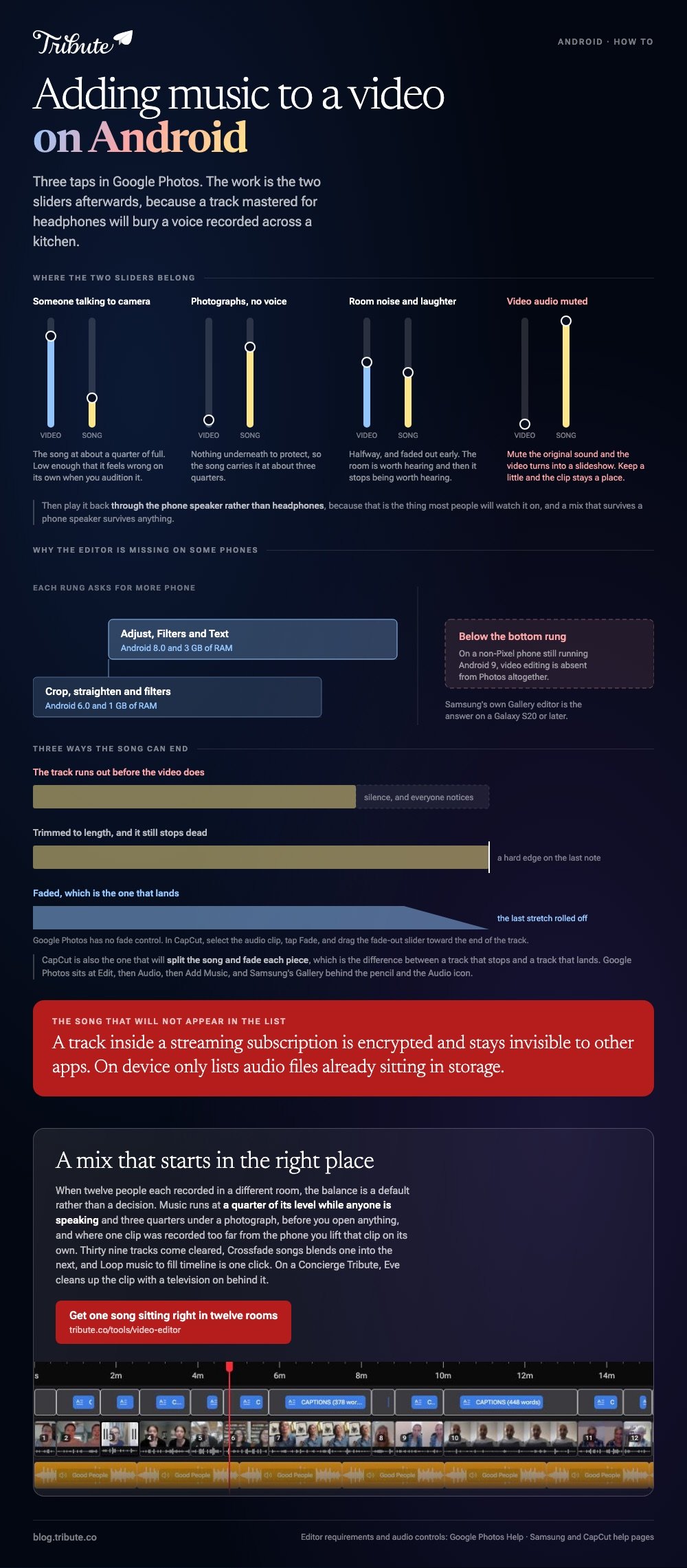
Adding music to a video on Android takes three taps in Google Photos: open the video, tap Audio, then Add Music. Samsung's Gallery editor and CapCut do the same job and give you more control over the mix.

Where do you start when adding music to a video on Android?
In Google Photos, because it is already holding the video.
- Open the video in Google Photos and tap Edit.
- Tap Audio, then Add Music. On some builds you scroll the tool row and tap Music instead.
- Pick a track from the list, or tap On device to use a song you have downloaded.
- Tap Volume and set the two sliders, Video audio and Soundtrack, against each other.
- Tap Save. Photos writes a copy and leaves the original alone.
The copy is the part worth noticing. Nothing you do here overwrites the video you started with, so a mix you dislike costs you a file and not a memory.
What if the song is a file in your Downloads folder?
On device is the route, and it only sees what is already downloaded.
A song streaming inside a subscription app is encrypted and will not appear. Buy it, download it, or pick a cleared track from the YouTube Audio Library instead.
Why the editor might be missing on your phone
Google sets a floor, and older handsets fall under it.
Crop, straighten and filters want Android 6.0 and 1 GB of RAM. Adjust, Filters and Text want Android 8.0 and 3 GB. On a non-Pixel phone still running Android 9, video editing is absent altogether.
How do you put music over video on Android without losing the voices?
By moving the two sliders apart, not by turning the song down a little.
A track mastered for headphones will bury a voice recorded across a kitchen. Set the soundtrack low enough that it feels wrong on its own, then play the clip back through the phone speaker rather than headphones.
| What is under the music | Where the soundtrack should sit |
|---|---|
| Someone talking to camera | About a quarter of full |
| Photographs with no voice | About three quarters |
| Room noise and laughter | Halfway, and fade it out early |
Mute the original sound altogether and the video turns into a slideshow. Keep a little of it, even under a song, and the clip stays a place somebody was standing in.

Which app should you reach for: Photos, Gallery or CapCut?
Whichever one you will not have to install.
| App | Where the music lives | Best when |
|---|---|---|
| Google Photos | Edit, then Audio, then Add Music | One clip, one song, no project |
| Samsung Gallery | The pencil, then the Audio icon | You have a Galaxy S20 or later |
| CapCut | Audio on the bottom bar, then Sounds | Several clips and a song that needs trimming |
On a Galaxy phone, open Gallery, tap the pencil Edit icon, then the Audio icon and choose Add background music. Samsung lists the editor on the S20 and later, and the levels for video and music sit side by side.
CapCut puts it on the bottom bar. Tap Audio, then Sounds for its own library, Extracted to lift a song out of another video, or the device option for a file you own.
Unlike the two built-in editors, CapCut lets you split the song and fade each piece, which is the difference between a track that stops and a track that lands.
Is adding music to a video on Android different for a slideshow?
The music comes first instead of last.
To create a photo slideshow with music on Android, pick the song before you pick the pictures. Divide the length of the track by the time each image should hold, and that number is how many photographs you need.
- Four seconds each is the setting that reads as considered rather than rushed.
- A three minute song carries about forty five images at that pace.
- Past sixty images the video becomes a queue and people reach for their phones.
Google Photos will make a slideshow with music on Android for you from a highlight or a template, with preset tracks you swap afterwards. It is the fastest route and the one with the least say in the running order.
An Android photo slideshow with music holds together on the pacing more than on the pictures.
Compared to a video of people talking, a run of stills has nothing but the song to carry it. A track that changes at the right moment is doing most of the work.

Any music video maker on Android follows the same arithmetic. More on the song itself in royalty free music for videos, and on the build in making a slideshow with music and adding music to a video on Android.
What if the song had to sit under twelve different voices?
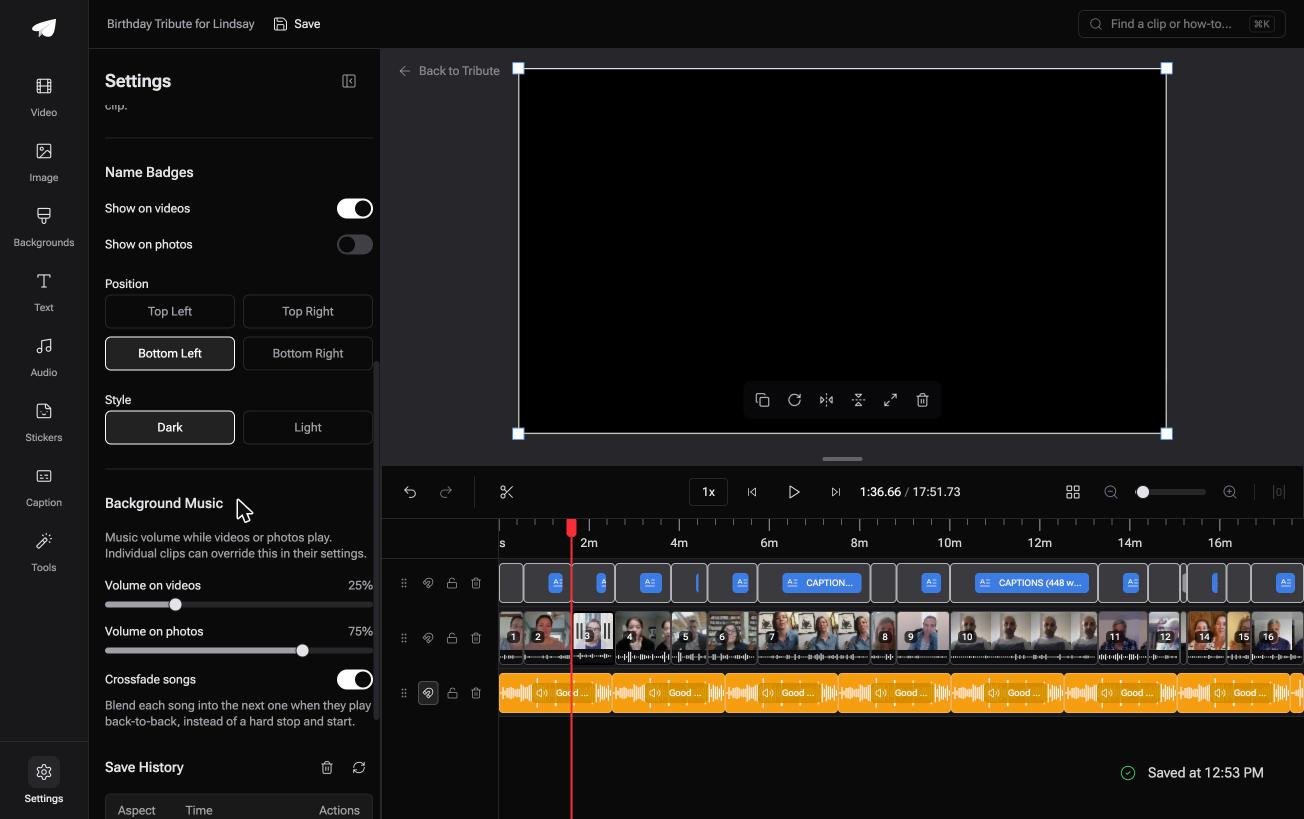
The Tribute video editor is a browser-based group video editor: contributors record clips on their phones and Tribute assembles them on a timeline with the music balanced under the voices.
It is ours, and it arrives at the end of this page.
- 39 licensed tracks across 11 genres, plus a YouTube link or your own MP3, WAV, M4A or FLAC
- Music at 25% under speech and 75% under photos by default, overridable on any single clip
- Crossfade songs, a switch that blends one track into the next when the video outlasts a song
- Loop music to fill timeline, a one-click job in the Tools panel

Best for: One song that has to hold up under a dozen voices recorded in a dozen rooms.
Why it works: The level is set per clip before you hear it, so a quiet voice in a big room is already louder than the song.
Does anybody have to drop a song onto a timeline?
Everything above starts the same way: one person, one phone, one slider to get right.
That holds when the video is yours. It stops holding when twelve people each sent you one. There is a case where nobody drops anything anywhere.
The case: twelve rooms, one song
You are in it when the recordings came from rooms you have never stood in.
A grandmother turning eighty. A colleague leaving after fifteen years. One recorded in a car, one in a garden, one with a television on behind them, and a single song has to sit under all of it.
Why the slider is already where it should be
Because the balance is a default, not a decision.
Music runs at a quarter of its level while anyone is speaking and three quarters under a photograph, before you open anything. Where one clip was recorded too far from the phone, you lift that clip on its own.
That is how the Tribute video editor handles a pile of phone recordings: not a better mixer, but a mix that starts in the right place.
What you do not have to set
- Not the slider. Music runs at a quarter under speech and three quarters under a photograph from the start.
- Not the television in the background on a Concierge Tribute: Eve, the assistant inside the editor, cleans up bad audio across every clip.
- Not the track hunt. Thirty nine come cleared, or you paste a YouTube link.
- Not any of it, if Tribute's editors build the video for you on Concierge.
When this is the wrong answer: you shot one clip on your own phone and want a song behind it. Google Photos does that in three taps. The editor is also not a music app: it lives inside a paid Tribute.
Frequently Asked Questions
Can I add music to a video on Android without an app?
Not without some editor, but you will not have to install one. Google Photos ships on every Android phone and holds the music tool inside the video editor.
Why will my downloaded song not show up in Google Photos?
Tracks inside a streaming subscription are encrypted and stay invisible to other apps. On device only lists audio files sitting in storage.
Does adding music lower the video quality?
Saving re-encodes the video once, so a long clip loses a little. Add the music in the same pass as any trimming rather than saving twice.
How do I fade the music at the end?
Google Photos has no fade control. CapCut does: select the audio clip, tap Fade, and drag the fade-out slider toward the end of the track.
Can I use a chart song off an album?
On a private video shared with family, nothing stops you. On anything posted in public, a cleared track avoids a copyright claim on the upload.
What if the clips come from several people?
Then the mix is the hard part, not the song. A tool that assembles the clips handles the levels too, as in making a video montage.
👉 Get one song sitting right in twelve different rooms if twelve people each recorded on their own phone, and no slider needs your attention.
