
Add Music to Video on Android: The App You Already Have, and the One Worth Installing
You can add music to video on Android inside Google Photos: tap Edit, then Add Music, and balance the two levels. CapCut is the step up when one song over one clip is not enough.

Which app should you use to add music to video on Android?
Start with the one that is already holding the video.
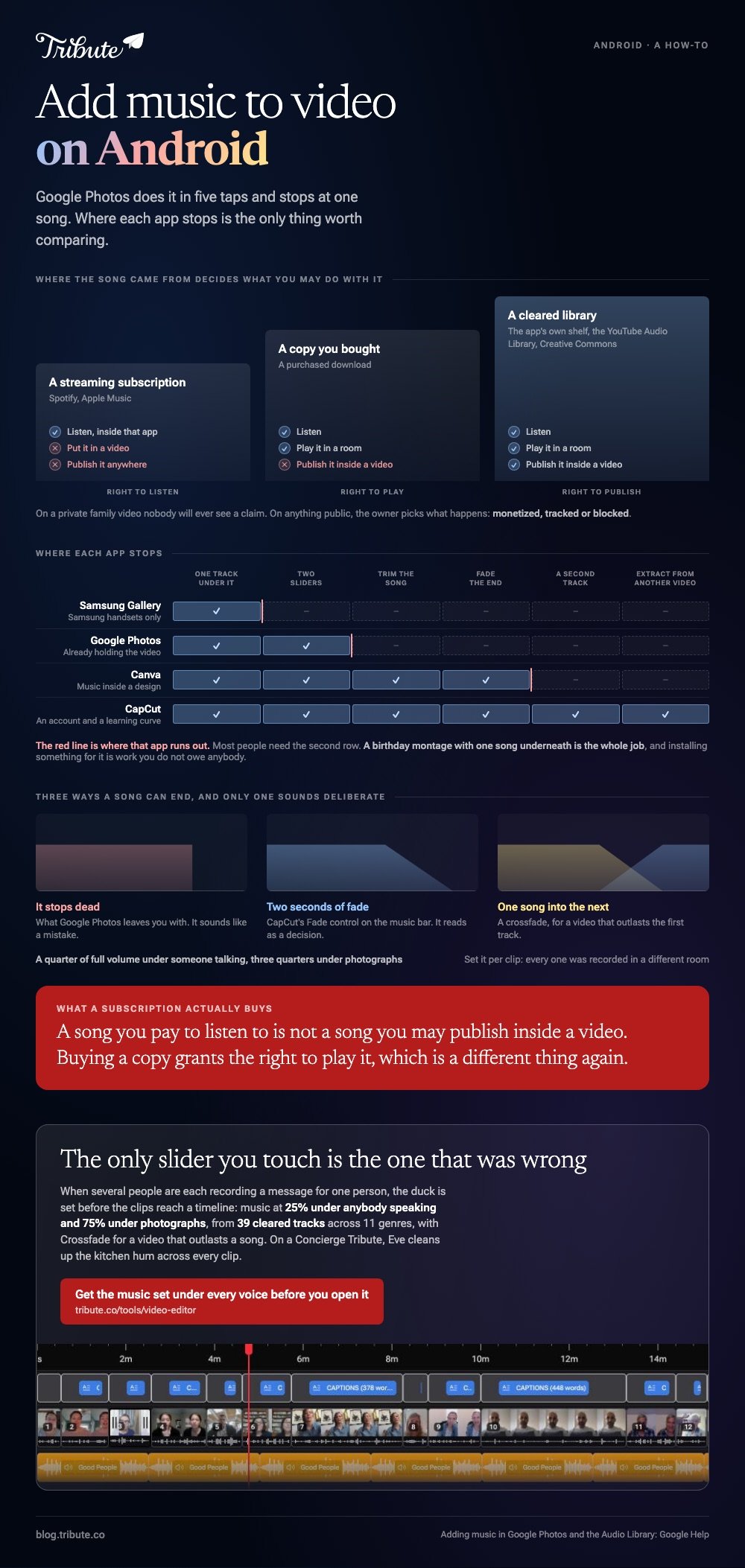
| App | What it gives you | Where it stops |
|---|---|---|
| Google Photos | One track under one clip, two volume sliders | No second song, no fades |
| CapCut | Several tracks, trimming, fades, extracted audio | An account and a learning curve |
| Canva | Music inside a design you are already making | Treats the video as a page element |
| Samsung Gallery | A quick background track on Samsung phones | Not on other handsets |
Most people need the first row. A birthday montage with one song underneath is the whole job, and installing something for it is work you do not owe anybody.
How do you add music to video on Android in Google Photos?
Five taps, and the fourth one is the one people skip.
- Open the video in Google Photos and tap Edit.
- Swipe the tool row along to Music, then tap Add Music.
- Pick a track. Google's help page covers adding downloaded music to your video, which needs music and audio access granted to Photos in Settings.
- Set both levels. Video audio is the sound already in the clip, Soundtrack is the song, and they are separate sliders for a reason.
- Tap Save copy. The original is left alone.
The same editor carries Speed at 2x, 4x, a quarter and a half, plus Mute. On a Pixel 8 and later there is an Audio Eraser for pulling background noise out of the recording.
What it will not do is change songs halfway, fade one out, or put a different track under a second clip. One video, one song, two sliders.
What does CapCut give you that Photos does not?
Control over where the music starts and how it ends.
- Open CapCut, tap New project, select your clips and tap Add.
- Tap Audio in the bottom bar, then Sounds.
- Choose a track from the library, from Extracted to lift the sound out of another video, or from Device for a file on the phone.
- Tap the music bar under the timeline and drag its ends to trim the song to the video.
- Use Volume and Fade on that bar, then tap the export arrow.
Fade is the one worth the install. A song that stops dead at the end of a video sounds like a mistake, and two seconds of fade reads as a decision.
Unlike Google Photos, CapCut will stack a second track, so a slow song under the photographs and a brighter one under the last clip is possible in the same video.

Where do you get music you are allowed to use?
From a library that has already cleared it, and not from your streaming app.
A song you pay a subscription to listen to is not a song you may publish inside a video. Buying a copy grants the right to play it, which is a different thing again.
- The app's own library. Cleared for use inside that app, and the shortest route.
- The YouTube Audio Library. Google describes it as royalty-free production music, filterable for tracks needing no credit.
- Creative Commons. Free music with a license to read on each track rather than on the collection.
If the video is going on YouTube, the risk of ignoring all three is a Content ID claim. YouTube lists three outcomes, and the owner picks: monetized, tracked or blocked.
On a private family video nobody will ever see a claim. On anything public it is the reason to spend five minutes in a cleared library. Compared to a paid subscription library, that shelf is smaller and already settled.
How loud should the song sit under a voice?
Lower than it feels right to set it.
Music is mastered to sound good on its own, which means it will bury a voice recorded on a phone in a kitchen.
| Underneath | Set the music to about |
|---|---|
| Someone talking | A quarter of full volume |
| Photographs, no voice | Three quarters |
Set it per clip where the app allows it, because every clip was recorded in a different room at a different distance. The same arithmetic applies on the other platform: see adding music on an iPhone and the longer walk through it.
Match the song length to the content before you start. Three minutes carries about forty photographs at four seconds each, and past sixty the video turns into a queue.
What if the clips came from a dozen different people?
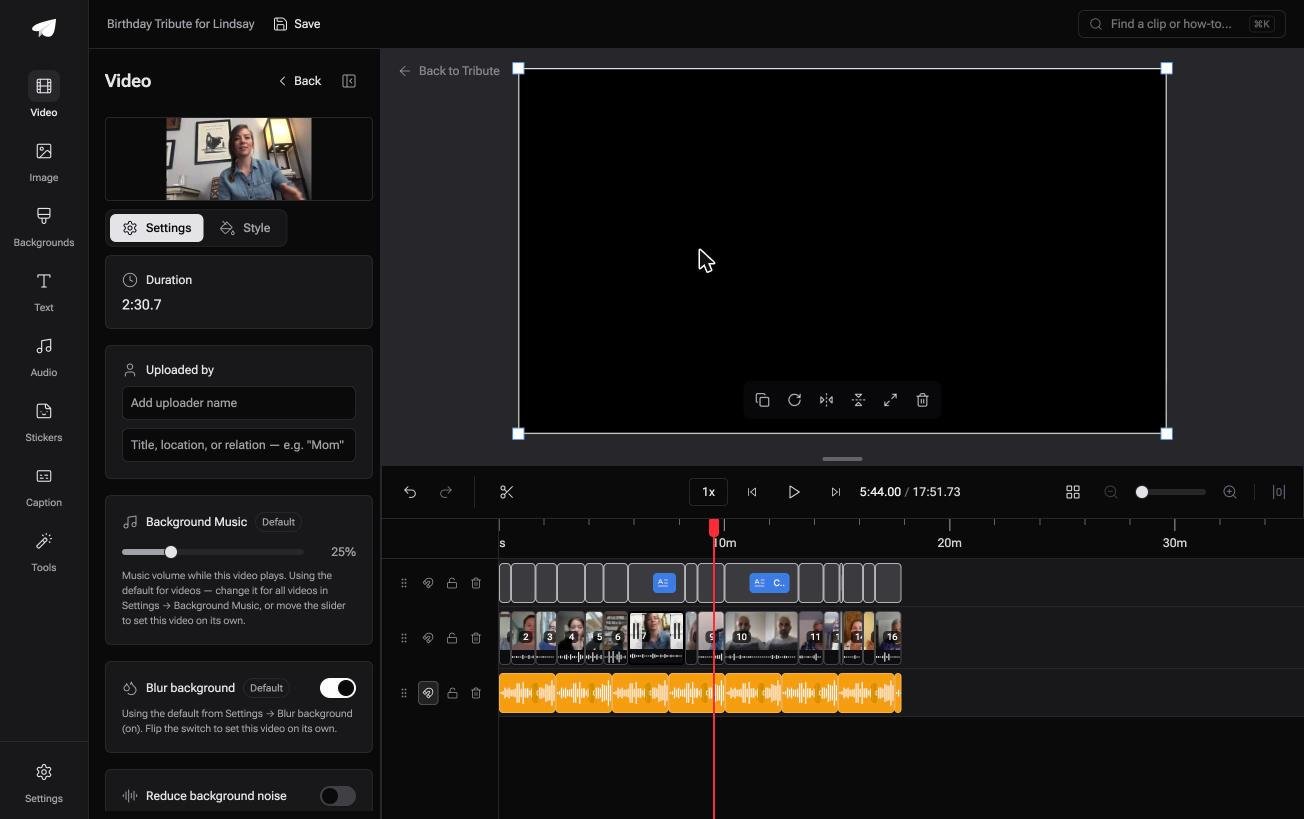
The Tribute video editor is a browser-based group video editor: contributors record clips on their phones and Tribute assembles them on a timeline with the music balanced under the voices.
It is ours, and it is the last thing on this page.
- 39 licensed tracks across 11 genres, cleared inside the editor, plus a YouTube link or your own MP3, WAV, M4A or FLAC
- 25% under speech, 75% under photos by default, and you can override it per clip
- Crossfade songs blends one track into the next when the video outlasts a song
- Loop music to fill the timeline as a one-click action in the Tools panel

Best for: A phone edit where the song keeps drowning whoever is talking.
Why it works: The level under each voice is set before you arrive, so the song is a choice rather than a mixing job.
What if the music was already under the voices?
Every step above is you putting two sounds in one room and hoping.
A song mastered loud, a voice recorded across a kitchen, and one slider between them. Twelve clips means twelve of those judgments. There is one case where none of them is yours to make.
The case: the video is a collection of messages
You are in it when several people each record something for one person.
A grandmother turning eighty. A colleague leaving after fifteen years. Each of them is talking to their own phone, in their own room, at their own distance from it.

Why the mixing never lands on you
Because the duck is set before the clips reach a timeline.
Music sits at a quarter under anybody speaking and rises to three quarters under photographs, and you override it on the one clip where it is wrong.
That is how the Tribute video editor handles it: not a better music button, but one you seldom need.
What you do not have to judge
- Not twelve levels. The duck is set before the clips reach a timeline, and it is per clip when you want it.
- Not the kitchen hum on a Concierge Tribute: Eve, the assistant inside the editor, cleans up background noise across every clip.
- Not the join between songs. One switch crossfades them when the video outlasts the first.
- Not one of them, if Tribute's editors build the video for you on Concierge.
When this is the wrong answer: you shot one clip and want one song under it. Google Photos does that in five taps. The editor is not a standalone music tool: it lives inside a paid Tribute.
Frequently Asked Questions
Can I add my own MP3 to a video in Google Photos?
Yes, if the file is downloaded on the phone and Photos has music and audio access in Settings. Streaming tracks that live inside another app are not available to it.
Why is the music louder than the voices?
Because the two levels are set apart. In Google Photos, drag the Soundtrack slider down and the Video audio slider up until the speech sits on top.
Can I add music to only part of a video on Android?
Not in Google Photos, which lays one track across the whole clip. CapCut lets you trim the music bar and place it where you want it on the timeline.
Will a song from Spotify or Apple Music work?
No. Those files are locked to their app, and a listening subscription is not a license to publish the track inside a video you share.
How do I put music behind a set of photos rather than a video?
Build the slideshow first, then lay the track underneath. Three minutes of music carries about forty photographs, and a montage tool handles both halves at once.
Does adding music reduce the video quality?
The picture is re-encoded when the app saves a copy, so a small amount of quality goes with it. Export at the largest size the app offers and the difference stays invisible.
What about music on a video headed for YouTube?
Use a cleared library and the claim never arrives. Adding music to a YouTube video covers what happens when it does.
👉 Get the music set under every voice before you open it if several people are each recording a message for one person, and the only slider you touch is the one that was wrong.
