
Video Collage for Instagram: The Grid, the Sequence, and Which One You Want
A video collage for Instagram is one of two things: several clips playing at once in a grid, or several clips playing one after another. The grid needs an app outside Instagram. The sequence you can build in a browser in ten minutes.
Which video collage for Instagram are you after?
Ask what the viewer is supposed to look at.
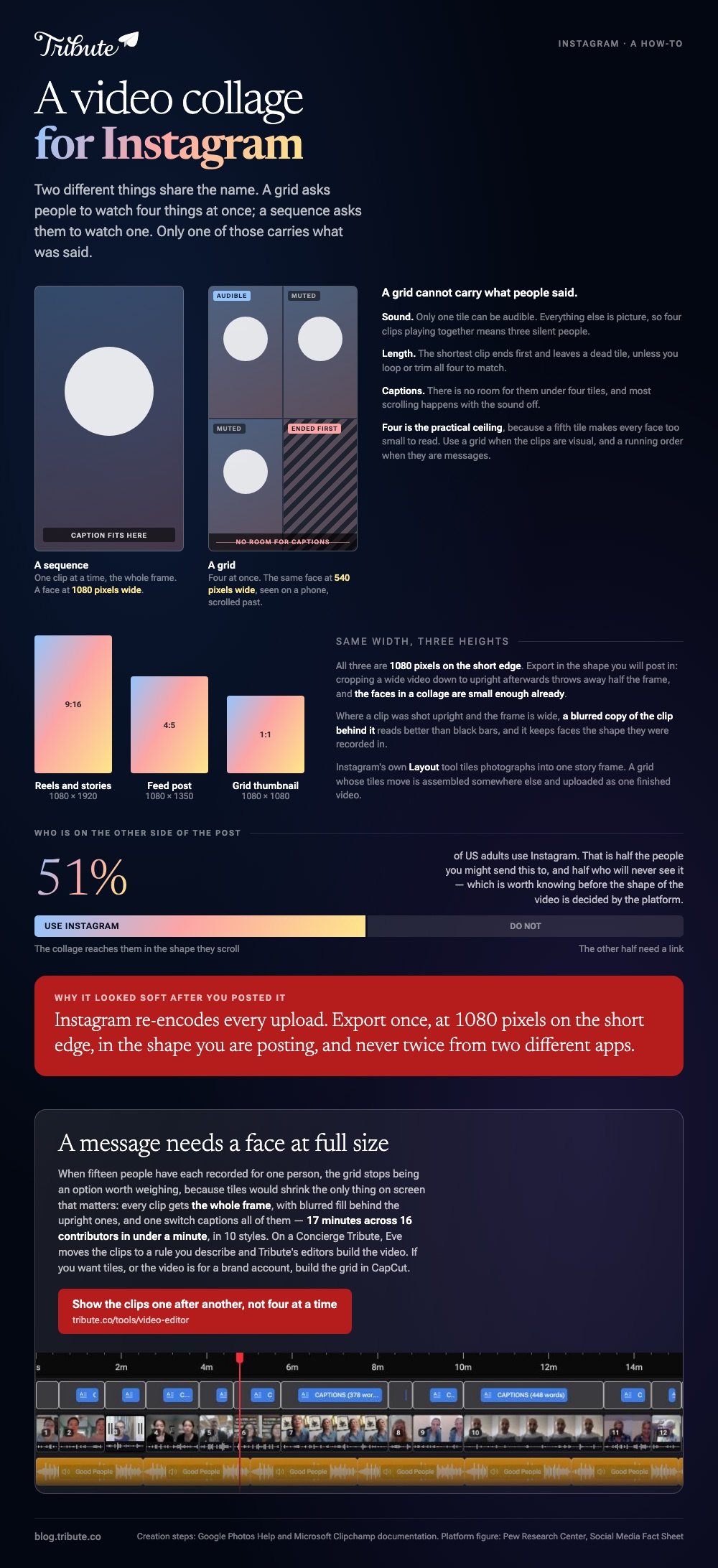
A grid asks them to watch four things at once, which suits a before-and-after or a reaction. A sequence asks them to watch one thing at a time, which is what you want when each clip is a person saying something.
| Shape | What it is | Where it gets built |
|---|---|---|
| Grid | Two to six clips playing at the same time | A video collage app for Instagram story and reels |
| Sequence | Clips one after another, each trimmed | A browser editor, or the Reels editor |
| Story layout | Photographs tiled in one story frame | Instagram's own Layout tool |
Layout tiles photographs into a single story frame. For an instagram video picture collage where the tiles move, the grid is assembled somewhere else and uploaded as one video.
That matters for reach as much as for looks. Pew Research Center's social media fact sheet puts Instagram use at 51% of US adults, which is half the people you might send it to and half who will never see it.
How do you make a video collage for Instagram on your phone?
Two routes, and only one of them produces a grid.
CapCut, when you want the tiles
Open CapCut, choose the Collage option rather than a new project, pick a layout, then drop a clip into each frame.
Mute everything except one source. Four clips playing together means four soundtracks competing, and the result is noise rather than a collage of videos and pictures for Instagram.
CapCut publishes no help center article for the phone app, so read the labels on your screen rather than trusting any walkthrough, including this one.
Best for: A reaction, a before-and-after, or two people doing the same thing in different rooms.
Why it works: The layouts are already cut to an upright frame, so nothing needs cropping after.
Google Photos, when you want the sequence
Google documents this one, and the steps hold on Android and iPhone.
- Open Google Photos, tap Create at the bottom, then Highlight video.
- Tap Select content at the top, choose your clips and photographs, then tap Next.
- Touch and hold a clip to drag it into a different position.
- Tap a clip you do not want, then tap Remove.
- Tap Save.
Those steps come from Google's guide to making creations in Google Photos. A highlight video arrives with a template, music and beat matching already applied, so it is a finished thing to adjust rather than a blank timeline.
Best for: Eight or ten clips that need to be one video by this evening.
Why it works: The ordering and the music are decided for you, and both are editable afterward.

Can you build an Instagram collage with video and pictures in a browser?
Clipchamp does it in Edge or Chrome, with nothing installed.
- Open My media on the toolbar and click the import media button to browse your device or OneDrive.
- Drag the clips onto the timeline side by side on the same track, so they play in sequence.
- Click a clip and drag its trimming handles. Hold shift or command to trim several at once.
- Hover over a gap between two clips and press the delete this gap button.
- Select Export and choose a quality such as 1080p.
Microsoft publishes those steps in its guide to combining videos in Clipchamp.
To make a video collage for Instagram as a grid here, you stack clips on separate tracks and shrink each into a corner. That is slower than the phone and worth it only when the files are already on the laptop.
A video collage maker for Instagram that runs in a tab has one real advantage: the files never leave the machine they are on, so a long set finishes at the speed of the device.
Other browser options are compared in online video collage makers and video collage makers.
What size should a video collage for Instagram story or reels be?
Upright, 1080 by 1920.
| Where it goes | Shape | Pixels |
|---|---|---|
| Reels and stories | 9:16 | 1080 x 1920 |
| Feed post | 4:5 | 1080 x 1350 |
| Grid thumbnail | 1:1 | 1080 x 1080 |
Export in the shape you will post in. Cropping a wide video down to upright afterward throws away half the frame, and the faces in a collage are small enough already.
Where a clip was shot upright and the frame is wide, a blurred copy of the clip behind it reads better than black bars. Compared to stretching the clip, blurred fill keeps faces the shape they were recorded in.
What goes wrong when four clips play at once?
Faces get small.
- Scale. A face in a quarter of a 1080 frame is a face at 540 pixels wide, seen on a phone, scrolled past.
- Sound. Only one tile can be audible. Everything else is picture.
- Length. The shortest clip ends first and leaves a dead tile unless you loop or trim to match.
- Captions. There is no room for them under four tiles, and without captions a muted scroll past shows nothing.
Unlike a sequence, a grid cannot carry what people said. Use it when the clips are visual and use a running order when they are messages.
What if the clips came from fifteen different people?
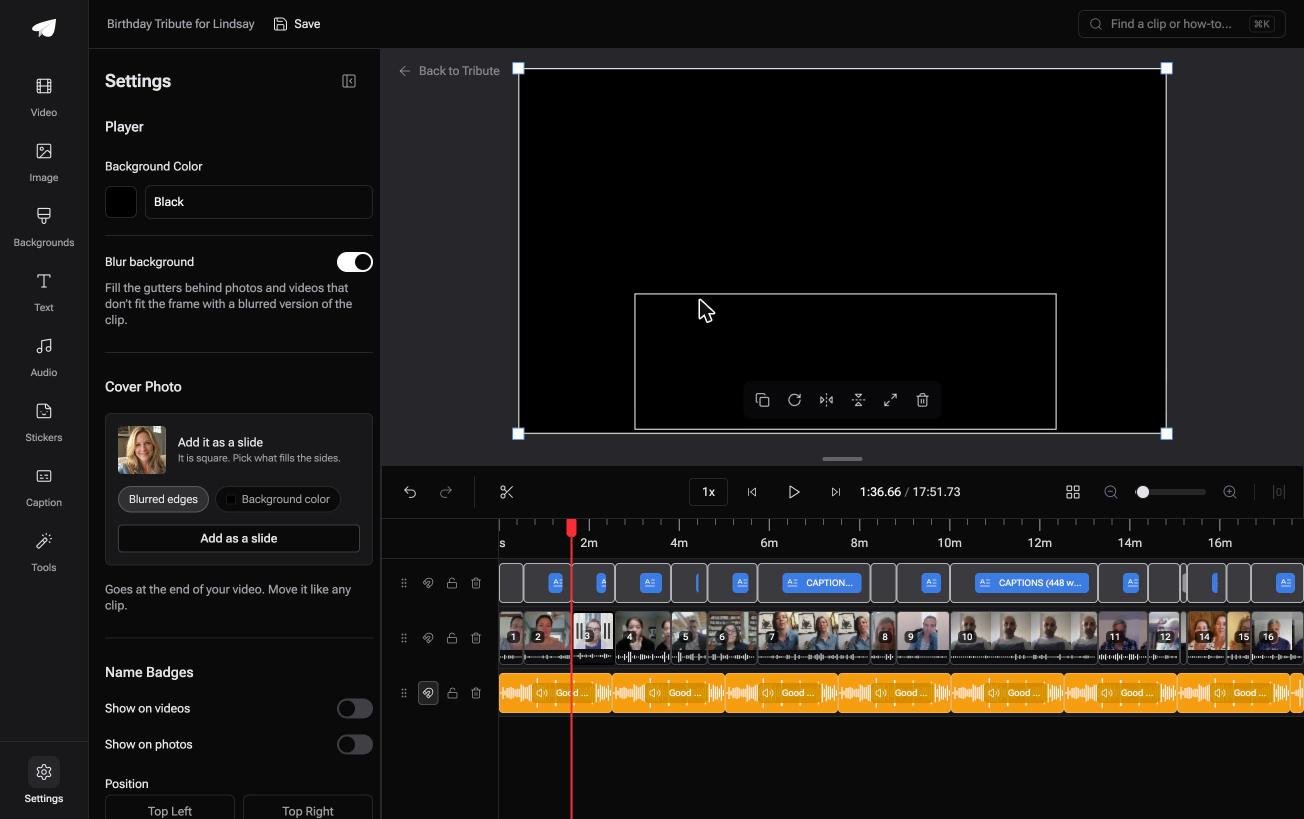
The Tribute video editor is a browser-based group video editor: contributors record clips on their phones and Tribute assembles them on a timeline with the music balanced under the voices.
It is ours, and it is the last thing on this page.
- Clips arrive auto-assembled in order, with a tick against the ones already on the timeline
- One switch captions every clip: 17 minutes across 16 contributors in under a minute, in 10 caption styles with the spoken word highlighted
- Blurred edges fill the frame behind upright phone footage, on by default
- Name badges from an uploader name and relation, in four corner positions
- 39 licensed tracks across 11 genres, sitting at 25% under a voice and 75% under a photograph
Best for: A birthday, retirement or leaving video where ten or more people each sent a clip.
Why it works: Every clip arrives upright from a different phone, and the frame is handled before you look at it.
Is a grid the right shape when every clip is a message?
Nothing above is hard once the clips are in your camera roll.
Collecting fifteen of them is the part that takes a week: the chasing, the two people who send a link instead of a file, the one recorded sideways.
There is a case where none of that happens.
The case: fifteen people, one person they are recording for
You are in it when the clips were never yours.
A fortieth birthday. A coach retiring after twenty seasons. A friend moving abroad, and the people who want to say something are spread across six cities.
Nobody is making a collage yet. Everyone is recording a message, and your job is assembly, not layout.
Why the collage question answers itself
A message needs a face at full size.
Once each clip is one person speaking, the grid stops being an option worth weighing: tiles would shrink the only thing on screen that matters. The shape of the finished video is settled before you choose it.
That is how the Tribute video editor handles it, and it is why there is no collage layout in it at all.

What you do not have to do
- No grid to build. Each clip gets the whole frame, blurred fill behind the upright ones.
- No reordering. On Concierge, Eve moves clips to a rule you describe.
- No captions to type. One switch covers every clip, each line editable.
- No edit, if you want none. Tribute's editors build it and hand it back.
Where it ends up
Most of these go out as a link, and some arrive as a video book: a hardcover case with a screen inside that plays when the cover opens.
When this is the wrong answer: you want tiles, you shot all the footage yourself, or the video is for a brand account rather than a person. Then build the grid in CapCut.
A DIY Tribute has no aspect ratio switcher, and the editor lives inside a paid Tribute. On a Concierge or Concierge Deluxe Tribute, Eve reframes the video to 9:16.

The wider job is covered in making a video montage, and the music side in a picture collage with music.
Frequently Asked Questions
Can you make a video collage inside Instagram itself?
You can build a sequence in the Reels editor by adding clips one after another and trimming each. A moving grid is not one of Instagram's own tools, so that version gets made in another app and uploaded as a finished video.
How many clips fit in a video collage for Instagram reels?
Four is the practical ceiling for a grid, because a fifth tile makes every face too small to read on a phone. A sequence has no such limit, though past about ninety seconds people stop watching.
What is the best video collage app for Instagram story posts?
CapCut for a grid and Google Photos for a sequence, both at no cost. Neither stamps the export on the layouts most people use, and both save straight to the camera roll.
Can I put photographs and video in the same collage?
Yes, and photographs need a longer hold than you think. Four seconds each is a good starting point, against one or two seconds for a clip that is already moving.
Why does my collage look blurry after posting?
Instagram re-encodes every upload. Export at 1080 pixels on the short edge in the shape you are posting, and avoid exporting twice from two different apps.
Should the clips have captions?
Yes, if anyone speaks. Most scrolling happens with the sound off, so an uncaptioned clip of someone talking reads as a silent face.
Can I use any song under it?
Instagram licenses music for use inside its own editor, which is not the same as clearing a track you add elsewhere. Pick from the in-app library when the video is going on Instagram and nowhere else.
👉 Show the clips one after another rather than four at a time if fifteen people each recorded for one person, and the layout question never comes up.
