
iPhone Cut Video: Trim the Ends, or Cut Out the Middle?
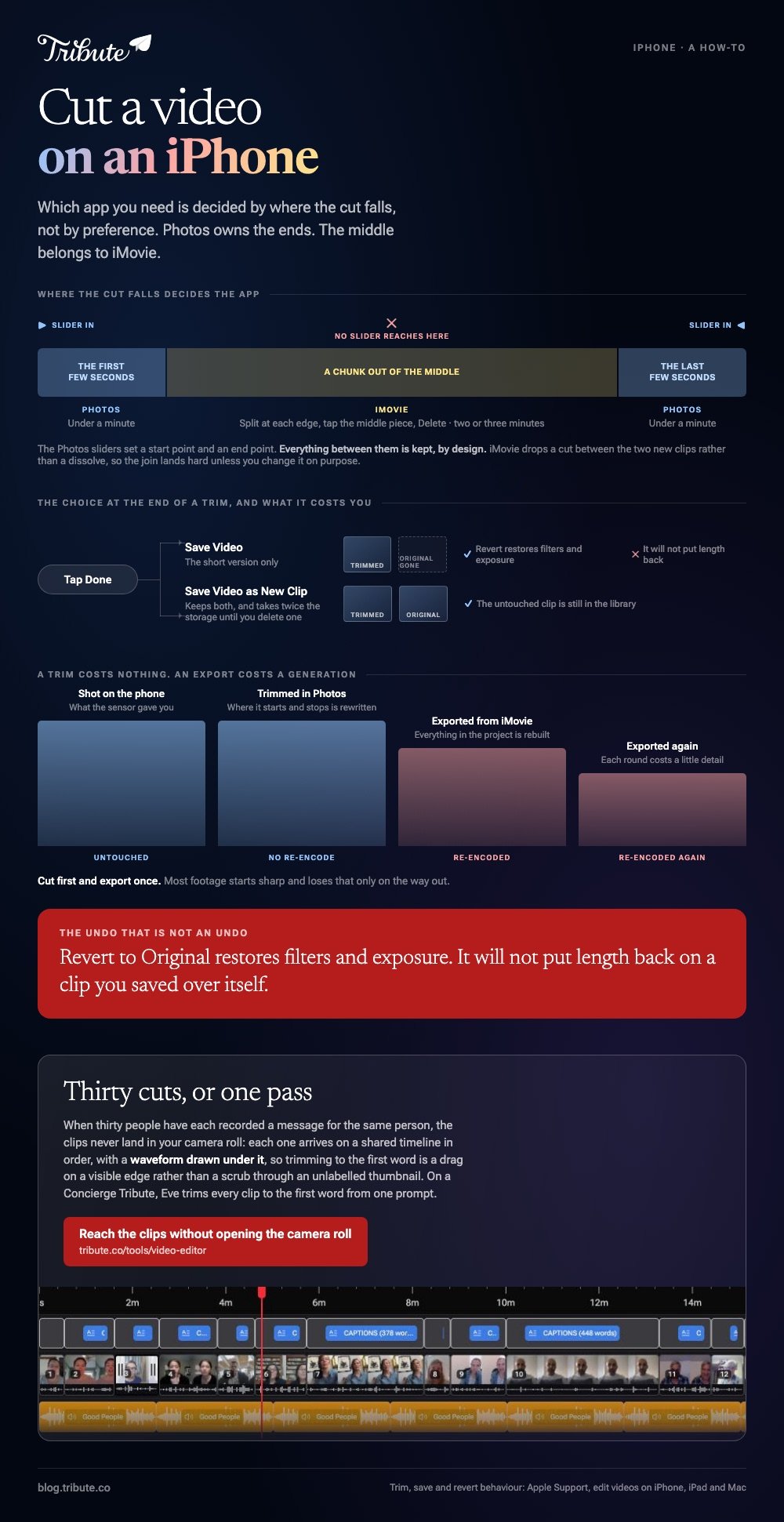
On an iPhone, cut video in Photos when only the ends need to go: tap Edit, drag the sliders, tap Done, Save Video as New Clip. Photos cannot cut the middle out. That job belongs to iMovie.

iPhone cut video: which app do you need?
It depends on where the cut falls.
Both apps are already on the phone or a tap from the App Store, and the one you want is decided by the shape of the edit rather than by preference.
| What you want gone | App | How long it takes |
|---|---|---|
| The first few seconds | Photos | Under a minute |
| The last few seconds | Photos | Under a minute |
| A chunk out of the middle | iMovie | Two or three minutes |
| Several clips joined and cut | iMovie | Longer, and worth it |
People search for iPhone how to cut video, find the Photos answer, and assume the middle is covered too. It is not, and that is the one thing worth knowing before you start.
How do you cut part of a video on an iPhone?
Photos trims from either end with the same slider you use to scrub.
- Open the clip in Photos and tap Edit.
- Drag the sliders at either side of the timeline to set a new start and end.
- Tap play to check the cut before you commit to it.
- Tap Done.
- Choose Save Video or Save Video as New Clip.
Apple spells out that last choice in its guide to editing videos on iPhone, iPad and Mac. Save Video keeps the short version only. Save Video as New Clip keeps both.
Take the second option. A trim you regret is only undoable while the original is still in the library, and Revert to Original will not put length back on a clip saved over itself.
Best for: Dead air at the start, a hand reaching for the stop button at the end.
Why it works: Nothing re-encodes. The clip keeps the quality it was shot at and the edit takes seconds.

How do you cut out the middle of a video on an iPhone?
Split the clip twice in iMovie and delete the piece between the splits.
- Open iMovie, start a Movie project and add the clip.
- Scroll the timeline so the playhead sits where the cut begins.
- Tap the clip, tap the Actions button, then tap Split. Swiping down over the playhead does the same thing.
- Repeat at the far end of the section you want gone.
- Tap the middle piece, then tap Delete.
Apple documents the split in its page on splitting a video clip in iMovie on iPhone, including the note that the playhead must not sit at the very start of a clip.
One detail catches people. iMovie drops a cut between the two new clips rather than a dissolve, so an iPhone video cut out of the middle lands hard unless you change that transition on purpose.
Best for: A long message with a false start in it, or a doorbell halfway through.
Why it works: The two halves stay separate after the split, so you can trim each one again without touching the other.
Does an iPhone cut video without losing the original?
Yes, if you pick the right save.
Photos keeps the untouched version behind the edit when you choose Save Video as New Clip. An edit saved in place can be undone with Edit, then Revert, then Revert to Original.
Apple is clear about the limit of that: reverting undoes filters and exposure, and it will not put length back.
iMovie never touches the source at all. The project references the clip in your library and the edit only exists in the exported video.
Compared to Photos, that is the safer habit for anything you cannot shoot again.
Will cutting a clip lower its quality?
A trim will not. An export might.
Trimming in Photos rewrites where the clip starts and stops, so the picture is untouched. Saving a project out of iMovie re-encodes everything in it, and each round of that costs a little detail.
So cut first and export once. With 91% of US adults owning a smartphone, according to the Pew Research Center mobile fact sheet, most footage starts sharp and loses that only on the way out.
More on the browser side of this in clip and cut video editors.
What if the clips came from a dozen different people?
Then cutting is not one job. It is twelve, and each one starts with a shuffle through your camera roll.
The Tribute video editor is a browser-based group video editor: contributors record clips on their phones and Tribute assembles them on a timeline with the music balanced under the voices.
- A waveform under every clip, so the silence before the first word is visible rather than guessed at
- Clips arrive in order, with a tick showing which are already on the timeline
- A Reorder media window with every clip numbered, plus move to front, move to back and bulk remove
- Autosave and restorable version history, and a removed clip is recoverable rather than deleted
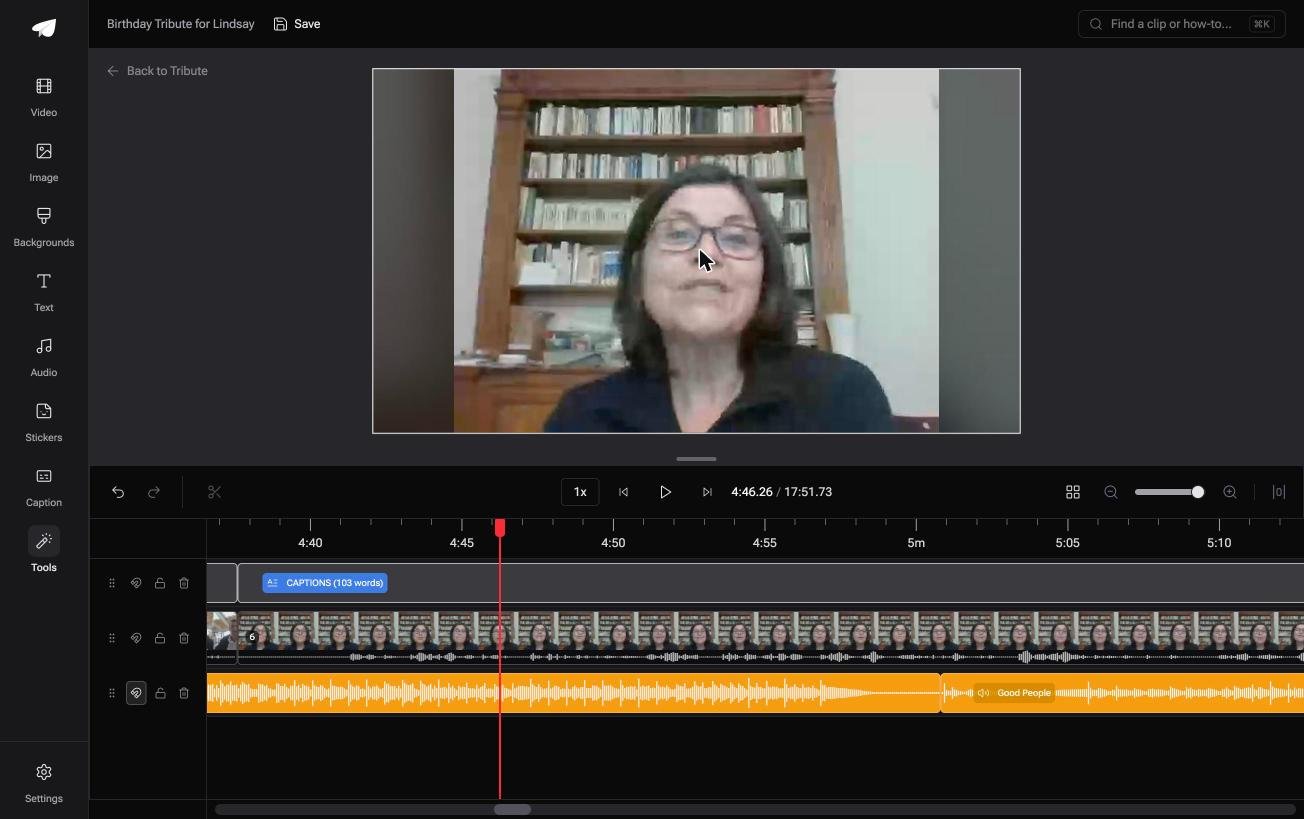
Best for: Twelve messages that each need a silent first second taken off before they play as one.
Why it works: Unlike a camera roll, a numbered timeline tells you what is already in and what is still missing.
Is there a version of this with no cutting at all?
A cut is a decision about where a sentence starts.
Make it once and it is a pleasure. Make it thirty times, on thirty clips of someone's aunt clearing her throat, and it is a Sunday. There is one case where the pile never reaches you in that state.
The case: the clips were recorded for one person
You are in it when several people each record a message for the same person.
A grandmother turning eighty. A coach retiring after fifteen seasons. Nobody shot a scene, and nobody is going to send you a tidy file.
If you are cutting one video of your own, Photos above is where this page ends for you.
Why the camera roll stops being the problem
Because the clips never land in it.
Each person records through a link and their clip goes onto a shared timeline in order, with a waveform drawn under it.
Trimming to the first word in the Tribute video editor is a drag on a visible edge, not a scrub through an unlabeled thumbnail.

What you do not have to do
Four jobs, and hunting through a camera roll is the first to go.
- No collecting. Each person records on their own phone and sends it with one link.
- No laying out. The clips arrive in order with music underneath.
- No cutting, on Concierge. Eve trims every clip to the first word from a prompt, across the whole timeline.
- No edit at all, if you want none. Tribute's editors build it and hand it back for approval.

When this is the wrong answer: the video is yours, one clip, one cut. Photos does that in forty seconds and nothing beats it. The editor is not a standalone trimmer either: it lives inside a paid Tribute.
Two related jobs: joining clips on an iPhone and making a video montage from the result.
Frequently Asked Questions
Can I cut a video on an iPhone without an app?
Photos is already on the phone and trims from either end. Cutting a section out of the middle needs iMovie, which is a separate download from the App Store.
How do I cut a video in the middle on an iPhone?
Split it twice in iMovie, once at each edge of the part you want gone, then tap the middle piece and delete it. The two surviving pieces close up against each other.
Why can I not drag a slider into the middle of my clip?
Because the Photos sliders only set a start point and an end point. Everything between them is kept, by design, and there is no way to carve out the center.
Does Save Video as New Clip use twice the storage?
It does, until you delete one of them. The original and the trimmed copy are two separate items in your library.
Can I undo a trim later?
Open the clip, tap Edit, tap Revert, then Revert to Original. That works on an edit saved in place, and it restores filters and exposure rather than length.
How do I cut and join several clips on one phone?
Build a Movie project in iMovie, add the clips in order, then split and trim each one on the timeline before you share the result.
Does trimming a video make the file smaller?
Yes, in rough proportion to what you removed. A trim keeps the original bitrate, so half the length is close to half the size.
👉 Reach the clips without opening the camera roll if thirty of them were each recorded for the same person, and the cutting is one pass.
