
Add Text to TikTok Video: The Text Tool, Duration and Text to Speech
You add text to a TikTok video on the editing screen that opens after you record or upload: tap Text, type the words, pick a font and color, then tap Done and drag the box into place. Set duration decides when it shows.
How do you add text to TikTok video in the app?
On the editing screen, before the caption screen, in four taps.
- Record or upload the clip, then wait for the editing screen with the tool strip down the side.
- Tap Text and type. The keyboard brings the font row, the color row and the alignment and background controls with it.
- Tap Done, then drag the box where it belongs and pinch to resize it.
- Tap the box again to reach duration, text to speech and the style options a second time.
The TikTok text editor is the Text button itself, and editing text on a TikTok video after you post is not something the app offers.
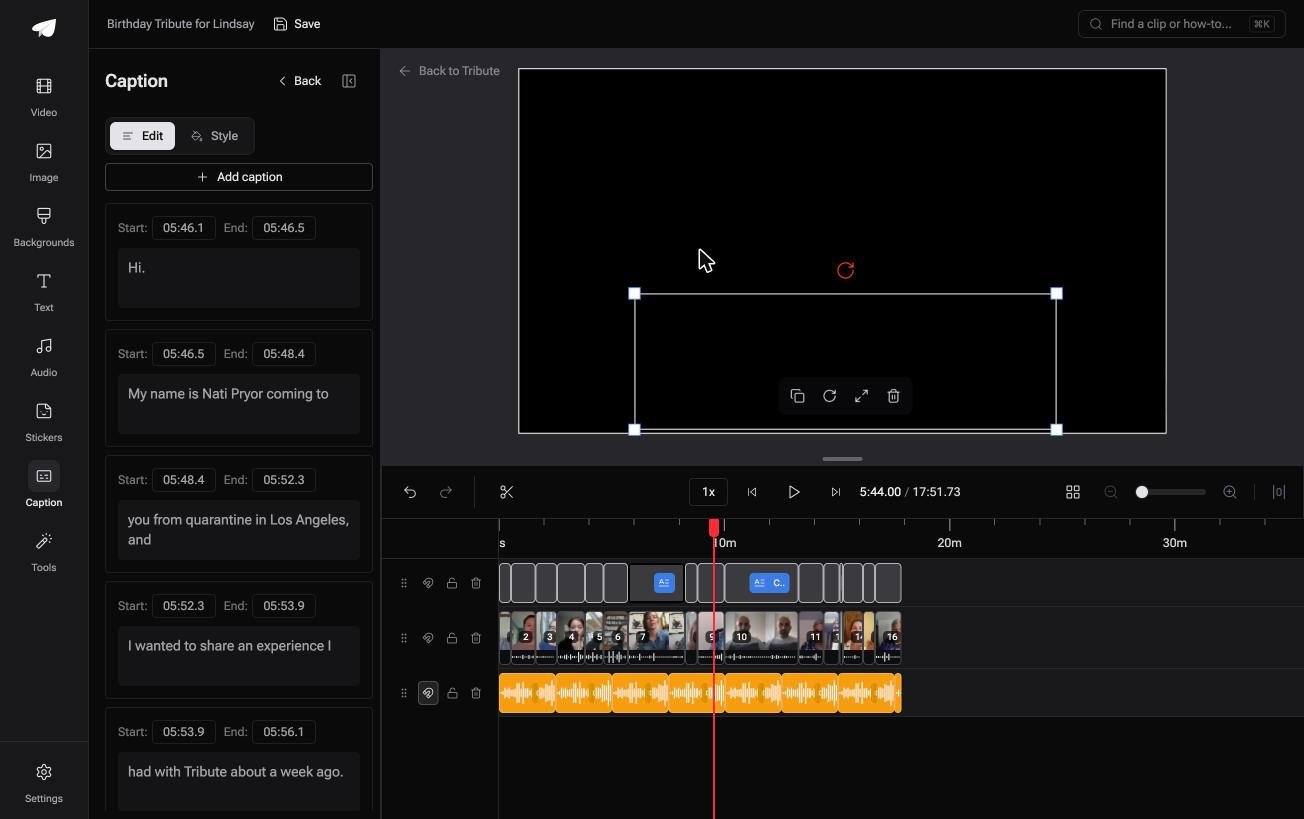
Keep the box away from the right edge and the bottom. That is where the buttons, the username and the caption sit, and anything behind them is lost on half the phones that see it.
Best for: A hook on the first frame, a punchline, or a label that tells people what they are watching.
Why it works: The text is added before the upload, so it plays whether the viewer has sound on or not.
How do you make the text appear at the right moment?
With Set duration, which is on the menu that appears when you tap the text box.
By default a block of text sits on screen for the whole clip. Set duration opens a bar along the bottom with handles at each end, and dragging them sets the moment it arrives and the moment it leaves.
Two habits make this painless. Write every line first and time them afterwards, and give each line a beat longer than you need to read it yourself, because you already know what it says.

Compared to a desktop editor, the timing handles are coarse, so a line that has to land on a specific frame is worth doing elsewhere.
Can TikTok read the text out loud?
Yes. Tap the text box and choose text to speech, then pick a voice.
The voice reads what is in the box, so a typo is audible as well as visible. Edit the words and the narration follows.
It is also the quickest way to carry a video with no spoken audio of its own.
31% of US adults say they use TikTok according to the Pew Research Center social media fact sheet, and plenty of them are watching with the sound down in a waiting room.
Can you add text to TikTok video without the app?
You can, and for anything longer than a few lines it is the better room to work in.
Clipchamp runs in a browser: click the text tab on the toolbar, add a title style to the timeline, then set the font, size, alignment, color and background in the property panel. Drag the text block's trim handles to time it.
Microsoft documents that panel in its guide to adding text and titles to a video.
| Where | Timing control | Catch |
|---|---|---|
| TikTok app | Drag handles on a bar | Coarse, and gone once posted |
| CapCut | A timeline | Another app to learn |
| Clipchamp | A timeline, typed seconds | Export then upload |
Export at 1080p in an upright shape, then upload the finished file.
The same job on other tools is in adding text to a video, on a phone in adding text to a video on an iPhone, and on a timeline in adding text in Premiere Pro.
Why can you not change the text after posting?
Because it is part of the picture by then, not a layer sitting over it.
TikTok renders what you typed into the upload. Nothing in the app rewrites those pixels, so a misspelled name means deleting the post and uploading it again, with the views and comments gone.
Auto captions are the exception worth knowing: those are generated from speech and stay editable in their own panel, which is a different thing from the text you typed.
Unlike a caption, a typed line cannot be proofread later. Read it twice before you post.
What if the video is sixteen people saying one thing each?
Then every clip needs a label, and typing sixteen of them on a phone is the wrong evening.
The Tribute video editor is a browser-based group video editor: contributors record clips on their phones and Tribute assembles them on a timeline with the music balanced under the voices.
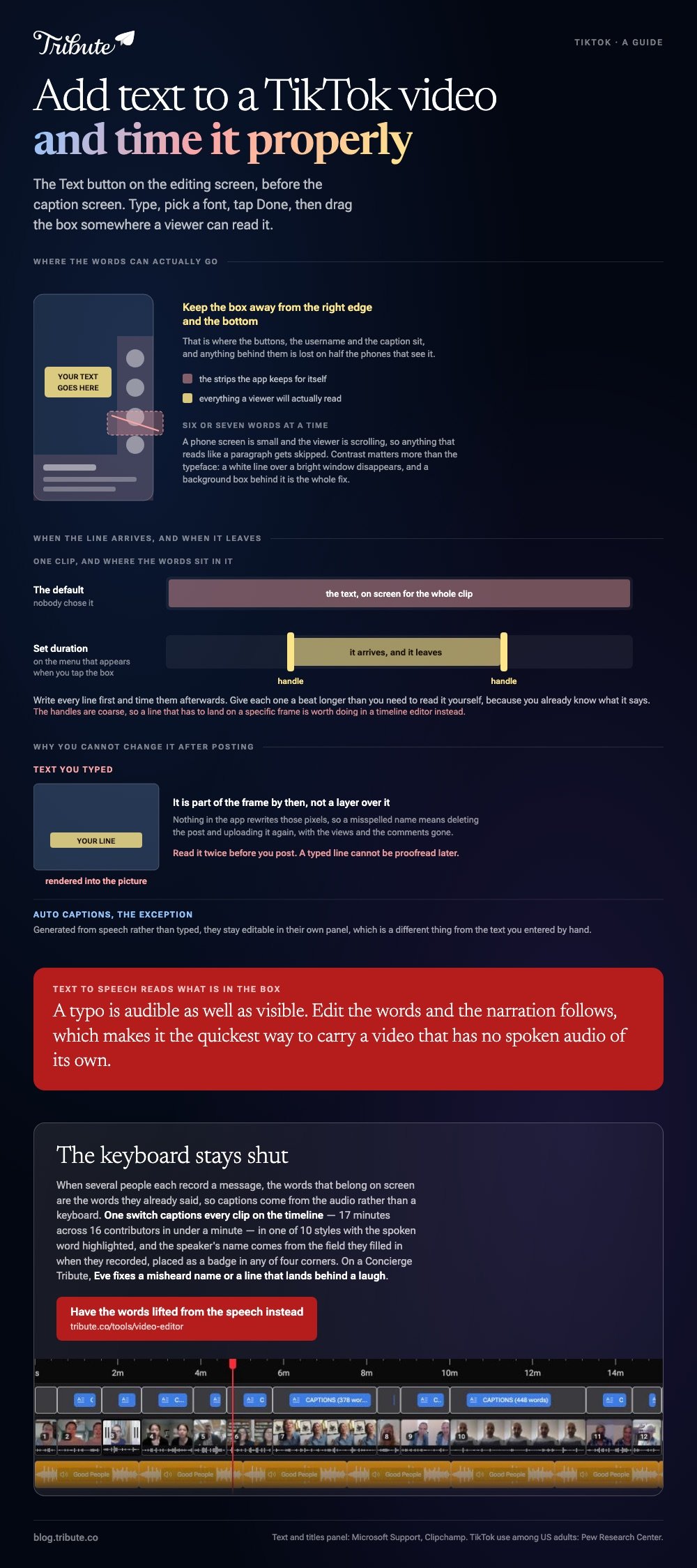
- One switch captions every clip: 17 minutes across 16 contributors in under a minute
- 10 caption styles with the spoken word highlighted as it is said
- Name badges from the name and relation each person entered, in 4 corner positions
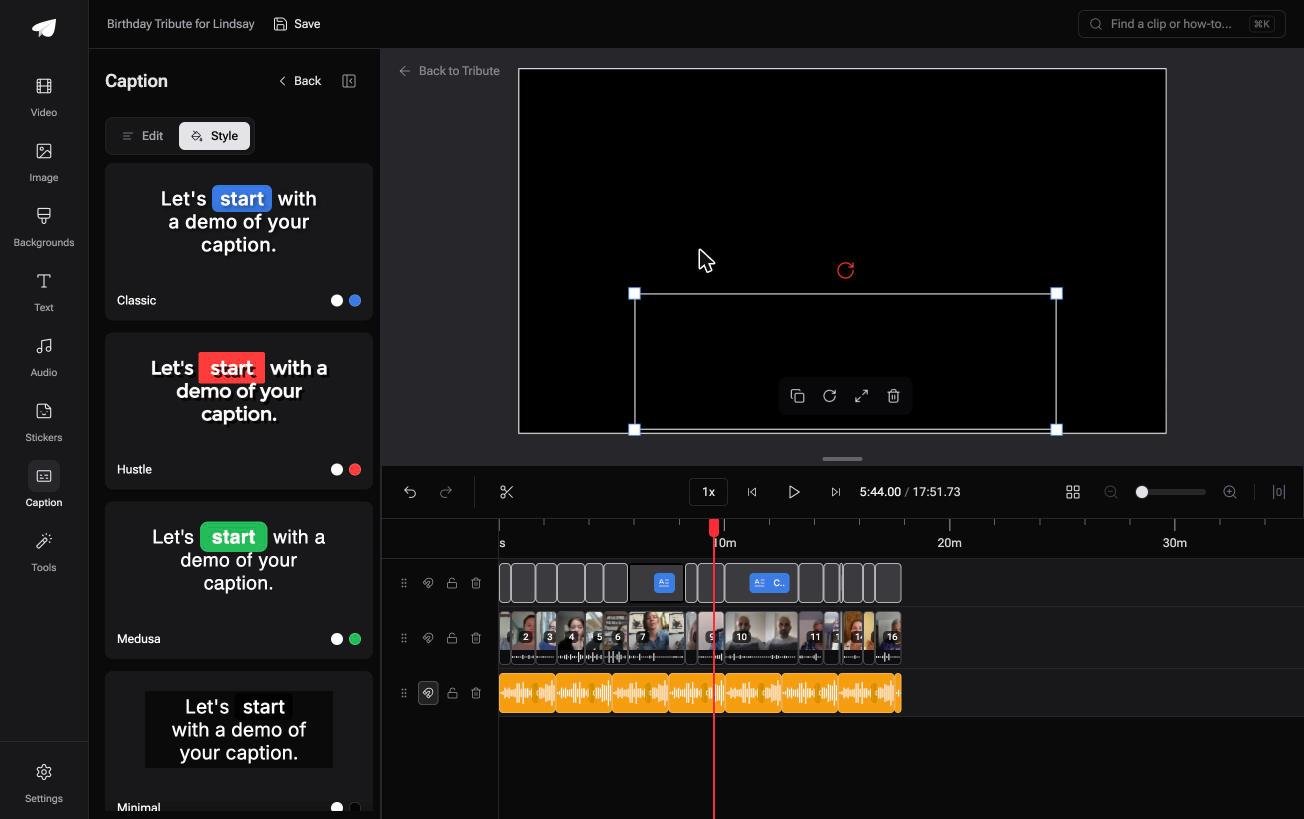
- Every line editable, with its own start and end timecode
Best for: A tribute video whose viewers will watch it on a phone with the volume off.
Why it works: The words come from the speech itself, so nobody types a line that someone already said.
Can the words appear without you typing them?
Typing is the whole cost of on-screen text, and it is charged per clip.
One hook on one TikTok is thirty seconds of work. Sixteen clips, each needing a name and a readable version of what was said, is an evening with a phone keyboard.
There is a case where the typing is already done.
The case: the speaking is the content
You are in it when several people each record a message for the same person.
A father turning sixty, a coach retiring, a friend moving overseas. Each person talks for thirty seconds, which means the words that belong on screen are the words they already said.
If you are writing a hook for one post, the Text button at the top of this page is all you need.

Why the typing stops
Because captions are generated from the audio rather than entered by hand.
One switch captions every clip on the timeline, in a style you pick once, with the spoken word highlighted as it is heard. The speaker's name comes from the field they filled in when they recorded.
Both of those are in the Tribute video editor, and both stay editable afterwards.
What the work is not
Three things, and none of them is a phone keyboard.
- Not the typing. One switch captions every clip, with the spoken word highlighted.
- Not the names. Each badge comes from the field the speaker filled in.
- Not the corrections. On a Concierge Tribute, Eve, the AI assistant inside the editor, fixes a misheard name or a line that lands behind a laugh.
When this is the wrong answer: you are posting to TikTok and the text is a joke, a hook or part of the design. Then the app's own tool is the right one and it is already open.
The editor is not a TikTok tool either: it lives inside a paid Tribute. For the wider job of turning many clips into one piece, see making a video montage.
Frequently Asked Questions
How do I edit text in a TikTok before I post it?
Tap the text box on the editing screen and the keyboard reopens with the words in it. Everything stays editable until you tap Post.
Can I change the text on a TikTok after posting?
No. The words are rendered into the video file. Deleting the post and uploading a corrected version is the only route, and it costs the views.
How many words should go on screen?
Six or seven at a time. A phone screen is small and the viewer is scrolling, so anything that reads like a paragraph gets skipped.
Why is my text hidden behind the buttons?
It is sitting in the right-hand strip or the caption area at the bottom. Drag the box toward the middle and leave a wide margin on both of those edges.
Is text to speech the same as captions?
No. Text to speech reads out what you typed. Captions are generated from speech that is already in the video and can be edited line by line.
What font should I use?
Whichever one stays readable with a background box behind it. Contrast matters more than the typeface, since a white line over a bright window disappears.
👉 Have the words lifted from the speech instead if sixteen clips each need a name and a caption, and the keyboard stays shut.
