
VidDay Reviews: What It Does Well and the Alternatives
VidDay is a group video gift service: you share one link, friends and family upload clips, and VidDay makes the video. You build it at no cost and pay at the end, from $5 for three minutes to $75 for 150 minutes. It suits short gift videos more than long ones.

| Option | Best for | Price |
|---|---|---|
| VidDay | A short gift video, paid for at the end | $5 to $75 per video by length |
| Tribute | Longer videos, captions, a done-for-you edit | DIY from $35, Concierge $99 |
| Kudoboard | Written messages with some video attached | $6.99 to $19.99 per board |
| A general editor plus a shared folder | Anyone with time and a dozen clips | No charge, plus your weekend |
Prices as of October 2026.
How does a VidDay video get made?
The flow has five steps and almost no editing in the first four. You start an event, customize the invitation with a message, prompts, a recipient photo, a banner, a color and a due date, then share a private link or send invitations through VidDay.
Its Smart Invites track who has opened the invitation and send reminders on their own, and anyone who responds through the submission page joins the same list.
Contributors record or upload video, photos and short clips from a phone or a computer, and you review everything in one place.
Then you edit. You can reorder clips, trim or split them, add photos, add text cards, pick a ready-made theme or build your own, and choose music from the library, upload a song or build one with the Custom Song Builder.
You preview as often as you like before paying.
Support is listed as live chat daily from 7am to 9pm Central and email replies within four hours during those hours, which is worth knowing if your deadline is a party on Saturday.
White Glove Premium is the paid option where VidDay specialists organize and polish the video with you.
Delivery is a 1080p MP4 download or a private viewing link, with an option to add digital gift wrap that plays first. Keepsakes sit on top: a Video Book with a built-in HD screen and 17 cover designs, or a postcard with a QR code.
There is also a group gift fund, where contributors add money the recipient redeems as a gift card, and a tree planting option.

What does VidDay cost in October 2026?
Two ways to pay, both listed on VidDay's pricing page.
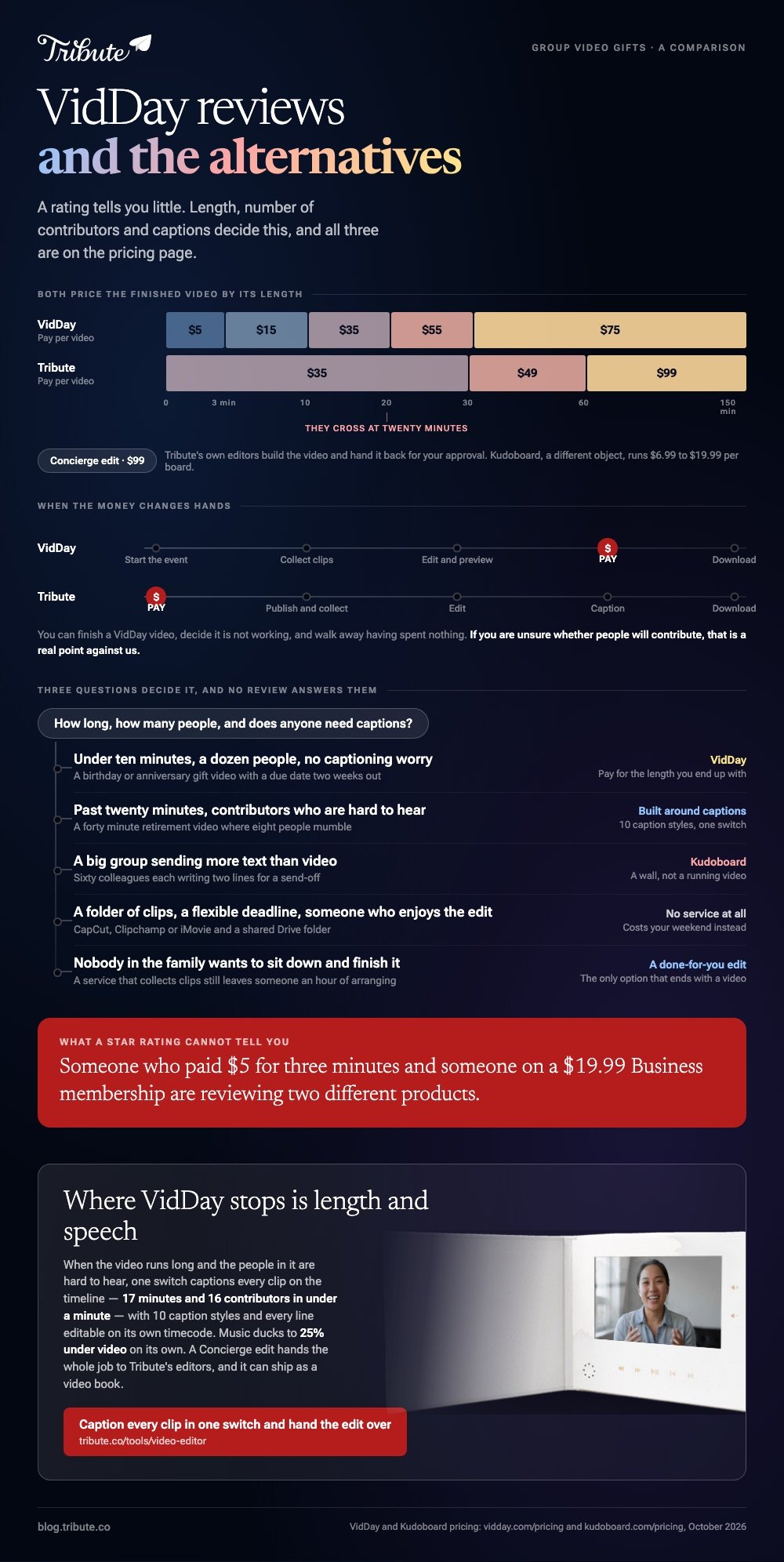
Pay per video is priced by finished length: $5 for up to three minutes, $15 for three to ten minutes, $35 for ten to twenty, $55 for twenty to thirty, and $75 for anything from thirty minutes up to 150.
Memberships suit people making several. Personal starts at $4.99 a month or $59.99 billed yearly and covers six videos a year with photo upscaling and priority processing.
Business starts at $19.99 a month or $237.99 a year for 30 videos with a branded intro and theme, and a Custom tier starts at $29.99 a month.
What you get before paying is the useful part of the VidDay prices picture. Collecting messages, editing, reordering, themes, background music and previewing all happen without a card on file, and payment buys 1080p HD, sharing, hosting, republishing, Video Book eligibility and a downloadable copy.
Compared with paying upfront, that order matters more than the headline number. You can see the finished video, decide it is not working, and walk away having spent nothing.
What should you make of VidDay reviews?
Treat them as evidence about a tier rather than about the product.
Someone who paid $5 for a three minute video and someone on a Business membership with a branded intro are describing two different experiences, and a rating stripped of that context tells you little.
VidDay describes itself as the top rated group video gift platform on the strength of verified Trustpilot feedback. That is their claim rather than ours, and we have not audited it.
Questions worth answering before you buy are on the pricing page and not in the feedback: how long will the finished video be, how many people are sending clips, and does anyone need captions.
Those three decide whether VidDay fits, and no review answers them for you.
Where does VidDay fit, and where does it not?
Its shape suits a short, warm, photo-friendly gift video with a dozen contributors and a due date two weeks out. The pay-at-the-end model removes the main risk of a group project, which is paying for something before you know whether anyone will send a clip.
Where it strains is length and speech. Pricing climbs with runtime, and the editor is built around arranging and theming rather than detailed work on audio.
A forty minute retirement video where eight people are hard to hear is a harder job than the tool is shaped for.
Best for: A birthday or anniversary video under ten minutes, built by someone who wants to see it before paying.
Why it works: The collecting, the reminders and the ordering are handled, and nothing is spent until the video exists.

What are the alternatives for a group video gift?
Tribute
The Tribute video editor is a browser-based group video editor: contributors record clips on their phones and Tribute assembles them on a timeline with the music balanced under the voices.
Clips arrive in order with a tick showing which are already on the timeline, and the organizer reorders, trims, captions and titles from there.
Two differences matter against VidDay, and one of them favors VidDay. Tribute asks for payment before you publish and start collecting, where VidDay lets you collect and edit first and pay at the end.
If you are unsure whether people will contribute, that is a real point against us.
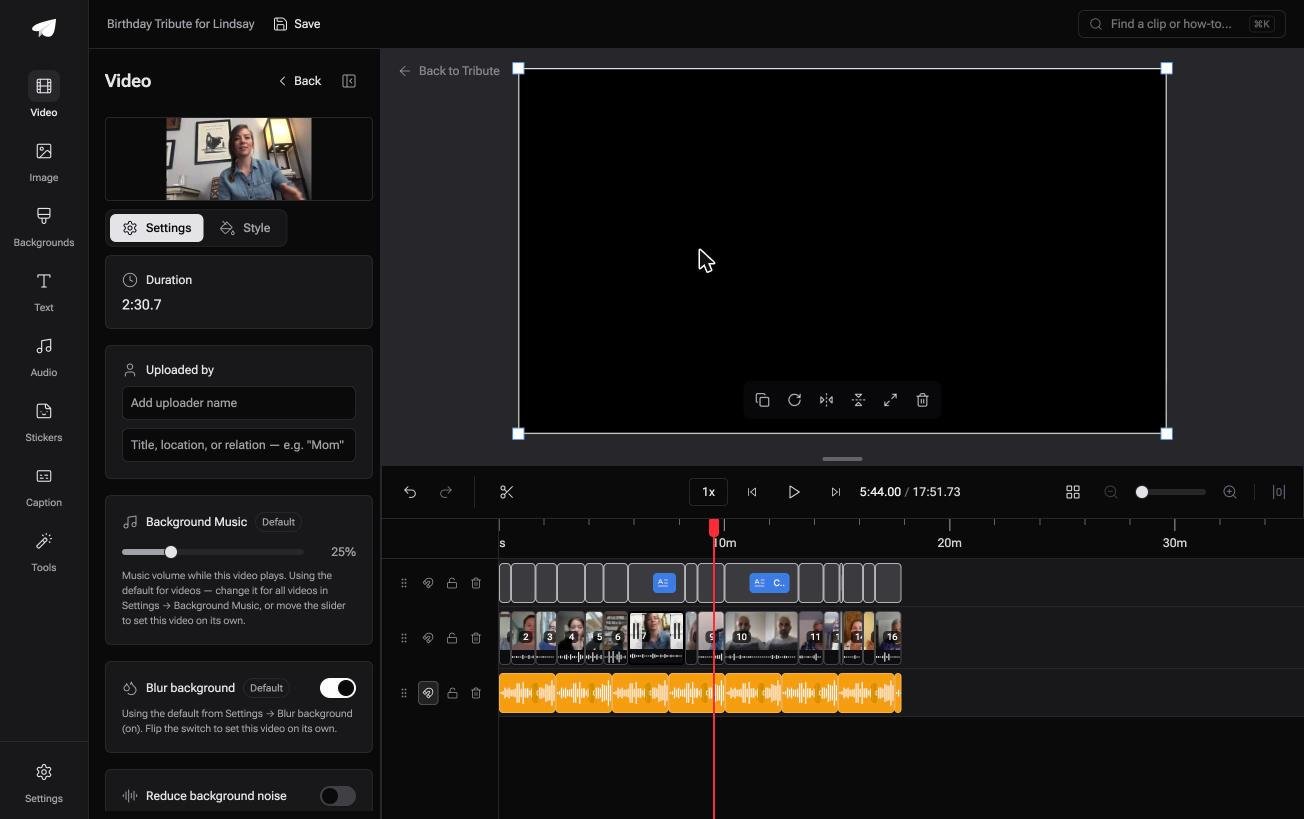
Length and speech run the other way. One switch captions every video on the timeline, with 10 caption styles that highlight the spoken word and every line editable on its own timecode.
Music ducks to 25% under video and 75% under photos by default, and the editor carries 83 occasion backgrounds and 39 licensed tracks.
Pricing is by length as well: $35 for a video up to 30 minutes, $49 up to an hour, and $99 past that. A Concierge edit is $99, where Tribute's own editors build the video and hand it back for your approval.
Best for: A longer video, heavy on speech, where captions and a hands-off edit matter.
Why it works: The assembly is finished before you open the editor, and the captioning that takes an afternoon elsewhere takes a minute.

Kudoboard
Kudoboard is a different object: a digital card where people post messages, photos, GIFs and video, shown as a wall rather than cut into a video.
Its boards run from $6.99 for up to 20 posts to $9.99 for up to 100 and $19.99 for a Milestone board, with video posts included from the Premium tier up, per its pricing page.
Reach for it when the words carry the gift and video is a bonus. Unlike a group video service, nobody has to watch anything in order, which suits a workplace send-off where 60 people each write two lines.
Best for: Written messages from a large group, with a few videos among them.
Why it works: A wall of short posts asks less of every contributor than a video message does.
A general editor and a shared folder
This is the option nobody sells you. Make a shared Drive or Dropbox folder, send the link, and assemble what arrives in CapCut, Clipchamp or iMovie, all of which cost nothing and handle this well enough.
Be honest about the hidden work. Chasing twelve people, re-asking the four who sent a WhatsApp clip compressed to a smear, and getting the volume even takes most of a weekend.
With 91% of US adults owning a smartphone, according to the Pew Research Center mobile fact sheet, the footage will arrive from a dozen handsets across three generations of camera, and reconciling them is the job.
One habit makes this route survivable. Ask for files through the shared folder rather than over a messaging app, because messaging compresses video hard and there is no way to get the quality back afterwards.
Best for: A small group, a flexible deadline and someone who enjoys the edit.
Why it works: No service in the middle, no per-video price, and the result is yours at full quality.
Our tool comparisons sit here: montage software compared and editing in a browser with nothing to install.

How do you choose between them?
Answer three questions and the choice makes itself. How long will the finished video be, how many people are sending something, and does the recipient need captions to follow it.
One more question decides more than people expect: who is going to sit down and finish this.
A service that collects clips still leaves someone with an hour of arranging, and if nobody in the family wants that hour, a done-for-you edit is the only option that ends with a video.
Under ten minutes with a dozen contributors and no captioning worry points at VidDay, where you pay for the length you end up with and see it first.
Past twenty minutes, or with contributors who are hard to hear, points at a tool built around captions and audio. A big group sending more text than video points at Kudoboard.
If none of that applies and you have a folder of clips to join, you do not need any of these services.
Start with our guide to making a video montage, or the group-specific version in how a group video maker handles thirty phones.
Frequently Asked Questions
Does the VidDay app have a free tier?
You can build a whole video for free, including collecting messages, editing and previewing. Payment comes at the end and buys the 1080p download, sharing, hosting and keepsake eligibility.
How much does a VidDay video cost?
From $5 for up to three minutes to $75 for a video of up to 150 minutes, with $15, $35 and $55 tiers between. Memberships start at $4.99 a month for six videos a year.
How many people can contribute to one video?
VidDay does not publish a cap on participants, and in practice the limit is social rather than technical. Past about thirty contributors, the organizing effort grows faster than the video does.
Can I download the finished video?
Yes, as a 1080p MP4 once you have paid, or you can send a private viewing link instead. Keep the download rather than relying on a link if the video matters to you.
Does VidDay add captions?
Its published feature list covers text cards, themes and music rather than spoken-word captions on every clip. If captions matter, confirm on the day rather than assuming, since feature lists move.
What is a good alternative to VidDay for a memorial video?
Something that handles length and speech, since memorial videos run long and contributors are often emotional and quiet. A done-for-you edit is worth the money when nobody in the family wants to sit with the footage.
Can I make a group video without any service?
Yes. A shared folder plus a no-cost editor does the same job for the price of your time, and the collecting rather than the editing is what you are paying a service to absorb.
👉 Caption every clip in one switch and hand the edit to Tribute's editors if the video is long and heavy on speech, which is where VidDay stops.
