
Combine Videos: Android Routes for Clips From Five Different Places
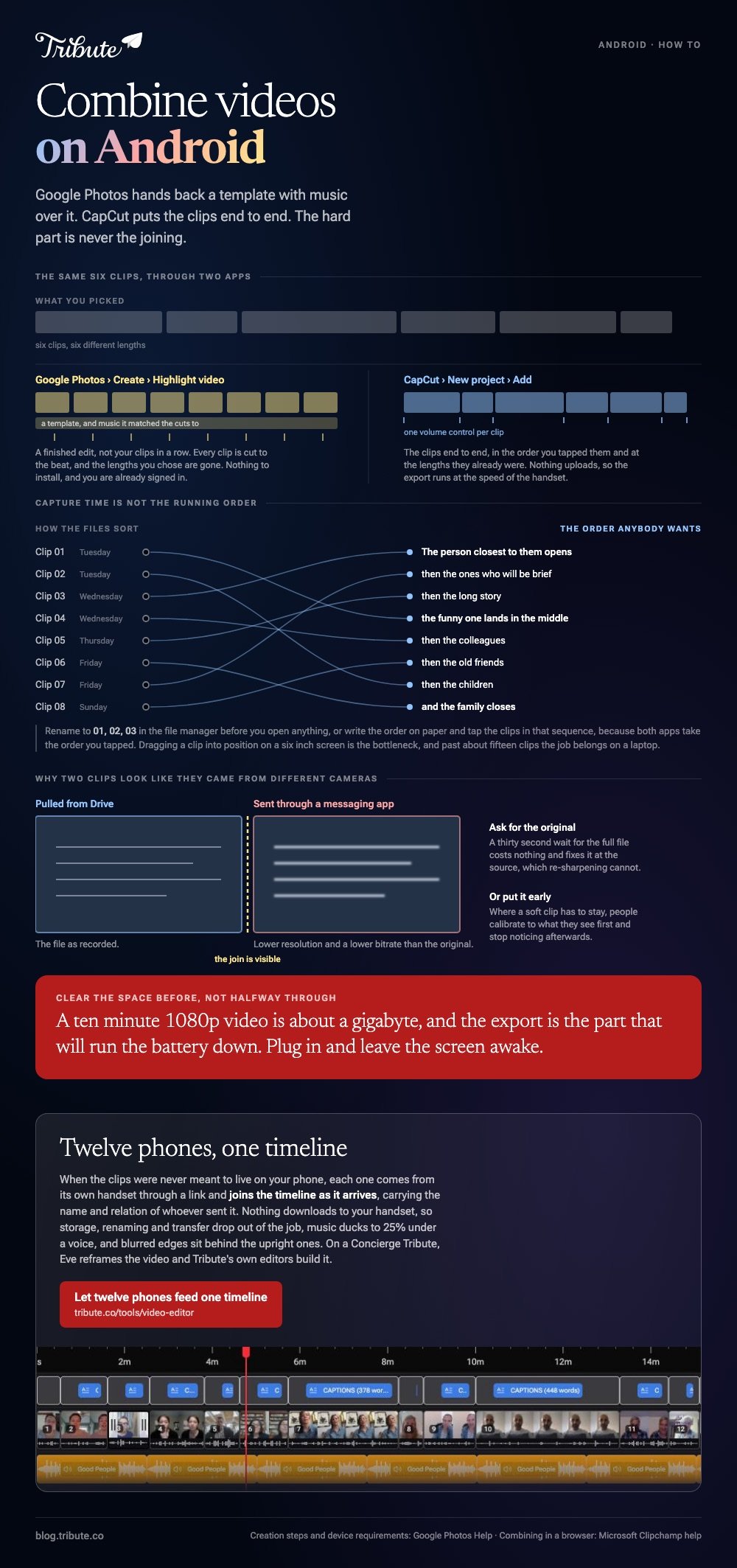
To combine videos on Android, open Google Photos, tap Create, then Highlight video, and pick the clips. Install CapCut when you want the clips end to end with no template over the top. The hard part is never the joining.
How do you combine multiple videos into one on Android?
Start with what is already on the phone.
- Open Google Photos and tap Create at the bottom, then Highlight video.
- Tap Select content, choose your clips, then tap Next.
- Touch and hold a clip to drag it into position, or tap one and tap Remove.
- Tap Save.
Google sets this out in its guide to making creations in Google Photos. What comes back is a highlight video with a template, music and beat matching applied, which is a finished edit rather than your clips in a row.
For the plain version, open CapCut, tap New project, select every clip and tap Add. They land in the order you tapped them, so tap in the order you want.
Press and hold a clip to move it, tap one and then Volume to set a level for that clip alone, and tap Export at the top right.
Best for: Six to twelve clips that need to become one video on the phone they are already on.
Why it works: Nothing uploads, so the export runs at the speed of the handset rather than the connection.
Which apps combine videos, Android or browser?
It depends on where the clips came from.
| Where the clips are | Use | Why |
|---|---|---|
| The camera roll | Google Photos | Already signed in, nothing to install |
| Mixed sources, mixed volumes | CapCut | A volume control per clip |
| Email, Drive, a shared folder | A browser editor on a laptop | Downloading twelve files to a phone first is the slow path |
| Twenty people's phones | Something that collects them | Combining was never the work |
Android apps to combine videos are a crowded shelf, and the ones that advertise hardest are the ones that stamp the export. Check what the output looks like before you spend an evening in any of them.

Why do clips from WhatsApp and Drive look different?
They have been through different machines.
A clip sent through a messaging app arrives compressed, often at a lower resolution and bitrate than the original. One pulled from Drive is the file as recorded. Put them next to each other and the join is visible.
Ask for the original where you can. Compared to re-sharpening a compressed clip, a thirty-second wait for the full file costs nothing and fixes it at the source.
Where a soft clip has to stay, put it early in the running order. People calibrate to what they see first and stop noticing afterward.
What order should the clips go in?
Decide before you open an editor.
Filenames sort by capture time, which is not the order anybody wants when twelve people recorded on twelve different afternoons. Rename to 01, 02, 03 in the file manager, or write the order on paper and tap in that sequence.
A running order that holds up most of the time: the person closest to the recipient opens, the funny one lands in the middle, the family closes.
Trim each head as you go. Everyone presses record, looks at the lens, then begins, so twelve clips carry about twelve seconds of staring.
When should you give up and use a laptop?
At about fifteen clips.
Dragging a clip into position on a six-inch screen is the bottleneck, not the processor, and a phone project past fifteen clips becomes a test of patience. A browser editor gives you a full-width timeline and the same export.
Microsoft's guide to combining videos in Clipchamp is the clearest walkthrough of that route, and it works in any Chromium browser.
Other devices are covered in combining videos on iPhone and combining video clips online.
What if the clips came from a dozen phones that are not yours?
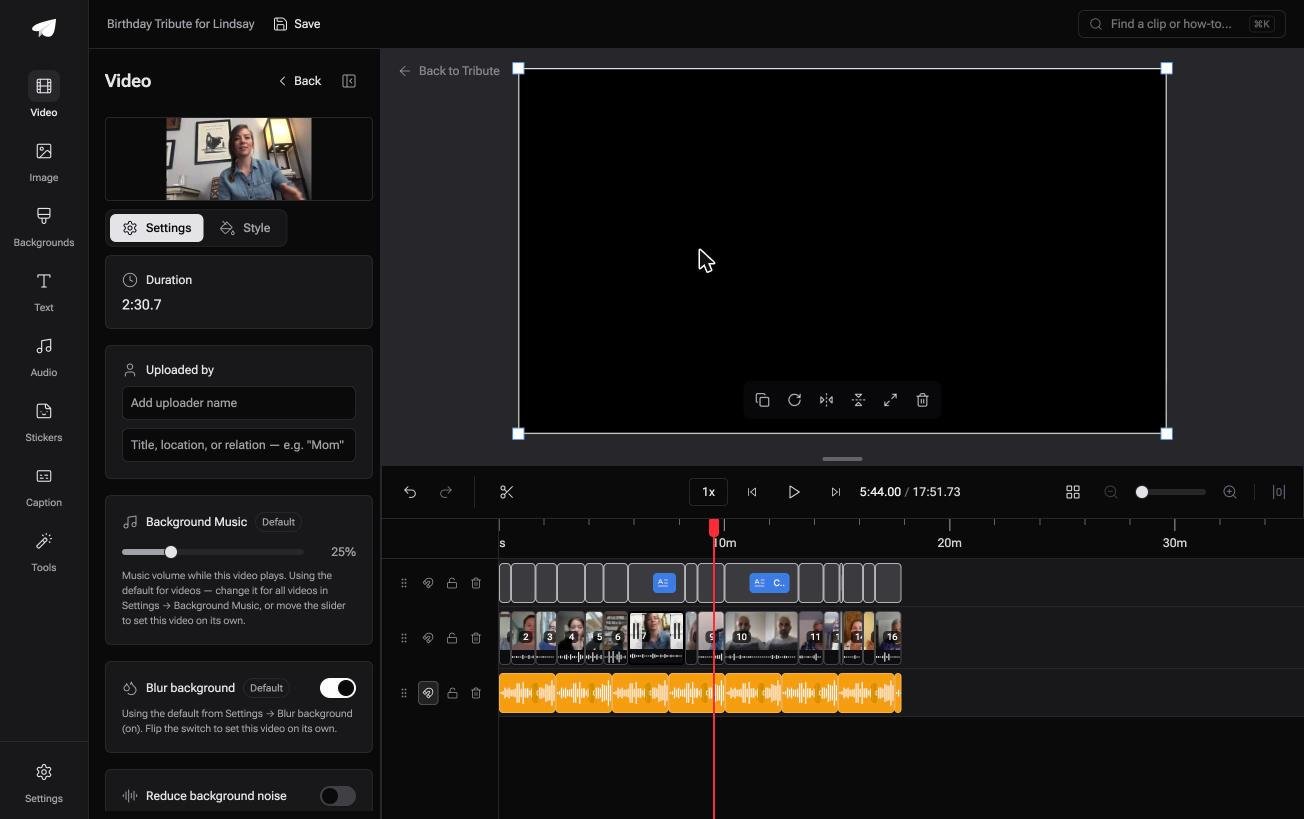
The Tribute video editor is a browser-based group video editor: contributors record clips on their phones and Tribute assembles them on a timeline with the music balanced under the voices.
It is ours, and it is the last thing on this page.
- Clips arrive auto-assembled in order, with a tick against the ones already on the timeline
- Name badges built from an uploader name and relation, in four corner positions, dark or light
- Music ducks automatically to 25% under a voice and 75% under a photograph, overridable per clip
- Blurred edges fill the frame behind upright phone footage, on by default
- A reorder window numbering every clip, with move to front, move to back and move to position
Best for: Clips that came in by text, email, WhatsApp and Drive, and now need one running order.
Why it works: Twelve phones means twelve volume levels, and the balancing is done before you hear it.
What if the group chat stopped being a filing system?
Everything above makes you the collection point.
You are the one chasing clips through a group chat, downloading them one by one, finding the storage warning, and discovering that the best message came in sideways.
There is a case where nobody plays that role.
The case: several people each recorded for one person
You are in it when the clips were never meant to live on your phone.
A grandmother turning eighty. A teacher retiring after thirty years. A friend emigrating, and the people who want to say something are in nine different households.
With 91% of US adults owning a smartphone, per the Pew Research Center mobile fact sheet, that is twelve cameras and twelve sets of settings before anyone presses record.
Nobody is combining anything yet. Everyone is recording a message, and your job is assembly, not collection.
Why the combining stops being a step
Each clip joins the timeline as it arrives.
It comes from its own phone through a link, lands in sequence, and carries the name and relation of whoever sent it. Nothing downloads to your handset, so storage, renaming and transfer all drop out of the job.
That is how the Tribute video editor handles it: not a better Android app to combine videos, but a video that arrives combined.

What you do not have to do
- No downloading from a group chat, because each clip joins the timeline as it arrives.
- No renaming or transferring. Nothing lands on your handset, so storage stops mattering.
- No sideways clip to deal with. Blurred fill sits behind the upright ones, and on a Concierge Tribute Eve, the assistant inside the editor, reframes the video for you.
- No assembly at all on Concierge, where Tribute's editors build it and it can arrive as a video book.
Where it ends up
It can stay a link, or arrive as a video book: a hardcover case with a screen inside that plays when the cover opens.
When this is the wrong answer: you recorded every clip yourself, or the video is a holiday edit rather than a message to one person. Then CapCut is the right app.
Unlike a phone editor, this one is not a general Android merger, and it lives inside a paid Tribute.

The wider job is covered in making a video montage.
Frequently Asked Questions
Can you combine two videos on Android without an app?
Google Photos does it without anything extra, because it is already installed and already signed in. Samsung's gallery editor can append clips on some models, though the feature moves between software versions.
How do I combine videos on Android without a watermark?
Both Google Photos and CapCut export clean on the standard layouts. An app that stamps the output is asking for a subscription to remove it.
What is the maximum length for a combined video?
Storage sets the limit rather than the app. A ten-minute 1080p video is about a gigabyte, so clear space before you export rather than halfway through.
Why did my combined video come out sideways?
One clip was recorded in a different orientation and the project took its frame from the first clip added. Rotate the odd one before combining, not after.
Can I combine videos and photographs in the same file?
Yes, and photographs need a longer hold than clips. Four seconds each is a sensible default, dropping to two when there are more than thirty of them.
Will combining clips drain the battery?
The export will. Several minutes at full load is normal for a long video, so plug in first and leave the screen awake.
Is there a size limit on what Android can handle?
Google lists real floors for its own editor: at least 3GB of RAM and Android 8.0 for the adjust and filter tools. Below that, move the job to a laptop.
👉 Let twelve phones feed one timeline if a dozen people are each recording for one person, and the group chat stops being a filing system.
