
Birthday Song With Video: How to Match the Music to the Clips
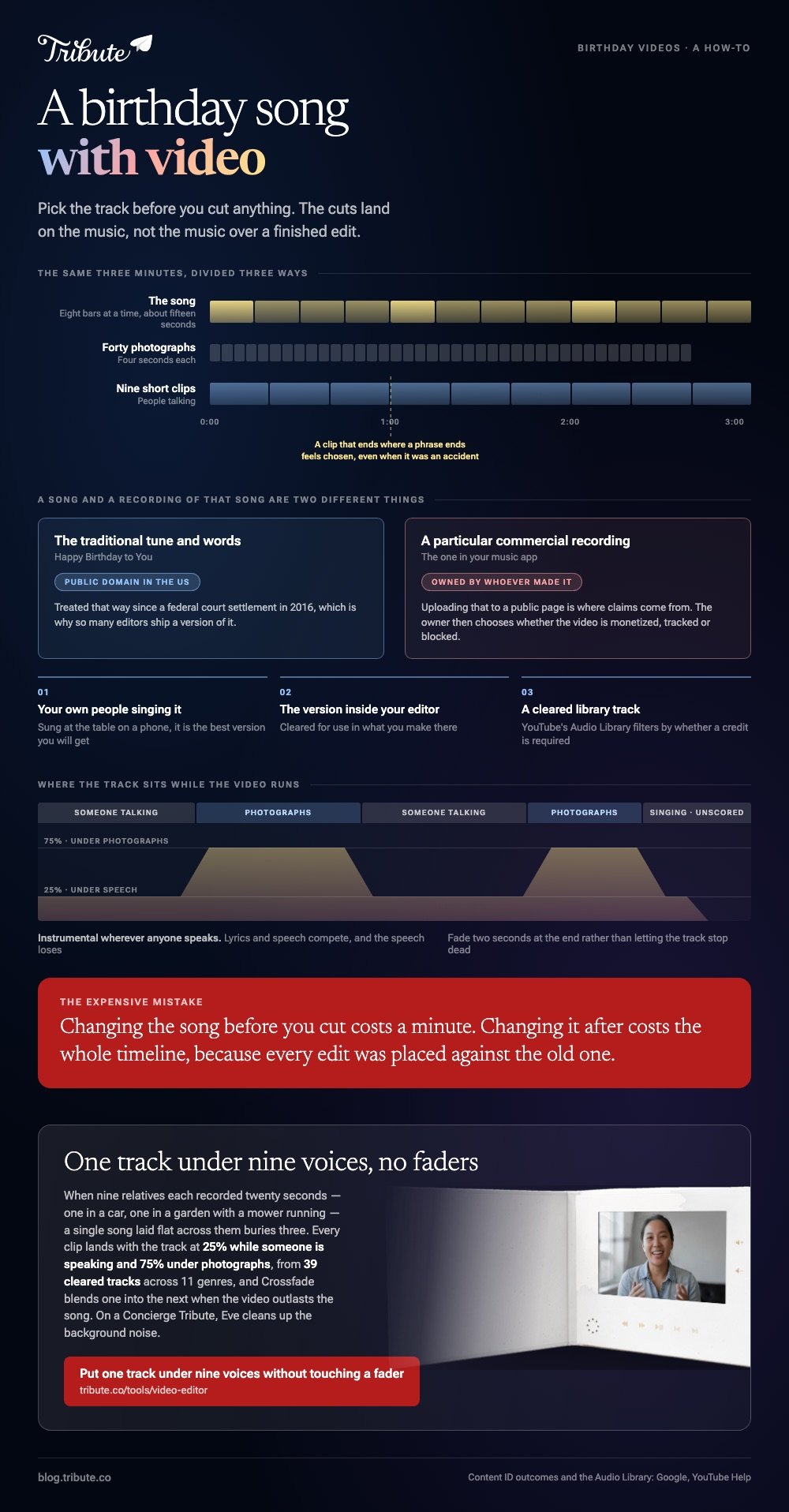
Pick the track before you cut anything. A birthday song with video works when the cuts land on the music rather than the music being poured over a finished edit. Three minutes of song is about forty photographs or nine short clips.
Which birthday song with video works best?
The one that matches the room, not the one that matches the age.
| The video | Track that fits | Avoid |
|---|---|---|
| Kids' party montage | Upbeat instrumental, 120 bpm or so | Anything with lyrics about love |
| Milestone with speeches | Quiet piano or strings under the voices | A big chorus that fights the talking |
| Photo sequence, no speech | One full song, start to finish | Three tracks in four minutes |
| Short card | No music at all | A ten second fade on a 30 second clip |
Unlike a wedding, a birthday carries no expected song, which is freedom and a trap at once: with nothing obvious to reach for, people reach for the loudest thing in their library.
Two rules carry most of the weight. Instrumental wherever anyone speaks, because lyrics and speech compete for the same attention and the speech loses. One track per video, because a change of song reads as a mistake unless the video changes with it.
The traditional birthday tune is a separate decision. It belongs at the top or over the candles, not under four minutes of people talking.
Can you use the Happy Birthday song itself?
A song and a recording of that song are two different things.
The traditional lyrics have been treated as public domain in the US since a federal court settlement in 2016, which is why so many editors ship a version of it.
A particular commercial recording is still owned by whoever made it. Uploading that to a public page is where claims come from, not the tune itself.
Three safe routes, in order of how little thought they need:
- Your own people singing it. Sung at the table on a phone, it is the best version you will get.
- The version inside your editor, cleared for use in what you make there.
- A cleared library track. YouTube's Audio Library is free production music, filterable by whether a credit is required.
On a private video played in a room, none of this matters. On a public upload it does: YouTube documents what Content ID does, and the owner chooses whether the video is monetized, tracked or blocked.
How do you sync a birthday song with video clips?
Lay the music down first and cut to it.
- Drop the track on its own row before a single clip is placed.
- Mark the phrase ends. Most songs change every eight bars, which is about fifteen seconds.
- Put your cuts there. A clip that ends where a phrase ends feels chosen even when it was an accident.
- Duck under speech. A quarter of full volume while anyone talks, three quarters under photographs.
- Fade two seconds at the end rather than letting the track stop dead.
Where the video opens on people singing at a table, start the track underneath them at a low level and bring it up as the singing ends. The join disappears.
Swapping the song late is the expensive mistake. Changing it before you cut costs a minute; changing it after costs the whole timeline, because every edit was placed against the old one.

Which app puts a birthday song behind photos?
Any photo video maker app with a birthday song on the shelf, which is most of them.
| App | Birthday song editing | Catch |
|---|---|---|
| CapCut | Templates cut to the beat for you | Your pauses get cut to fit the beat |
| iMovie | Built in soundtracks that stretch to the video | Apple devices only |
| Clipchamp | A separate audio track you control | Uploading comes first |
| Google Photos | One click soundtrack swap | Little control over where cuts land |
A birthday video maker app with a song and pictures already paired is quicker and blunter. Compared with a template, a manual timeline takes an extra half hour and keeps the long pause where your father stopped to think.
For a birthday song edit with photos, the pace is the whole craft: divide the track length by the number of pictures and hold the last one while the music resolves.
More on the build: making a video montage, a photo birthday video maker, fun birthday videos and the video birthday card.
What if the song has to sit under twelve voices?
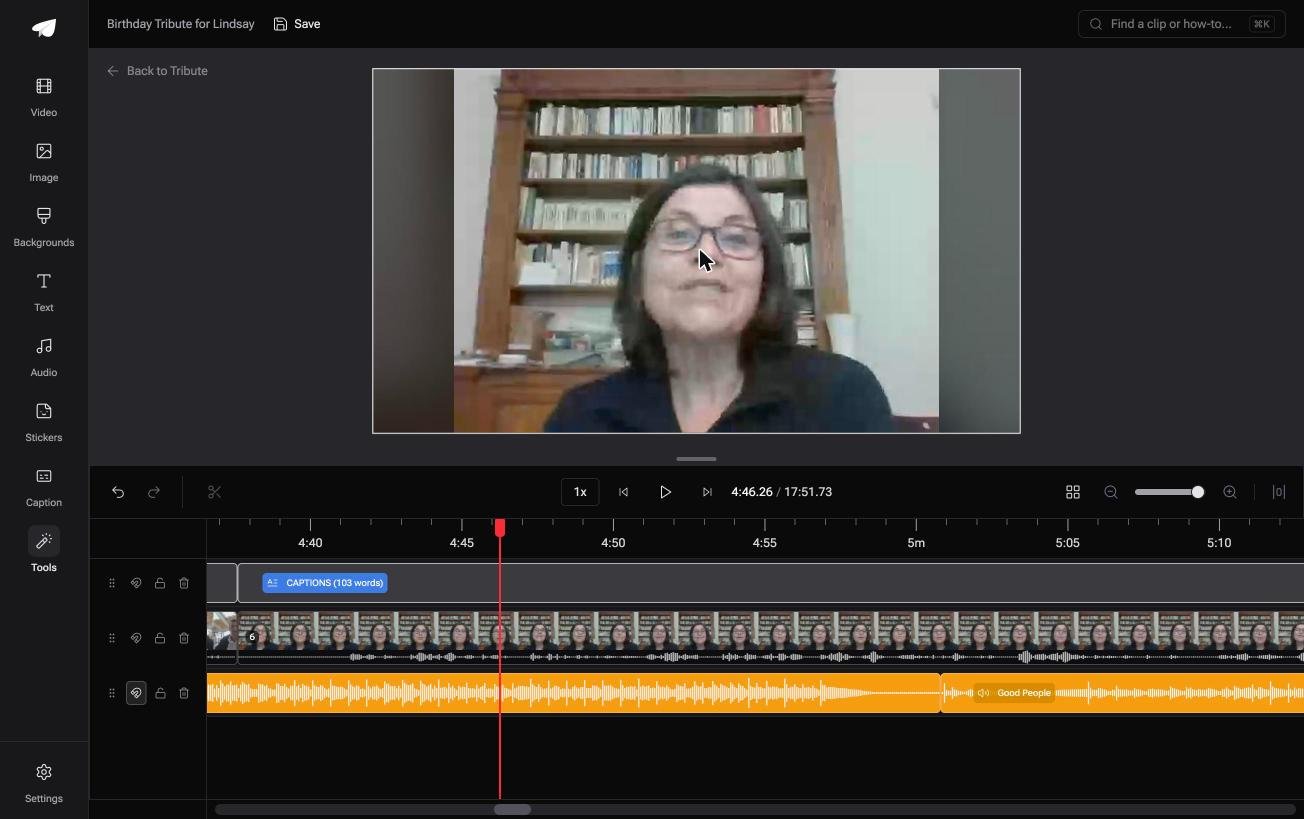
The Tribute video editor is a browser-based group video editor: contributors record clips on their phones and Tribute assembles them on a timeline with the music balanced under the voices.
It is ours, and it is the last thing on this page.
- 39 licensed tracks across 11 genres, cleared for use inside the editor
- Your own audio too: a YouTube link, or an MP3, WAV, M4A or FLAC upload
- 25% under speech, 75% under photographs by default, changeable on any single clip
- Crossfade songs blends one track into the next, and Loop music fills a timeline that outruns the song

Best for: A birthday video where twelve people were recorded in twelve rooms at twelve different volumes.
Why it works: The level is set per clip rather than once for the timeline, so the quiet speaker is not buried by the track that suited the loud one.
Does the song have to be your decision at all?
Everything above starts with you choosing a track.
You audition, you check whether it is cleared, you cut to it, and you balance it against nine voices recorded at nine distances. That is a real job, and it is the one most people underestimate when they start.
For one kind of birthday video, the decision is made before you arrive.
The case: the clips are other people, not your footage
You are in it when a group each recorded something for one person.
Picture a seventieth where nine relatives sent twenty seconds each. One was recorded in a car, one in a garden with a mower running, one on speaker in a hallway. A single song laid flat across those nine will bury three of them.
Which means the search that brought you here, birthday song with video, is a mixing question more than a music one.
Why the balance stops being yours to fix
The music arrives already sitting under the voices.
In the Tribute video editor every clip lands with the track at 25% while someone is speaking and 75% under photographs, and the shelf of 39 tracks is cleared for use there, so no part of the choice involves a license page.
What you do not have to balance
- Not nine clips by ear. The track runs at 25% under speech and 75% under photographs from the start.
- Not the wind and the mower on a Concierge Tribute: Eve, the assistant inside the editor, cleans up background noise across every clip.
- Not the song's ending. Crossfade blends one track into the next when the video outlasts it.
- Not the edit itself, if you take Concierge and Tribute's editors build the video for you.
When this is the wrong answer: the video is yours alone, or the whole point is one specific commercial song. Then the apps above are where you belong, and the licensing question is yours to settle.

Frequently Asked Questions
How loud should the music be under talking?
About a quarter of full volume, which will feel too quiet while you set it. Phone audio recorded in a kitchen loses to music at any even level.
Can I use a chart song in a birthday video?
In a private video played at a party, nobody checks. Uploaded to a public page, a commercial recording can draw a Content ID claim, and the owner decides what happens next.
What is the right length for a birthday song edit?
One song, which is to say three to four minutes. Needing a second track is the signal that the video is too long.
Do I need a birthday song editing app, or will any editor do?
Any editor with a separate audio track will do. The dedicated apps save you the pacing decisions and take away the control at the same time.
How many photographs fit a three minute song?
About forty at four seconds each. Past sixty, the sequence turns into a queue whatever the music is doing.
What about people singing on the clips themselves?
Keep those unscored. Nine relatives singing out of time is the best thing in the video, and music underneath makes it sound like a mistake rather than a choice.
👉 Put one track under nine voices without touching a fader if a group each recorded something for one person, and the mixing stops being yours.
