
Edit Song TikTok: What You Can Change In the App and What You Cannot
Inside TikTok you can choose where a song starts and how loud it sits against your own audio. You cannot cut a verse out, fade an ending or rearrange a track. That work happens before you upload.

What does the edit song TikTok trimmer give you?
A start point, and that is close to the whole of it.
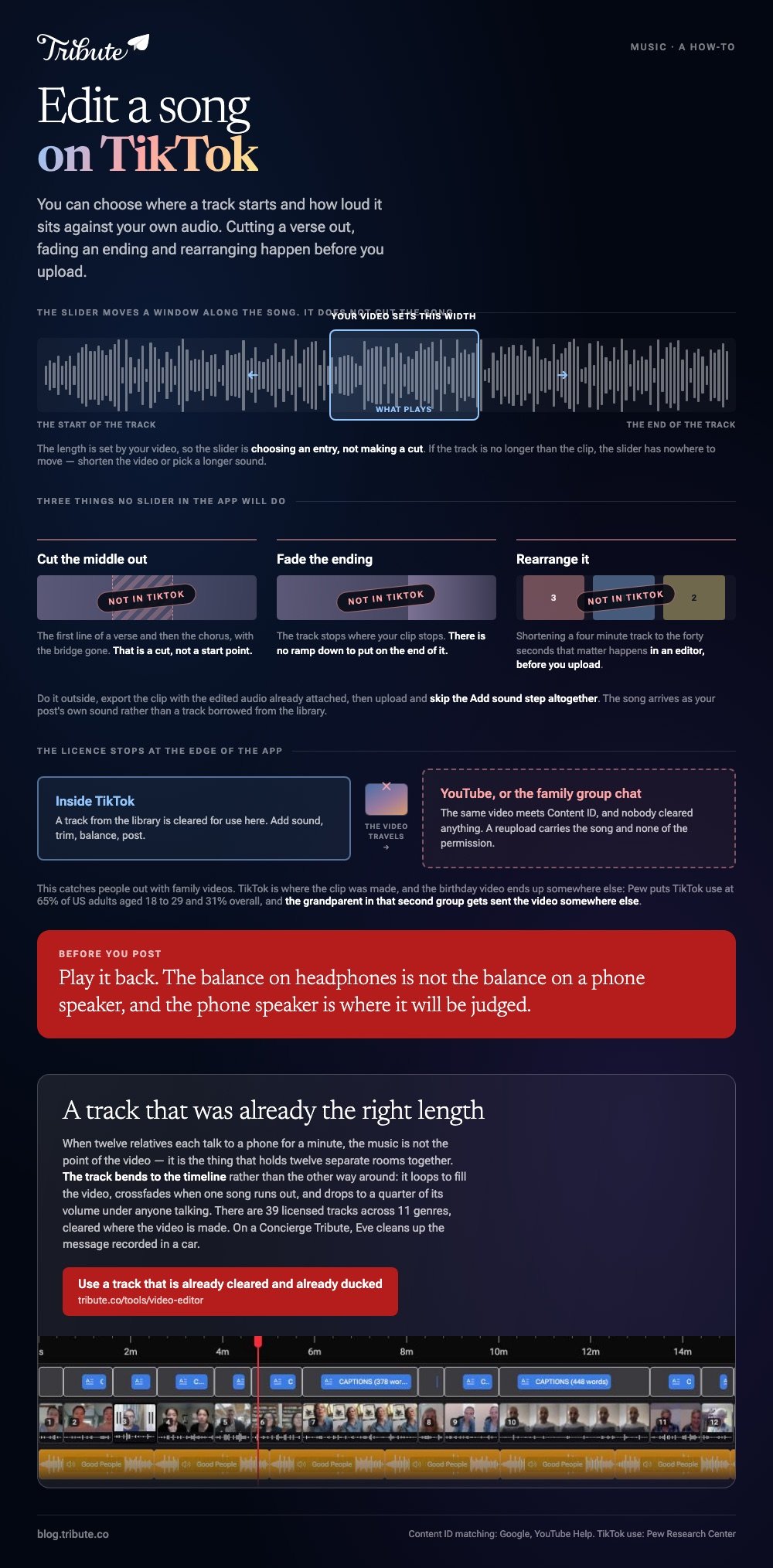
When you add a sound to a clip, the app lets you slide along the track to pick which stretch plays. The length is set by your video, so the slider is choosing an entry, not making a cut.
A TikTok song editor in the sense people mean, something that reshapes a track, is not part of the app. What you get is a small set of controls that sit on top of a song somebody else cleared.
| What you want | In TikTok | Where it is done |
|---|---|---|
| Start on the chorus | Yes, with the slider | The sound screen |
| Balance music against speech | Yes, two sliders | The volume control |
| Cut the middle out of a song | No | An audio editor, before upload |
| Fade the ending | No | An audio editor, before upload |
How do you trim a sound on TikTok?
Add the sound first, then open its trim control.
The order is worth getting right. A sound added after you have set your clip length behaves in its own way, and the slider only has somewhere to go when the track runs longer than the video.
- Tap the plus button and record or upload your clip.
- Choose Add sound and pick a track from the library.
- Open the trim control next to the sound name, shown as a scissors icon on most builds.
- Drag the waveform until the part you want sits under your clip.
- Open Volume and set the two sliders: your original audio, and the added sound.
- Play it back before you post. The balance on headphones is not the balance on a phone speaker.
TikTok moves these controls between releases, so the icon may sit on the right edge of the editing screen rather than beside the sound name. The sequence stays the same: add, trim, balance.
Compared with a desktop editor, this is a set of presets rather than a mixer. It is enough for a clip where a song plays under a scene, and not enough for anything where the music has to land on a cut.

When does an edit song TikTok job belong outside the app?
The moment you need the song to change shape.
Shortening a four minute track to the forty seconds that matter is a cut, not a start point. Say you want the first line of a verse and then the chorus, with the bridge gone: no slider does that.
Do it in an editor, export the result, then bring it in as the audio of your upload. The song becomes the original sound of your post rather than a track borrowed from the library.
- Trim and fade in an audio or video editor on your phone or laptop.
- Export the clip with the edited audio already attached.
- Upload it and skip the Add sound step altogether.
Nearby jobs: putting lyrics on screen, editing subtitles, choosing a song for a slideshow, and building a montage where the music has to carry the whole thing.
What happens when the video leaves TikTok?
The license stays behind.
A track from TikTok's library is cleared for use inside TikTok. Post the same video to YouTube and it meets Content ID, which Google documents as matching uploads against a database of recordings, with the owner choosing what happens next.
This catches people out with family videos. TikTok is where the clip was made, and the birthday video ends up on YouTube or in a group chat, where nobody cleared anything.
Unlike a post that stays on TikTok, a reupload carries the song with it and none of the permission.
Numbers make the gap plain. The Pew Research Center puts TikTok use at 65% of US adults aged 18 to 29 and 31% of US adults overall, and the grandparent in that second group gets sent the video somewhere else.
What if the video is a present from a dozen people?
The Tribute video editor is a browser-based group video editor: contributors record clips on their phones and Tribute assembles them on a timeline with the music balanced under the voices.
It is ours, and it is the last thing on this page.
- 39 licensed tracks across 11 genres, cleared inside the editor, so no song has to be borrowed
- Your own audio too: a YouTube link, or an MP3, WAV, M4A or FLAC upload
- Music at 25% under speech and 75% under photos by default, overridable per clip
- Crossfade songs blends one track into the next, and a Tools panel option loops music to fill the timeline

Best for: A video that has to play at a party and then live in the family group chat, where a borrowed track would be a problem.
Why it works: The track is cleared where the video is made, and the level under each voice is set before you touch it.
What if the song never had to be cut to length?
Trimming a track is a symptom. The cause is a song that was written for the radio and a video that is four minutes long.
Every control above exists to force one to fit the other. There is a kind of video where the fit is handled before you arrive.
The case: the clips are messages, not scenes
This is the case where several people each record something for one person.
Twelve relatives talk to a phone for a minute each. The music is not the point of the video, it is the thing that holds twelve separate rooms together, and it has to duck out of the way whenever somebody speaks.

Why the length question disappears
Because the track bends to the timeline rather than the other way around.
Music loops to fill the video, crossfades when one song runs out, and drops to a quarter of its volume under anyone talking. None of that is a cut you make.
That is how the Tribute video editor treats music: not a better trimmer, but a track that was already the right length.
What you do not have to do
- Not the chasing. Each person records from one link, wherever they are.
- Not the cutting. The track loops to the length of the video and crossfades into the next.
- Not the levels. It drops to a quarter under anyone talking without a slider.
- Not the edit. On a Concierge Tribute, Tribute's own editors finish it, and Eve, the AI assistant inside the editor, cleans up the message recorded in a car.

When this is the wrong answer: the song is the whole idea and the video is built around one specific commercial release. Then edit the audio yourself, upload it as your own sound, and accept that it stays on TikTok.
The editor is also not a sound editor. It sets levels and blends tracks, and it lives inside a paid Tribute rather than standing on its own.
Frequently Asked Questions
Can you cut a song on TikTok?
Not in the sense of removing a section. You can choose where the track starts under your clip, and the clip length decides where it stops.
Why can I not trim the sound on my video?
Because the track is no longer than the clip, which leaves the slider nowhere to move. Shorten the video or pick a longer sound.
How do I lower the music without losing my voice?
Open the volume control and use the two sliders: one for your original audio, one for the added sound. Set the music low enough that the words win on a phone speaker.
Can I edit a TikTok sound after posting?
No. The sound and its trim are part of the post, so a change means deleting it and uploading again.
How do I use a song TikTok does not have?
Put the audio on the video in an editor first, then upload the result. The song arrives as your clip's own sound rather than as a library track.
Is it safe to post the same video to YouTube?
Only if the music is cleared for use there. A library track from TikTok is not, and Content ID will match it.
What length should the music be for a group video?
As long as the video, which is the problem with using a single song. Looping or crossfading two tracks covers a longer edit without a hard stop.
👉 Use a track that is already cleared and already ducked if twelve people are talking and one song has to sit under all of it, and no slider work survives into the final cut.
