
Merge QuickTime Videos: What Works, What Breaks, What to Use Instead
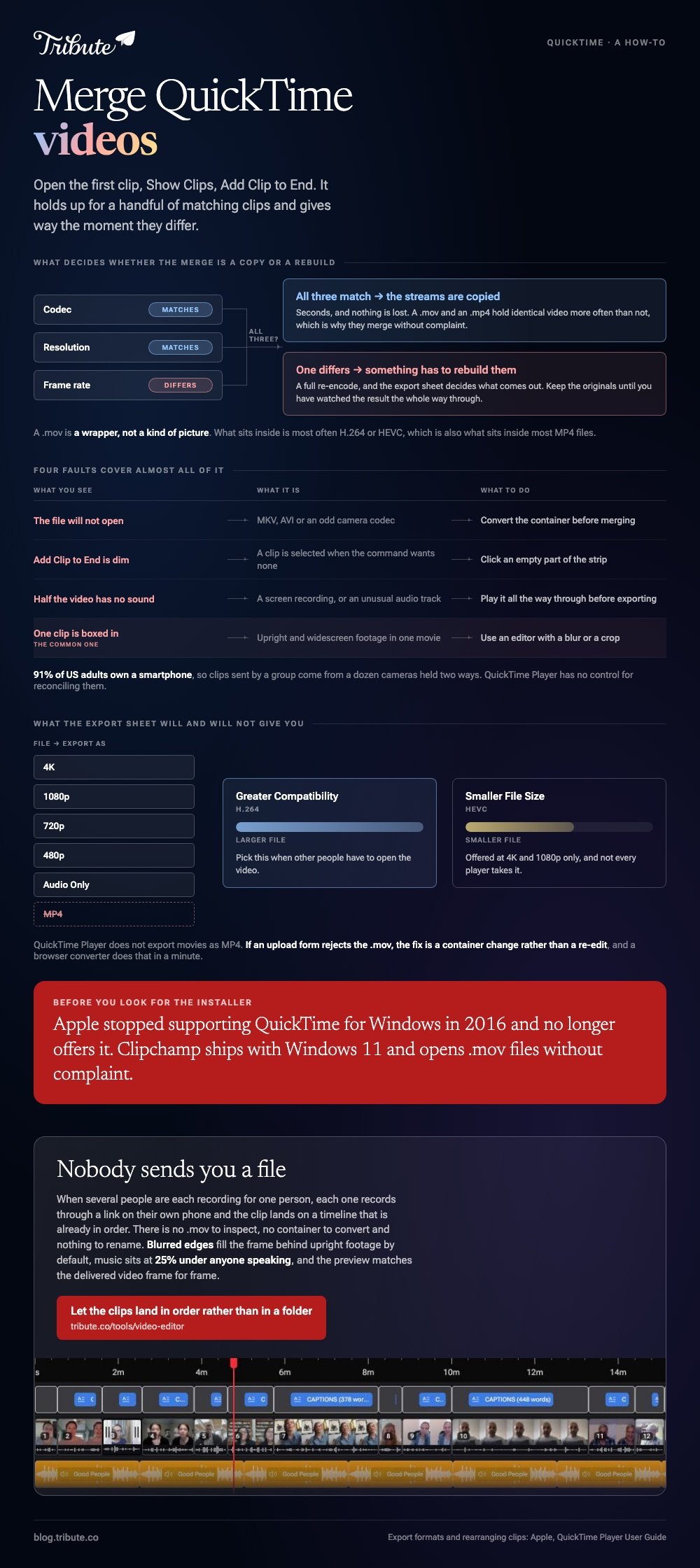
You can merge QuickTime videos in QuickTime Player itself: open the first clip, choose View > Show Clips, then Edit > Add Clip to End. It holds up for a handful of matching clips and gives way the moment they differ.

What is a QuickTime video file?
It is a container, not a kind of picture.
A .mov is a wrapper. What sits inside is most often H.264 or HEVC, which is also what sits inside most MP4 files.
So the two extensions hold identical video more often than not. That is why a .mov and an .mp4 merge without complaint, and why two .mov files sometimes will not.
What decides whether a merge needs a rebuild is the codec, resolution and frame rate inside the wrapper. Match those three and any tool copies the streams. Mismatch one and something has to rebuild them.
How do you merge QuickTime videos on a Mac?
In the player that opened the file, with nothing to install.
- Double-click the clip you want first.
- Choose View > Show Clips to bring up the clip strip.
- With nothing selected, choose Edit > Add Clip to End, select the second file and click Choose media.
- Repeat for each further clip.
- Drag the thumbnails into the order you want, then click Done.
Apple's page on rearranging movie clips covers the drag step, and notes that a movie with a single clip has to be split before there is anything to rearrange.
Trimming before the join
Select a clip, choose Edit > Trim, and drag the yellow handles inward.
Do this before you export rather than after. Unlike a timeline editor, QuickTime Player gives you no waveform, so you are finding the first word by ear.
Trim the head of every clip except the first. Three seconds of someone reaching for the record button reads as a pause between speakers, and across ten clips it adds half a minute of nothing.
Why does the merge fail or come back silent?
Four faults cover almost all of it.
| What you see | What it is | What to do |
|---|---|---|
| The file will not open | MKV, AVI or an odd camera codec | Convert before merging |
| Add Clip to End is dim | A clip is selected when the command wants none | Click an empty part of the strip |
| Half the video has no sound | A screen recording or an unusual audio track | Play it through before exporting |
| One clip is boxed in | Upright and widescreen footage in one movie | Use an editor with a blur or crop |

The last row is the common one.
With 91% of US adults owning a smartphone, per the Pew Research Center mobile fact sheet, clips sent by a group come from a dozen cameras held two ways. QuickTime Player has no control for reconciling them.
What file comes out when you merge QuickTime videos?
Another .mov, and nothing else.
Use File > Export As. Apple's page on exporting movies lists 4K, 1080p, 720p, 480p and Audio Only, and states that QuickTime Player does not export movies as MP4 videos.
At 4K and 1080p you also choose between Greater Compatibility, which writes H.264, and Smaller File Size, which writes HEVC. Pick the first when other people have to open the video.
If an upload form rejects the .mov, the fix is a container change rather than a re-edit, and a browser converter does that in a minute.
Where should you merge .mov files instead?
Wherever the clips stop matching or the list stops being short.
- iMovie: already on the Mac, and the shortest path to music, titles and a level per clip.
- Clipchamp: the same job in a browser tab, which matters if the files are not all on one machine.
- Clideo: one merge and nothing else, with a watermark on the free tier.
- VLC: skip it. VideoLAN's own documentation says none of the methods VLC offers appear to merge with correct time signatures.
The line between them is the number of clips. Two or three matching files belong in QuickTime Player, because opening anything heavier costs more time than the merge saves.
Ten clips from ten people belong somewhere with a timeline, a waveform and a volume control, and that is true whichever container they arrived in.
Browser routes are covered in merging video clips online and merging videos online. For clips that live on a channel rather than a disk, see merging YouTube videos.
What if the clips came from a dozen households?
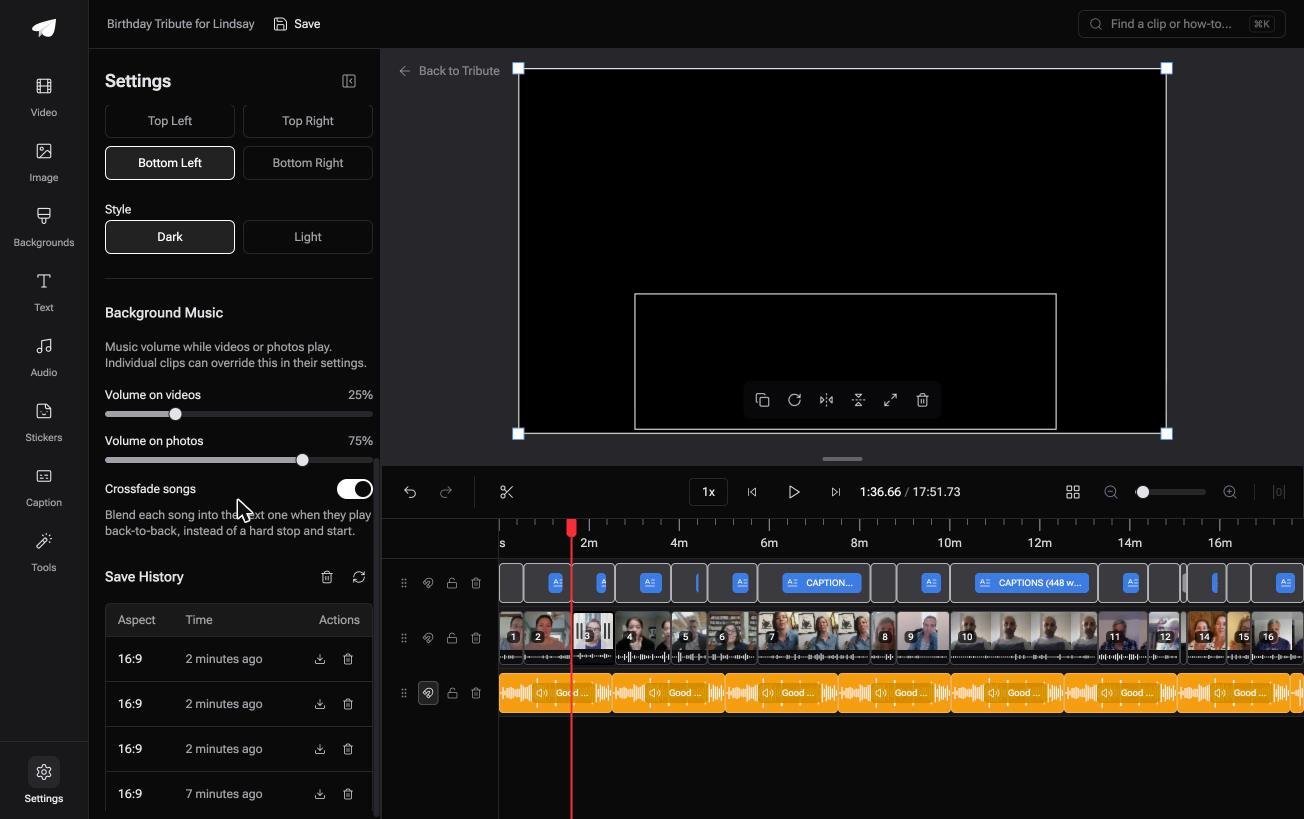
The Tribute video editor is a browser-based group video editor: contributors record clips on their phones and Tribute assembles them on a timeline with the music balanced under the voices.
It is ours, and it is the last thing on this page.
- Clips arrive in order, whatever phone recorded them, with a tick against the ones on the timeline
- Blurred edges fill the frame behind upright footage by default, which is the boxed-in problem solved
- Autosave and restorable version history, so a clip you removed is recoverable rather than gone
- Tribute renders the video on its servers, and the Tools panel sets expectations at five minutes to several hours
Best for: Clips from a dozen different phones that refuse to sit in the same frame.
Why it works: Compared to a folder of mismatched files, nothing has to be reconciled before the editing starts.
Is there a version of this with no file handling at all?
None of the work above was the join.
Downloading them, checking what is inside them, converting the one that will not open, renaming them so they sort. The join itself takes seconds; the file handling takes the evening.
There is one case where no file ever reaches you.
The case: several people each recorded for one person
You are in it when the video is addressed to somebody rather than about something.
A coach whose last season just ended. A grandmother turning eighty. A friend in hospital whose visitors cannot all get there.

Why the codec question never comes up
Nobody sends you a file.
Each person records through a link on their own phone, and the clip lands on a timeline that is already in order. There is no .mov to inspect, no container to convert and nothing to rename.
That is the trade the Tribute video editor makes: less control over the format, none of the work that control costs.

What you do not have to do
- No codec to match. Each person uploads from their own phone and Tribute handles the rest.
- No roll call. A tick marks each clip already on the timeline.
- No audio balancing. Music sits at 25% under anyone speaking, and Eve cleans up a noisy room on Concierge.
- No merge to run. The preview matches the delivered video, frame for frame.
When this is the wrong answer: you shot the clips yourself, or you need a specific codec out the other end. Then QuickTime Player and iMovie are the right tools. The editor is not a standalone merger and lives inside a paid Tribute.
The wider job is covered in making a video montage.
Frequently Asked Questions
Can I merge two QuickTime videos without re-encoding?
Only if they match in codec, resolution and frame rate, and even then the export sheet decides. Keep the originals until you have watched the result the whole way through.
How do I merge QuickTime videos on Windows?
Not in QuickTime. Apple stopped supporting QuickTime for Windows in 2016 and no longer offers the installer. Clipchamp ships with Windows 11 and opens .mov files without complaint.
Why is my merged movie much larger than the originals?
The export rebuilt it at a higher setting than the source. Choose a size that matches the footage rather than the largest one offered.
Can I add music while merging in QuickTime Player?
No. There is no second audio track and no volume control per clip. iMovie is the shortest route to music on a Mac.
How many QuickTime videos can I merge at once?
Apple publishes no limit, and the clip strip is the real ceiling. Past a dozen thumbnails, dragging them into order is slower than using a timeline.
Will a merged .mov play on an Android phone?
Most of the time, since the video inside is H.264 or HEVC. Export with Greater Compatibility if you are unsure who is opening it.
Can I merge QuickTime screen recordings?
Yes, and check the sound on each one first. Screen recordings are the clips that turn up silent after a merge, and the fault is easier to spot before the export than after.

👉 Let the clips land in order rather than in a folder if they were sent to you rather than shot by you, and the codec question never reaches you.
