
Video Retirement Gifts: How to Make the Send Off Video
A video retirement gift works when it is short, specific and made of colleagues rather than stock footage. Fifteen people, twenty seconds each, one question answered by all of them. The gathering takes two weeks; the edit takes an evening.

What makes a video retirement gift land?
Detail that only the workplace knows.
Thirty-eight years in one building produce a vocabulary: the nickname, the chair nobody else sits in, the thing said at every Monday meeting. Those lines are the gift. A montage of generic thanks could be addressed to anyone.
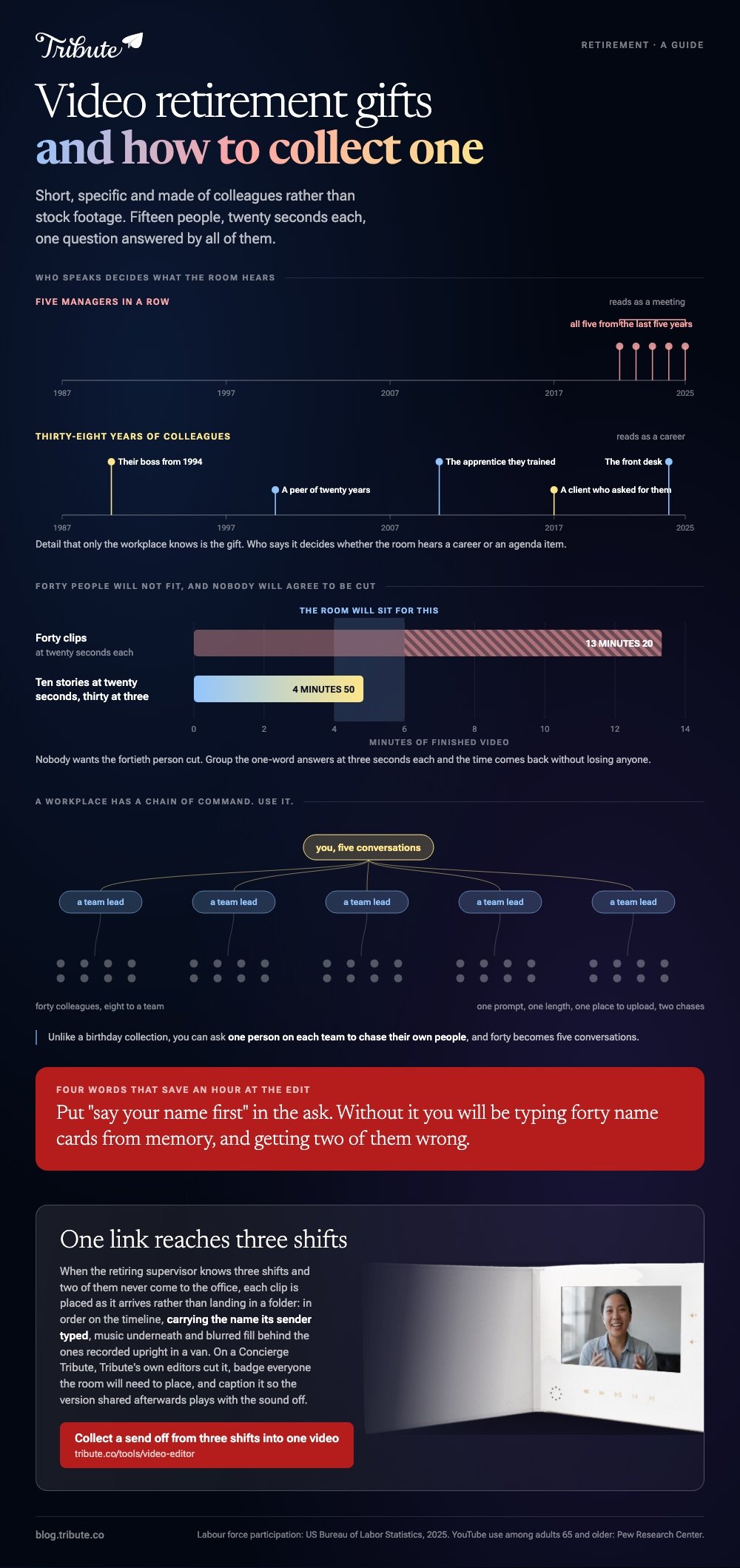
The other half is who speaks. A video that holds the retiree's own boss from 1994, the apprentice they trained, and the person on the front desk reads as a career. Five managers in a row reads as a meeting.
Work is lasting longer, which is part of why these videos keep getting commissioned. The Bureau of Labor Statistics reports that 19.1% of people 65 and older were in the labor force in 2025, so a send off now covers decades of colleagues.
Which retirement video ideas work for a coworker?
Send one question, not an invitation to speak.
The best happy retirement video ideas are prompts. A prompt gets a story; an open ask gets twelve people wishing someone all the best in their next chapter.
| Who is speaking | Ask them for | Length |
|---|---|---|
| Someone they trained | The first thing you learned from them | 20 seconds |
| A peer of 20 years | The day it all went wrong and what they did | 30 seconds |
| A manager | One decision of theirs that changed something | 20 seconds |
| A customer or client | Why you asked for them by name | 15 seconds |
| The whole team | One word each, cut together | 3 seconds each |
Retirement tribute video ideas tend to land when one person's story opens the video and the one word answers close it. The rhythm does the work that a title card cannot.
How do you collect retirement clips from forty people?
With a deadline, a format and two reminders.
- Set the date a week before you need it. Half the clips arrive on the last day whatever date you choose.
- Give the prompt and the length in one line. "Twenty seconds: the first thing Dave taught you."
- Name the format. Phone held sideways, face a window, say your name first.
- Collect in one place. A shared folder or an upload link, never a thread of attachments.
- Chase twice. Once at halfway, once the morning of the deadline.
Unlike a birthday, a workplace collection has a chain of command you can use: ask one person on each team to chase their own people, and the forty becomes five conversations.
Saying "say your name first" saves an hour at the edit. Without it you will be typing forty name cards from memory and getting two of them wrong.
Putting the clips together
- Drop everything on one timeline in a rough order, worst to best is a good start.
- Trim each clip's head in to the first word. The dead air is where the energy goes.
- Put names on screen for the first second of each clip.
- Add one instrumental underneath at about a quarter of full volume.
- Export at 1080p. Microsoft says the Clipchamp free plan exports to 1080p without a watermark, which is all a meeting room needs.

How long should a video retirement montage run?
Four to six minutes, played in a room.
| Setting | Length | Why |
|---|---|---|
| Team call | Under 3 minutes | Attention falls off a cliff on video calls |
| Office send off | 4 to 5 minutes | People are standing up with a drink |
| Seated dinner | 5 to 6 minutes | A room that is sitting will give you longer |
| Sent afterward | Any length | They will watch their own version twice |
Compared with a wedding video, a send off has a harder floor on length: nobody wants the fortieth person cut, and forty times twenty seconds is already thirteen minutes. Group the one word answers to buy the time back.
The craft carries over from other occasions: making a video montage, the anniversary version, fun birthday videos, and the slower video tribute.
Were you looking for the LiteBlue USPS retirement video?
Different thing, and worth saying out loud.
A search for a liteblue usps retirement video wants the Postal Service's own HR portal and its pension paperwork, not a send off for a colleague. The same goes for the CalPERS and TRS retirement videos: those are pension explainers from the plan itself.
If that is what brought you here, go to your plan's own site. The rest of this page is about the video the team makes.
What if forty colleagues each owe twenty seconds?
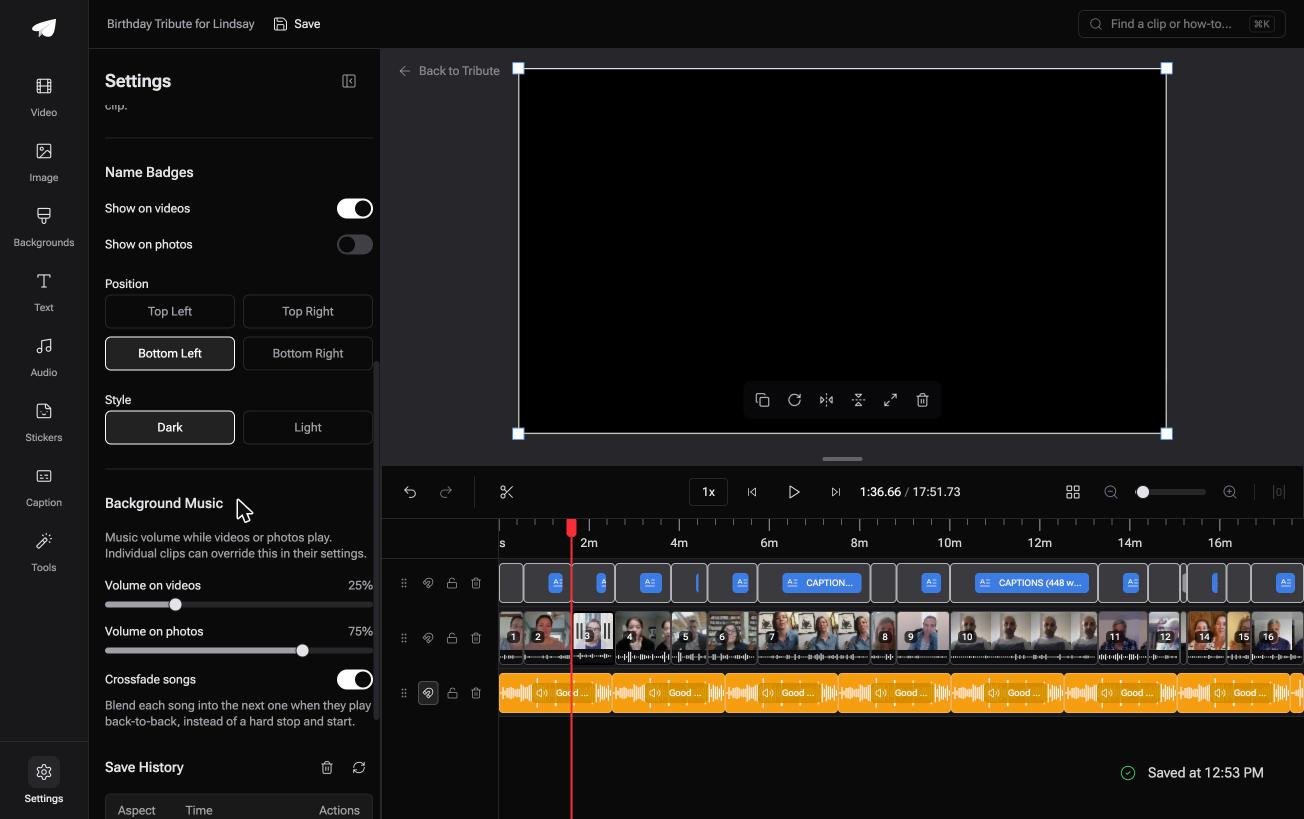
The Tribute video editor is a browser-based group video editor: contributors record clips on their phones and Tribute assembles them on a timeline with the music balanced under the voices.
It is ours, and it is the last thing on this page.
- Name badges from an uploader name and relation, four corner positions, dark or light
- Captions in one switch, 10 styles, every line editable with its own start and end timecode
- Music at 25% under speech and 75% under photographs, overridable per clip
- Reorder media numbers every clip and offers move to front, move to back and move to position
Best for: A send off where the names on screen matter as much as the stories, because half the room has never met the other half.
Why it works: Badges and captions apply across the whole timeline, so forty clips cost about what eight clips cost.
Who chases the forty coworkers for their clips?
Forty years of work and forty people who want to say something.
Somebody has to ask each of them, hold the files, and turn the pile into five minutes. In most offices that person volunteered in a meeting and now has a second job for a fortnight.
There is a way to run it where the chasing is the whole of the work.
The case: you are the organizer, not the editor
You are in it when your contribution is the list of people, not the cutting.
Picture a depot where the retiring supervisor knows three shifts, two of which never come to the office. Nobody on those shifts will open an editor, and six of them will record in a van at lunchtime.
Which means the search that brought you here, video retirement, is a logistics question wearing an editing costume.
Why the pile never forms
Each clip is placed as it arrives instead of landing in a folder.
In the Tribute video editor the submissions are already in order on the timeline, with a tick against the ones placed, music underneath and blurred fill behind the clips somebody shot upright in a van.
What you do not have to do
- No chasing three shifts. One link and one prompt reach all of them.
- No sorting. Clips arrive in order, each carrying the name its sender typed.
- No edit. On a Concierge Tribute, Tribute's own editors cut it, badge everyone the room will need to place, and caption it so the version shared afterward plays with the sound off.
That last point is not a detail. Pew Research Center puts YouTube use among adults 65 and older at 65%, and the retiree will rewatch this on a tablet long after the party.

When this is the wrong answer: the video is four colleagues and a photo montage from the shared drive. Then Clipchamp and one afternoon finishes it without anyone signing up for anything.

Frequently Asked Questions
How far ahead should we start?
Three weeks. Two for collecting, one for the edit and the inevitable late clip from the person who matters most.
What if someone will not record themselves?
Take it in writing and read it over a photograph of them. A written line in someone else's voice beats a gap where a close colleague should be.
Should the video be a surprise?
Tell the retiree there is a video, not what is in it. Surprises go wrong when the person has been dreading a fuss for a month.
What music suits a send off?
Instrumental, mid tempo, no swell at the end. A big finish turns a send off into a eulogy, which is not the feeling you want in the room.
Can we include people who already left?
Those are often the best clips in the video. A colleague from 1998 who turns up on screen is the moment the room reacts.
What format should the final file be?
An MP4 at 1080p, copied to a laptop before the day. Never rely on a venue's internet connection or on streaming it from a phone.
👉 Collect a send off from three shifts into one retirement video if nobody is ever in the same room, and every clip arrives on the timeline in order.
