
Photo and Video Editing Apps Compared
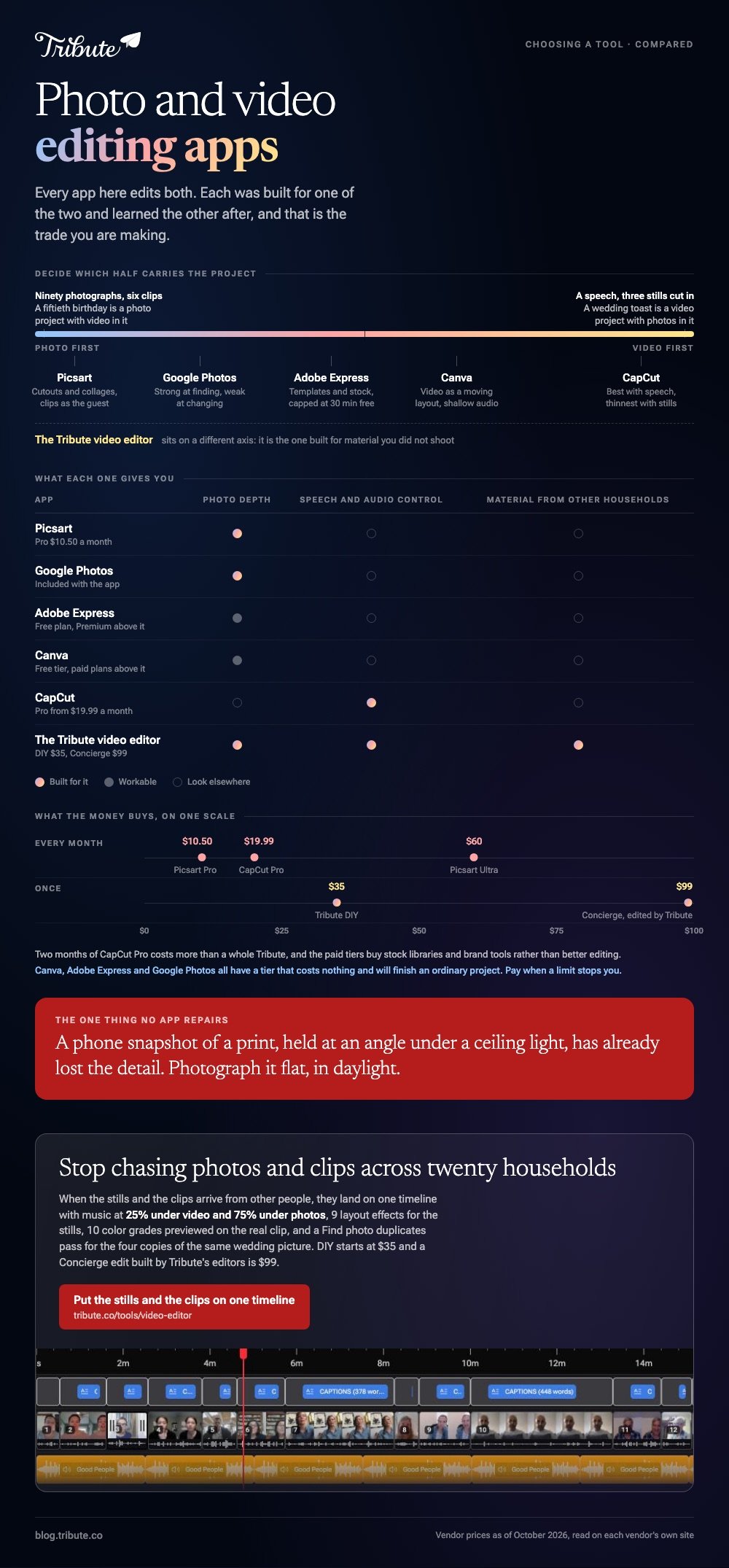
A photo and video editing app has to handle both stills and clips. The short answer is Canva for designed pieces, CapCut for anything with speech, Google Photos for material already in your library, and Adobe Express for templates. None is best at both, and that is the trade you are making.

| App | Best for | Price |
|---|---|---|
| Canva | Designed posts, title cards, photo-led videos | Free tier, paid plans above it |
| Adobe Express | Templates and a deep stock library | Free plan, Premium above it |
| CapCut | Clips with speech, captions, social formats | Free tier, Pro from $19.99 a month |
| Google Photos | Editing what is already on your phone | No charge, included with the app |
| The Tribute video editor | Photos and clips sent in by many people | Paid, DIY from $35 |
| Picsart | Cutouts, collages and stylised stills | Free tier, Pro $10.50 a month billed yearly |
Prices as of October 2026.
Can one app handle photos and video well?
Up to a point. Every app here edits both, and each one was built for one of the two and learned the other afterwards.
Canva and Adobe Express came from design, so their video is a moving layout. CapCut came from video, so its photo tools are thin. Google Photos came from a library, so it is strong at finding and weak at changing.
Decide which half carries the project before you choose. A fiftieth birthday video of ninety photographs and six clips is a photo project with video in it; a wedding speech with three stills cut in is a video project.
Pick the app that leads with the half that dominates.
Where they converge is the boring part, and it is the part that decides the result: photo duration, per-clip volume and a clean export. Check those three before you look at a single filter.
Price is the least useful way to separate them. Every app here has a tier that costs nothing and will finish an ordinary project, and the paid versions buy stock libraries, higher resolutions and brand tools rather than better editing.
Pay when a specific limit stops you, not before.
Which photo and video editing app should you choose?
Canva
Canva treats a video as a sequence of designed pages, which suits anyone who already builds invitations or slides there. Photos get cropped, masked and laid out with type that looks considered, and clips drop onto the same canvas.
Its weakness shows with long speech. Audio control is shallow, so forty minutes of talking across a dozen clips is the wrong material for it. Keep Canva for the short, designed, photo-led piece and send the talking to CapCut.
Best for: Title cards, photo-led videos and anything that needs to look designed.
Why it works: Nothing new to learn if you already use it, and the type and layout are better than any video editor on this list.
Adobe Express
Express is Adobe's lighter tool, built around templates and a large stock library rather than a professional timeline.
Its free plan runs to over 100,000 templates, a million licensed stock assets and 5GB of storage, with video projects capped at 30 minutes against two hours on the paid tiers.
Treat it as a design tool with video attached rather than an editor with design attached. For a photo collage, a short promo or a social post it is strong; for cutting an hour of family footage it is the wrong shape.
Best for: Templates, stock imagery and short pieces under half an hour.
Why it works: The stock library removes the hunt for a background or a font, which is where short projects stall.

CapCut
CapCut is the strongest video editor in this list and the weakest photo editor. Tap New project, add stills and clips together, drag them into order, and tap Export at the top right with the resolution label beside it.
Photos become timeline items with a duration you set, which is what a montage needs and nothing like what a photo editor offers. For retouching a portrait, open something else.
For putting ninety photos and six clips in order with music under them, this is the tool.
Best for: Mixed projects where the clips carry the story and the photos fill gaps.
Why it works: Per-clip volume and automatic captions are two taps away, and no photo editor on this list handles speech at all.
Google Photos
Google Photos is the only entry where the material and the tool live in the same place, which removes an entire step. Tap Create, tap Highlight video, tap Select content, pick your photos and videos, tap Next, then Create video.
Its photo editing is strong and its video editing is shallow. You can reorder clips by touching and holding, remove them, add music and add text, and you cannot trim individual clips inside a Highlight video, as Google's help page on making creations sets out.
Collages and animations sit in the same Create menu.
Best for: A quick video from photos and clips already on the phone.
Why it works: No importing, no upload and no second app. Compared with a dedicated editor, you give up fine control and save an hour of file shuffling.
The Tribute video editor
Here is the paid one, with the honest caveat first: if you are editing your own photos and your own clips, every app above is a better fit.
The Tribute video editor is a browser-based group video editor: contributors record clips on their phones and Tribute assembles them on a timeline with the music balanced under the voices. It runs inside a paid Tribute and will not open material from elsewhere.
Where it earns its place is a mixed project built by a group.
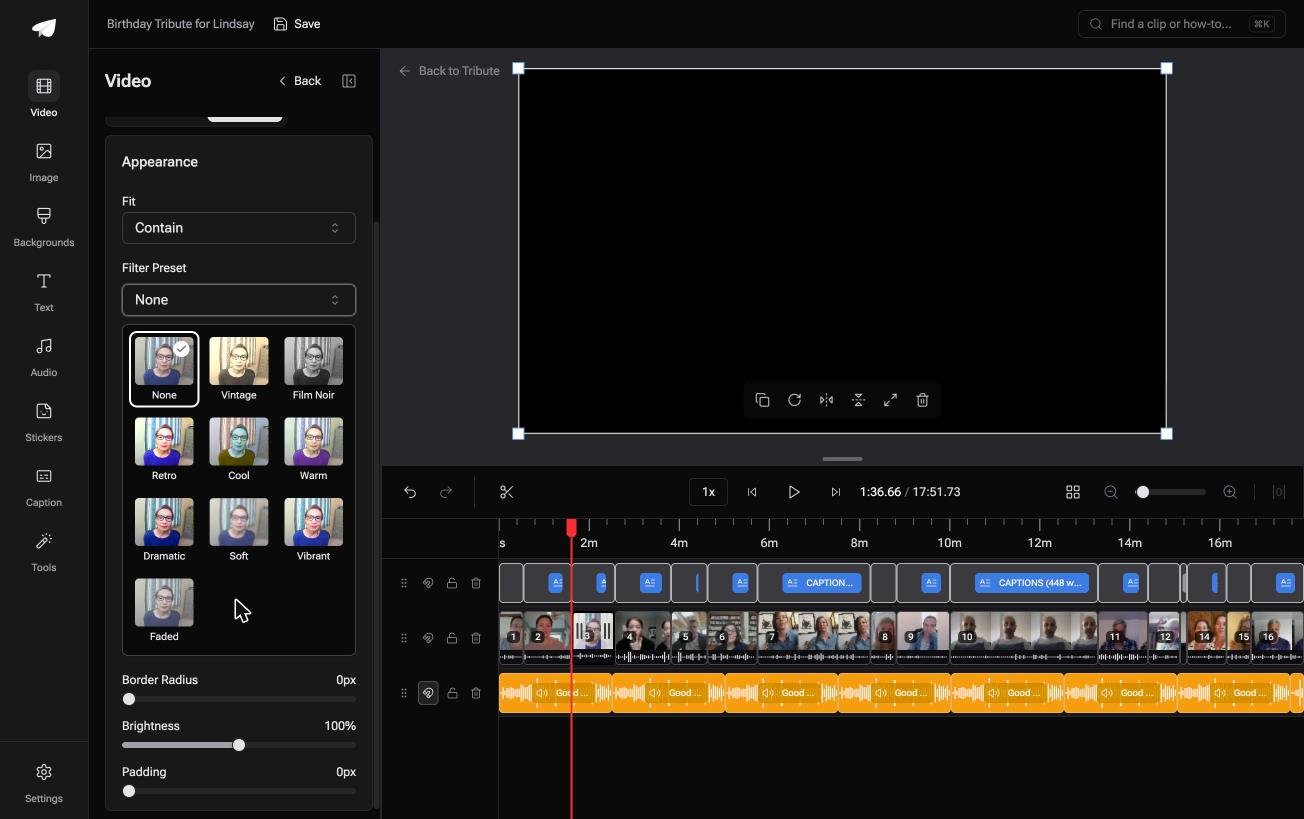
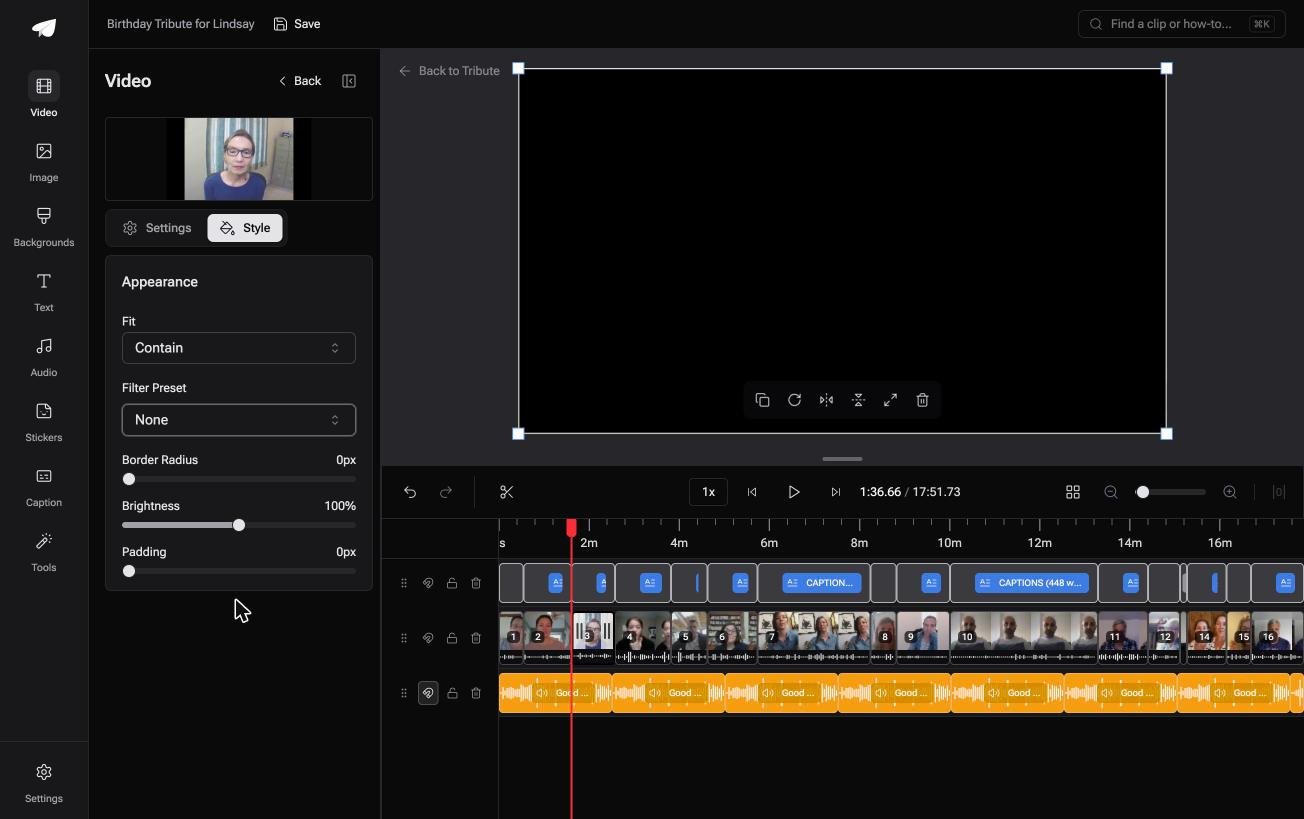
Photos and clips arrive from twenty people, and the editor handles stills with 9 layout effects including Tilt, Book and Floating, 10 color grades previewed on the real clip, and music at 25% under video and 75% under photos by default.
A Find photo duplicates tool clears the four copies of the same wedding picture that always turn up.
Best for: Photographs from an album and clips from a phone, sent in by fifteen different households.
Why it works: The collecting and the ordering happen before the editing. DIY pricing starts at $35 and a Concierge edit built by Tribute's editors is $99.
Picsart
Picsart is the most photo-first entry here, built around cutouts, backgrounds, collages and stylised edits, with video tools alongside them. Unlike CapCut, it starts from the still image and treats the clip as the guest.
Its paid tiers run to $10.50 a month for Pro and $60 a month per seat for Ultra, both billed yearly, and standard photo and video editing sits in every plan.
Choose it when the stills are the point and the clips are decoration. A birthday collage with two short videos embedded is its territory; a twenty minute video is not.
Best for: Stylised stills, cutouts and collages with a little video attached.
Why it works: The photo tools go deeper than any video-first app here, which matters when half your material is pictures.

What does a photo and video editor need to get right?
Four things, and none of them appear on a feature list.
Photo duration in one place. Setting ninety stills to three seconds each should be a single control. Software that makes you drag each one turns an hour into an evening.
Resolution mismatch. A scanned photograph and a 4K clip in the same video will not share a frame size. Look for a blurred fill behind the smaller item rather than black bars, which reads as a mistake.
Audio that ducks. Music at a fixed level will bury a quiet speaker in clip nine. Per-clip volume or automatic ducking is the difference between watchable and not.
A clean export. 1080p with no watermark is the floor. Check the export screen before you build, not after the render.
Scanned material is the fifth thing, and it catches people with older photographs. A print scanned at 300 dpi gives you enough detail for a full screen; a phone snapshot of a print held at an angle does not, and no app repairs that later.
Photograph flat, in daylight, against a window rather than under a ceiling light.
Instagram reaches 51% of US adults, according to Pew's social media fact sheet, which is why most of these apps default to a square or vertical canvas.
If the video is for a television at a party, change that before you start rather than cropping at the end.
Which is the best photo and video editing software for a mixed project?
Count your material first. Photos with a few clips among them sends you to Canva, Adobe Express or Picsart, clips with a few photos among them sends you to CapCut, and everything already sitting on an Android phone sends you to Google Photos.
Use two apps without guilt. Retouch the stills where retouching is good and assemble the video where assembling is good, since exporting a finished photo and importing it into an editor costs about ninety seconds.
Run a short test before you commit to either. Build thirty seconds with three photos, one clip and a music track, then export and watch it on a phone and a television.
Ten minutes spent that way will tell you whether the photo duration, the frame size and the volume behave, which is the whole question.
The exception is material you did not shoot.
When photos and clips arrive from twenty relatives, the editing app is not the constraint, as we cover in how a group video maker handles thirty phones, in montage apps for phones and in montage software compared.

Frequently Asked Questions
What is the best photo and video editor on a phone?
CapCut when video leads and Picsart or Canva when photos do. Google Photos is the better answer when the material is already in your library and the video is short.
Is there a photo and video editing app with no watermark?
Google Photos and the Apple Photos editor never add one, and Canva, CapCut and Adobe Express are clean at the resolutions most people export. Check the export panel in any app before the render.
Can I mix photos and video in one video?
Yes, in every app here. Set the photo duration once rather than one still at a time, and expect to deal with the frame size difference between a scan and a phone clip.
Do I need Photoshop?
Not for a family video. Photoshop is for one image at a time, and the work in a mixed project is sequencing and sound rather than retouching.
Which app is best for a slideshow with music?
CapCut for control over how the music sits under any speech, Google Photos if you want a track fitted for you, and Canva when the typography matters more than the audio.
How do I stop old photos looking soft next to video?
Scan or photograph them at the highest resolution you can, then let the editor scale down rather than up. A blurred fill behind a small image reads better than stretching it.
Should I edit on a phone or a computer?
A phone is faster under twenty items. Past that, dragging things into order on a small screen costs more than the edit, and our guide to merging videos covers the desktop route.
👉 Put stills and video on one timeline without chasing either if they are coming from other households, and the duplicate wedding photo gets caught for you.
