
Fix MP4 File Free: What Works and What Does Not
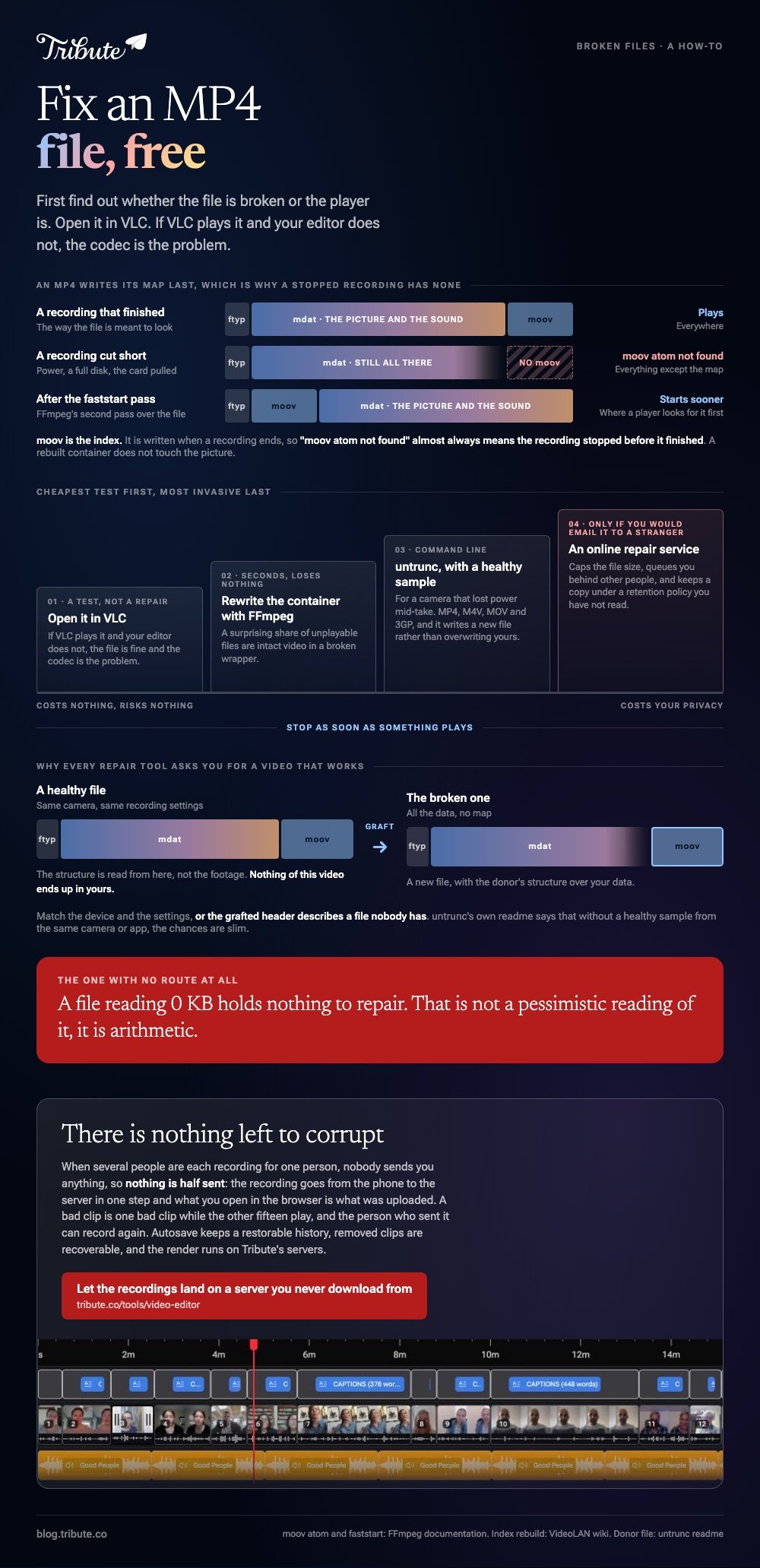
Before you repair anything, find out whether the file is broken or the player is. Open it in VLC. If VLC plays it and your editor does not, the file is fine and the codec is the problem.

| What happened | What is wrong | What has a chance |
|---|---|---|
| Recording stopped on its own | The index was never written | untrunc, with a healthy sample |
| Download or transfer cut off | The file is short | Copy it again from the source |
| Plays in VLC, not elsewhere | The container, not the data | Remux with FFmpeg |
| 0 KB on disk | Nothing was written | Nothing. Recover from the device |
Which fix MP4 file free tools are worth trying?
Three, and they solve three different faults.
Running them in the wrong order wastes an afternoon. Work from the cheapest test to the most invasive, and stop as soon as something plays.
1. VLC, as a diagnosis
VLC plays things other software refuses, which makes it a test rather than a repair. If it opens, your footage survived and you need a different container or a different codec.
One genuine repair does live in VLC, and it is for AVI rather than MP4. When an AVI has no index, VLC can rebuild one as it plays.
- Open Tools > Preferences and set Show Settings to All.
- Go to Input / Codecs > Demuxers > AVI.
- Set Force index creation to Always fix.
- Press Save, then restart VLC.
VideoLAN's own page on the setting describes the three choices: Ask, which is the default, Always fix, and Never fix. The repair happens in memory, so your file on disk is unchanged.
2. FFmpeg, to rewrite the container
A surprising share of unplayable files are intact video in a broken wrapper. Rewriting the wrapper without touching the picture takes seconds and loses nothing.
FFmpeg's faststart flag exists for a related reason. The documentation describes it as a second pass that moves the index, the moov atom, to the beginning of the file, which is where a player looks for it first.
That matters because "moov atom not found" is the error behind most dead MP4s. The index is written last, so a recording cut short has everything except the map.
3. untrunc, for a truncated recording
This is the tool for a camera that lost power mid-take. It rebuilds the missing index by copying the structure from a file that is intact.
The project's own readme is honest about the condition: you need another video file taken from the same camera or app that is not broken. Without one, in its words, the chances are slim.
It handles MP4, M4V, MOV and 3GP, and it writes a new file rather than overwriting yours. It is a command line tool, which is the real barrier for most people.

Should you fix a corrupted video online free of charge?
Only when you would be content to email that footage to a stranger.
Browser repair services do work, and the good ones use the same trick untrunc does: they ask for a healthy sample recorded on the same device at the same settings.
To fix an MP4 video online free tools exist, and the ones that ask for nothing are the ones to distrust.
Read the terms before you upload a memorial service or a wedding. You are handing a file you cannot replace to a company whose retention policy you have not read.
Unlike a local tool, an online service also caps file size and queues you behind other people. Compared to running FFmpeg once, that is a slow way to learn the file is beyond help.
A practical order: try to fix corrupted video files online free of charge only after the local tools have failed, and copy the broken file somewhere safe first.
What do you do when nothing opens the file?
Go back to where it came from, because a second copy beats a repair every time.
- The camera or phone. The original may still be on the card or in the app's own storage
- Cloud backup. Photos services keep a copy from before the transfer went wrong
- The recycle bin or trash. On the computer and on the phone
- The card itself. Stop writing to it and use a recovery tool before anything else lands on it
A file reading 0 KB holds nothing to repair. That is not a pessimistic reading of it, it is arithmetic.
Next time: copy rather than move, let the camera finish writing before you pull the card, and leave a little space on the card so the index has room.
Related reading on the files themselves: compressing a video file online and exporting MP4 from iMovie.
What if the footage was never on your machine?
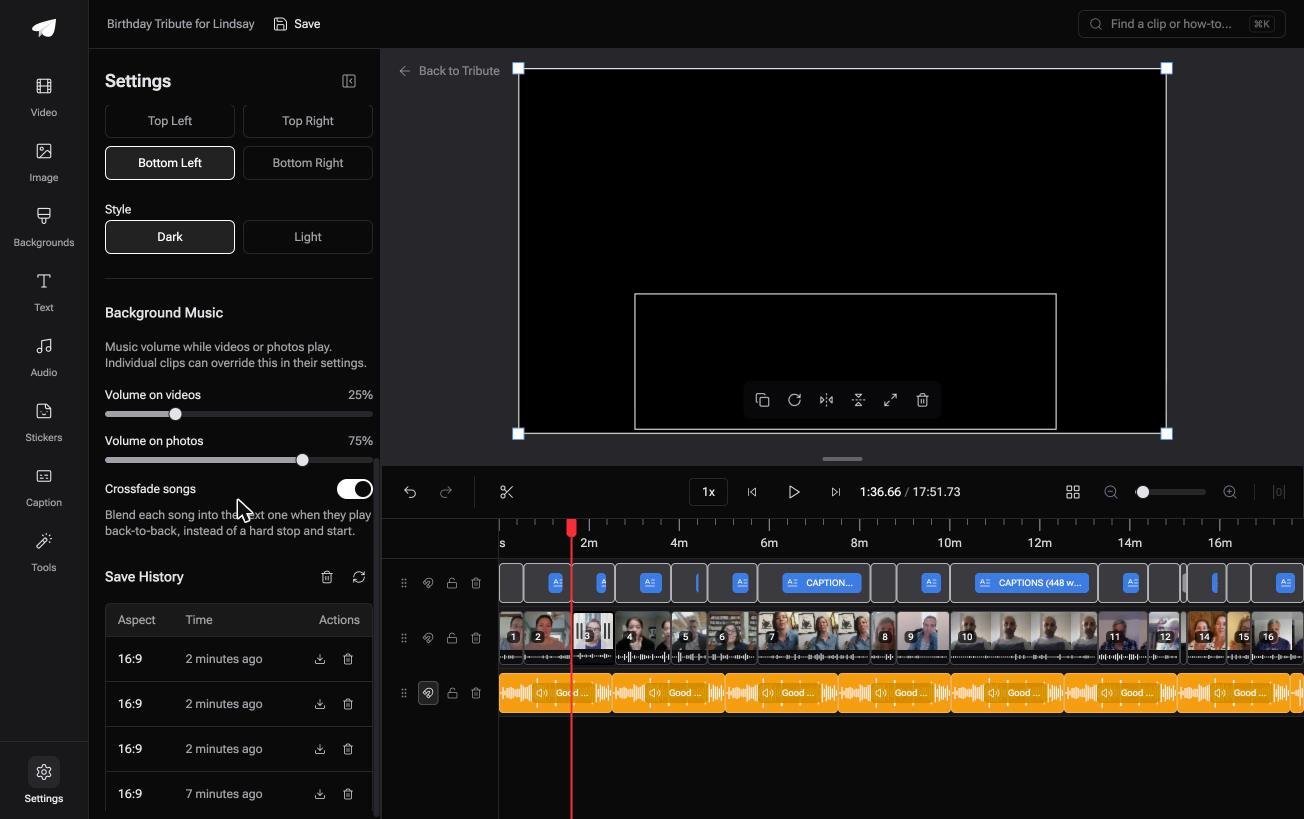
The Tribute video editor is a browser-based group video editor: contributors record clips on their phones and Tribute assembles them on a timeline with the music balanced under the voices.
It is ours, and it is the last thing on this page.
- Autosave with restorable version history, and removed clips are recoverable rather than deleted
- Tribute renders the final video on its servers, which the Tools panel puts at five minutes to several hours
- Music at 25% under speech and 75% under photos by default, set per clip
- The preview is frame-accurate to the video you get back
Best for: Footage you cannot reshoot, recorded by people who are not careful with files.
Why it works: Unlike a project file on one laptop, the clips and the edit both live on a server with history behind them.
Can the file skip your laptop altogether?
All of that begins with a file you are holding and cannot open.
It arrived by AirDrop, by email, on a card, or from a download that stopped. Each handoff is a chance for the index to go missing, and most repair work is paying for a handoff that went wrong.
The case: the clips upload themselves
You are in it when several people each record something for one person.
A grandfather turning ninety. A manager leaving after eighteen years. Each person records on the phone in their hand and the clip uploads from there.
Which means the search that brought you here, how to fix an MP4 file, describes a failure that needs a transfer to happen in.
Why the corrupt file never arrives
Nobody sends you anything, so nothing is half sent.
The recording goes from the phone to the server in one step, and what you open in the browser is what was uploaded.
In the Tribute video editor a bad clip is one bad clip, while the other fifteen play, and the person who sent it can record again.

What you do not have to do
Three jobs, and recovering a file is not among them.
- Not the transfer. The recording goes from the phone to the server in one step.
- Not the render. The file is built on Tribute's servers, not yours.
- Not the edit. On a Concierge Tribute, Tribute's editors assemble the sixteen clips, and Eve, the assistant on Concierge and Concierge + Video Book, cleans up the one that came back rough.

When this is the wrong answer: the broken file is the only copy of something already shot, which no editor can undo. Then your route is untrunc, a recovery tool on the card, or a specialist.
More on assembling what you do have in a video montage maker and making a video tribute.
Frequently Asked Questions
What does "moov atom not found" mean?
The MP4 index is missing. It is written when a recording ends, so the message almost always means the recording stopped before it finished.
Can VLC repair an MP4?
Not in the way it repairs an AVI. VLC's Force index creation setting is for AVI files, though VLC is still the fastest way to test whether an MP4 is readable.
Why do repair tools ask for a working video?
They copy the structure from the healthy file and graft it onto the broken one. Match the device and the recording settings, or the grafted header describes a file nobody has.
Is it safe to upload damaged footage to a repair site?
Treat it as publishing. For anything private, run a local tool first and read the retention policy before you upload.
Will repairing a file lose quality?
A rebuilt container does not touch the picture. A repair that re-encodes the video does, and most of the good tools avoid it.
My phone video stops partway through. Is that the same fault?
Often yes. A recording interrupted by a full disk or a dead battery leaves playable data with a broken tail, which is the case untrunc was built for.
Can I still edit a file that plays with glitches?
Re-encode it to a clean copy first, then cut the clean copy. Editing a damaged file tends to spread the damage into your export.
👉 Let the recordings land on a server you never download from if people would otherwise send them however they like, and there is nothing left to corrupt.
