
Combine Videos: Windows 11 and 10, and the Editor Microsoft Took Away
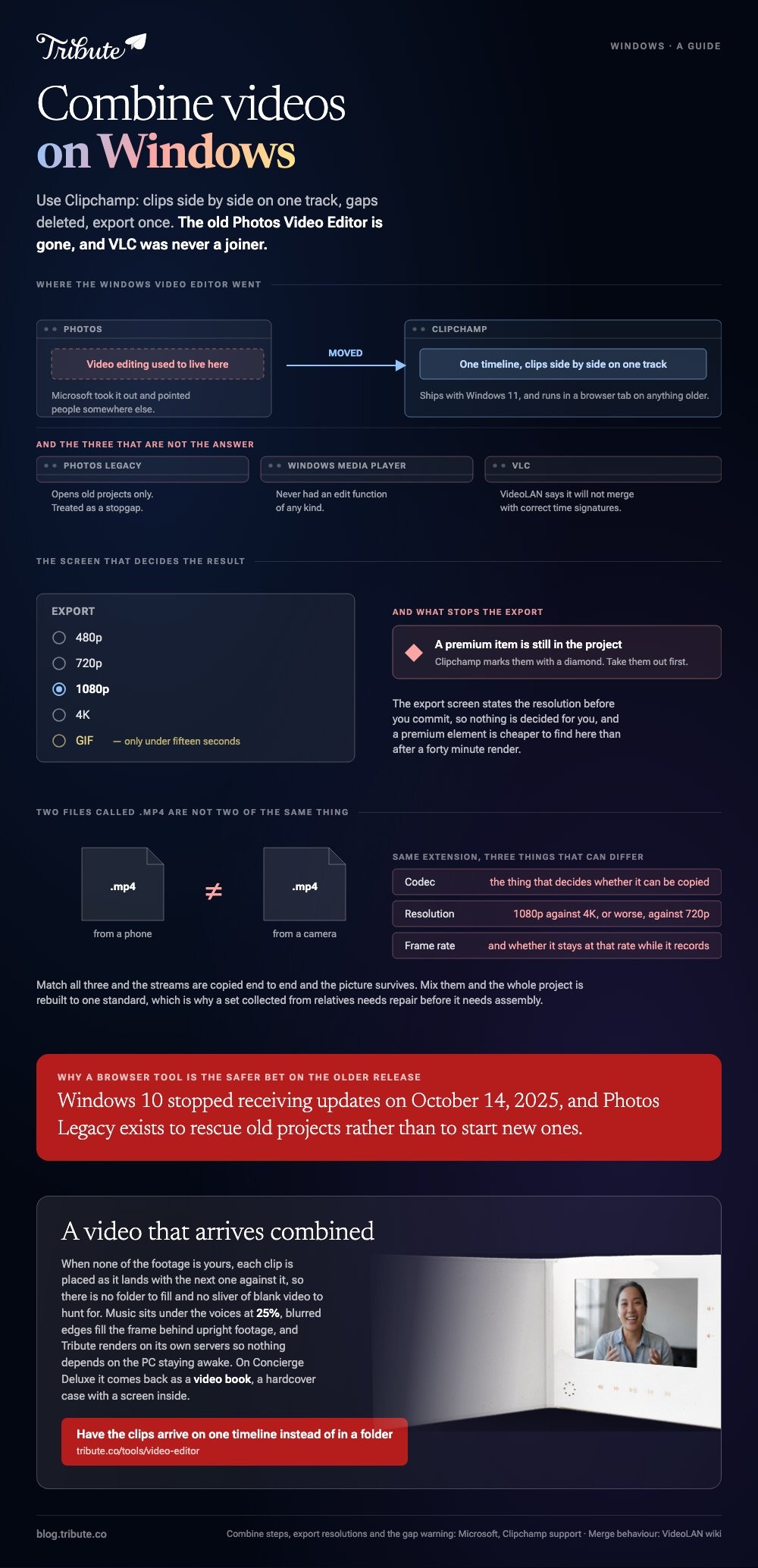
Use Clipchamp. Drag the clips side by side on one timeline track, delete any gap between them, then export. The old Photos Video Editor is gone, and VLC is not a joiner whatever the tutorials say.

Is there a way to combine videos, Windows 10 included, without an install?
Yes. Clipchamp runs in a browser and ships with Windows 11.
Microsoft moved video editing out of the Photos app and pointed people at Clipchamp instead. Old projects survive in a separate Photos Legacy app, which Microsoft has treated as a stopgap rather than a product.
That matters more on the older release. Windows 10 stopped receiving updates on October 14, 2025, so a browser tool is the route that will still be there next year.
How do you combine videos, Windows 11 or Windows 10, in Clipchamp?
Five steps, and the fourth is the one people skip.
- Open My media on the toolbar, then import media, and bring in every clip from the PC or OneDrive.
- Drag the clips onto the timeline, side by side on the same track, in the order you want them to play.
- Trim with the handles on a clip. Hold Shift, select several, and the handles move all of them at once.
- Hover over any space between two clips and press delete this gap. A gap renders as blank video in the finished file.
- Click Export at the top right and choose a resolution.
Microsoft's own page on combining videos in Clipchamp carries that gap warning, and Microsoft lists 480p, 720p, 1080p and 4K on the export screen, plus GIF for anything under fifteen seconds.
Premium items carry a diamond mark. If you are not upgrading, take them out before you export rather than discovering them at the end.
Best for: Any Windows machine, including one you are not allowed to install software on.
Why it works: The export screen states the resolution before you commit, so nothing is decided for you.

Which video combiner for Windows should you use?
It comes down to whether the clips match each other.
| Tool | Install | Good at | Watch out for |
|---|---|---|---|
| Clipchamp | Built into Windows 11 | Trimming, music, captions, 4K out | Gaps between clips |
| A browser joiner | None | Two files, one job | Size caps and watermarks |
| Photos Legacy | From the Store | Reopening old projects | Microsoft is retiring it |
| VLC | Already installed | Playback | Broken timestamps |
Windows combine MP4 files questions almost all land on the same answer, because an MP4 from a phone and an MP4 from a camera can differ in codec, frame rate and resolution while sharing the extension.
Can VLC combine two MP4 files on Windows?
Skip it, on VideoLAN's own advice.
VideoLAN's wiki on merging videos together says none of the ways VLC offers to combine streams appears to merge them with correct time signatures, even when replayed in VLC, which causes seeking errors. It points readers at other joining utilities instead.
Straight concatenation works at times, which is why the method keeps circulating. A file that will not seek is a bad trade for the ten minutes it saves.
Can Windows Media Player combine videos?
No. It has never had an edit function of any kind.
Unlike Clipchamp, Media Player is a player: it opens a file and shows it. Nothing in it writes a new file.
What goes wrong when you combine videos, Windows 10 and older files?
The joining is never what fails.
Combine two MP4 files on Windows that share a codec, resolution and frame rate and the picture survives the round trip.
Mix the sources and that stops being true. Combine multiple MP4 files into one video on Windows 10 from four different phones and the lot is rebuilt to one standard, with the weakest file setting the ceiling.
- Orientation. One upright recording in a wide project sits between black bars unless you fill the gutters.
- Volume. A kitchen, a car and a quiet bedroom give three levels from the same sentence. Set it per clip.
- Heads and tails. Everyone presses record, looks at the lens, then begins. Trim to the first word.
- Variable frame rate. Phone footage often has one, and some editors drift out of sync on a long clip.
Compared to a set shot on one camera in an afternoon, clips collected from relatives need repair before they need assembly.
Browser tools are covered in full in combining video clips online, the phone version in combining videos on iPhone, and the wider app choice in video editors for Windows.
What if the clips came from twelve different households?
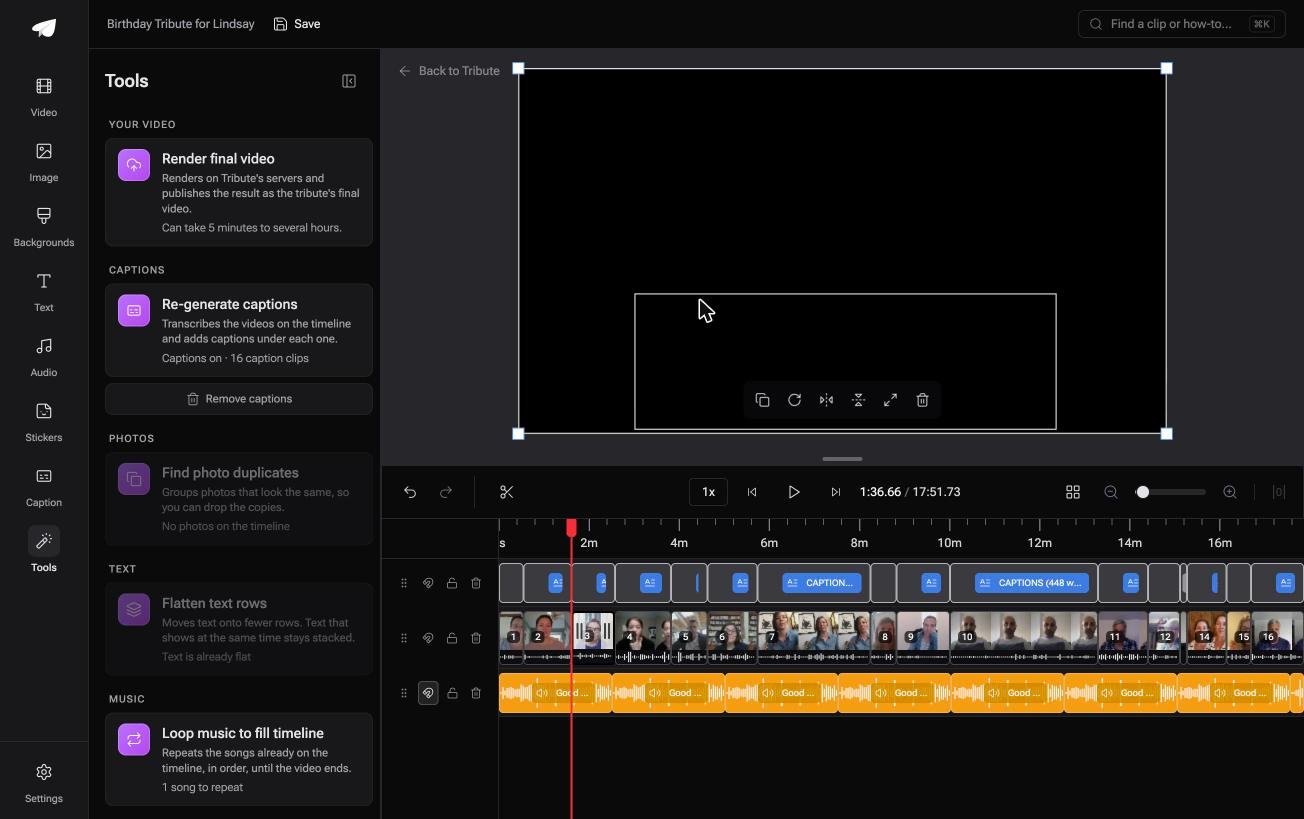
The Tribute video editor is a browser-based group video editor: contributors record clips on their phones and Tribute assembles them on a timeline with the music balanced under the voices.
It is ours, and it is the last thing on this page.
- Clips arrive already in order, with a tick against the ones on the timeline
- Blurred edges fill the frame behind upright phone footage rather than black bars
- Music ducks to 25% under video and 75% under photos, overridable on a single clip
- One switch captions every clip, with 10 caption styles and every line editable
- Tribute renders the video on its servers, so nothing depends on the PC staying awake
Best for: A PC you would rather not leave rendering overnight, and a dozen senders to chase first.
Why it works: Nothing is installed, nothing is rendered on your machine, and the gap problem cannot happen.
Who arranges the clips if you do not?
There is a step before all of this that nobody counts.
Filling the folder. The clips came by text, email and a shared drive, three of them the night before, and two with names like VID_20261018_193344.
For one kind of video, that folder never exists.
The case: several people each recorded for one person
You are in it when none of the footage is yours.
A grandmother turning eighty. A colleague leaving after fifteen years. A memorial where the people who should speak are in four states.

Nobody is combining anything yet. Everyone is recording a message, and the order is the only thing anyone has to decide.
Why there is no gap to delete
Each clip is placed as it lands, with the next one against it.
No dragging onto a track, no hunting for a sliver of blank video, no export screen to read. Music sits under the voices at 25%, and upright footage gets blurred fill.
That is how the Tribute video editor handles it: not a better video combiner for Windows, but a video that arrives combined.

What you do not have to do, and where it ends up
- No folder on the PC. Each person uploads from the phone that recorded the clip.
- No ordering or trimming. On a Concierge Tribute, Tribute's own editors do both, caption every clip and badge each speaker.
- No file to hand over. On Concierge Deluxe it comes back as a video book, a hardcover case with a screen inside that plays on opening.

When this is the wrong answer: you shot the clips yourself, or you want one file joined and nothing more. Then Clipchamp is twenty minutes of work. The editor runs in a browser and lives inside a paid Tribute.
The wider craft is in making a video montage.
Frequently Asked Questions
Where did the Windows video editor go?
Microsoft took video editing out of the Photos app and directed people to Clipchamp. The old editor opens only inside the separate Photos Legacy app, which exists to rescue projects rather than to start new ones.
How do I combine MP4 files on Windows 10 now?
Open Clipchamp in a browser, import the files, place them side by side on one timeline track, delete the gaps and export. Nothing needs installing, which matters on a release that no longer receives updates.
Does combining videos on Windows lower the quality?
Not when every file shares a codec, resolution and frame rate. A mismatched set is re-encoded to one standard and the weakest file decides what the rest look like.
Can I combine videos on Windows 11 without a watermark?
Clipchamp marks premium items with a diamond and asks you to remove them or upgrade before export, so the way to avoid surprises is to read the export screen rather than the landing page.
What is the fastest way to combine two videos on a PC?
Two matching files and a browser joiner will do it in one upload and one download. Past two files, or with anything mismatched, Clipchamp saves more time than it costs.
Why does my combined video go out of sync near the end?
Phone footage is often recorded at a variable frame rate, and some editors drift on long clips. Re-export the source clip at a fixed frame rate first, then combine.
Can I combine videos and add music in the same pass?
Yes. Clipchamp holds audio on its own track under the video, and the level is set per clip rather than once for the whole timeline.
👉 Have the clips arrive on one timeline instead of in a folder if several people each recorded for one person, and nothing ever reaches your PC.
