
iMovie Templates: Photo Slideshow Options on a Mac and iPhone
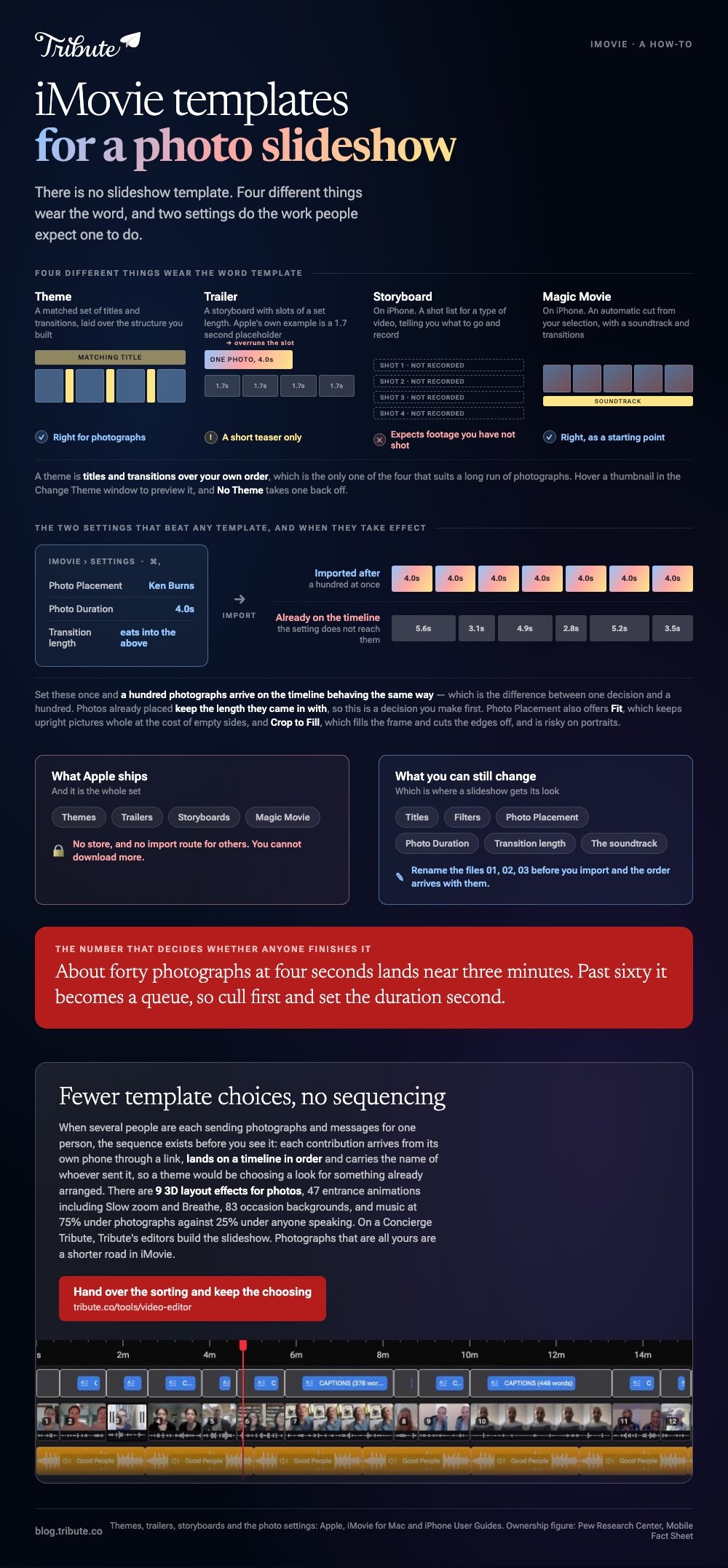
iMovie has no slideshow template. It has themes, which add matching titles and transitions, trailers, which are fixed storyboards, and two settings that decide how every photo behaves. Those two settings do the work people expect a template to do.

What do iMovie templates, photo slideshow included, give you?
Three different things wear the word template in iMovie, and only one of them suits a run of photographs.
| What it is called | What it does | Right for photos? |
|---|---|---|
| Theme | A matched set of titles and transitions | Yes |
| Trailer | A storyboard with fixed-length slots | Only for a short teaser |
| Storyboard (iPhone) | A shot list for a type of video | No |
| Magic Movie (iPhone) | An automatic cut with a soundtrack | Yes, as a starting point |
Themes
Apple describes a theme as a matched set of titles and transitions, and iMovie can add them for you as you build.
On a Mac, click Settings in the upper right of the timeline, click the Theme button, pick one in the Change Theme window and click Change.
Hover a thumbnail to preview it, and No Theme takes one off again. Apple's page on adding or changing a movie theme sets out the same path.
Trailers
A trailer is a template with slots of a set length, and a photo dropped into one is held for that slot and no longer.
Apple's own example is a 1.7 second placeholder. That is a teaser, not a slideshow, and forty photographs will not fit inside one.
Which two settings matter more than any template?
Photo Placement and Photo Duration, set before you add a single image.
Choose iMovie > Settings on a Mac, or press Command-Comma. Apple's page on changing iMovie settings lists what is in there.
- Photo Placement > Ken Burns: applies a slow zoom to every photo added. This is the setting that makes stills look like video rather than a PowerPoint deck.
- Photo Placement > Fit: resizes each photo inside the frame, which keeps upright pictures whole at the cost of empty sides.
- Photo Placement > Crop to Fill: fills the frame and cuts the edges off. Risky on portraits.
- Photo Duration: the default length of every still you add. Four seconds is the sensible starting number.
- Transitions: the default length of the transition between them, which eats into the duration above.
Set these once and a hundred photos arrive on the timeline behaving the same way. Compared to fixing each image after the fact, it is the difference between one decision and a hundred.
How do you build a photo slideshow in iMovie?
Settings first, pictures second, music third.
- Open iMovie > Settings and set Photo Placement to Ken Burns and Photo Duration to four seconds.
- Create a new Movie project.
- Import the photographs in one go, in the order you want them. Renaming them 01, 02, 03 before you import saves a long drag later.
- Apply a theme from the Settings button in the timeline if you want matching titles.
- Drag a track underneath, then pull the end of the last photo so the pictures finish with the music.
- Choose File > Share > File and export at 1080p.

How many photographs is too many?
About forty, at four seconds each, which lands near three minutes.
Past sixty the video becomes a queue and people start checking their phones. Cull first and set the duration second, rather than shortening every photo to fit a song you have already chosen.
What are the iPhone equivalents?
Magic Movie, which is the closest thing to a slideshow template Apple ships.
Tap Start New Project, tap Magic Movie, select your photos and clips, and iMovie assembles them with a soundtrack and transitions. You can then change the style, edit titles and swap the music.
Storyboards sit beside it and are a different tool: premade templates for types of video, each with a shot list telling you what to record. Unlike Magic Movie, a storyboard expects footage you have not shot yet.
With 91% of US adults owning a smartphone, per the Pew Research Center mobile fact sheet, the phone is where most of these photographs already live, which is reason enough to build the slideshow there.
Other routes are covered in using iMovie to make a slideshow, making a Canva slideshow and photo slideshow generators.
What if the photographs came from a dozen different people?
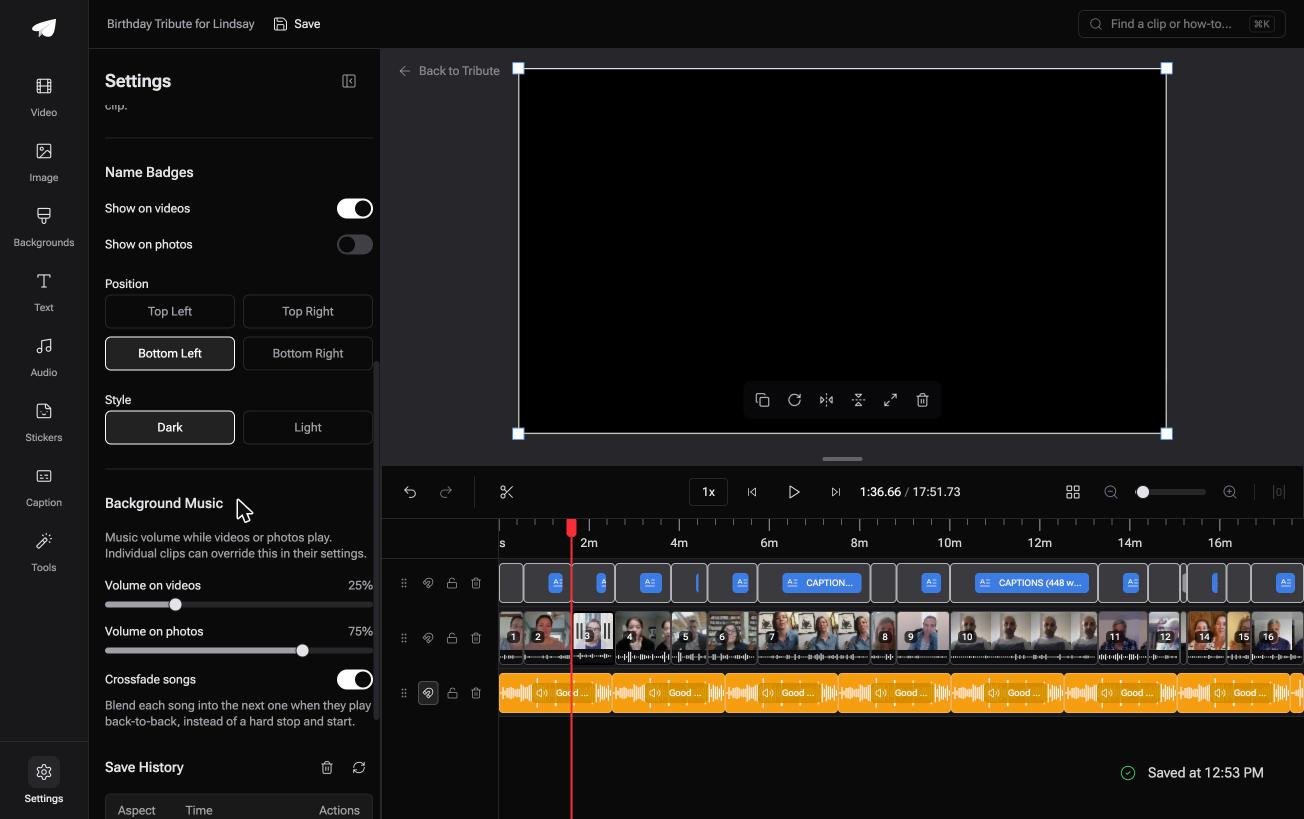
The Tribute video editor is a browser-based group video editor: contributors record clips on their phones and Tribute assembles them on a timeline with the music balanced under the voices.
It is ours, and it is the last thing on this page.
- 9 3D layout effects for photos, including Tilt, Book, Floating and Billboard, which is the Ken Burns question answered with more than a zoom
- 47 entrance and 47 exit animations, among them Slow zoom, Drift and Breathe
- Music at 75% under photographs and 25% under anybody speaking, set per clip rather than once
- 83 occasion backgrounds grouped by Celebration, Retirement and Love
Best for: A shoebox of printed photographs and a handful of new video messages.
Why it works: Photographs and speech want different music levels, and the editor treats them as two settings rather than one.
What if the order and the music were settled before you opened it?
A template is a decision about order, and so far the order has been yours.
You gathered the pictures, sequenced them, picked a theme and then discovered the song was ninety seconds short. That is the real work a slideshow template does not do.
There is one case where somebody else has already done it.
The case: several people each recorded for one person
You are in it when the slideshow is addressed to somebody.
A grandmother turning eighty. A colleague leaving after fifteen years. A memorial where the people who should speak are in four states and the photographs are in four houses.

Why the template question stops mattering
The sequence exists before you see it.
Each contribution arrives from its own phone through a link, lands on a timeline in order and carries the name of whoever sent it. A theme would be choosing a look for something that is already arranged.
That is the swap the Tribute video editor offers: fewer template choices, no sequencing.

What you do not have to do
- Pick a template. 83 occasion backgrounds, 9 3D layout effects for photos, 39 licensed tracks.
- Collect or sort what arrives. Photographs and clips land numbered, in order.
- Time the stills. An animation keeps each one moving without a four second rule.
- Assemble it, on a Concierge Tribute. Tribute's editors build the slideshow, and Concierge Deluxe returns it as a video book.
When this is the wrong answer: the photographs are all yours and nobody else is contributing. Then iMovie and four seconds a picture is the shorter road. The editor is not a standalone slideshow maker and lives inside a paid Tribute.
The wider job is covered in making a video montage.
Frequently Asked Questions
Can you download more iMovie templates?
No. Themes and trailers are the set Apple ships, and there is no store or import route for others. What you can change is the look of what you build, through titles, filters and the two photo settings.
How do I change the duration of all photos at once in iMovie?
Set Photo Duration in iMovie Settings before you import. Photos already on the timeline keep the length they came in with, so the setting is a decision you make first.
Why do my photos zoom when I do not want them to?
Photo Placement is set to Ken Burns, which is the default behavior for stills. Switch it to Fit or Crop to Fill, then re-add the photographs.
Can I use a trailer template for a slideshow?
For a short one. A trailer holds each photo for the length of its placeholder, which Apple illustrates with a 1.7 second slot, so a long run of pictures will not fit.
Does iMovie on iPhone have slideshow templates?
Magic Movie is the closest thing. It takes your selection and builds a cut with a soundtrack and transitions, which you can then edit like any other project.
What size should a photo slideshow be?
1080p unless the pictures are going on a television. Larger exports gain nothing on the phone screens where most of these get watched.
How do I put my own song under an iMovie slideshow?
Drag the audio file into the project from Finder, or use the Audio browser for tracks in your music library. Songs bought from a store are often protected and will not import.

👉 Hand over the sorting and keep the choosing if several people are each sending photographs and messages for one person, and the template question answers itself.
