
Canva Birthday Video: Build One From a Template or From Scratch
A Canva birthday video starts one of two ways: open a birthday template and swap your photos onto its placeholders, or start a blank video design and build the timeline. Templates are faster; a blank design is the one that fits people talking.
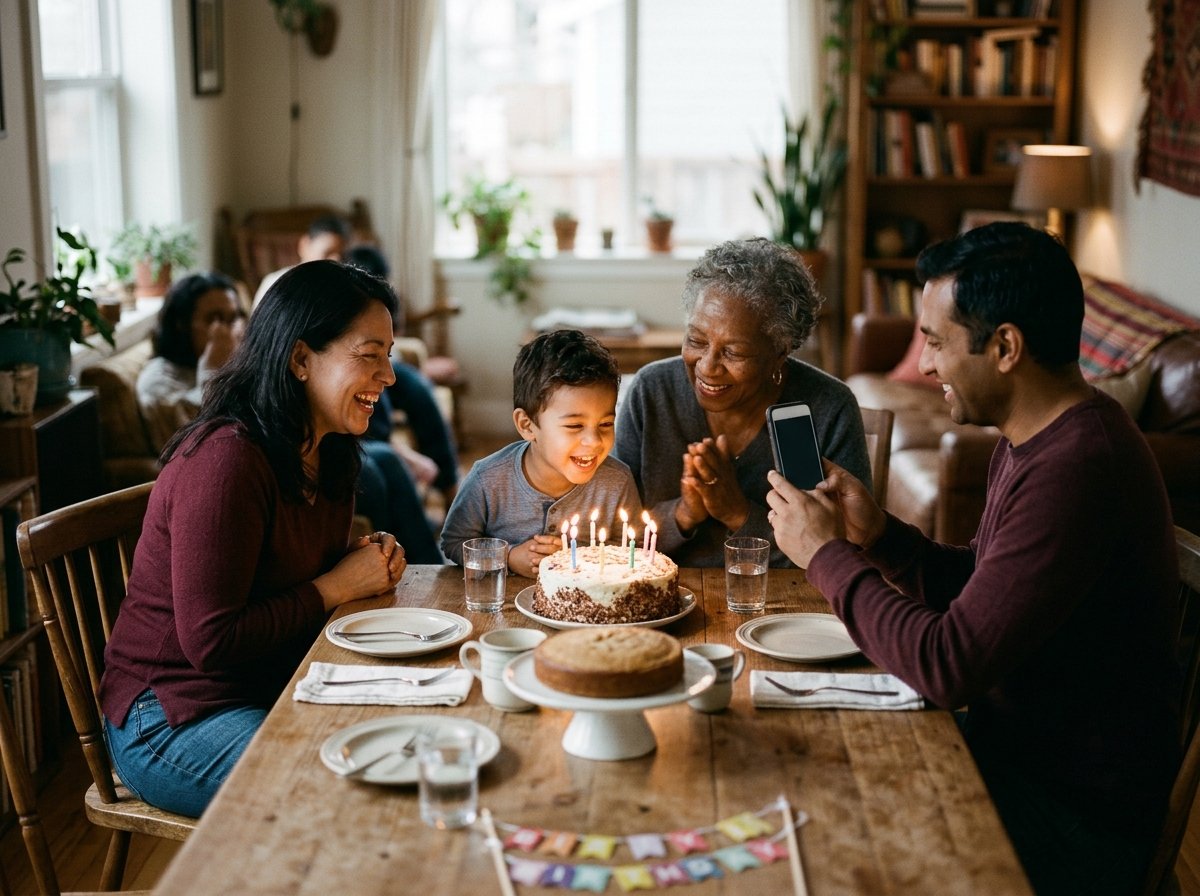
| Route | Time | Best when |
|---|---|---|
| Birthday template | 20 minutes | Photos and short clips, no speeches |
| Blank video design | An hour or two | People talking, mixed clip lengths |
| Phone editor instead | 30 minutes | Everything is already on one phone |
Is a Canva birthday video the right tool for the job?
It depends on whether anyone speaks.
Canva is built around pages, each holding for a set number of seconds, which suits photographs and short cutaways. Thirty pictures at four seconds each becomes a two minute video without you making a single timing decision.
Speech breaks that model. A person talking for fifty-two seconds does not fit a page you sized for four, and the whole video becomes an argument with durations.
Unlike a phone editor, where clip length is whatever the clip is, Canva asks you to set it.
So the honest split: photographs and b-roll go to Canva, and a video of twelve people giving messages belongs somewhere built for clips. More on that choice in birthday video makers that work from photos.
How do you make a Canva birthday video from a template?
Start from the template rather than from a blank page, because the pacing is already decided.
- Search birthday video on the Canva home page, or select Create a design, then Video, and browse the templates in the side panel.
- Pick one whose page count is close to the number of photographs you have. Adding pages later is easy; restyling twenty of them is not.
- Open Uploads and add your photos and clips.
- Drag an upload straight onto a photograph already in the template. It replaces that image and keeps the frame, the crop shape and any animation on it.
- Double-click any text to change the name, the age and the message.
- Select a page, then its duration control, to hold a picture longer than the template intended.
- Select Share, then Download, then MP4 Video.
One caveat worth knowing before you start: Canva has been rolling its rebuilt video timeline out in stages, so some accounts still open an older page-based editor and the panels sit in different places.
Best for: A birthday video canva users can finish in one sitting, built from photographs and a few short clips.
Why it works: Someone already chose the type, the pacing and the transitions, and those are the three decisions that eat an evening.
How do you build one from a blank video design?
Take this route when the clips have people talking in them.
- From the home page select Video, or select Create a design and choose Videos, then pick a size.
- Select the plus button beside the main track, choose Uploads, and add every photograph and clip.
- Drag the left and right handles of each item on the timeline to set how long it holds.
- Park the playhead and press the S key to split a clip, or use Split in the more menu.
- Drag items along the track until the order is the one you want watched.
- Select Add Audio in the timeline and pick a track.
- Select Share, then Download, then MP4 Video.
Trim the dead air at the front of every speaking clip before you do anything else. Four seconds of someone checking the red dot is on, times twelve people, is a minute of nothing at the top of your video.
Best for: A birthday video with six or more people each saying something.
Why it works: You set every duration by hand, which is slow and is also the only way speech lands where you want it.
What music can you put under a birthday video?
One track, instrumental, and quiet enough that you stop noticing it.
Canva ships an audio library, and its help page on audio tracks covers picking one from the Audio tab and uploading your own MP3 or WAV.
Tracks marked with a crown need a paid plan, and the editor tells you before you export rather than after.
Lower the music under anyone speaking. A birthday message recorded on a phone in a kitchen is quiet to begin with, and a track mastered to sound good on its own will sit on top of it.
Skip the chart song. It plays at the party either way, and an upload to a public account may collect a copyright claim and be blocked in some countries.

What does Canva cost, and will it watermark the download?
Your own media exports clean on the free plan.
What triggers a watermark is a paid element you left in the design: a Pro template, a Pro track, a Pro graphic. Each carries a crown icon, and swapping it for something without one clears the problem before you spend the export time.
Canva Pro ran at $144 a year and Canva Business at $250 a year per person, prices as of October 2026. Compared with the cost of one birthday video, a year of Pro is a poor trade unless you make things monthly.
What if the clips came from twelve different people?
Then collecting them was the work, and Canva only helps with the last twenty minutes.
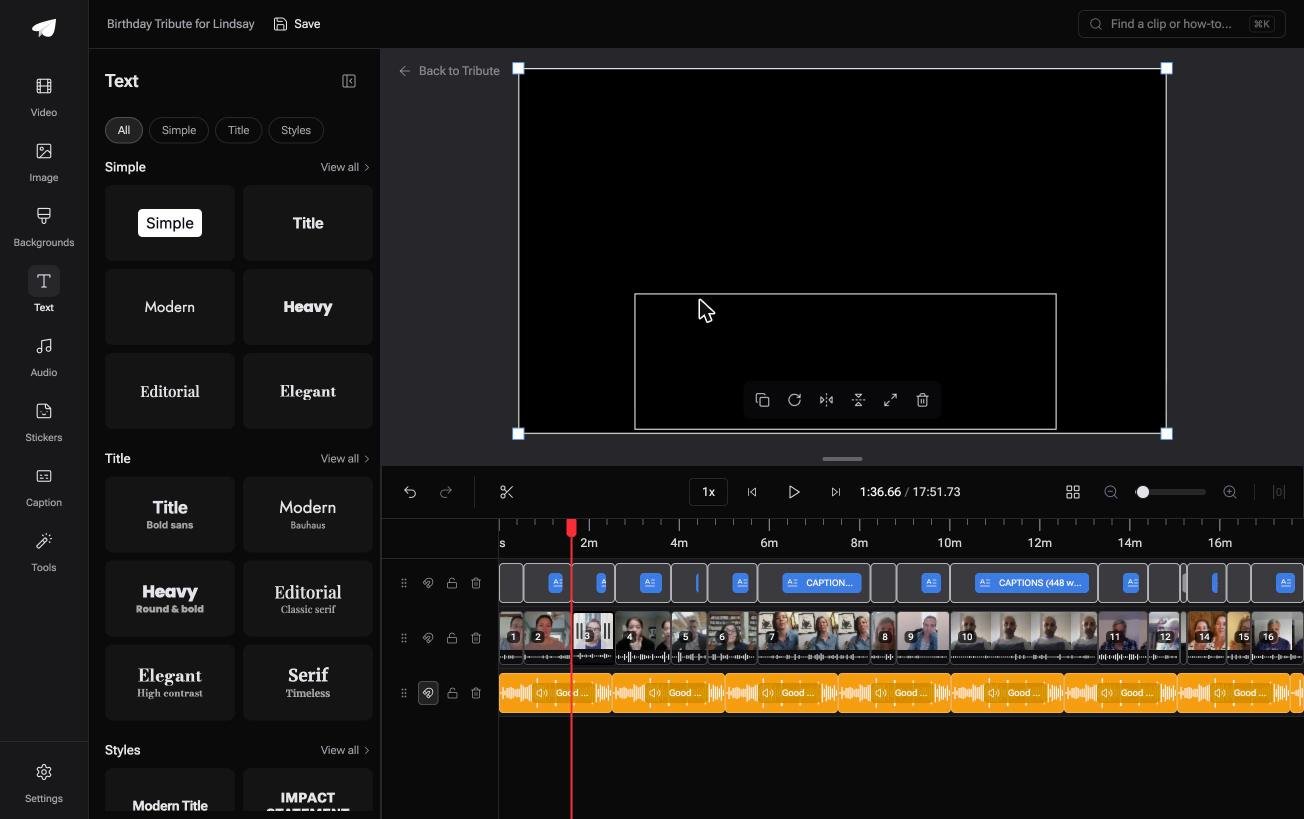
The Tribute video editor is a browser-based group video editor: contributors record clips on their phones and Tribute assembles them on a timeline with the music balanced under the voices.
The clips are in order before you open it, with a tick against each one already on the timeline.
Specific numbers do the work here. Music sits at 25% under a speaking clip and 75% under photographs.
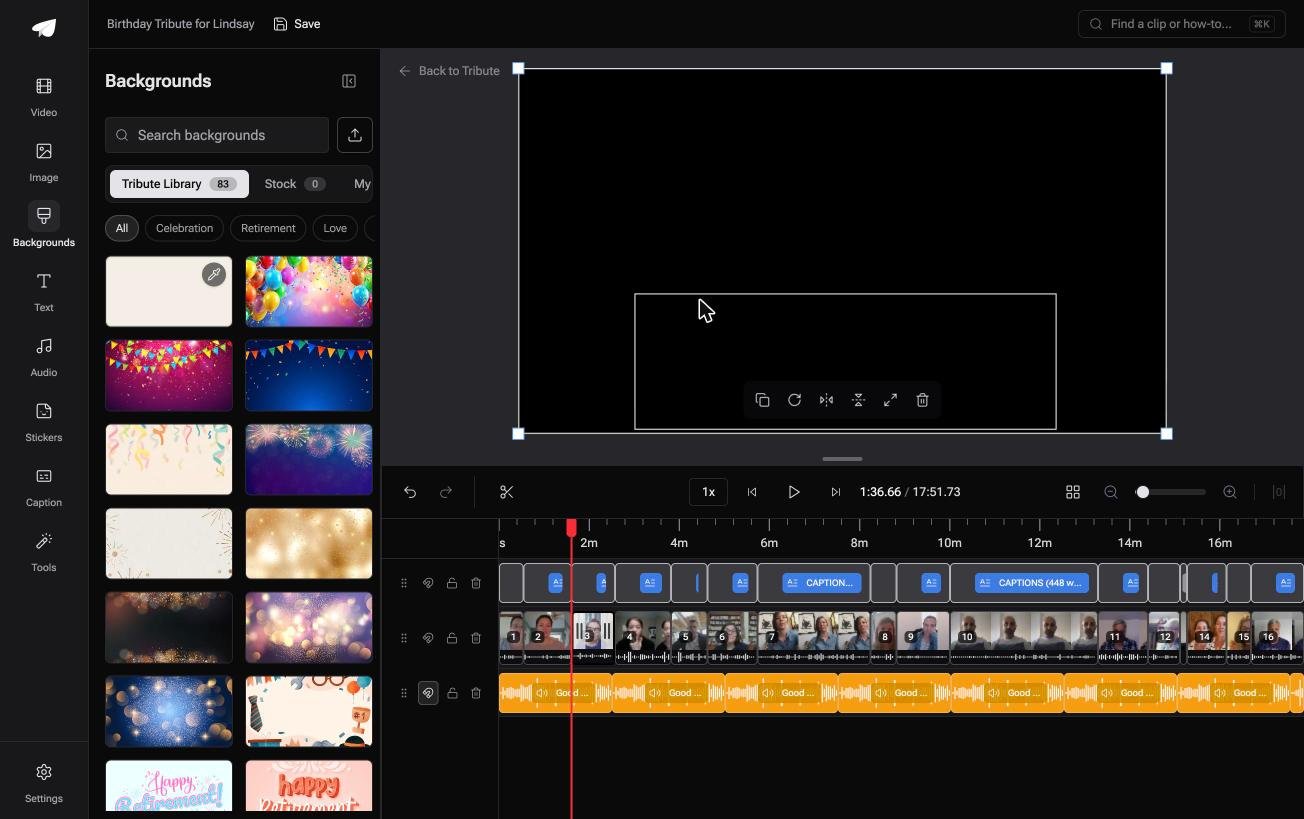
There are 39 licensed tracks across eleven genres, 83 occasion backgrounds grouped by occasion, and ready-made title styles grouped as Simple, Title and Styles rather than a raw font list.
Best for: A birthday video where ten or more people each sent a message from their own phone.
Why it works: There is no stage where you are setting a duration for a clip whose length was never yours to choose.
Can you skip the template question altogether?
Everything above assumes you are the one holding the files.
Gathering them was yours, picking a template was yours, and so was every duration on every page. There is one case where none of that work appears.
The case: several people, each recording for one person
You are in it when a dozen people record a message for someone turning forty, or sixty, or eighty. Nobody is shooting a scene and nobody is designing anything. Everyone is talking to a phone, and the job in front of you is assembly.
Which means the search that brought you here, a Canva birthday video, points at a design tool for a job that has almost no design in it.
What you do not have to do
Three jobs, and choosing a template is not one of them.
- Not the layout. The clips land in order with music under them at 25% while anyone is speaking.
- Not the edit. On a Concierge Tribute, Tribute's editors reorder, trim, caption and title it.
- Not the name the captions spelled wrong. Eve, the assistant on Concierge and Concierge + Video Book, fixes it across every clip.
That is how the Tribute video editor handles it. Compared with a page-based design, nothing here asks you how many seconds a person's sentence should take.

When this is the wrong answer: you want a designed piece with your own type and brand, or the video is photographs only. Then Canva is the better tool and the steps above are the whole job.
Related reading: ideas for a birthday video and sending one as a card.
Frequently Asked Questions
Can I make a birthday video in Canva on my phone?
Yes, the mobile app carries the same templates and the same export. Swapping media onto a template works well on a small screen, and setting durations for twelve speaking clips does not.
How long should a birthday video be?
Four to six minutes if a room will watch it, up to ten if people watch at home. Twelve contributors at forty seconds each is already eight minutes before any photographs.
Can I add my own song?
Yes. Canva accepts MP3 and WAV uploads, which is also the route for a voice note you want to put under a photo sequence.
Why is my Canva export blurry?
Check the size of the design against the size of your source. A photograph scaled up to fill a 1080p page looks soft, and a design built at a small size exports at that size regardless of what you put in it.
Can two people work on the same video?
Yes, with a share link set to allow editing. Agree who touches the timeline, since two people reordering pages at once produces an order neither of them chose.
Where should the finished video go?
Upload it and send a link rather than the file. Pew puts YouTube use at 84% of US adults and Facebook at 70%, so an unlisted YouTube link opens for almost everyone you will send it to.
Does Canva work offline?
No. It runs in a browser and the media lives on Canva's servers, so a weak connection shows up as slow playback while you edit rather than as a broken export.
👉 Get a dozen recorded messages back as one birthday video if that is the reason you came looking at Canva, and the template question never comes up.
