
Add Music to Video for Facebook: In the App, or Before You Upload
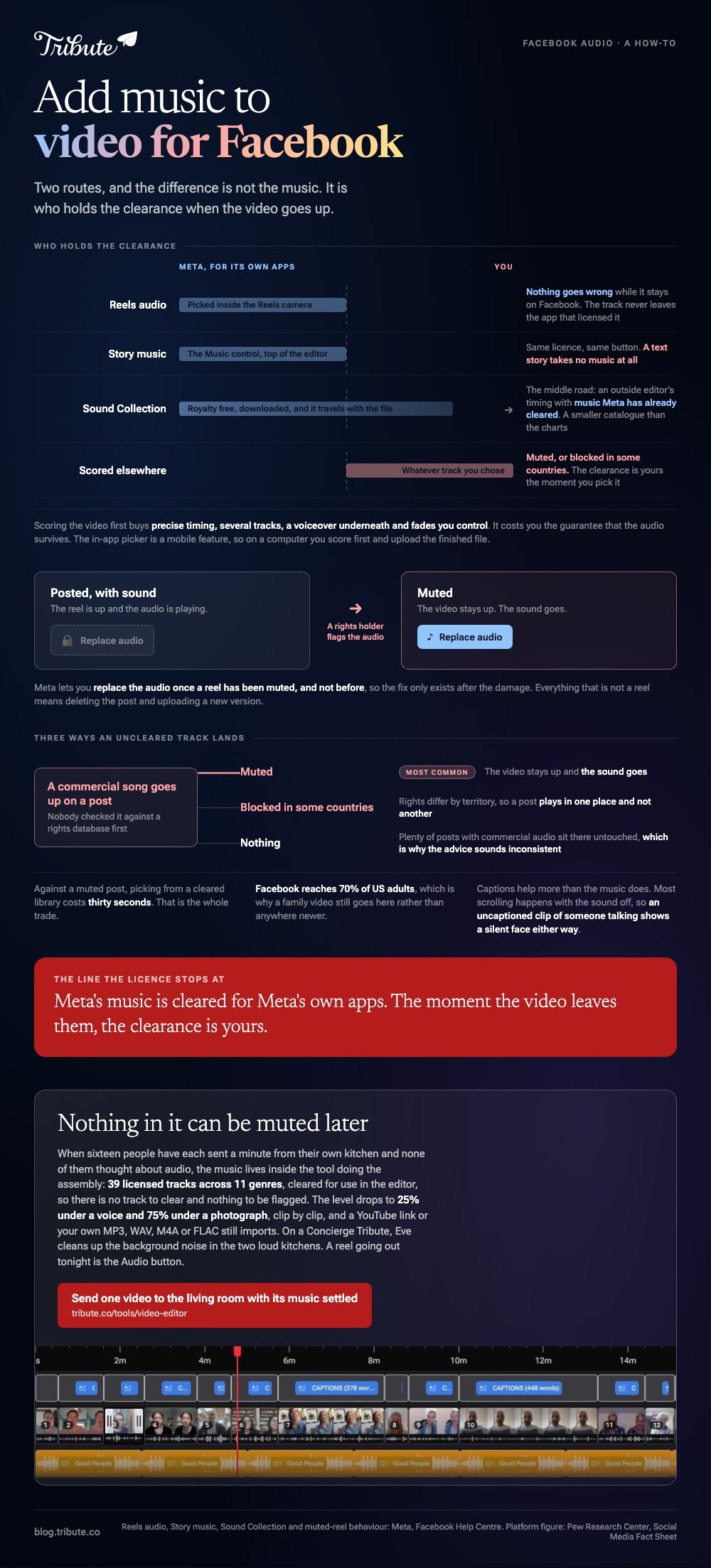
You can add music to video for Facebook two ways. Pick a track inside the Reels camera and Meta's license covers it. Score the video elsewhere and the clearance is yours, which is how a post ends up silent.

| Route | Who cleared the track | What can go wrong |
|---|---|---|
| Reels audio | Meta, for its own apps | Nothing, while it stays on Facebook |
| Story music | Meta, for its own apps | Not available on text stories |
| Sound Collection | Meta, royalty free to download | A smaller catalog than the charts |
| Scored elsewhere | You | Muted, or blocked in some countries |
How do you add music to video for Facebook inside the app?
Through the Audio button on the Reels camera.
- In the Facebook app, tap + at the top right of your Feed and choose Reel.
- Tap Camera to record, or pick a video already on the phone.
- Tap the Audio icon and search by genre or theme, or by name.
- Tap the song, then choose the section of it you want, and tap Done.
- Tap Next, choose an audience, then tap Share now.
Facebook sets out those steps on its help page for adding music when creating a reel.
Best for: A clip going straight to Reels tonight, where no risk to the audio is acceptable.
Why it works: The licensing question never reaches you, because the track never leaves the app that licensed it.
Stories work the same way with a different button
Music sits behind a Music control at the top of the story editor.
The catch is that a text story takes no music at all, so a quote on a colored background stays silent. Put it over a photo or a clip and the option comes back.
Can you add music to video for Facebook before you upload it?
Yes, and then the license is your problem rather than Meta's.
Scoring the video first buys you precise timing, several tracks, a voiceover underneath and fades you control. It costs you the guarantee that the audio survives.
Where to get a track you are allowed to use
Meta publishes a Sound Collection of royalty free music and sound effects to download and use in your videos.
That is the middle road: the timing control of an outside editor with music Meta has already cleared. Unlike a chart single, nothing in it triggers a claim when the video goes up.
Scoring it in a browser or on the phone
- Clipchamp, in any browser: import the clip, drop the audio on its own row beneath it, then set volume and fades per asset in the property panel.
- Google Photos, on the phone: Create, then Highlight video, then Add Music, with Section to choose the part of the song and Volume to balance it against the clip.
- CapCut, when a cut has to land on a beat. It publishes no help center article for the phone app, so read the labels on your screen.
Best for: A birthday montage with a voiceover, where the music has to drop under the speech and come back up.
Why it works: Separate rows mean separate volumes, which no in-app music picker gives you.

A phone walkthrough sits in adding music to a video on iPhone, with the longer version in the step by step for iPhone, and the other platform in adding music to a YouTube video.
What happens when the track is not cleared?
The video stays up and the sound goes.
- Muted. The most common outcome. Meta lets you replace the audio once a reel has been muted, and not before.
- Blocked in some countries. Rights differ by territory, so a post can play in one place and not another.
- Nothing. Plenty of posts with commercial audio sit there untouched, which is why the advice sounds inconsistent.
Compared to a muted post, picking from a cleared library costs thirty seconds. That is the whole trade.
Pew Research Center's social media fact sheet puts Facebook use at 70% of US adults, which is why a family video still goes here rather than anywhere newer.
How loud should the music sit under a voice?
Lower than it feels while you are setting it.
| Underneath | About |
|---|---|
| Someone talking | A quarter of full volume |
| Photographs, nobody speaking | Three quarters |
Music is mastered to sound good on its own, so it will bury a voice recorded on a phone in a kitchen. Set the level per clip rather than once for the whole video, because each clip was recorded at a different distance.
What if a dozen people each sent a clip for one person?
The Tribute video editor is a browser-based group video editor: contributors record clips on their phones and Tribute assembles them on a timeline with the music balanced under the voices.
It is ours, and it is the last thing on this page.
- 39 licensed tracks across 11 genres, cleared for use inside the editor
- Your own audio too: a YouTube link, or an MP3, WAV, M4A or FLAC upload
- 25% under a voice, 75% under a photo by default, and overridable per clip
- Crossfade songs blends one track into the next when the video runs past the end of a song
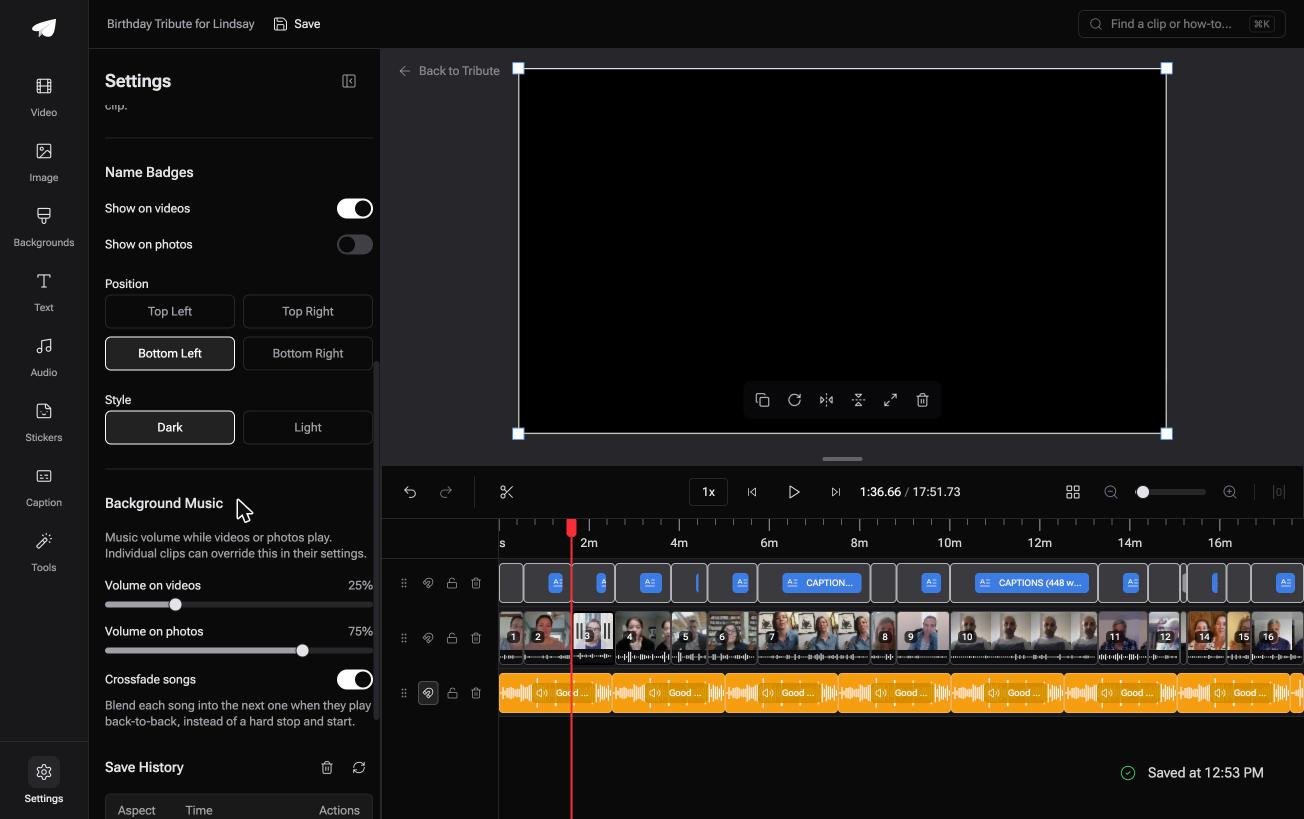
Best for: A family video where one song has to sit under sixteen voices recorded in sixteen kitchens.
Why it works: The balance between the song and sixteen different voices is set before you open it, clip by clip.
What if the music was settled before you started?
Everything above is a choice between Meta's library and your own.
Both routes assume you are the one holding the video, choosing the song and judging the level. That is the normal case, and there is one where it does not apply.
The case: one person, and everyone recording for them
You land here when the clips were never yours to shoot.
A seventieth birthday. A soccer team saying goodbye to its captain. Sixteen people each sent a minute from their own kitchen, and none of them thought about audio.
This video is not a post. It gets watched once, in a room, with the sound on.
Why the licensing question never opens
A cleared shelf is a smaller problem than an open web.
Once the music lives inside the tool doing the assembly, there is no track to clear and nothing to be muted. The Tribute video editor carries 39 of them and drops the level under every voice without being asked.

What you do not have to settle
- Not the license. 39 tracks are cleared inside the editor, so nothing can be muted later.
- Not the level under sixteen voices. The music drops to a quarter whenever somebody speaks.
- Not the two noisy kitchens on a Concierge Tribute: Eve, the assistant inside the editor, cleans up background noise across every clip.
- Not the editing, if Tribute's editors put the video together for you on Concierge.
When this is the wrong answer: the video is a reel going out tonight, you shot it yourself, or the song is the point of the post. Then the Audio button is where you want to be.
The editor is not a standalone music tool either: it lives inside a paid Tribute.

Assembly itself is covered in making a video montage.
Frequently Asked Questions
Why did Facebook mute my video?
A rights holder flagged the audio, or the track is not licensed where the viewer is. Once the reel is muted you are allowed to replace the music, which is not an option while it still has sound.
Can I add music to a video already posted?
Not to a normal post. A muted reel can have its audio replaced, and everything else means deleting the post and uploading a new version.
Does the Sound Collection music work outside Facebook?
It is published for use in your videos, and the terms live on the page itself. Read them before you put a track on a video heading somewhere else.
Can I add music to a Facebook video from a computer?
The in-app music picker is a mobile feature. On a computer, score the video first in Clipchamp or another editor, then upload the finished file.
Why is there no music option on my story?
Text stories take no music. Put the words over a photo or a clip and the Music control comes back at the top of the screen.
How long should the song be?
As long as the video and not a second more. A track that fades mid-sentence reads as an accident, so trim the audio to the last frame rather than the last chorus.
Will captions help if the sound gets muted?
Yes, and more than the music does. Most scrolling happens with the sound off, so an uncaptioned clip of someone talking shows a silent face either way.
👉 Send one video to the living room with its music settled if sixteen people each recorded for one person, and nothing can mute it.
