
Best Songs for Graduation Slideshow Videos: 12 That Fit the Room
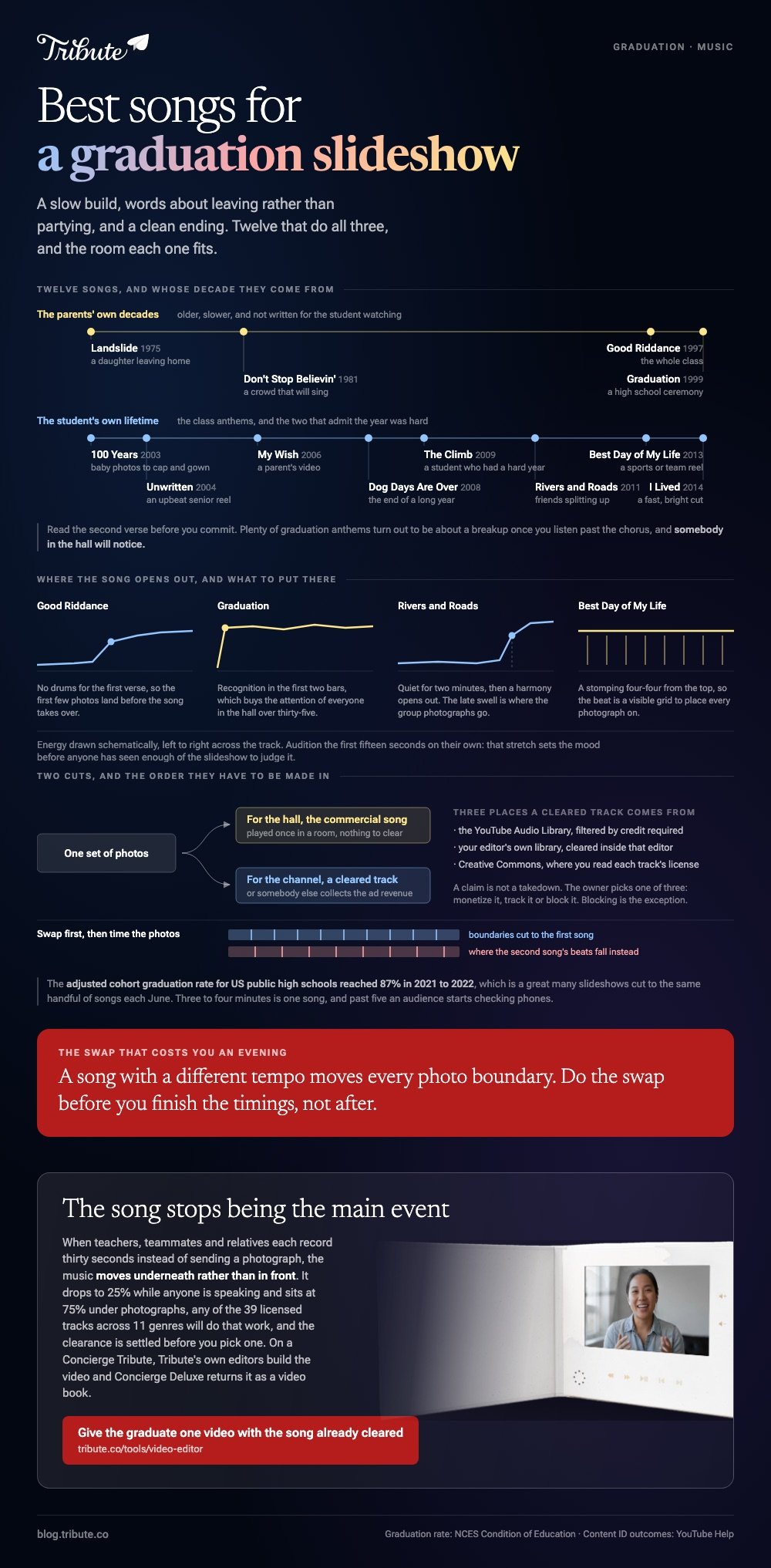
The best songs for graduation slideshow use share three things: a slow build, words about leaving rather than partying, and a clean ending. Twelve that do all three are below, with what each one suits.

| Song | Artist | Best for |
|---|---|---|
| Good Riddance (Time of Your Life) | Green Day, 1997 | The whole class |
| Graduation | Vitamin C, 1999 | A high school ceremony |
| I Lived | OneRepublic, 2014 | A fast, bright cut |
| Rivers and Roads | The Head and the Heart, 2011 | Friends splitting up |
| My Wish | Rascal Flatts, 2006 | A parent's video |
| Landslide | Fleetwood Mac, 1975 | A daughter leaving home |
| 100 Years | Five for Fighting, 2003 | Baby photos to cap and gown |
| Unwritten | Natasha Bedingfield, 2004 | An upbeat senior reel |
| Dog Days Are Over | Florence + the Machine, 2008 | The end of a long year |
| Don't Stop Believin' | Journey, 1981 | A crowd that will sing |
| Best Day of My Life | American Authors, 2013 | A sports or team reel |
| The Climb | Miley Cyrus, 2009 | A student who had a hard year |
How do you choose the best songs for graduation slideshow videos?
Start with the length, not the lyrics.
Divide the track by four seconds a photo. A three and a half minute song carries about fifty images, and past sixty the room stops watching.
Then read the second verse. Plenty of graduation anthems turn out to be about a breakup once you listen past the chorus, and somebody in the hall will notice.
Three rules that do most of the work
- Instrumental under speech. If anyone is talking in a clip, lyrics and voice fight and the voice loses.
- Audition the first fifteen seconds alone. That stretch sets the mood before anyone has seen enough to judge.
- Pick the song before you cut. The best song for video editing is the one you can cut to, and swapping late means rebuilding every timing.
What are the best songs for graduation slideshow videos, one by one?
Nine of the twelve, with the case each one fits.
1. Good Riddance (Time of Your Life)
Green Day, 1997. An acoustic guitar, no drums for the first verse, and a line about an unpredictable turn that every graduating class has lived through.
Best for: A whole-class slideshow where no single student is the subject.
Why it works: The sparse opening lets the first few photos land before the song takes over.
2. Graduation
Vitamin C, 1999. The obvious pick, and obvious is not a flaw when half the room graduated to it themselves.
Best for: A high school ceremony with parents in the audience.
Why it works: Recognition in the first two bars buys you the attention of everyone over thirty-five.
3. 100 Years
Five for Fighting, 2003. A piano song that counts off ages, which lines up with a slideshow that starts at a birth photo and ends at a cap and gown.
Best for: A graduation picture slideshow that spans eighteen years.
Why it works: The lyric already marks the passage of time, so your photo order does the rest.
4. Rivers and Roads
The Head and the Heart, 2011. Quiet for two minutes, then a harmony that opens out. The subject is distance between friends.
Best for: A group of seniors scattering to different states.
Why it works: The late swell gives you a natural place to put the group photos.
5. My Wish
Rascal Flatts, 2006. Written from a parent to a child, which is the point of view most slideshows are built from anyway.
Best for: A video a parent is making for one graduate.
Why it works: It says the thing the parent is trying to say, so the captions can stay short.
6. Landslide
Fleetwood Mac, 1975. Slow, plain and old enough to belong to the parents rather than the student.
Best for: One of the best songs for a daughter graduation slideshow, and it suits a son just as well.
Why it works: There is no beat to cut to, so the photos can hold for six seconds each.
7. Best Day of My Life
American Authors, 2013. Fast, bright and built on a stomping four-four, which makes it easy to cut on the beat.
Best for: A team reel, and one of the best songs for sports slideshow edits for the same reason.
Why it works: The tempo gives you a visible grid to place every photo on.
8. The Climb
Miley Cyrus, 2009. Unapologetic about effort rather than achievement, which fits a student whose last two years were hard.
Best for: A single graduate who got there the long way.
Why it works: The chorus arrives late, so the early photos stay quiet.
9. Dog Days Are Over
Florence + the Machine, 2008. Handclaps, a harp and a chorus that arrives like a door opening, about a hard stretch ending rather than a celebration starting.
Best for: A class that spent part of high school learning from a kitchen table.
Why it works: Compared to the straight anthems, it acknowledges the bad year before it celebrates the end of it.
What are the best senior slideshow songs for a parent to pick?
Older, slower, and from the parent's own decade.
Landslide, 100 Years and My Wish all read as a parent speaking. Unlike the class anthems, they do not assume the student is the one watching, which suits a video played at a dinner table rather than in a gym.
A senior slideshow built for one child can also run longer. Thirty photos and one song is a four minute video that nobody checks a phone during.
Compared to a class reel, it can also repeat a face without anyone minding, which means the ordinary photographs earn their place beside the posed ones.
More picks in music for a graduation slideshow and choosing a graduation song for a slideshow.
Which app is best to add a song in a video?
The one on the device holding the photos.
Which app is best for adding a song in a video depends on what you are already carrying, not on features. There is no single best video song maker app, and the differences stop mattering once the track is in place.
| Device | App | Where the music lives |
|---|---|---|
| iPhone or Mac | iMovie | Soundtracks, under Audio |
| Windows | Clipchamp | A built-in library plus uploads |
| Any browser | Canva | The Audio tab in Elements |
| Android | CapCut or Google Photos | In-app library |
All four carry tracks cleared for use inside them, which settles the licensing question before you start. The best video song editing app is whichever one you can open tonight.
Step by step versions live in building a slideshow in Canva and video montage makers.
Will a commercial song get the video taken down?
On YouTube, taken down in almost no case. Claimed, often.
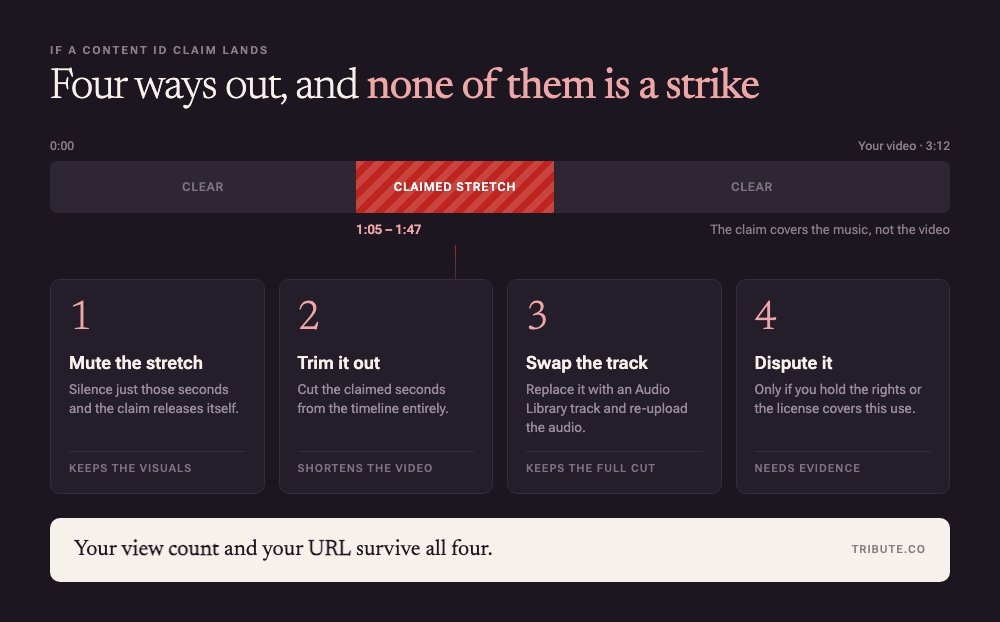
Content ID matches your upload against a database of recordings, and YouTube documents three outcomes: the owner can monetize it, track it, or block it. Blocking is the exception.
For a video played once in a school hall, none of this applies. For one posted to a channel, swap the track or accept that somebody else collects the ad revenue.
Two versions solve it. Cut the slideshow to the commercial song for the ceremony, then swap in a cleared track and export a second time for the version that goes online.
Do the swap before you finish the timings, not after. A song with a different tempo moves every photo boundary, and redoing fifty of them at midnight is how a good slideshow gets shipped rough.
Where to find a cleared track instead
Three places, none of which charge anything.
- The YouTube Audio Library: filterable by whether attribution is required
- Your editor's own library: cleared for use inside that editor
- Creative Commons: read the license on the track, not the collection
Graduation is a volume business for these libraries. The adjusted cohort graduation rate for US public high schools reached 87% in 2021 to 2022, which is a great many slideshows being cut to the same handful of songs each June.
What if the clips came from a dozen different people?
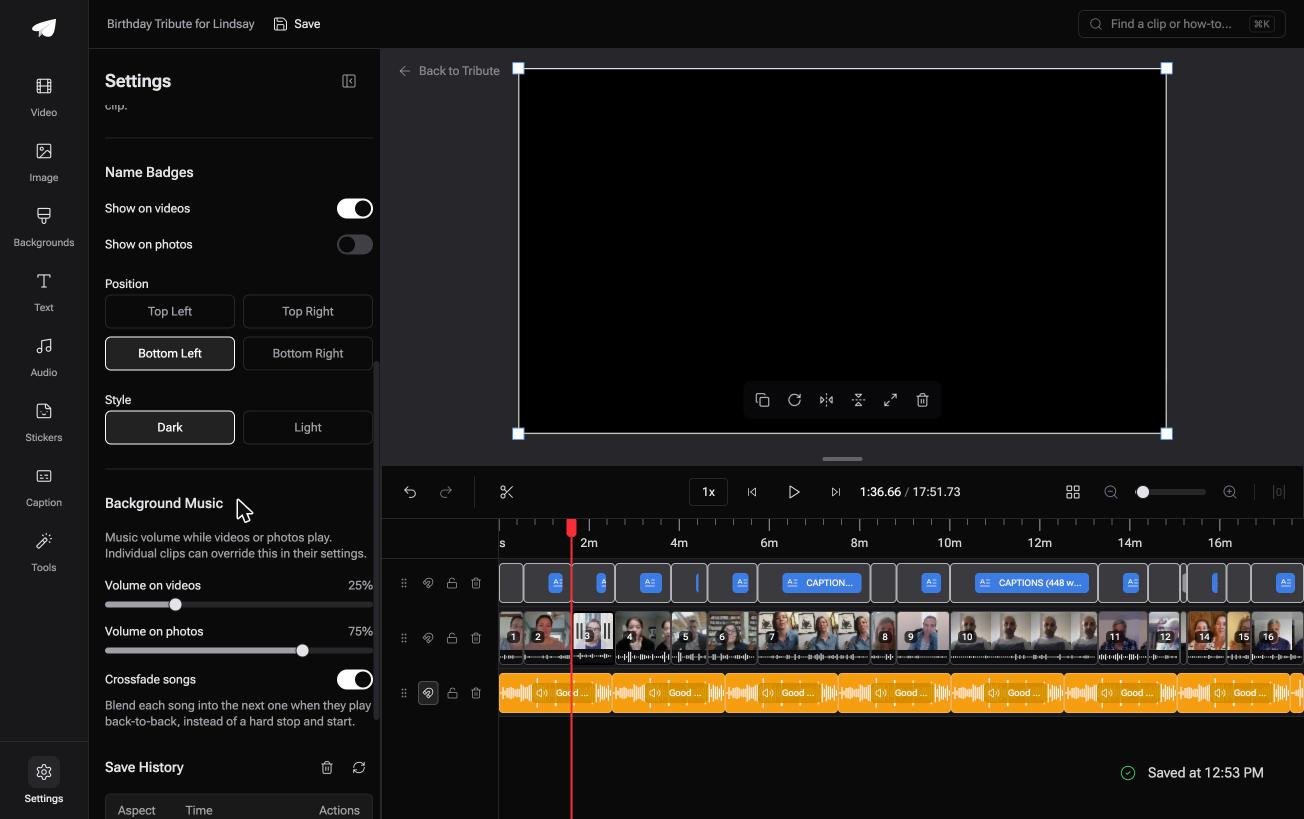
The Tribute video editor is a browser-based group video editor: contributors record clips on their phones and Tribute assembles them on a timeline with the music balanced under the voices.
It is ours, and it is the last thing on this page.
- 39 licensed tracks across 11 genres, cleared inside the editor, plus a YouTube link import and your own MP3, WAV, M4A or FLAC
- 25% under speech, 75% under photographs by default, set per clip rather than once for the whole video
- Crossfade songs blends one track into the next when the video outlasts a song
- 83 occasion backgrounds grouped by occasion, with Celebration among the groups

Best for: A graduation video where classmates, coaches and relatives are each sending a clip.
Why it works: The song question and the level question are settled in the same place.
Can you skip the song question altogether?
Everything above assumes the music carries the video.
It has to, because a slideshow is silent. The song is doing the emotional work that nobody in the photos is doing out loud, which is why choosing it takes an evening.
There is one case where the song stops being the main event.
The case: people talking, not photos
You are in it when the graduate's teachers, teammates and relatives each record thirty seconds instead of sending a picture.
A coach from middle school. An aunt who could not fly in. The grandfather who paid for the first set of books. Nobody is cutting photos to a chorus: everyone is speaking, and the music moves underneath rather than in front.
Why the track matters less
Music under speech is doing a smaller job.
It fills the joins and it sets a tone, at a quarter of its volume, which means it does not have to be the perfect graduation song. Any of the 39 licensed tracks in the Tribute video editor will do that work, and the clearance is settled before you pick one.

What you do not have to do
- Clear a song. Thirty-nine licensed tracks across eleven genres sit inside the editor.
- Ride the music under the speeches. It drops to 25% while anyone is talking.
- Collect or order the clips. They are on the timeline before you open it.
- Cut the video, on a Concierge Tribute. Tribute's editors build it, and Concierge Deluxe returns it as a video book.

When this is the wrong answer: you have 200 photos and one song, and nobody else is sending anything. Then pick from the twelve above and cut to it. The Tribute editor is also not a standalone app: it lives inside a paid Tribute.
Frequently Asked Questions
How long should a graduation slideshow be?
Three to four minutes, which is one song. Past five minutes an audience starts checking phones, however good the photographs are.
How many photos per student in a class slideshow?
Two or three, and the same number for everyone. Uneven counts are the thing parents notice and mention afterward.
Can you use two songs in one slideshow?
Yes, and the join is the risk. Crossfade the end of the first into the start of the second rather than cutting between them, and change songs on a section break in the photos.
What are good instrumental options?
Orchestral piano and acoustic guitar beds from your editor's own library. They carry a slideshow with speech over it without competing for the same frequencies as a voice.
Are the best songs for a graduation picture slideshow different from a video one?
A little. A photo slideshow needs a steady tempo to cut on, while a video with people talking needs something quiet and without lyrics.
What song suits a sports or team reel?
Something with a hard beat you can cut on: Best Day of My Life, Dog Days Are Over, or any track at around 120 beats a minute. Match the cut to the beat and the reel looks edited rather than assembled.
👉 Give the graduate one video with the song already cleared if teachers, teammates and relatives are each recording for them, and nobody opens a license page.
