
Sony Vegas Add Text to Video: The Titles and Text Generator, Step by Step
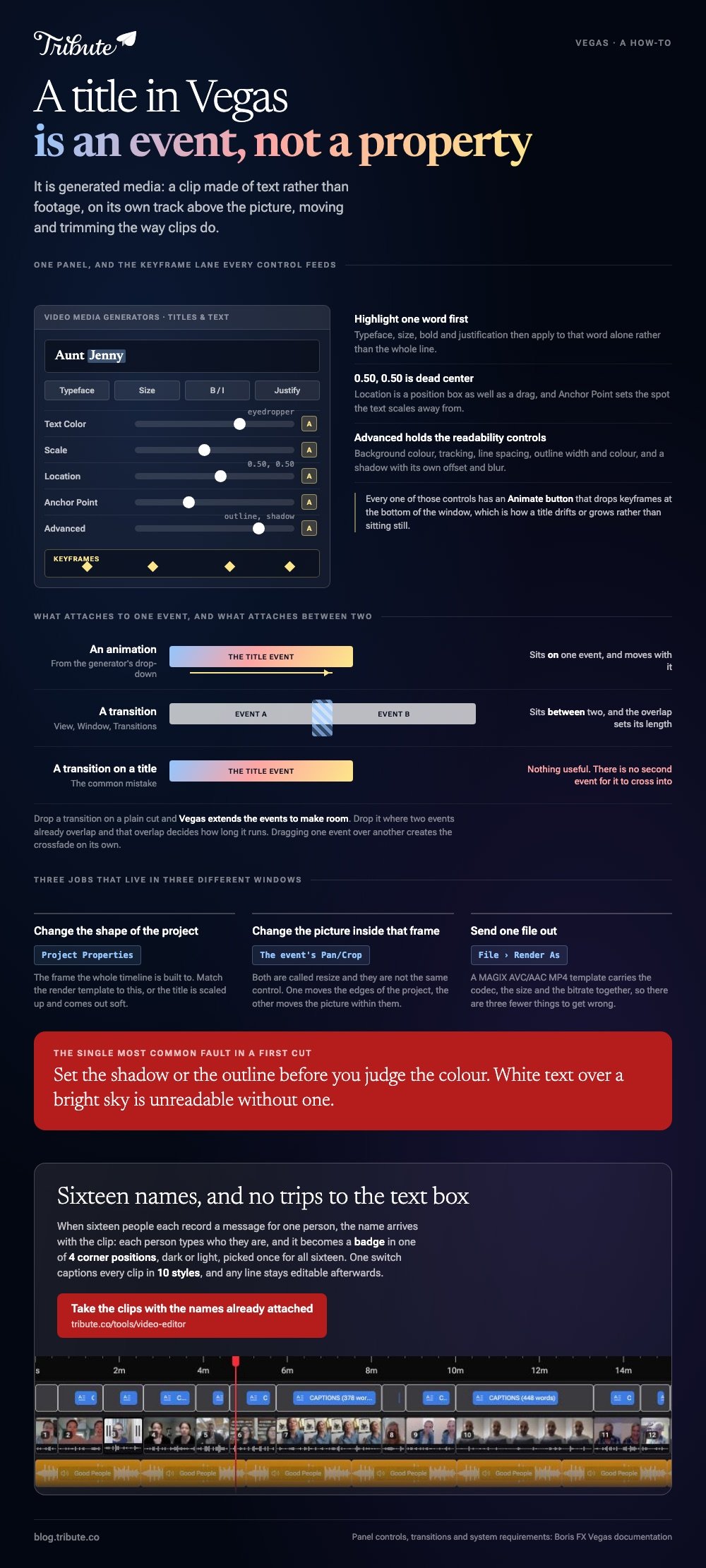
Sony Vegas adds text through one window. Choose View, then Window, then Media Generators, select the Titles and Text plug-in, and drag a preset onto the timeline. The Video Media Generators panel opens with every control for that title.

How does Sony Vegas add text to video?
As a generated media event, which is a clip made of text rather than footage.
That is the part that confuses people coming from other editors. A title is not a property of the clip underneath: it is its own event, most often on its own track above the picture.
- Choose View, Window, Media Generators.
- Select Titles & Text in the left pane. Its presets appear on the right.
- Drag a preset to the spot on the timeline where the title belongs.
- Type your words in the text box of the Video Media Generators window.
- Drag the event's edges to set how long the title stays on screen.
Boris FX, which publishes the current Vegas documentation, covers the panel in its page on using the Titles and Text plug-in.
Best for: Lower thirds, a name under a speaker, and an opening card on a project you already have open.
Why it works: The title is an event like any other, so it moves, trims and copies the way clips do.
What can you change once the text is on the timeline?
Almost everything, from the same panel, with no plug-in to buy.
The controls above the text box set typeface, size, bold, italic and justification. Highlight one word inside the box and those four apply to that word alone.
- Text Color: a picker, a typed value, or the eyedropper.
- Scale and Location: a slider, and a position box where 0.50, 0.50 is dead center.
- Anchor Point: the spot the text scales away from.
- Advanced: background color, tracking, line spacing, outline width and color, and a shadow with its own offset and blur.
Every one of those has an Animate button that drops keyframes at the bottom of the window, which is how a title drifts or grows rather than sitting still.

Set the shadow or the outline before you judge the color. White text over a bright sky is unreadable without one, and that is the single most common fault in a first cut.
Can Sony Vegas add text to video that moves?
Yes, in two ways, and they are worth keeping apart.
The Animation drop-down in the generator applies a ready-made move to the title. Keyframes on any control give you the move you want, at the cost of setting two positions by hand.
Sony Vegas transition effects are a separate window again: choose View, Window, Transitions, then drag a preset between two events.
Drop it on a plain cut and Vegas extends the events to make room. Drop it where two events already overlap and that overlap sets the length.
Boris FX documents that behavior under creating transitions, including the automatic crossfade that appears when you drag one event over another.
Compared to a title animation, a transition sits between two things rather than on one, which is why dragging it onto a title does nothing useful.
How do you resize, merge clips and render for a phone?
Three jobs that sit in three different places.
- Sony Vegas resize video in two senses: the project frame size lives in Project Properties, while the size of the picture inside that frame is the event's Pan/Crop.
- Sony Vegas merge clips by putting the events end to end on one track. Overlap two and you get a crossfade rather than a cut.
- Sony Vegas render for phone through File, Render As, choosing a MAGIX AVC/AAC MP4 template.
Match the render template to the project rather than to the phone. A 1080p MP4 plays on everything made in the last decade, and a bigger file buys nothing on a screen held at arm's length.

Best for: A finished timeline that has to leave the machine as one file.
Why it works: The template carries the codec, the size and the bitrate together, so there are three fewer things to get wrong.
Is there a Sony Vegas online editor?
No. There is no browser version and no Mac build.
The published system requirements list Windows, and a Sony Vegas online editor has never shipped. Searches for one tend to come from someone on the wrong machine.
If that is you, Clipchamp and Canva both add text in a browser: pick a title style, drop it on the timeline, then drag its trim handles to time it.
The same job on other tools is covered in adding text to a video and adding text to a video on an iPhone.
For the Adobe equivalent of the Titles and Text panel, see adding text to a video in Premiere Pro.
What if the project is sixteen clips from sixteen people?
Then the text you need is not a title sequence. It is a name under every face, sixteen times.
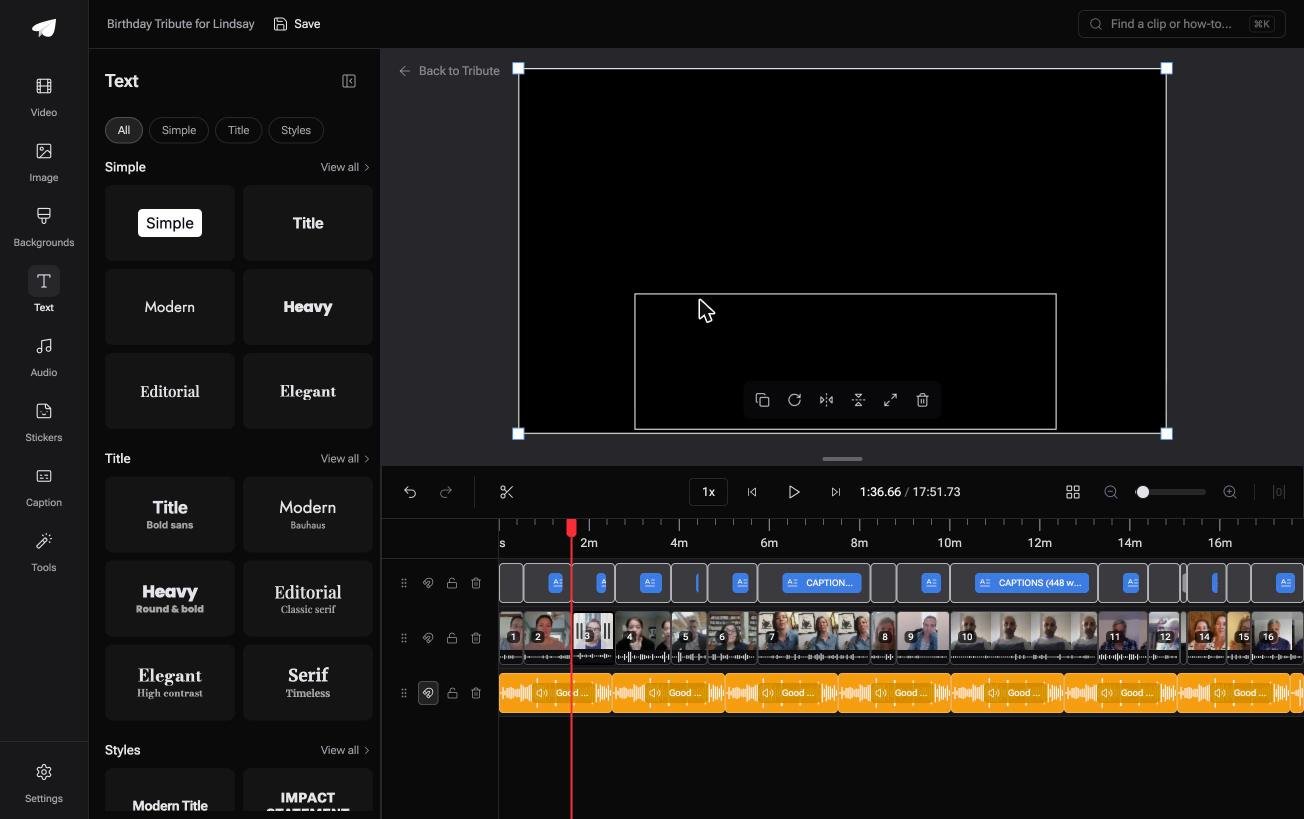
The Tribute video editor is a browser-based group video editor: contributors record clips on their phones and Tribute assembles them on a timeline with the music balanced under the voices.
- Name badges built from an uploader name and relation, in 4 corner positions, dark or light
- Captions on every clip from one switch, in 10 styles with the spoken word highlighted
- Ready-made text styles grouped as Simple, Title and Styles, rather than a raw font list
- Every caption line editable, each with its own start and end timecode
Best for: A leaving video whose viewers have never met half the people in it.
Why it works: Unlike a title event, a name badge comes from the field each person filled in, so nobody types sixteen of them.
What happens when sixteen speakers each need a name on screen?
In Vegas that is sixteen generated media events, sixteen trips to the text box and sixteen chances to misspell a cousin's name.
The craft is real and it is the right craft for a project with a script. For a video of people saying goodbye to someone, it is data entry with a timeline attached.
There is one case where the names are already in the file.
The case: the clips were recorded for one person
You are in it when several people each record a message for the same person.
A father turning sixty. A teacher who taught in the same room for thirty years. Each person recorded alone, so each one has to be introduced, and that is where the titling work comes from.
If you are cutting your own footage to a script, the Titles and Text steps above are your page and this section is not.

Why the titling work stops arising
Because the name arrives with the clip.
Each person types who they are when they record, and that becomes a badge in the corner of their clip. Pick a corner and a dark or light style once, and it holds for all sixteen.
Captions work the same way in the Tribute video editor: one switch captions every clip on the timeline, and any line stays editable afterwards.
What you do not have to do
Four jobs, and typing sixteen names is the first to go.
- No name to key in. Each badge carries the name and relation the clip came with.
- No layout to build. Four corner positions, dark or light, and the clips arrive in order.
- No caption line to retype. On a Concierge Tribute, Eve fixes a misspelled name across every clip.
- No edit at all, if you want none. Tribute's editors build it and hand it back for approval.

When this is the wrong answer: you are titling your own footage, or the text is part of the design rather than a label. Then Vegas is the better tool and the generator above is the shortest route.
The editor is also not a standalone titler: it lives inside a paid Tribute.
For the wider job of turning many clips into one piece, see making a video montage.
Frequently Asked Questions
Where is the text tool in Sony Vegas?
In the Media Generators window, under View, Window, Media Generators. Select Titles and Text in the left pane and drag a preset to the timeline.
How do I edit text I already added?
Click the generated media event, open its Video Media Generators window and change the text box. The event keeps its position and length while you do.
Can I copy one title's styling to another?
Yes. Vegas can transfer text properties from one event to another, which saves rebuilding a lower third for every speaker in a sequence.
Why is my text blurry on export?
The project frame size is smaller than the render template, so the title is being scaled up. Match the two in Project Properties before rendering.
Does Vegas generate subtitles from speech?
Speech to Text produces Titles and Text events you can edit like any other. Check the spelling of names before you trust the pass.
What is the best font size for a phone?
Big enough to read at a third of the height of your monitor. Most titles that look right on a desktop preview are too small on the screen people watch on.
👉 Take the clips with the names already attached if the only text you need is who is speaking, and the title generator stays shut.
