
Combine YouTube Videos: Playlists, Downloads and the Copyright Line
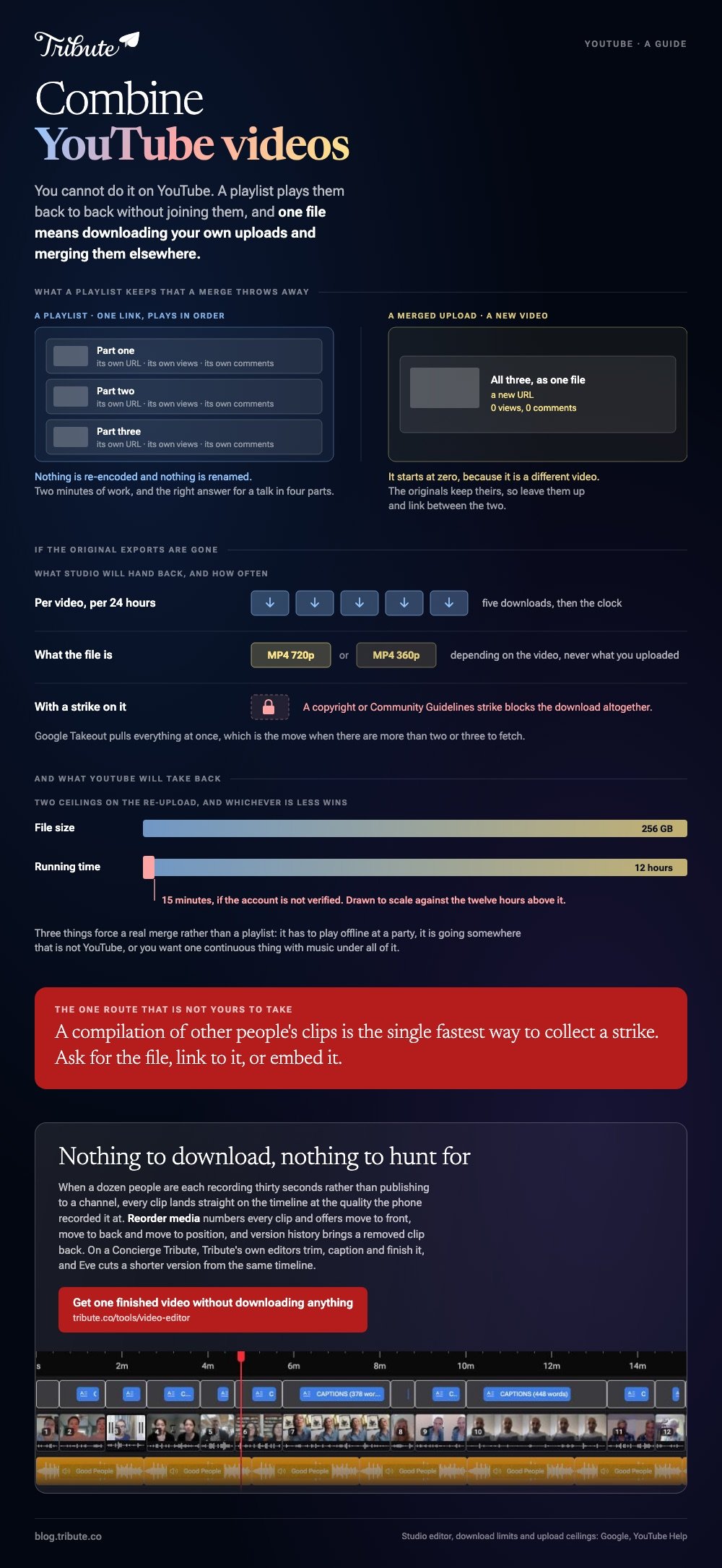
You cannot combine YouTube videos on YouTube. A playlist plays them back to back without joining them; a single file means downloading your own uploads and merging them on your computer. Other people's videos are off limits.

Can you combine YouTube videos inside YouTube?
No, and the editor is the reason people think otherwise.
Google documents the Studio editor as a tool for trimming the start or end of one video and cutting a middle section out of it. There is no second track, no append, and no YouTube Studio combine videos button.
So every route below either avoids joining the videos or does the joining somewhere else.
| What you want | What to do | Quality cost |
|---|---|---|
| They play one after another | Build a playlist | None |
| One file, your own uploads | Use your original exports | None |
| One file, originals lost | Download from Studio, then merge | Drops to 720p |
| Someone else's video | Ask, link or embed | Not yours to merge |
What does a playlist do instead?
It gives you one link that plays everything in order.
Open a video, click Save, then New playlist, name it and set it to unlisted. Add the rest the same way, then drag the rows in the playlist page to set the order.
Unlike a merged file, the playlist keeps each video's own views, comments and URL. For a conference talk in four parts, or a set of lessons, that is the better answer and it takes two minutes.
When a playlist is not enough
Three cases force a real merge.
- The video has to play offline, at a party or in a hall with poor Wi-Fi
- It is going somewhere that is not YouTube, like a message thread or a TV
- You want one continuous thing with music under all of it
How do you combine YouTube videos you uploaded yourself?
Start from your own export files if you still have them.
That is the version with full resolution and untouched audio. Search the folder you exported to before you do anything else, because the alternative costs quality.
If the originals are gone
- Sign in to YouTube Studio and open Content in the left panel.
- Hover the video, open the menu, and choose Download.
- Repeat for each video, then merge the downloads in any editor.
Google states that these downloads are MP4 files at 720p or 360p depending on the video, that you can download one video five times in 24 hours, and that videos with a copyright or Community Guidelines strike cannot be downloaded at all.
Google Takeout pulls everything at once.

Compared to your own export, a Studio download is a second-generation copy. Merge two of them, re-upload, and YouTube re-encodes the whole thing a third time.
Which youtube video combiner should you use?
The one already installed, in almost every case.
| You are on | Use | Why |
|---|---|---|
| Windows | Clipchamp | Built in, drag clips onto a timeline |
| Mac or iPhone | iMovie | Takes mixed formats without converting |
| Chromebook | A browser joiner | Nothing to install, watch the size caps |
| Android | CapCut | Fast on a phone, exports to the camera roll |
Each one works the same way: import everything, drag the clips into order on one track, trim the ends, export a single MP4. Combine YouTube clips this way and the result behaves like any other upload.
If you are re-uploading, YouTube takes 256 GB or 12 hours, whichever is less, and holds unverified accounts to 15 minutes a video.
Step by step versions live in combining videos, combining video clips online and combining videos on an iPhone, with the wider list in video montage makers.
Can you combine two videos from someone else's channel?
Not without permission, and the answer does not change because the video is short.
Downloading another channel's video breaks YouTube's terms, and re-uploading it is a copyright matter that Content ID finds on its own. A compilation of other people's clips is the single fastest way to collect a strike.
Ask the creator for the file, or link to their video, or embed it. For a reaction or a review, the fair use question is real but it is a legal judgment rather than a setting, and it is worth proper advice before you publish.
What if the clips came from a dozen different people?
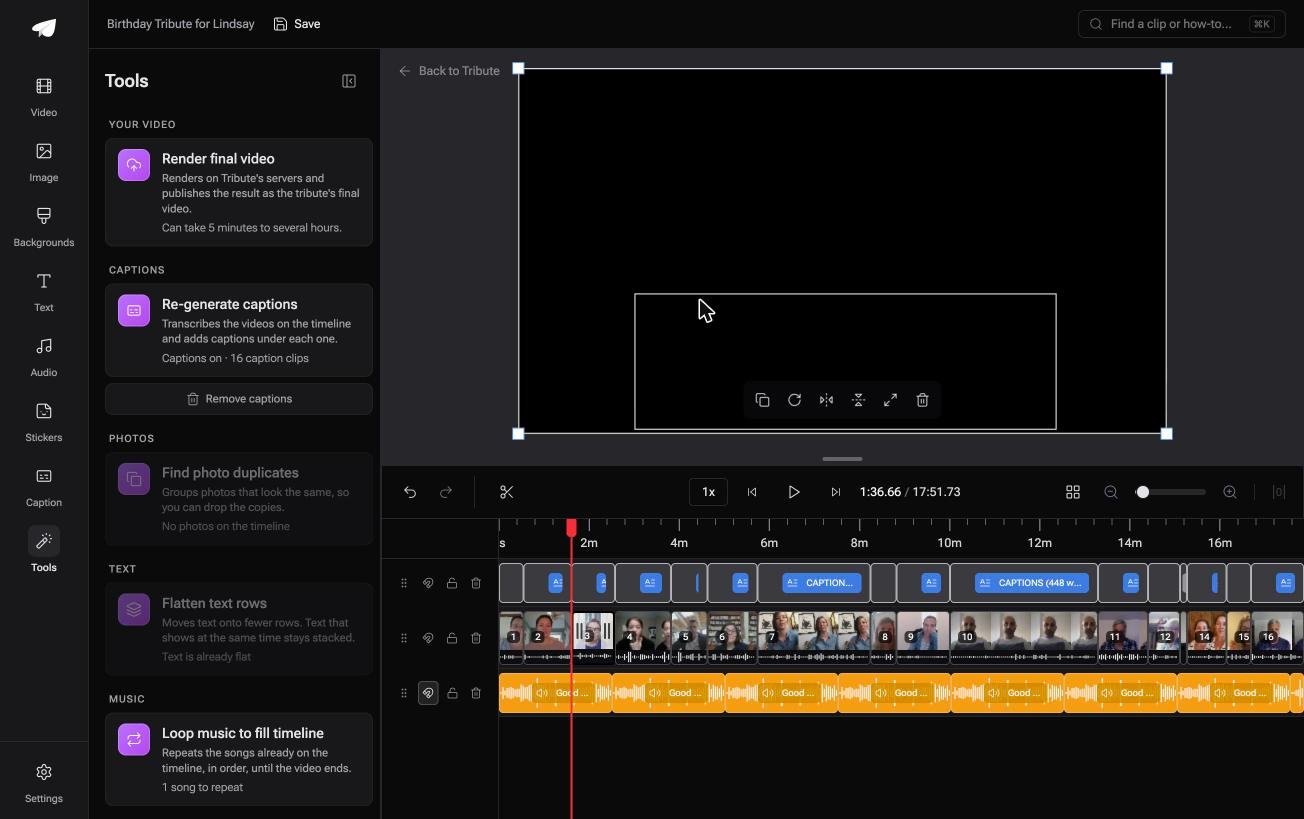
The Tribute video editor is a browser-based group video editor: contributors record clips on their phones and Tribute assembles them on a timeline with the music balanced under the voices.
It is ours, and it is the last thing on this page.
- Clips arrive in order on one timeline, with a tick marking which are already placed
- Reorder media numbers every clip and offers move to front, move to back, move to position and bulk remove
- 39 licensed tracks across 11 genres, plus a YouTube link import and your own MP3, WAV, M4A or FLAC
- Autosave and version history, so a removed clip can be brought back rather than lost

Best for: A dozen contributors whose clips were never on a channel in the first place.
Why it works: Nothing has to be downloaded, converted or hunted for before the editing starts.
Can you avoid the whole download and merge round trip?
Everything above exists because the material is already somewhere else.
It is on a channel, in a folder, in a chat thread, at a resolution you did not pick. Half the work is retrieval, and retrieval is where the quality goes.
There is one case where the material never leaves home.
The case: several people recording for one person
You are in it when each clip is a message rather than a published video.
A teacher retiring in June. A grandmother turning ninety with family in three states. Nobody uploads anything to a channel first: they record thirty seconds and send it, and your job is assembly, not retrieval.
Why there is nothing to download
The clip goes straight onto the timeline.
Each person records on their own phone, and the clip lands where the editing happens. Nothing is exported, re-uploaded, downloaded again or capped at five tries a day.
The clip also keeps the quality the phone recorded it at, rather than whatever a YouTube download hands back after two rounds of compression.
That is what the Tribute video editor is built around: not a better combiner, but a shorter path between the phone and the finished video.

What you do not have to do
- Not the retrieval. Nothing is pulled off a channel, so nothing returns compressed twice.
- Not the combining. Each clip lands on the timeline where the editing happens.
- Not the edit. On a Concierge Tribute, Tribute's own editors trim, caption and finish it.
- Not the shorter cut. Eve, the AI assistant inside the editor, makes one from the same timeline when two minutes is the limit.

When this is the wrong answer: the videos are your own published uploads and the point is a channel. Then download them, merge them and re-upload. The Tribute editor is also not a standalone app: it lives inside a paid Tribute.
Frequently Asked Questions
Is there a YouTube editor that can combine videos?
No. The Studio editor works on one upload at a time, so combining happens on your computer or in a browser tool. A playlist is the only native way to play several videos in sequence.
How do you combine 2 YouTube videos into one?
Download both from Studio if you no longer have the originals, drag them onto one timeline in an editor, then export a single MP4. Re-upload that file as a new video.
Does combining videos lose views or comments?
The merged upload is a new video and starts at zero. The originals keep their views, comments and URLs unless you delete them, so leave them up and link between the two.
Can you merge videos in a playlist into one file?
Not through YouTube. A playlist is a running order, not a video, and nothing in the interface exports it as one file.
What is the best resolution to export a combined video?
Match the highest source you have, and 1080p covers most cases. Upscaling a 720p Studio download to 4K adds file size without adding detail.
Can you combine a YouTube video with your own footage?
Only with your own video, or with permission from whoever made the other one. Licensed stock, Creative Commons material and your own uploads are the safe inputs.
👉 Get one finished video without downloading anything if a dozen people are recording thirty seconds each for one person.
